
このページはアプリまたはその開発者の公式ページではなく、情報提供および論評を目的として作成された独立した編集出版物です。明示的に別段の記載がない限り、アプリおよびその開発者は、MWM、Apple、Google Play、アプリのパブリッシャー、またはアプリの開発者と提携、承認、後援、認可、またはその他の公式的な関係はなく、このページのいかなる内容も、アプリがMWMのサービスを使用して開発されたことを意味するものではありません。すべての商標、ロゴ、スクリーンショット、その他のコンテンツはそれぞれの所有者の財産です。


WebLink Host
あなたの車のディスプレイをスマートフォンの実力で支配する。WebLink Hostは、時代遅れの車載システムを、あなたが手放せないアプリの中心へと変貌させる。運転中の体験は、もはやメーカーの言いなりではない。
ダウンロード
1M+ユーザー評価
評価数
10.0K開発元
カテゴリ
Entertainment対応言語
39最新バージョン
3.6.4サイズ
112.0 MBリリース日
2017年8月18日ドライバーのインフォテインメント体験を革新する主要機能
WebLink Host アプリケーションの分析
信頼性と安全性
本システムは継続的なテストと更新を通じて、運転中の安全を最優先にし、ユーザーに安心感を提供します。
アプリのシームレスな車両画面統合
ユーザーはスマートフォンの多様なアプリを車両のディスプレイにシームレスに表示し、車内での利用を可能にします。
直感的でユーザーフレンドリーなインターフェース
本アプリは、ユーザーが慣れ親しんだアプリと快適に連携できる、美しく直感的な車載インターフェースを提供します。
豊富なスマートフォンメディアアクセス
このシステムは、スマートフォンのメディアやコンテンツへの広範なアクセスを提供し、車内でのエンターテイメントと情報取得を充実させます。
車両画面の最新化
WebLinkは、車両の既存画面を最新のコネクテッドインフォテインメントシステムへと進化させ、現代的な運転体験を実現します。
YouTube動画の車内視聴
ユーザーは互換性のある車両画面で、お気に入りのYouTube動画を手軽に視聴できます。
よくある質問
について知っておくべきこと WebLink Host
What is WebLink Host?
WebLink Host transforms your in-vehicle screen into a modern, connected infotainment system. It allows safe and easy access to your favorite smartphone apps directly on your car's display while on the go.
How does WebLink Host connect to a vehicle screen?
WebLink Host connects by installing the app, accepting permissions, then connecting your smartphone to a compatible WebLink vehicle screen using a certified USB cable for data and charging.
Can I watch YouTube videos using WebLink Host?
Yes, WebLink Host allows you to watch your favorite YouTube videos on many compatible vehicle screens. Some vehicle screen manufacturers may restrict the use of certain apps.
Which smartphone apps are compatible with WebLink Host?
WebLink Host allows you to use almost any smartphone app on your vehicle screen through its Cast feature. Examples include Music, YouTube, OpenWeather, Waze, Calendar, and Videos.
Is a specific USB cable required for WebLink Host connection?
Yes, a certified USB cable that supports both data communication and charging capabilities is required to connect your smartphone with the in-vehicle screen for WebLink Host.
How do I get audio playback from WebLink Host through car speakers?
To get full audio playback from WebLink Host through your car speakers, you must pair your smartphone to the in-vehicle screen using Bluetooth. Consult your screen's manual for connection details.
How can I check WebLink Host compatibility with my vehicle screen?
To check if your vehicle screen is compatible with WebLink Host, look for a WebLink logo on your product packaging or within your vehicle screen's manual. A compatible screen is necessary.
Does WebLink Host require app permissions during setup?
Yes, upon opening the WebLink Host app on your smartphone, you must accept the Terms & Conditions and all required permission prompts to successfully set up and use the service.
Can WebLink Host personalize the in-vehicle experience?
Yes, WebLink Host provides a connected in-vehicle experience that is tailored to you. It offers a beautifully designed interface to interact with your apps, music, and videos.
以下のスクリーンショットと説明は、アプリの公式ストアリスティングから直接取得されたものであり、アプリ開発者の所有物です。
アプリストア
スクリーンショット

ユーザーは「音楽」や「YouTube」といった多様なアプリを一覧で確認し、手動での並べ替え機能を通じて、表示順を自由にカスタマイズできます。
お気に入りアプリを整理
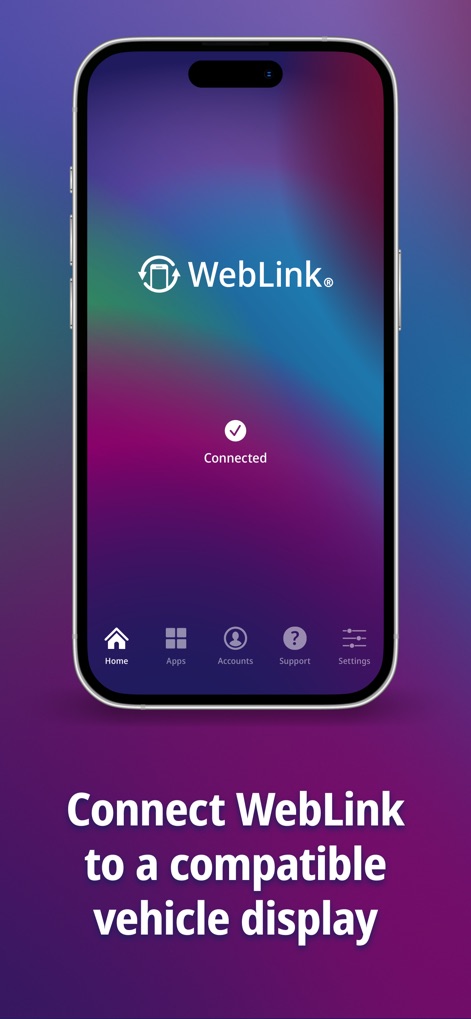
スマートフォン画面に表示される明確な「Connected」ステータスは、互換性のある車載ディスプレイとの正常な接続を示します。また、アプリのブランドである「WebLink」ロゴがユーザーに安心感を与えます。
簡単な車載接続

スマートフォンはUSBケーブルを通じて車載ディスプレイに接続され、「音楽」プレーヤーや「天気」予報など、お気に入りのアプリが車の大きな画面にシームレスに表示されています。
車載画面でエンタメ
説明
Download
類似アプリ
似た機能とユーザー体験を持つアプリ
Car Play Connect: Sync My Auto
Liquid Apps Bilgi ve Operasyonel Teknolojileri Limited Sirketi
Car Play Connect: Auto Sync
Rostyslav Dudnyk
Car Play Connect - Auto Sync
Tapwise LLC
Car Widgets: Style Dashboard
SUPRAPPS SP Z O O
Car Play Connect Sync Autolink
Ahmet Mucahid Bozkurt
Car Play Connect Sync
Emrullah Bas
Car.Play Connect: Smart Sync
5SKay VietNam Technology JSC
CarOS · Smart Dashboard
Oh My Software FZCO

Hudway Go: Navigation with HUD
HUDWAY LLC.
このページはアプリまたはその開発者の公式ページではなく、情報提供および論評を目的として作成された独立した編集出版物です。明示的に別段の記載がない限り、アプリおよびその開発者は、MWM、Apple、Google Play、アプリのパブリッシャー、またはアプリの開発者と提携、承認、後援、認可、またはその他の公式的な関係はなく、このページのいかなる内容も、アプリがMWMのサービスを使用して開発されたことを意味するものではありません。すべての商標、ロゴ、スクリーンショット、その他のコンテンツはそれぞれの所有者の財産です。