iFont: find, install any font

iFont: find, install any font

ダウンロード: App Store
ロゴ: iFont: find, install any font

iFont:iPadとiPhoneであらゆるフォントを検索、インストール、管理

プロフェッショナルなタイポグラフィで、あなたのクリエイティブな可能性を解き放ちましょう。Pages、GoodNotes、Keynoteにカスタムフォントをシームレスにインストールし、デジタルプランナー、書籍、ドキュメントを真にユニークなものにします。

開発元

VINCI APPS LTD

カテゴリ

Utilities

ダウンロード

10M+

ユーザー評価

4.6/5

評価数

43K+

対応言語

1

タイポグラフィの実践

このインターフェースを利用する 10M+ 人のユーザー.

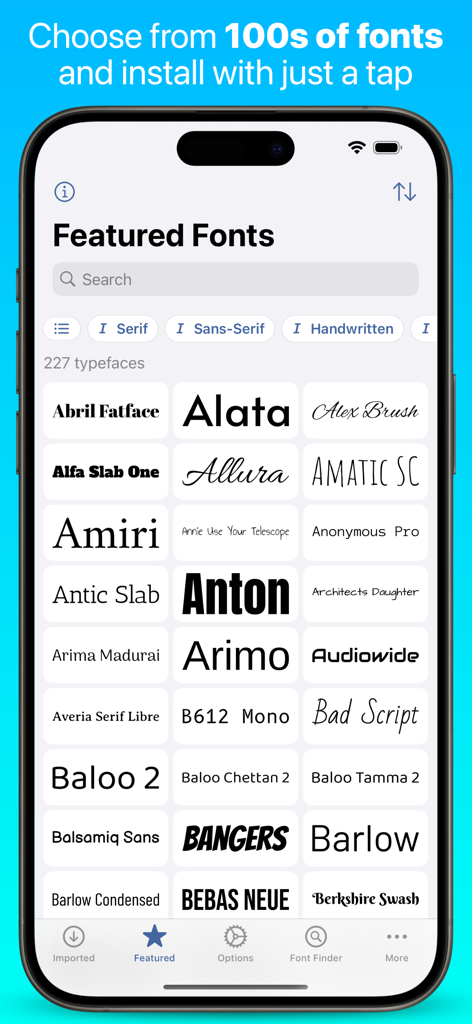
ダウンロード可能なAbril FatfaceやAlataを含む注目のフォントライブラリを表示するiFontアプリのスクリーンショット
ダウンロード可能なAbril FatfaceやAlataを含む注目のフォントライブラリを表示するiFontアプリのスクリーンショット

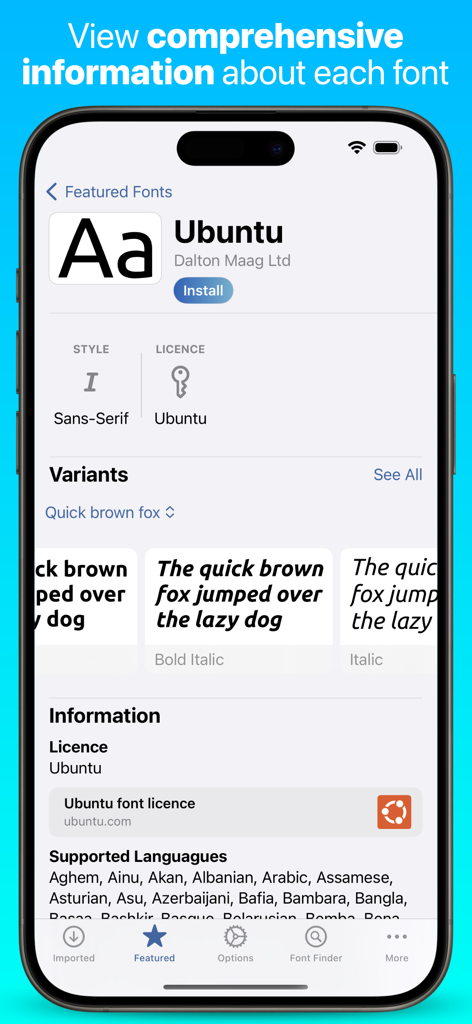
iPhone上のUbuntuフォントの詳細情報とバリエーションを表示するiFontアプリのスクリーンショット。
iPhone上のUbuntuフォントの詳細情報とバリエーションを表示するiFontアプリのスクリーンショット。

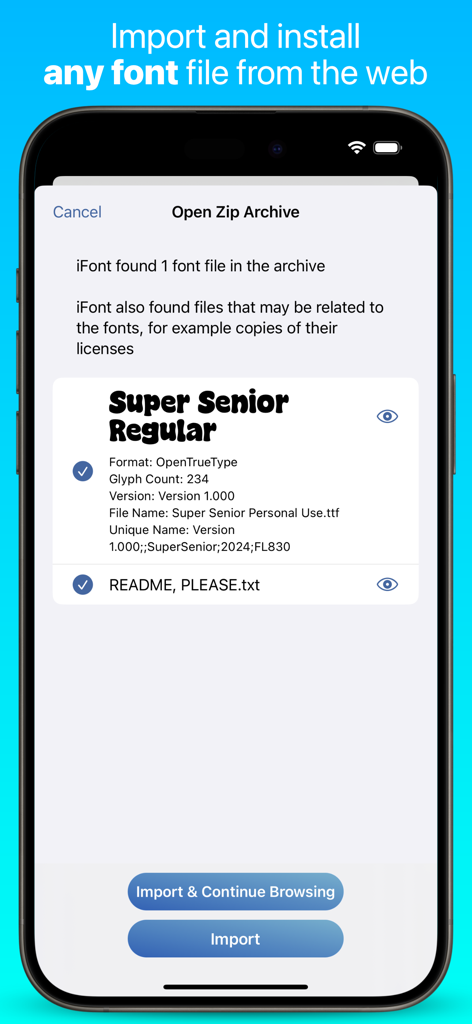
iPhoneでzipアーカイブからカスタムフォントをインポートするプロセスを表示するiFontアプリの画面
iPhoneでzipアーカイブからカスタムフォントをインポートするプロセスを表示するiFontアプリの画面

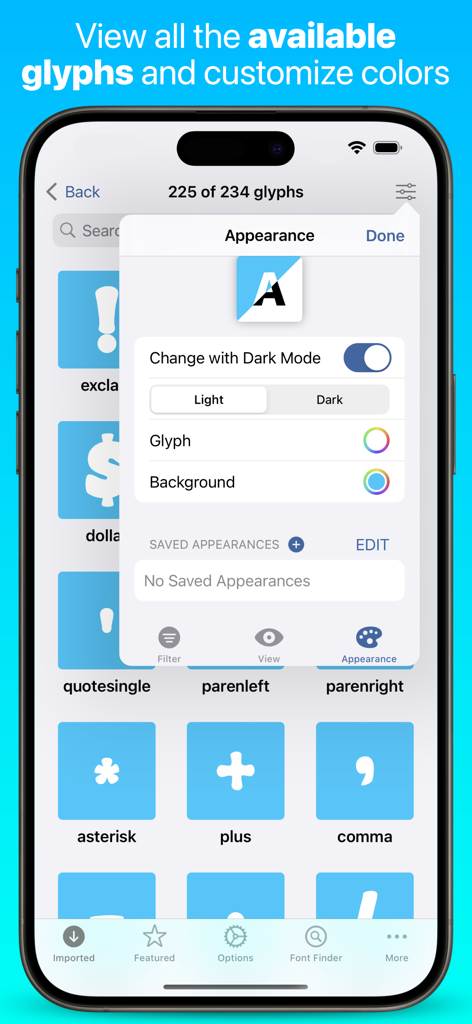
フォント文字のグリッドと色カスタマイズ用の外観設定メニューを表示するiFontアプリのグリフビューア
フォント文字のグリッドと色カスタマイズ用の外観設定メニューを表示するiFontアプリのグリフビューア

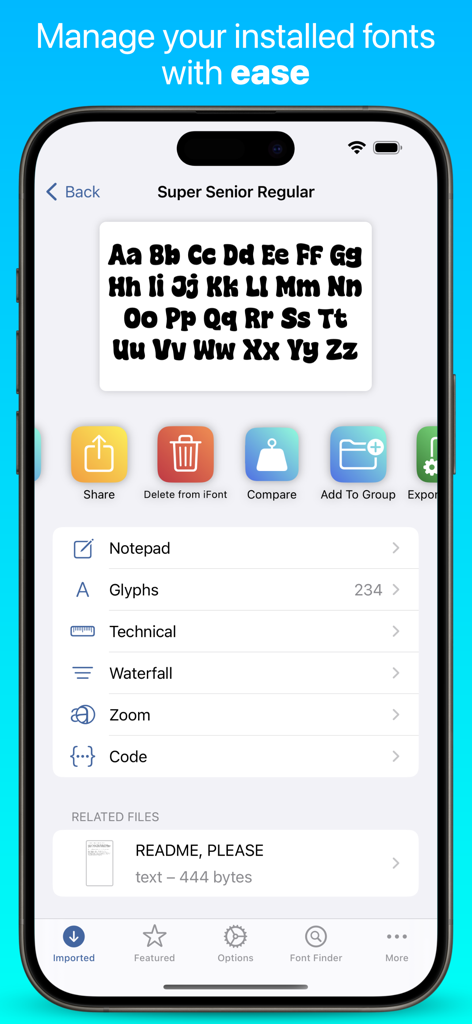
インストールされたカスタムフォントの管理およびプレビューオプションを表示するiFontアプリのインターフェース。
インストールされたカスタムフォントの管理およびプレビューオプションを表示するiFontアプリのインターフェース。

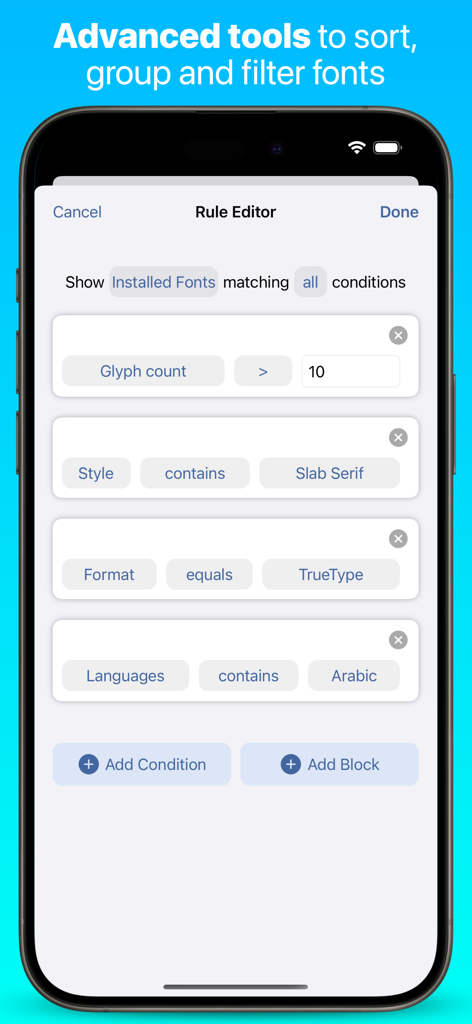
iPhone上の高度なフォントフィルタリングオプションを表示するiFontアプリのルールエディターのインターフェース。
iPhone上の高度なフォントフィルタリングオプションを表示するiFontアプリのルールエディターのインターフェース。

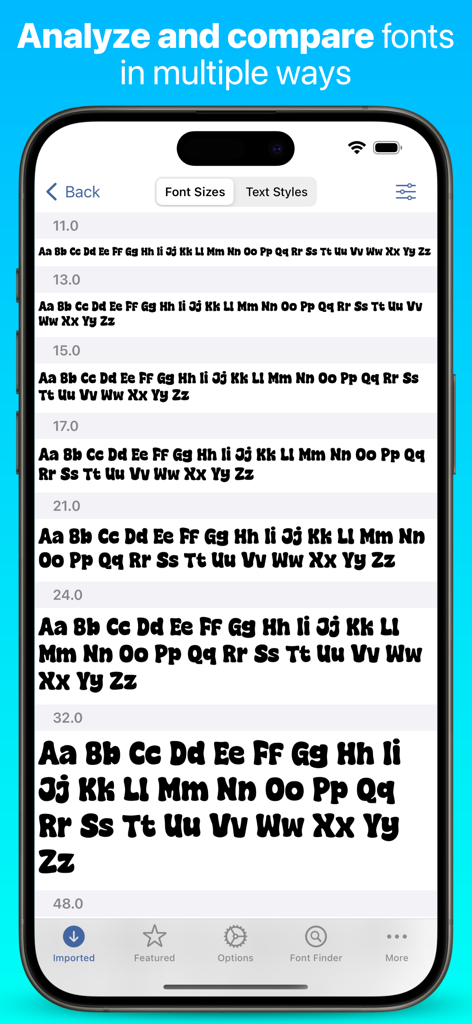
さまざまなサイズで表示されたフォントを示すiFontアプリケーションのインターフェース

さまざまなサイズで表示されたフォントを示すiFontアプリケーションのインターフェース

クリエイティブなワークフローのためのプロフェッショナル・タイポグラフィ

このアプリを際立たせるツール、 10M+ 人のユーザーが選択.

📥

無制限のフォントアクセス

独自の.otfまたは.ttfファイルをインポートしたり、アプリ内から直接Google FontsやDaFontの何千もの無料スタイルを閲覧して、最適なものを見つけたりできます。

🎨

シームレスなアプリ連携

クリエイティブスイート全体でプロジェクトを向上。Procreate、Canva、GoodNotes、Pages、Keynoteなどのプロフェッショナルツールでカスタムフォントを使用できます。

🔍

高度な書体管理

フォントの並列比較、ウォーターフォールプレビュー、各グリフの詳細なテクニカルメタデータにより、データに基づいたデザイン選択が可能です。

レビュー分析

ユーザーレビューの分析.

感情スコア

16%
ネガティブ

概要

Users overwhelmingly report negative experiences with this app, primarily due to misleading subscription practices and unexpected charges. Many reviews detail being immediately charged for annual subscriptions despite signing up for a free trial, with numerous complaints about denied refunds and a lack of clear cancellation options. Additionally, a significant number of users found fonts difficult to install or incompatible with other common applications like Goodnotes and Google Docs. While some users appreciated the variety of fonts available and found the font management easy once understood, long-time users expressed frustration over the app's recent transition from a free service to a mandatory paid subscription model.

主なテーマ

Subscription & Free Trial Issues(31)
Unexpected Charges & Refunds(25)
Font Installation & Compatibility(8)
Transition to Paid Model(6)
Font Management Ease(4)
Font Variety(3)

アプリについて

について知っておくべきこと iFont: find, install any font.

説明

What can iFont do? iFont lets you install new fonts for use in apps which support creating content using custom fonts, such as Pages, Keynote or Numbers. What can't iFont do? iFont can't change the system font; work with the keyboard; or force apps to let you customise the font. iFont also can't make Comic Sans look good. *** “Without iFont, writing my new book, ‘Ten Seconds To Consider’, would be an impossible task, given that I'm designing as I write. For my Pages documents to be consistent between macOS and iOS now is a game changer. Thank you for iFont!” — Daniel Klein, former Apple employee *** iFont includes a wide range of features which let you install, compare, and view typefaces, including individual glyphs and technical details. These include: CUSTOM FONTS Install your own fonts (.ttf, .ttc, .otf formats supported, as well as these formats compressed in a .zip) for use in other apps. Simply download a font in a web browser, open in iFont and follow the simple instructions to install it on your device. You can also export a copy of the font, or send the profile to a friend to let them install it, too. iFont can also open archives containing multiple fonts. FONT DOWNLOADS iFont lets you download and install a range of fonts from the Google Fonts library, Dafont and more (including custom sources) within the app. It couldn’t be easier to find a suitable typeface for your next leaflet, poster or financial report. *** After discovering iFont a couple of years ago it has slotted happily into my professional workflow on the iPad Pro. It has a number of standout features which set it apart from the competition, and has been a great help in my client project work. There’s also an appreciation of type heritage and design, with biographical information and rich technical detail on hand. Choosing the right type is made easier with the Notepad and Compare features. The ability to install multiple fonts at once is essential, saving time and allowing better management of your font library. Imported fonts are viewed as families allowing you to easily compare different weights and make the right choices. There’s also easy access to online type resources such as Google Fonts, which makes finding and installing them a breeze. Great if you’re in a hurry, or have no access to your own font library. — Martin Cleave, creative professional *** COMPARE Compare many different typefaces to see which will suit your intended use. Arial or Helvetica? Zapfino, Snell Roundhand or Savoye LET? Georgia, Iowan Old Style or Times New Roman? With Compare, you can be the judge! NOTEPAD The Notepad you find under each font lets you test it out and type a message, and then export it as an image to send in apps such as Messages. Add some character to your texts by using a font which stands out from the crowd! WATERFALL See how a font looks at very small or very large point sizes easily using the Waterfall view. This lets you judge which size would be suitable for your use. ZOOM Zoom into a font up to 500%, allowing you to see the minute details in each character. TECHNICAL DETAILS See information about each font, from the designer and trademark information to the spacing of the ascents and descents. *** “Missing fonts on iOS is an issue of the past, thanks to apps like iFont… I hope you saw how easy it is to install fonts on iPhone or iPad and I suggest you give iFont a try.” — Michael Kummer, blogger *** NOTE: iFont does not currently support .suit or .dfont files. iFont is also fully optimised for iPad with a beautiful split view experience and a range of keyboard shortcuts. Terms of Service: https://www.apple.com/legal/internet-services/itunes/dev/stdeula/ Privacy Policy: https://bit.ly/ifont_pp

最新バージョン

11.8.0

サイズ

137.1 MB

リリース日

2016年11月7日

お気に入りのフォントをiOSで活用しよう

モバイルワークフローを一変させた1,000万人以上のクリエイターやプロフェッショナルの仲間に加わりましょう。今すぐiFontをダウンロードして、iPhoneやiPadで制限のないデザインを始めましょう。

ダウンロード: App Store
FAQ

よくある質問

について知っておくべきこと iFont: find, install any font

Can iFont install new fonts for use in other apps?

はい、iFontを使用すると、iOSデバイスに新しいフォントをインストールできます。これらのフォントは、Pages、Keynote、Numbersなどのコンテンツ作成アプリと互換性があり、これらのアプリケーション内でカスタム書体を使用できます。

Does iFont change the system font on an iPhone or iPad?

いいえ、iFontはデバイスのシステムフォントを変更することはできません。その機能は特定のアプリ用のフォントのインストールに焦点を当てており、デバイス全体のシステムタイポグラフィやキーボードフォントの変更には及びません。

What font file formats does iFont support for installation?

iFontは、.ttf、.ttc、.otf形式のカスタムフォントファイルをサポートしています。また、.zipアーカイブに圧縮されたこれらの形式も受け付けるため、簡単なインポートとインストールが可能です。

Can I download new fonts directly within the iFont app?

はい、iFontを使用すると、アプリ内でGoogle FontsやDafontなどの人気ライブラリからさまざまなフォントを直接ダウンロードしてインストールできます。カスタムオンラインソースからのフォントの統合もサポートしています。

Does iFont offer a feature to compare different fonts?

はい、iFontには「比較」機能が含まれています。このツールを使用すると、複数の書体を分析および比較して、デザインまたはコンテンツ作成のニーズに最適なものを判断できます。

Can I preview how a font looks with custom text using iFont?

はい、iFontでは各フォントの詳細の下に「メモ帳」機能が用意されています。ユーザーはメッセージを入力して選択したフォントでテストし、結果を画像としてエクスポートして他のアプリケーションで共有できます。

Does iFont display technical information about fonts?

iFontは、各フォントの詳細な技術情報を提供します。これには、デザイナー、商標データ、およびアセントやディセントなどのスペーシングの詳細が含まれており、情報に基づいたフォント選択を支援します。

Can iFont import font files downloaded from the internet?

はい、iFontはインターネットから直接ダウンロードしたフォントファイルをインポートすることをサポートしています。ユーザーはWebブラウザでフォントをダウンロードし、iFontで開き、簡単な手順に従ってデバイスにインストールできます。

Does iFont display individual font glyphs and offer customization?

はい、iFontではフォント内のすべての個々のグリフを表示できます。また、グリフと背景の色を変更するなど、カスタマイズオプションも提供しており、ダークモード設定との互換性もあります。

Is the iFont app optimized for use on an iPad?

はい、iFontはiPad用に完全に最適化されています。マルチタスクを強化するための分割ビューエクスペリエンスを備え、さまざまなキーボードショートカットをサポートしており、デバイスでの生産的なワークフローを保証します。

What font file types are not supported by iFont?

iFontは現在、.suitまたは.dfontファイルをサポートしていません。アプリケーション内での正常なインストールのためには、ユーザーは.ttf、.ttc、または.otfなどの互換性のある形式でフォントファイルが提供されていることを確認する必要があります。

App information, icons, screenshots, and descriptions displayed on this page are sourced from the Apple App Store and are the property of their respective developers. Download estimates and rankings are based on MWM's proprietary models and may not reflect actual figures. This page is provided for informational and analytical purposes only.

Believe this page infringes your intellectual property? File a dispute