
このページはアプリまたはその開発者の公式ページではなく、情報提供および論評を目的として作成された独立した編集出版物です。明示的に別段の記載がない限り、アプリおよびその開発者は、MWM、Apple、Google Play、アプリのパブリッシャー、またはアプリの開発者と提携、承認、後援、認可、またはその他の公式的な関係はなく、このページのいかなる内容も、アプリがMWMのサービスを使用して開発されたことを意味するものではありません。すべての商標、ロゴ、スクリーンショット、その他のコンテンツはそれぞれの所有者の財産です。

Interval Timer □ HIIT Timer
このアプリは、ユーザーにトレーニングの主導権を握らせ、ワークアウトを妨げないシームレスな体験を提供する。フィットネス愛好家は、ワークアウト中に音楽アプリを中断させずに使える点で、その洗練された設計を評価するだろう。
ダウンロード
2.5M+ユーザー評価
評価数
270.5K開発元
カテゴリ
Health & Fitness対応言語
22最新バージョン
26.3.0サイズ
33.7 MBリリース日
2016年6月21日テックアナリストによる主要機能の評価と解説
「Interval Timer □ HIIT Timer」機能分析
カスタムインターバル設定
ユーザーは、ワークアウト、休憩、ラウンドなどのインターバルをドラッグ操作で柔軟に設定できます。この機能は、HIITやサーキットトレーニングに不可欠な高度なカスタマイズ性を提供し、個々のトレーニング計画に完全に適合させることが可能です。
バックグラウンドでの音声・ビープガイド
アプリがバックグラウンドで実行されている状態でも、音声またはビープ音によるタイムガイドが継続して提供されます。ユーザーは画面を見る必要なく、オンラインのトレーニング動画に従う際や他の作業中に、シームレスにワークアウトを継続できます。
詳細なワークアウト履歴と統計
本アプリは、詳細なワークアウト履歴と統計ページを提供します。ユーザーは過去のトレーニングデータを視覚的に追跡し、進捗状況を把握することで、モチベーションを維持し、より効果的なトレーニング計画を立てることが可能です。
音楽アプリとの非干渉性
本アプリは、ユーザーがワークアウト中に任意の音楽アプリを利用しても、その再生を妨げません。これにより、ユーザーは自身の好みに合わせた音楽を楽しみながらトレーニングに集中できるため、より快適でパーソナライズされた運動体験が得られます。
直感的な簡単操作
インターバルの設定はドラッグ操作、開始はタップのみという直感的なユーザーインターフェースが採用されています。このシンプルさにより、新規ユーザーもすぐにアプリを使いこなすことができ、トレーニングへの導入障壁が低減されます。
過去のワークアウトを繰り返し実行
ユーザーは、履歴から以前に設定したワークアウトを簡単に選択し、繰り返し実行できます。これにより、毎回同じインターバル設定を繰り返す手間が省かれ、定型的なトレーニングルーティンを効率的に実行することが可能です。
よくある質問
について知っておくべきこと Interval Timer □ HIIT Timer
How do I set custom intervals in Interval Timer?
You set custom intervals in Interval Timer by dragging to define durations for work, rest, and rounds. The app provides sliders for easy customization of your workout structure.
Does Interval Timer play audio guides during workouts?
Yes, Interval Timer provides voice or beep guides for every workout. These audio guides continue even if you leave the app to use other applications.
Can I listen to music while using the Interval Timer app?
Yes, Interval Timer does not interfere with your music. You can listen to your music apps while you workout, as the timer functions concurrently in the background.
How does Interval Timer track my workout progress?
Interval Timer tracks your workout progress by offering detailed history and statistics pages. It records your workout data, allowing you to review and repeat previous sessions.
Is there a subscription for Interval Timer?
Yes, Interval Timer offers an optional auto-renewable subscription called Premium Pass. This subscription typically includes a free trial period before initiating the monthly charges.
Does Interval Timer offer a free trial for its Premium Pass?
Yes, the Premium Pass in Interval Timer begins with a free trial period. The auto-renewable monthly subscription starts automatically once this trial period ends.
How do I manage my Interval Timer Premium Pass subscription?
You manage your Interval Timer Premium Pass subscription through your Apple Account Settings. Here, you can turn off auto-renewal at least 24 hours before the current period ends.
Can I repeat a previous workout in Interval Timer?
Yes, Interval Timer allows you to repeat a previous workout directly from your history. This feature eliminates the need to manually set up your workout again.
Where can I find the Privacy Policy for Interval Timer?
The Privacy Policy for Interval Timer is available at the following URL: https://float.support/interval-timer/privacy. The app description provides this direct link.
以下のスクリーンショットと説明は、アプリの公式ストアリスティングから直接取得されたものであり、アプリ開発者の所有物です。
アプリストア
スクリーンショット

このアプリは、ワークアウト、休憩、ラウンドなど、各インターバルの時間を一目で確認できる視覚的に整理されたリストと、中央の大きなタイマー表示で、ユーザーのトレーニング準備を簡素化します。
シンプルなインターバル設定

本ツールは、ユーザーが「Rounds」や「Work」といったワークアウト要素を、直感的な縦型スライダーで簡単に調整できるため、個別のニーズに合わせた柔軟なカスタマイズを可能にします。
カスタム設定で柔軟に

アクティブなワークアウト中、本アプリは「WORK」の残り時間を明確な数字と円形プログレスバーで表示し、ユーザーが現在のフェーズと残り時間を視覚的に把握できるようサポートします。
進捗を明確に表示
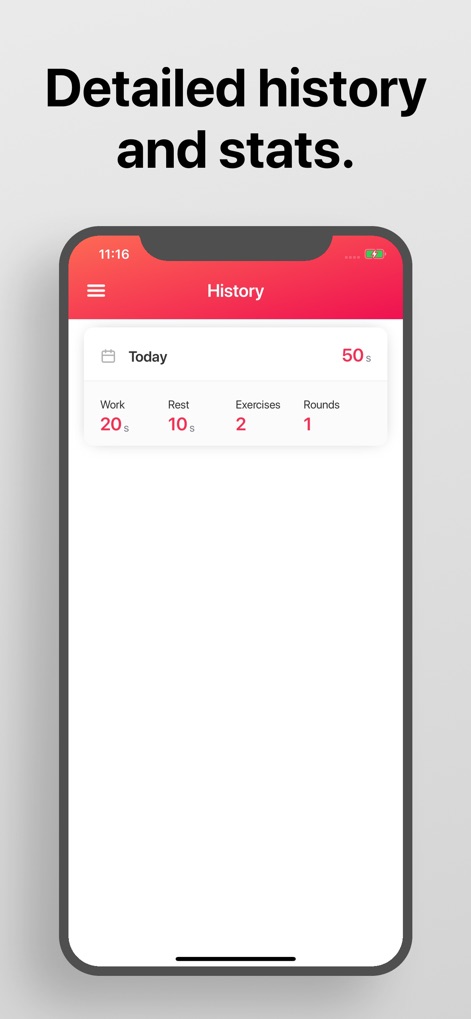
ワークアウトの完了後、ユーザーは「Work」や「Rest」の合計時間、実施した「Exercises」の数といった詳細な履歴と統計情報を確認し、自身の進捗を客観的に把握できます。
詳細な履歴と統計
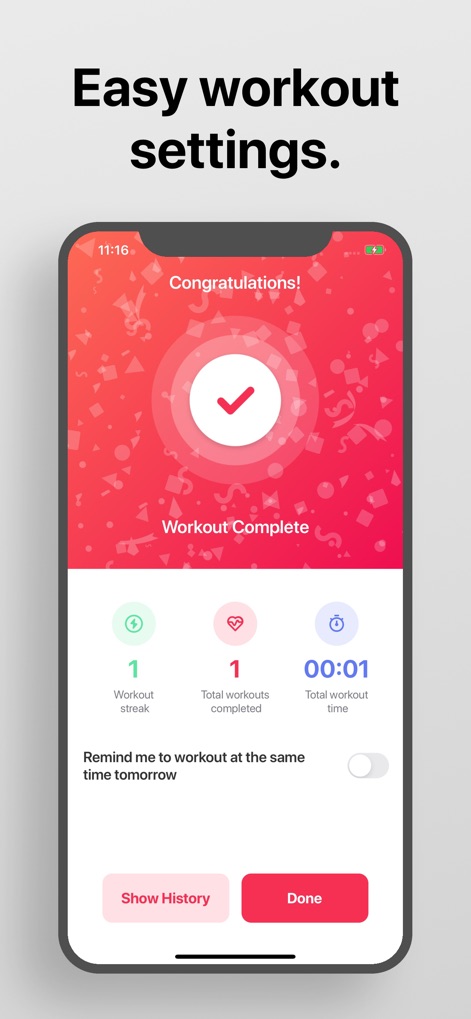
ワークアウト完了画面では、「Workout streak」や「Total workouts completed」といった成果の要約が提供され、ユーザーは自身の継続的な努力と達成状況を喜びと共に確認できます。
ワークアウト完了と成果
説明
Download
類似アプリ
似た機能とユーザー体験を持つアプリ
Timer Plus - Workouts Timer
VGFIT LLC

Tabata Timer: Interval Timer.
Oleksandr Serhiienko

SmartWOD Timer - WOD Clock
SmartWOD GmbH
Interval Timer Plus
Su-Au Hwang
Boxing Interval Timer
Thang Nguyen

Tabata Timer and HIIT Timer
Anuj Seth

Simple Interval Timer
Alena Kazarova
Interval Timer: Tabata & HIIT
AppManage LLC
Tabata Timer □
Float Tech, LLC
このページはアプリまたはその開発者の公式ページではなく、情報提供および論評を目的として作成された独立した編集出版物です。明示的に別段の記載がない限り、アプリおよびその開発者は、MWM、Apple、Google Play、アプリのパブリッシャー、またはアプリの開発者と提携、承認、後援、認可、またはその他の公式的な関係はなく、このページのいかなる内容も、アプリがMWMのサービスを使用して開発されたことを意味するものではありません。すべての商標、ロゴ、スクリーンショット、その他のコンテンツはそれぞれの所有者の財産です。