
このページはアプリまたはその開発者の公式ページではなく、情報提供および論評を目的として作成された独立した編集出版物です。明示的に別段の記載がない限り、アプリおよびその開発者は、MWM、Apple、Google Play、アプリのパブリッシャー、またはアプリの開発者と提携、承認、後援、認可、またはその他の公式的な関係はなく、このページのいかなる内容も、アプリがMWMのサービスを使用して開発されたことを意味するものではありません。すべての商標、ロゴ、スクリーンショット、その他のコンテンツはそれぞれの所有者の財産です。


Intuit QuickBooks for Business
起業家は、このアプリでビジネスのあらゆる側面に魔法をかけることができます。AIが雑用を処理し、あなたは成長に集中できます。
ダウンロード
10M+ユーザー評価
評価数
334.5K開発元
カテゴリ
Business対応言語
4最新バージョン
26.04.0サイズ
558.6 MBリリース日
2013年2月14日中小企業経営者のための主要機能と利点
Intuit QuickBooks for Businessの機能分析
AIによる取引自動分類
Intuit AIは取引の自動分類と照合、データの統合、矛盾点の発見、そして次のステップの提案を通じて、経理作業の時間を大幅に削減します。
モバイル決済と請求書作成
ユーザーはiPhoneでのタッチ決済や、ボタン一つで支払いが可能な請求書送付を通じて、どこにいても迅速に支払いを受け取ることができます。
経費管理とレシート自動照合
ユーザーはレシートの写真を撮るだけで経費を記録でき、本アプリのAIが自動で取引と照合するため、経費管理の手間と時間を削減します。
クラウド同期とウェブアクセス
モバイルアプリとQuickBooks Onlineアカウントが同期されるため、ユーザーはいつでもどこでも最新の財務データにアクセスし、迅速な意思決定を行うことが可能です。
請求書と見積書の作成
本アプリは顧客情報やプロジェクト詳細の追加、手書きメモの写真からの請求書・見積書の生成と送信を可能にし、業務効率を向上させます。
走行距離の自動追跡
このアプリはGPSで走行距離を自動追跡し、正確な記録を提供することで、ユーザーが最大限の税控除を受けられるようサポートします。
よくある質問
について知っておくべきこと Intuit QuickBooks for Business
What is Intuit QuickBooks for Business?
Intuit QuickBooks for Business is an app designed to help businesses manage accounting, payments, and customers on the go. It integrates Intuit AI in Essentials and Plus plans.
Can I accept contactless payments using the Intuit QuickBooks app?
Yes, the Intuit QuickBooks app supports Tap to Pay on iPhone for in-person contactless payments. It also allows sending invoices that customers can pay with a tap.
How does Intuit QuickBooks for Business help with invoicing?
The Intuit QuickBooks app enables users to create and send invoices and estimates. It supports adding customer details and generating documents from photos of handwritten notes.
Does the Intuit QuickBooks app track business mileage automatically?
Yes, Intuit QuickBooks for Business automatically tracks mileage via GPS for accurate tax deductions. Users can categorize trips by swiping within the app to stay organized.
Can I capture and manage leads with Intuit QuickBooks for Business?
Yes, the Intuit QuickBooks app features a Customer Hub [Beta] that works with Intuit AI to surface qualified leads from emails. It also incorporates voice notes into auto-generated estimates.
How does Intuit QuickBooks automate accounting tasks?
Intuit QuickBooks AI automates categorizing and reconciling transactions. It also combines data, spots inconsistencies for review, and proactively recommends next steps for users.
Is the Intuit QuickBooks mobile app compatible with QuickBooks Desktop?
No, the Intuit QuickBooks mobile app is not compatible with QuickBooks Desktop for Windows or Mac. It syncs with your QuickBooks Online account instead.
How do I manage my Intuit QuickBooks app subscription?
Users manage their Intuit QuickBooks app subscription through their Apple account settings after purchase. Auto-renewal can be turned off there at least 24 hours before the current period ends.
Does Intuit QuickBooks for Business help manage expenses?
Yes, the Intuit QuickBooks app's Accounting AI matches transactions and expenses. It can also prompt users to upload receipts for credit card transactions requiring them, ensuring accurate expense tracking.
Can I digitize receipts using the Intuit QuickBooks app?
Yes, the Intuit QuickBooks app allows users to take photos of receipts. These digital receipts are then stored and automatically matched to relevant transactions, simplifying expense management.
以下のスクリーンショットと説明は、アプリの公式ストアリスティングから直接取得されたものであり、アプリ開発者の所有物です。
アプリストア
スクリーンショット
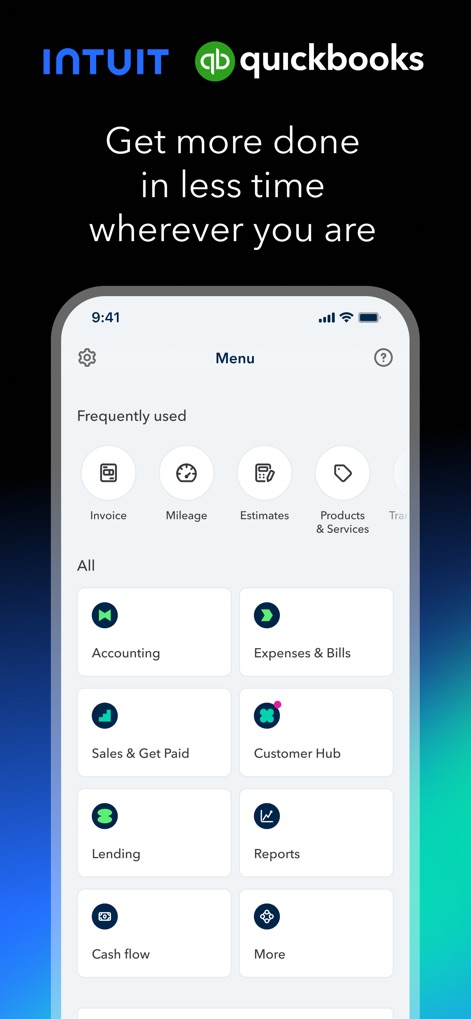
このアプリのダッシュボードは、経理、経費、顧客管理など主要な機能へ素早くアクセスできる「Frequently used」セクションと「All」セクションを提供し、ユーザーはすべての業務を一目で把握できます。
直感的なダッシュボード

請求書作成画面では、ユーザーは「Customer」セクションで顧客情報を簡単に入力し、「Product or service」セクションで提供するサービスや商品の詳細を追加できます。
簡単な請求書作成
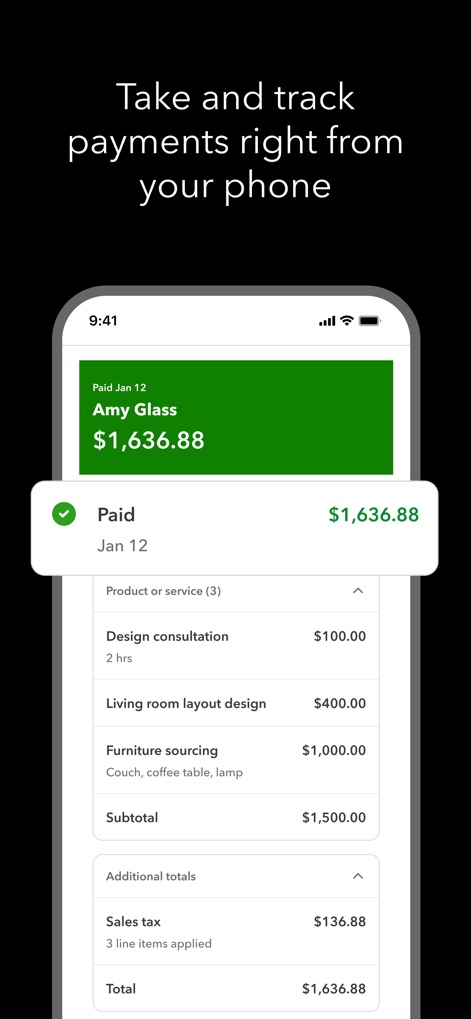
支払い追跡機能により、ユーザーは完了した支払いを「Paid」という緑色のバナーで明確に確認でき、請求書の「Total」の内訳を詳細に表示できます。
支払いを迅速に追跡
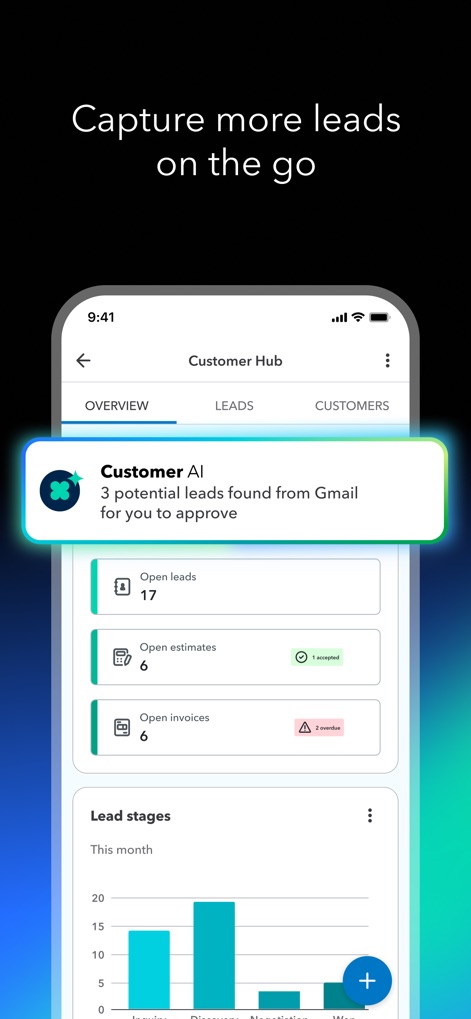
顧客ハブでは、「Customer AI」からのGmailで検出された潜在的なリードに関する通知を確認でき、「Lead stages」のグラフで現在のリードの状況を視覚的に把握できます。
リードを効率的に獲得

このアプリの自動化機能は、「Accounting AI」がレビューを必要とする取引を特定し、「Overdue invoices」セクションで期日超過の請求書に対するリマインダーを自動生成します。
時間を節約する自動化

経費管理画面では、「Accounting AI」が取引を自動的に分類していることをリアルタイムで表示し、ユーザーは銀行預金やカフェでの食事などの取引リストを確認できます。
リアルタイム経費管理

レシートスキャン機能は、ユーザーがレシートを写真に撮ると「Capturing」アニメーションが表示され、画像ギャラリーとカメラのオプションを使って簡単に入力できます。
レシートを瞬時にキャプチャ

自動走行距離追跡機能は、ユーザーの移動ルートを地図上に明確に表示し、走行の目的を「Business Purpose」フィールドで分類して正確な控除をサポートします。
走行距離を自動追跡
説明
Download
類似アプリ
似た機能とユーザー体験を持つアプリ

Invoice Maker - PDF Creator
Decodation LLC
Invoice Maker + Estimate App
Daniel Bitton

Invoice Maker - Invoice Fly
Labhouse Mobile SL
Invoice Maker ▸ Estimate App
GetPaid Inc.

Invoice Simple: Invoice Maker
Zenvoice Inc.
Zoho Invoice Maker App
Zoho Corporation

Accounting App - Zoho Books
Zoho Corporation

Invoice2go: Easy Invoice Maker
Invoice2go.com

Invoice Maker & Estimate App
Bookipi Pty Ltd
このページはアプリまたはその開発者の公式ページではなく、情報提供および論評を目的として作成された独立した編集出版物です。明示的に別段の記載がない限り、アプリおよびその開発者は、MWM、Apple、Google Play、アプリのパブリッシャー、またはアプリの開発者と提携、承認、後援、認可、またはその他の公式的な関係はなく、このページのいかなる内容も、アプリがMWMのサービスを使用して開発されたことを意味するものではありません。すべての商標、ロゴ、スクリーンショット、その他のコンテンツはそれぞれの所有者の財産です。