
このページはアプリまたはその開発者の公式ページではなく、情報提供および論評を目的として作成された独立した編集出版物です。明示的に別段の記載がない限り、アプリおよびその開発者は、MWM、Apple、Google Play、アプリのパブリッシャー、またはアプリの開発者と提携、承認、後援、認可、またはその他の公式的な関係はなく、このページのいかなる内容も、アプリがMWMのサービスを使用して開発されたことを意味するものではありません。すべての商標、ロゴ、スクリーンショット、その他のコンテンツはそれぞれの所有者の財産です。


Intune Company Portal
企業インフラへの唯一の扉。本アプリは、ユーザーが自身のデバイスをセキュリティの檻に繋ぎつつ、その内部で仕事の自由を最大限に引き出すための、巧妙に設計された操縦桿を提供している。
ダウンロード
25M+ユーザー評価
評価数
2.1M開発元
カテゴリ
Business対応言語
22最新バージョン
5.2602.0サイズ
121.1 MBリリース日
2013年11月19日Intune Company Portal アプリの主要機能分析
企業リソースへの安全なアクセスと効率的なデバイス管理をサポート
企業リソースへの安全なアクセス
本アプリは、企業のリソース(Office、メール、OneDrive for Businessなど)への安全かつ効率的なアクセスを提供します。
デバイスの登録と管理
ユーザーは、企業リソースへのアクセスを許可するため、自身のデバイスを効率的に登録することが可能です。
リモートからのデバイス管理
本アプリを通じて、登録済みデバイスの一覧表示、紛失時や盗難時のデータ消去(ワイプ)をユーザー自身が行えます。
セルフサービスパスワードリセット
従業員は、仕事用アカウントのパスワードを忘れた場合でも、迅速かつ簡単にリセットできます。
企業アプリケーションの発見と展開
企業が提供する業務に必要なアプリケーションを簡単に見つけ、インストールする機能を提供します。
ITサポート情報へのアクセス
ユーザーは、IT部門の連絡先情報に容易にアクセスでき、困った際に迅速なサポートを受けることが可能です。
よくある質問
について知っておくべきこと Intune Company Portal
Does Microsoft Intune Company Portal help simplify work-related tasks for employees?
Yes, Microsoft Intune Company Portal simplifies tasks like enrolling your device to access corporate resources, resetting work account passwords, finding company-provided apps, and managing enrolled devices.
What are the requirements to use the Intune Company Portal app?
To access corporate resources through Intune Company Portal, your IT admin must set up your work account, and your company must have a subscription to Microsoft Intune.
Can my company see my personal data through Intune Company Portal?
No, your company cannot view your browsing history, personal emails, contacts, calendar, passwords, photos, or the location of a personal device via Intune Company Portal.
How do I find and access company apps using Intune Company Portal?
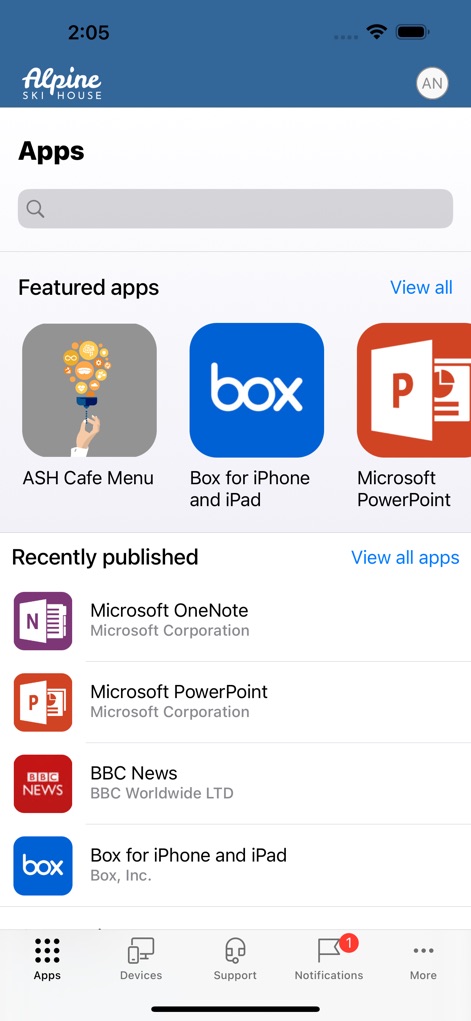
You can find apps provided by your company within the Intune Company Portal by navigating to the 'Apps' section, which displays featured and recently published applications.
Is device management required to install apps from Intune Company Portal?
Yes, some applications found in Intune Company Portal, such as Microsoft PowerPoint, require device management for installation and access to corporate resources.
How do I install the management profile for Intune Company Portal on my device?
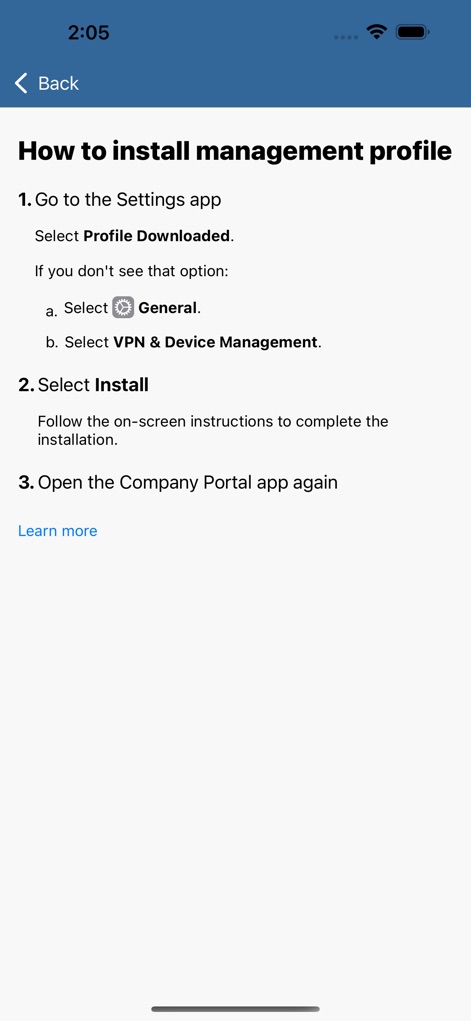
To install the management profile for Intune Company Portal, go to the Settings app, select 'Profile Downloaded,' then navigate to 'General' > 'VPN & Device Management,' and follow installation instructions.
Can I view details about my enrolled devices using Intune Company Portal?
Yes, you can view and manage all your enrolled devices, including their manufacturer, model, and operating system, within the Intune Company Portal's 'Device' section.
Can I remotely wipe my device if it is lost or stolen using Intune Company Portal?
Yes, Intune Company Portal allows you to wipe your enrolled device yourself if it gets lost or stolen, helping protect corporate data and resources.
How can I contact my IT department for support with Intune Company Portal?
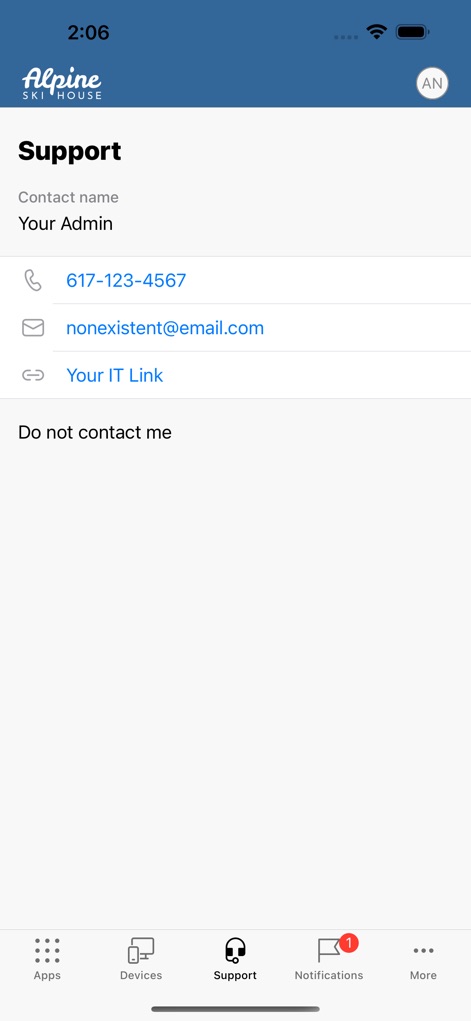
You can get help from your IT department by finding their contact information (phone, email, IT link) in the 'Support' section of the Intune Company Portal app.
以下のスクリーンショットと説明は、アプリの公式ストアリスティングから直接取得されたものであり、アプリ開発者の所有物です。
アプリストア
スクリーンショット

デバイス設定をガイド
このスクリーンは、デバイスのセットアッププロセスを段階的に説明します。企業リソースへの安全なアクセスを確立するための4つのステップと、「Begin」および「Postpone」ボタンが表示されています。

プライバシーを確認
ユーザーのプライバシーを保護するため、このスクリーンでは、企業がデバイス上で閲覧履歴や個人用ファイルなどのデータにアクセスできないことを明確に示しています。「Can't」と「Can」のタブで情報開示の範囲が視覚的に分かります。
アプリを探す
このスクリーンでは、従業員向けに承認されたビジネスアプリケーションのカタログを閲覧できます。検索バーと「Featured apps」および「Recently published」といったカテゴリ別のアプリ表示により、必要なツールを簡単に見つけることができます。

アプリの詳細
特定のアプリケーションを選択すると、このスクリーンにその詳細情報と、「Install」ボタンが表示されます。アプリの説明文とデバイス管理の必要性の有無を確認できます。

アプリを絞り込む
このスクリーンは、アプリケーションの検索を効率化するための高度なフィルタリングオプションを提供します。アプリの可用性フィルターや出版元選択のトグルスイッチを使用して、関連性の高いアプリを絞り込むことが可能です。
設定手順ガイド
デバイスに管理プロファイルをインストールするための明確な手順が、このスクリーンに表示されます。番号付きのインストール手順と「Settings app」および「Company Portal app」での具体的な操作指示により、スムーズなセットアップをサポートします。

デバイスを確認
登録済みのデバイスに関する詳細な情報がこのスクリーンに表示され、ユーザーは自身のデバイスを管理できます。デバイスの基本情報表示と、「Rename」ボタンにより、デバイス名の変更が可能です。
サポートに連絡
このスクリーンでは、IT部門へのサポート連絡先情報が提供されており、ユーザーは迅速な支援を受けることができます。電話番号とメールアドレス、そして「Your IT Link」へのリンクが容易に確認できます。
説明
Download
類似アプリ
似た機能とユーザー体験を持つアプリ

Zoom Workplace for Intune
Zoom Communications, Inc.

Kiosker Pro: Web Kiosk
Top North AB

Intelligent Hub
Wandering WiFi LLC

Kiosk Pro Plus
Kiosk Group, Inc.

Kiosker: Fullscreen Web Kiosk
Top North AB

Kiosk Pro Basic
Kiosk Group, Inc.

Ivanti Mobile@Work™ Client
MobileIron

PIA S5 Control
MARS BROTHERS LIMITED

Apple Configurator
Apple Inc.
このページはアプリまたはその開発者の公式ページではなく、情報提供および論評を目的として作成された独立した編集出版物です。明示的に別段の記載がない限り、アプリおよびその開発者は、MWM、Apple、Google Play、アプリのパブリッシャー、またはアプリの開発者と提携、承認、後援、認可、またはその他の公式的な関係はなく、このページのいかなる内容も、アプリがMWMのサービスを使用して開発されたことを意味するものではありません。すべての商標、ロゴ、スクリーンショット、その他のコンテンツはそれぞれの所有者の財産です。