
このページはアプリまたはその開発者の公式ページではなく、情報提供および論評を目的として作成された独立した編集出版物です。明示的に別段の記載がない限り、アプリおよびその開発者は、MWM、Apple、Google Play、アプリのパブリッシャー、またはアプリの開発者と提携、承認、後援、認可、またはその他の公式的な関係はなく、このページのいかなる内容も、アプリがMWMのサービスを使用して開発されたことを意味するものではありません。すべての商標、ロゴ、スクリーンショット、その他のコンテンツはそれぞれの所有者の財産です。


ダウンロード
2.5M+ユーザー評価
評価数
12.1K開発元
カテゴリ
Entertainment対応言語
42最新バージョン
36.03.242サイズ
137.1 MBリリース日
2014年3月14日多様なデジタルメディアを愛用するユーザーのための包括的なメディアプレーヤー評価
KMPlayerの主要機能分析
ネットワーク&クラウド連携
ユーザーはFTP、UPNP、SMB、WebDavといったネットワークプロトコルや、Google Drive、Dropbox、OneDriveなどの主要なクラウドサービスと連携できるため、どこからでもメディアライブラリにシームレスにアクセスして再生できます。
幅広いフォーマットと高解像度対応
様々な高解像度動画、音楽、字幕ファイルを完璧に再生できるため、ユーザーは幅広いメディアコンテンツを一つで楽しめます。
字幕詳細設定
ユーザーは字幕の色、サイズ、位置を自由に変更できるため、視認性を高め、個人の好みに合わせた快適な視聴環境を構築できます。
URLストリーミング再生
ユーザーはURLを入力するだけでウェブ上の動画(ストリーミング)を直接再生できるため、多様なオンラインコンテンツにアクセスし、アプリ内で一元的に視聴できます。
画面色彩調整
ユーザーは輝度、光度、色相、彩度、ガンマ情報を細かく調整できるため、視聴環境や好みに合わせて映像の色合いを最適化できます。
イコライザー設定
ユーザーは音楽用と動画用に異なるイコライザー設定を保存できるため、コンテンツの種類に応じた最適な音質でメディアを楽しめます。
区間リピート再生
ユーザーは特定の区間(A点からB点まで)を繰り返し再生できるため、語学学習や音楽練習、特定シーンの分析などに役立ちます。
ブックマーク機能
ユーザーは視聴中に特定の時間点にブックマークを追加できるため、お気に入りのセクションや重要な部分に簡単に戻り、再視聴することが可能です。
画面サイズ調整
再生中の動画画面を拡大・縮小できるため、ユーザーはデバイスの画面サイズや視聴の好みに合わせて柔軟に表示を調整できます。
クイック設定ボタン
ユーザーはプレーヤーのオプションを素早く設定できるため、再生中の操作性を向上させ、ストレスなく視聴体験をカスタマイズできます。
よくある質問
について知っておくべきこと KMPlayer
What are the key features of the KMPlayer app?
KMPlayer is a media player supporting high-resolution video, music, and subtitles. It includes bookmarking, subtitle settings, play speed adjustments, color controls, section repeat, equalizer, URL playback, and network/cloud access.
What video and music formats does KMPlayer support?
KMPlayer supports video and music formats such as AVI, MP3, WAV, MOV, MP4, WMV, FLAC, MKV, and others. It also supports various subtitle formats including SRT, SSA/ASS, and SMI.
Can I bookmark specific parts of a video in KMPlayer?
Yes, KMPlayer allows users to add bookmarks to specific time points within media. This feature enables playback of cherished sections later.
Does KMPlayer allow customization of subtitles?
Yes, KMPlayer offers comprehensive subtitle settings. Users can change the color, size, and position of subtitles to suit their preferences.
Does KMPlayer include an equalizer for audio adjustments?
Yes, KMPlayer has an equalizer feature. Users can turn on the EQ to adjust music sounds and save separate equalizer settings for both music and video.
Does KMPlayer support cloud storage and network protocols?
Yes, KMPlayer supports cloud services like Google Drive, Dropbox, and OneDrive. It also provides network support for FTP, UPNP, SMB, and WebDav.
Can I transfer files wirelessly with KMPlayer?
Yes, KMPlayer offers a "Sharing via Wi-Fi" feature. This allows users to easily transfer files between their phone and PC when connected to the same wireless network.
What audio/video codecs are not supported by KMPlayer?
Due to policy, KMPlayer does not support certain codecs. These include DTS, EAC3, TrueHD, and Divx.
What permissions does the KMPlayer app require?
KMPlayer requires storage space permission. This allows the app to access photos, music, and videos stored on the device.
Can KMPlayer play videos directly from a URL?
Yes, KMPlayer supports URL Playing. Users can enter a URL to stream and play any videos available on the web.
Can I zoom in on videos while playing in KMPlayer?
Yes, KMPlayer includes a "Zoom & Move" feature. This allows users to zoom in and move the video screen during playback.
以下のスクリーンショットと説明は、アプリの公式ストアリスティングから直接取得されたものであり、アプリ開発者の所有物です。
アプリストア
スクリーンショット
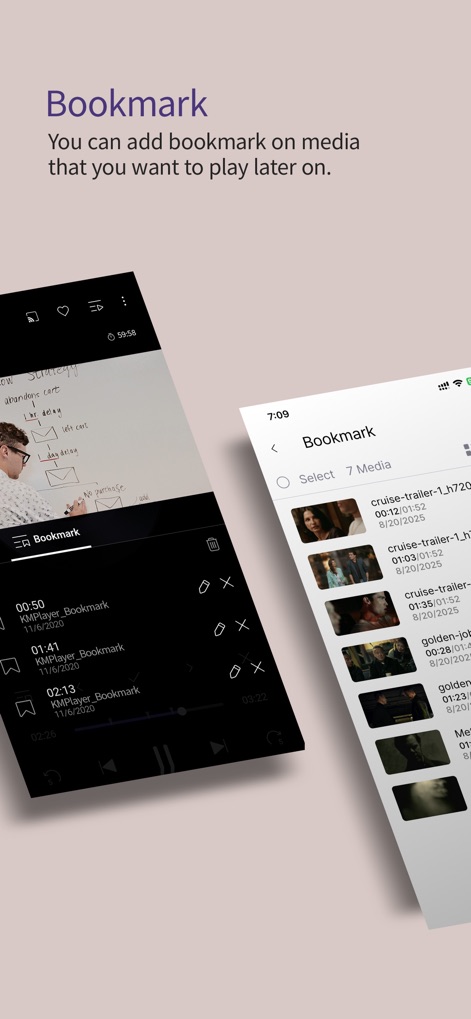
ユーザーは再生中の動画にブックマークを設定でき、ブックマークアイコンと時間点リストで後から簡単にアクセスできます。
しおり機能

このアプリはピンチジェスチャーを用いて映像の拡大・移動が可能で、視聴体験を細かく調整できます。
拡大縮小操作

ユーザーは字幕の色選択パレットとサイズ調整スライダーを使い、字幕の表示を自由にカスタマイズできます。
字幕設定カスタマイズ

ユーザーは周波数バンドスライダーとプリアンプ設定を通じて、再生される音楽や動画の音質を詳細に調整できます。
音質調整イコライザー
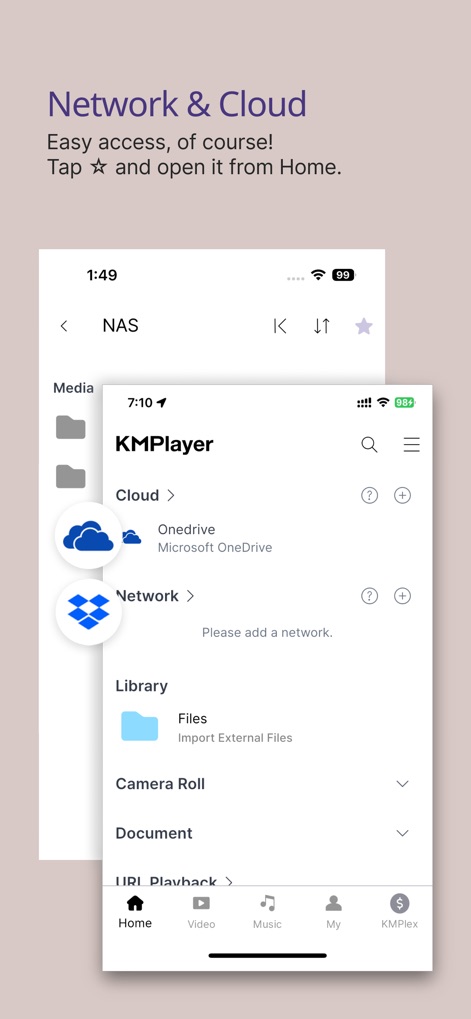
本アプリはOneDriveなどのクラウドストレージ連携とネットワークドライブ接続に対応しており、多様なメディアソースにアクセス可能です。
連携機能拡張
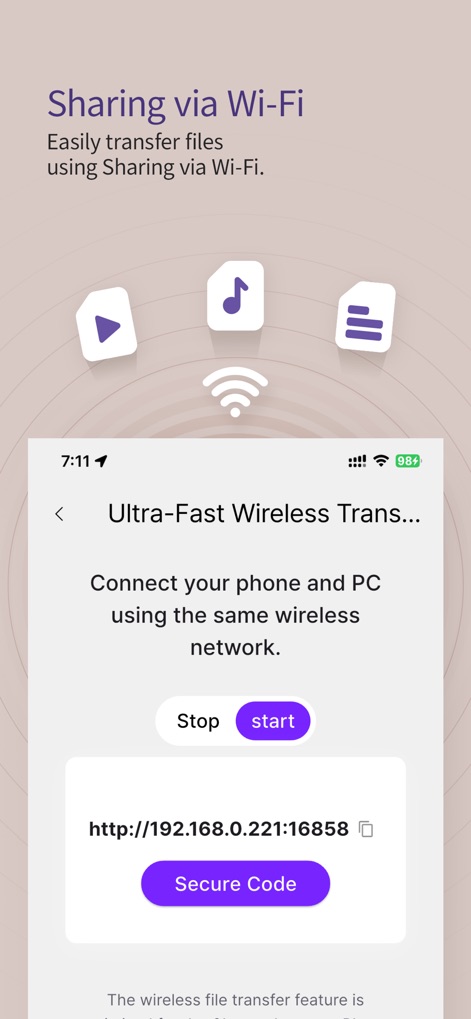
このツールはIPアドレス表示とセキュリティコードオプションを備えたWi-Fi経由のファイル転送機能により、安全かつ迅速なデータ共有を実現します。
Wi-Fiファイル転送
説明
Download
類似アプリ
似た機能とユーザー体験を持つアプリ

网易爆米花-智能媒体库,全能云盘网盘播放器
Guangzhou NetEase Computer System Co.Ltd

Immich
Hau Tran

飞牛
Guangzhou TR Intelligent Manufacturing Technology Co., Ltd.
nPlayer
Newin Inc.

MiraPlay
悦 刘

NipaPlay
荣广 梁

VidHub -Video Library & Player
Nanjing Oumi Software Development Co., Ltd.

Fast Player - video player
化媚 席

zFuse - Media Player
s-joys Technology Co., Ltd.
このページはアプリまたはその開発者の公式ページではなく、情報提供および論評を目的として作成された独立した編集出版物です。明示的に別段の記載がない限り、アプリおよびその開発者は、MWM、Apple、Google Play、アプリのパブリッシャー、またはアプリの開発者と提携、承認、後援、認可、またはその他の公式的な関係はなく、このページのいかなる内容も、アプリがMWMのサービスを使用して開発されたことを意味するものではありません。すべての商標、ロゴ、スクリーンショット、その他のコンテンツはそれぞれの所有者の財産です。