
このページはアプリまたはその開発者の公式ページではなく、情報提供および論評を目的として作成された独立した編集出版物です。明示的に別段の記載がない限り、アプリおよびその開発者は、MWM、Apple、Google Play、アプリのパブリッシャー、またはアプリの開発者と提携、承認、後援、認可、またはその他の公式的な関係はなく、このページのいかなる内容も、アプリがMWMのサービスを使用して開発されたことを意味するものではありません。すべての商標、ロゴ、スクリーンショット、その他のコンテンツはそれぞれの所有者の財産です。


LightBlue®
Bluetooth Low Energyペリフェラルのスキャン、デバッグ、シミュレーションを行う業界標準アプリ。ファームウェアのテスト、デバイスサービスの探索、ハードウェアとソフトウェアのギャップを容易に埋めます。
ダウンロード
1M+ユーザー評価
評価数
2K+開発元
カテゴリ
Utilities対応言語
1最新バージョン
5.3.5サイズ
21.3 MBリリース日
2012年9月8日BLE開発のためのスイスアーミーナイフ
LightBlue®は、ハードウェアエンジニアやIoT開発者にBluetooth Low Energyエコシステムへの完全な透明性を提供し、強力なスキャナーと多用途なペリフェラルシミュレーターの両方として機能します。
詳細なペリフェラル検査
スキャン、接続、探索。リアルタイムRSSI追跡による読み取り、書き込み、通知購読の完全サポートにより、すべてのサービスとキャラクタリスティックをブラウズします。
仮想デバイスエミュレーション
BLEペリフェラルとしてアドバタイズすることで、開発を加速します。既存のハードウェアプロファイルをクローンしたり、カスタム仮想デバイスを作成して、物理的なプロトタイプなしでモバイルアプリをテストしたりできます。
よくある質問
について知っておくべきこと LightBlue®
LightBlue®とは何ですか?
LightBlue®は、Bluetooth Low Energy(BLE)を使用してデバイスに接続するアプリケーションです。ユーザーは、セントラルモードとペリフェラルモードの両方でBLEデバイスをスキャン、接続、および操作できます。
LightBlue®はどのようにBLEデバイスに接続しますか?
LightBlue®はセントラルモードで動作し、近くのBLEデバイスをスキャンして接続します。接続後、ユーザーは詳細なデバイスプロファイルを表示したり、キャラクタリスティックの読み取り、書き込み、通知の購読を行ったりできます。
LightBlue®はBLEペリフェラルとして機能できますか?
はい、LightBlue®はBLEペリフェラルとして機能します。ユーザーは「Virtual Devices」タブに移動して仮想デバイスを作成およびアドバタイズし、そのサービスとキャラクタリスティックをカスタマイズできます。
LightBlue®でどのようなBLEデバイスをテストできますか?
LightBlue®は、心拍数モニター、温度センサー、Microchip AVR-BLEおよびPIC-BLE開発ボード、TI CC2540 Keyfobs、Nordic uBlue、Panasonic PAN1720など、さまざまなBLEデバイスのテストをサポートしています。
LightBlue®で信号強度(RSSI)を表示するにはどうすればよいですか?
LightBlue®は、接続されているペリフェラルの信号強度(RSSI)を表示し、ユーザーがBLEデバイスへの近接性を判断するのに役立ちます。
LightBlue®はBLEイベントのログ記録をサポートしていますか?
はい、LightBlue®には、デバイス検出、接続、読み取り、書き込みなどのすべての重要なBLEイベントを追跡するログタブが含まれています。ユーザーはログの内容を共有することもできます。
LightBlue®はクラウドサービスにデータを送信できますか?
はい、LightBlue®は、アプリのCloud Connect機能を通じて、通知およびインジケーションからのデータをAWS IoTまたはAdafruit IOに送信できます。
LightBlue®でキャラクタリスティックに値を書き込むにはどうすればよいですか?
LightBlue®では、Hex、Oct、Bin、Decimal、またはASCII形式でキャラクタリスティックに書き込むことができます。ユーザーはキャラクタリスティックの詳細ビューでこの操作を行います。
LightBlue®で既存のペリフェラルプロファイルをクローンできますか?
はい、LightBlue®はペリフェラルプロファイルのクローンをサポートしています。ユーザーはセントラルモードでデバイスに接続し、「Clone」ボタンをタップしてそのプロファイルを仮想ペリフェラルとして保存します。
LightBlue®は検出されたデバイスについてどのような情報を提供しますか?
LightBlue®は、検出されたペリフェラルのUUIDやRSSIなどの基本的なデバイス情報を提供します。また、利用可能なサービスとキャラクタリスティックのブラウジングも可能です。
以下のスクリーンショットと説明は、アプリの公式ストアリスティングから直接取得されたものであり、アプリ開発者の所有物です。
アプリストア
スクリーンショット
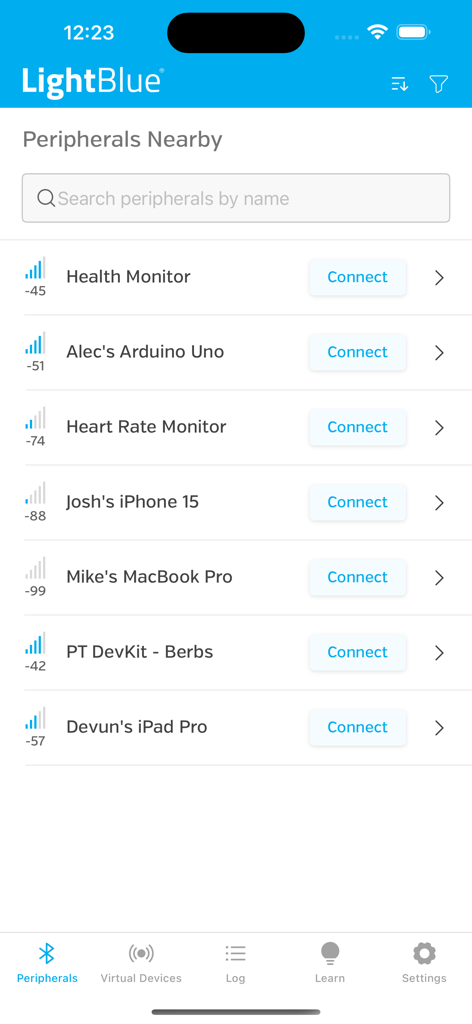
LightBlueアプリに、信号強度付きで検出されたBluetooth Low Energyペリフェラルのリストが表示されています
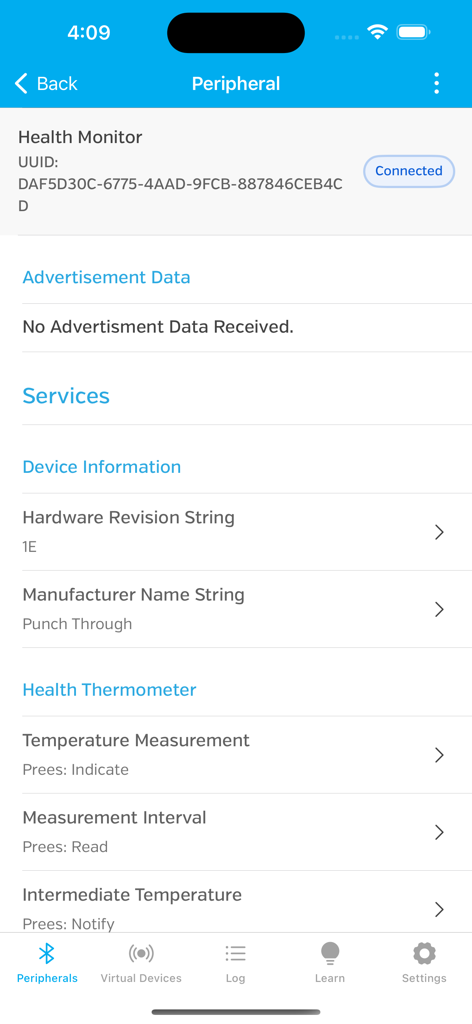
LightBlueアプリのインターフェースに、接続されたヘルスモニターペリフェラルのサービスとキャラクタリスティックが表示されています
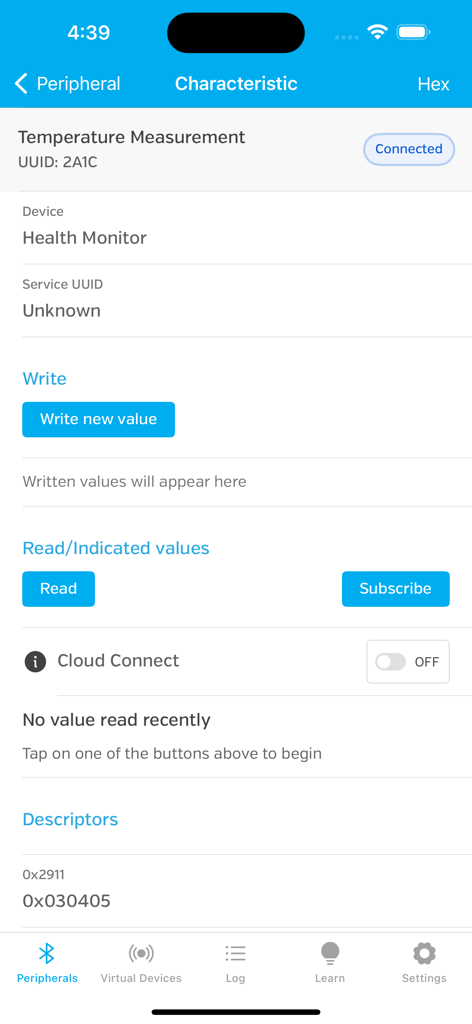
LightBlueアプリのインターフェースに、接続された温度測定デバイスのBluetoothキャラクタリスティックの詳細が表示されています
説明
Download
類似アプリ
似た機能とユーザー体験を持つアプリ
Proxyman - Capture HTTPS
Proxyman LLC

ProxyPin - Open Source Capture
Minimalist Network Co., Ltd.

BluetoothAssistant
Hangzhou OrangeJuice Technology Co., Ltd.

StikDebug
Stephen Bove

Onmi: Networking & API Request
Vuong Anh

Shizuku
Ahammam Lahcen

Stream - Network Debug Tool
Stream Lab Inc.

Web Inspector
And a Dinosaur

Surge 5
Surge Networks Inc.
このページはアプリまたはその開発者の公式ページではなく、情報提供および論評を目的として作成された独立した編集出版物です。明示的に別段の記載がない限り、アプリおよびその開発者は、MWM、Apple、Google Play、アプリのパブリッシャー、またはアプリの開発者と提携、承認、後援、認可、またはその他の公式的な関係はなく、このページのいかなる内容も、アプリがMWMのサービスを使用して開発されたことを意味するものではありません。すべての商標、ロゴ、スクリーンショット、その他のコンテンツはそれぞれの所有者の財産です。