
このページはアプリまたはその開発者の公式ページではなく、情報提供および論評を目的として作成された独立した編集出版物です。明示的に別段の記載がない限り、アプリおよびその開発者は、MWM、Apple、Google Play、アプリのパブリッシャー、またはアプリの開発者と提携、承認、後援、認可、またはその他の公式的な関係はなく、このページのいかなる内容も、アプリがMWMのサービスを使用して開発されたことを意味するものではありません。すべての商標、ロゴ、スクリーンショット、その他のコンテンツはそれぞれの所有者の財産です。


ダウンロード
50k+ユーザー評価
評価数
419開発元
カテゴリ
Graphics & Design対応言語
52最新バージョン
1.0.30サイズ
93.2 MBリリース日
2025年7月23日本評価は、Lightbox Drawが提供する主要機能と、それがターゲットユーザーにもたらす影響を技術的な視点から分析します。
Lightbox Draw - Tracing Paperの技術分析: クリエイティブなトレースを革新するモバイルソリューション
デバイスのライトボックス機能
このアプリは、スマートフォンやタブレットを強力なデジタルライトボックスに変え、紙越しの画像トレースを可能にします。
多様な画像ソースからのトレース
ユーザーは自身の写真を取り込んだり、このアプリが提供する事前定義された画像ライブラリから選択して、あらゆる画像をトレースできます。
画面ロックによる安定したトレース
このツールは、トレース作業中に画面が誤って移動するのを防ぐため、表示内容を固定する機能を提供し、中断のない精密な描画を支援します。
写真から線画への変換
本アプリは、写真を瞬時に明瞭な線画に変換する機能により、複雑な画像でもより簡単かつ正確にトレースすることを可能にします。
オーバーレイグリッドによる精度向上
このアプリは、カスタマイズ可能なグリッドを画面に重ねて表示することで、ユーザーが画像を正確に配置し、ピンポイントの精度で描画を行うことを支援します。
幅広いクリエイティブ用途への対応
本ツールは、スケッチ、イラストレーション、カリグラフィー練習、描画スキルの向上、ステンシル作成、DIYプロジェクトなど、多様なクリエイティブなニーズに対応します。
よくある質問
について知っておくべきこと Lightbox draw - tracing paper
What is Lightbox Draw - Tracing Paper?
Lightbox Draw - Tracing Paper transforms your phone or tablet into a powerful lightbox and tracing tool. It allows users to effortlessly trace any image onto paper for drawing and creative projects.
Can users trace their own photos using Lightbox Draw?
Yes, Lightbox Draw enables users to import their own photos for tracing. The app also provides a library of predefined images for selection, offering flexibility for various creative needs.
How does Lightbox Draw prevent accidental image movement during tracing?
Lightbox Draw features a "Lock Display" function. This feature keeps the tracing image steady on the screen, preventing accidental movement or interference during the tracing process.
Does Lightbox Draw convert photos into line art for easier tracing?
Yes, Lightbox Draw offers an "Outline Conversion" feature. This instantly transforms photos into clear line art, facilitating easier and more precise tracing for users.
Can users add a grid overlay in Lightbox Draw for precision?
Yes, Lightbox Draw allows users to activate a customizable "Overlay Grid." This feature aids in positioning images accurately and drawing with pinpoint precision on the device screen.
Who is Lightbox Draw - Tracing Paper designed for?
Lightbox Draw - Tracing Paper is designed for sketch artists, illustrators, students, designers, and hobbyists. It is ideal for improving art skills, calligraphy practice, stencil creation, and various DIY projects.
What are the basic steps to use Lightbox Draw - Tracing Paper?
To use Lightbox Draw, select an image, adjust its position, and lock the display. Then, place paper over your device screen and trace the image that shines through, drawing with confidence.
以下のスクリーンショットと説明は、アプリの公式ストアリスティングから直接取得されたものであり、アプリ開発者の所有物です。
アプリストア
スクリーンショット

このアプリを使用すると、ユーザーはスマートフォンに表示された画像を紙を通して正確にトレースできます。透明な紙越しに**下絵のイメージがはっきりと透過**し、それをなぞることで、どんな複雑なアートワークでもスムーズに描き始められます。
紙に描画
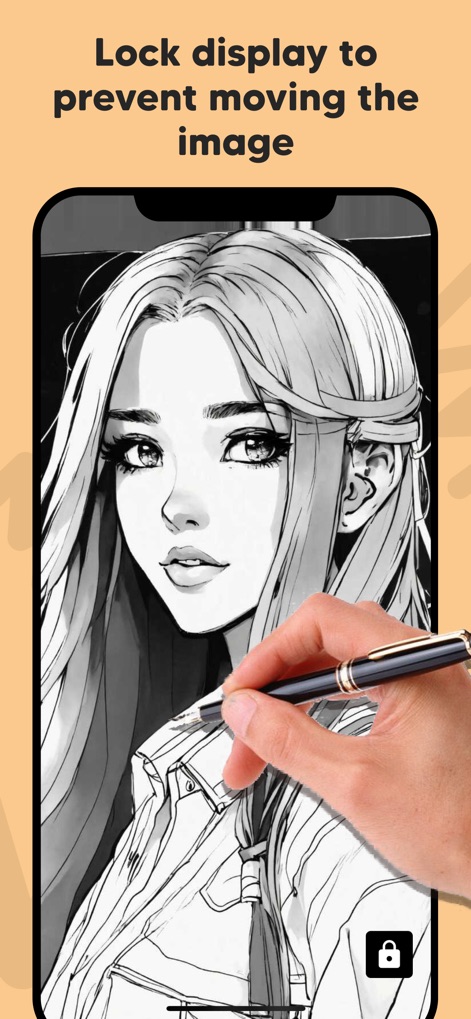
描画中の誤操作を防ぐため、本ツールには画面ロック機能が備わっています。ユーザーは、描画中に**画面下のロックアイコンをタップ**するだけで、**トレース対象の画像**が動く心配なく、集中して作品を制作できます。
画面をロック
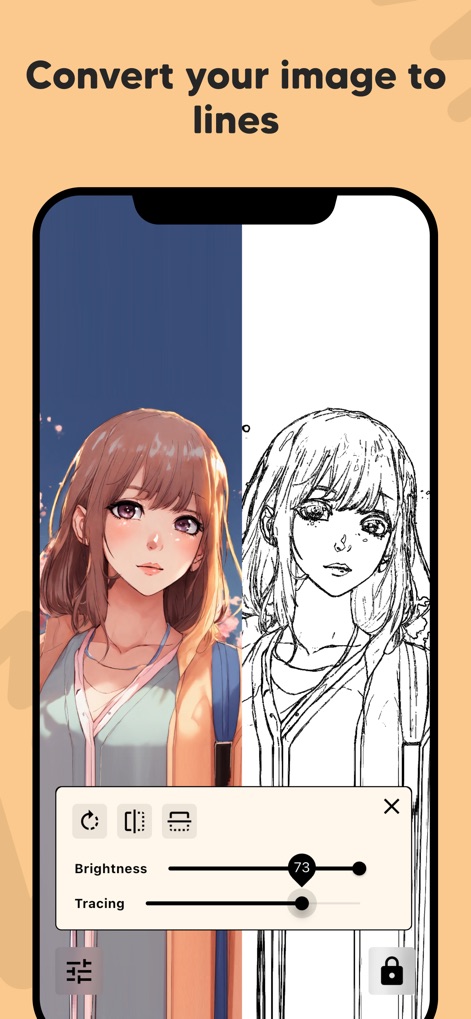
元の画像を線画に変換することで、トレースの精度を飛躍的に向上させます。この機能により、ユーザーは**鮮明なラインアート**を基に作業でき、さらに**明るさ調整スライダー**で表示を最適化し、細部まで正確に捉えることができます。
線画に変換
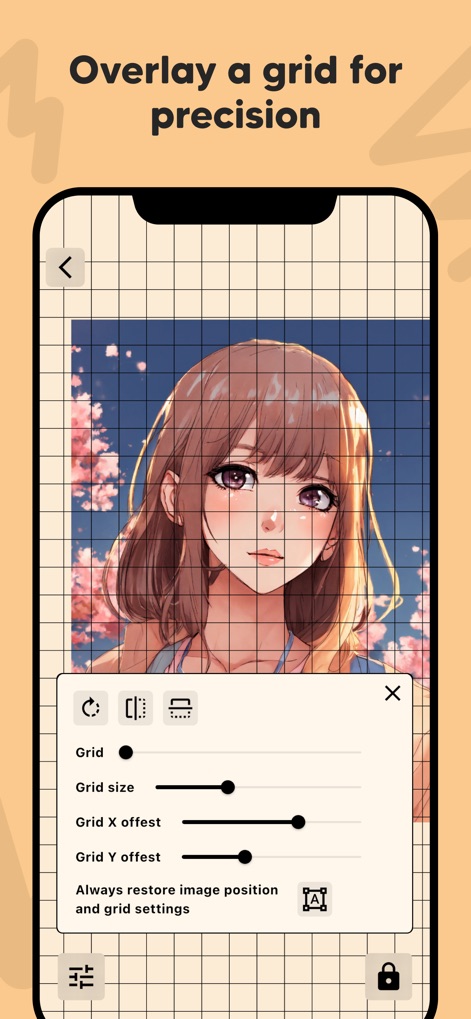
精密な描画や配置をサポートするために、このアプリはカスタマイズ可能なグリッドオーバーレイを提供します。ユーザーは**グリッド設定パネル**でサイズやオフセットを調整し、**画面上に表示されるグリッド**を利用して、画像を正確に配置し、バランスの取れた作品を作成できます。
グリッドで精密に
説明
Download
類似アプリ
似た機能とユーザー体験を持つアプリ
このページはアプリまたはその開発者の公式ページではなく、情報提供および論評を目的として作成された独立した編集出版物です。明示的に別段の記載がない限り、アプリおよびその開発者は、MWM、Apple、Google Play、アプリのパブリッシャー、またはアプリの開発者と提携、承認、後援、認可、またはその他の公式的な関係はなく、このページのいかなる内容も、アプリがMWMのサービスを使用して開発されたことを意味するものではありません。すべての商標、ロゴ、スクリーンショット、その他のコンテンツはそれぞれの所有者の財産です。