LumaBooth Event Photo Booth

LumaBooth Event Photo Booth

ダウンロード: App Store
ロゴ: LumaBooth Event Photo Booth

LumaBooth:オールインワン・プロフェッショナル・フォト&360ブース・ソフトウェア

iPadやMacをハイエンドなイベントの原動力に変えましょう。起業家やイベントプロフェッショナル向けに構築された、最も信頼性の高いソフトウェアで、素晴らしい360ビデオ、240fpsスローモーション、AI搭載のフォトレイアウトを提供します。

ダウンロード: App Store

開発元

Lumasoft LLC

カテゴリ

Photo & Video

ダウンロード

425K+

ユーザー評価

4.5/5

評価数

1K+

対応言語

6

魔法の断片

このインターフェースを利用する 425K+ 人のユーザー.

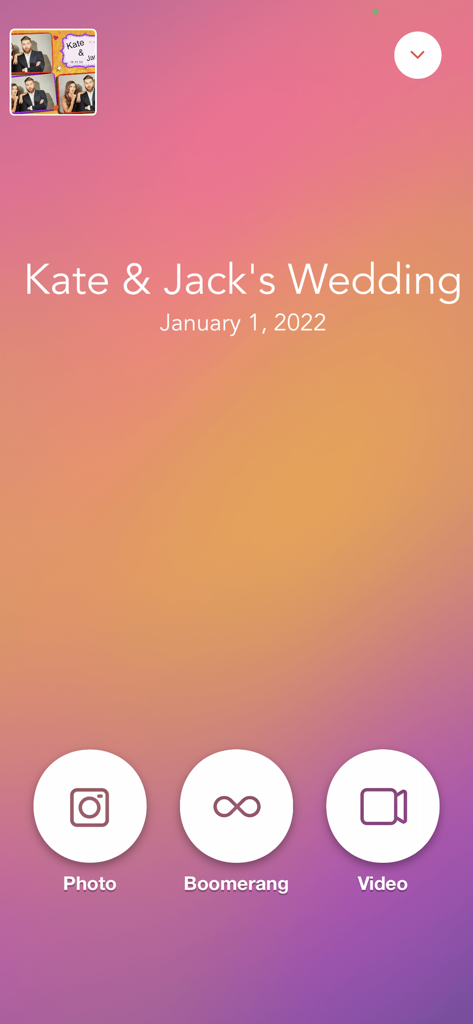
写真、ブーメラン、ビデオキャプチャオプションを表示する結婚式用のLumaBoothアプリのインターフェース
写真、ブーメラン、ビデオキャプチャオプションを表示する結婚式用のLumaBoothアプリのインターフェース

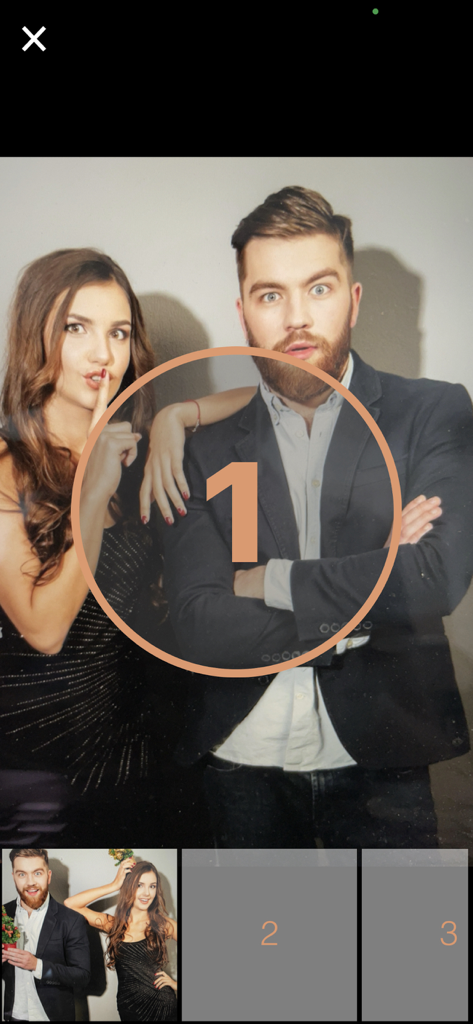
カウントダウンタイマー付きでゲストが写真のためにポーズをとっている様子を示すLumaBoothアプリのインターフェース
カウントダウンタイマー付きでゲストが写真のためにポーズをとっている様子を示すLumaBoothアプリのインターフェース

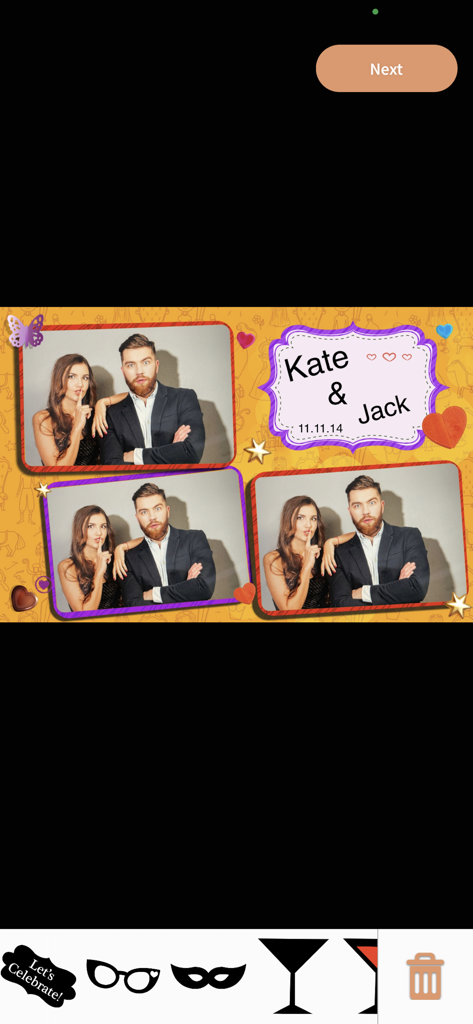
デジタルステッカーとパーソナライズされたテーマを備えたLumaBoothのカスタムウェディングフォトブースレイアウト
デジタルステッカーとパーソナライズされたテーマを備えたLumaBoothのカスタムウェディングフォトブースレイアウト

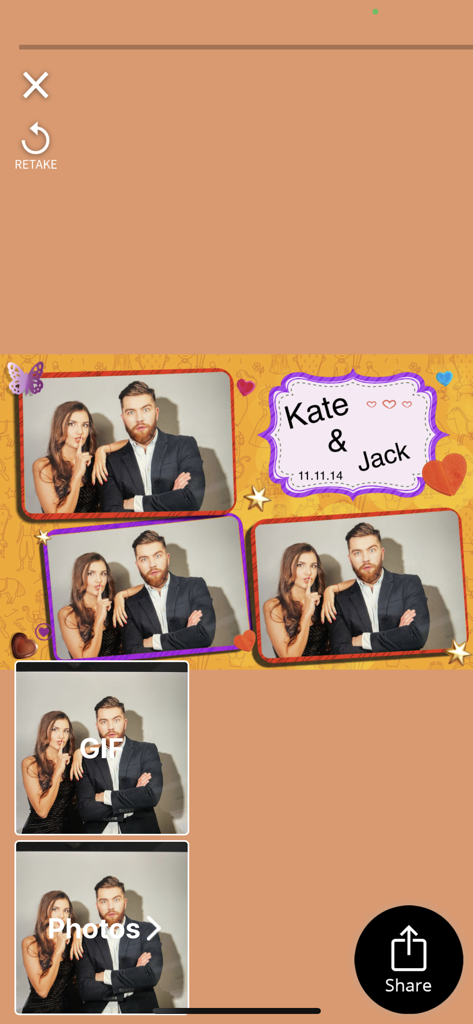
JackとKateのためのパーソナライズされたウェディングフォトブースレイアウトを表示する、共有および撮り直しオプション付きのLumaBoothアプリのインターフェース。
JackとKateのためのパーソナライズされたウェディングフォトブースレイアウトを表示する、共有および撮り直しオプション付きのLumaBoothアプリのインターフェース。

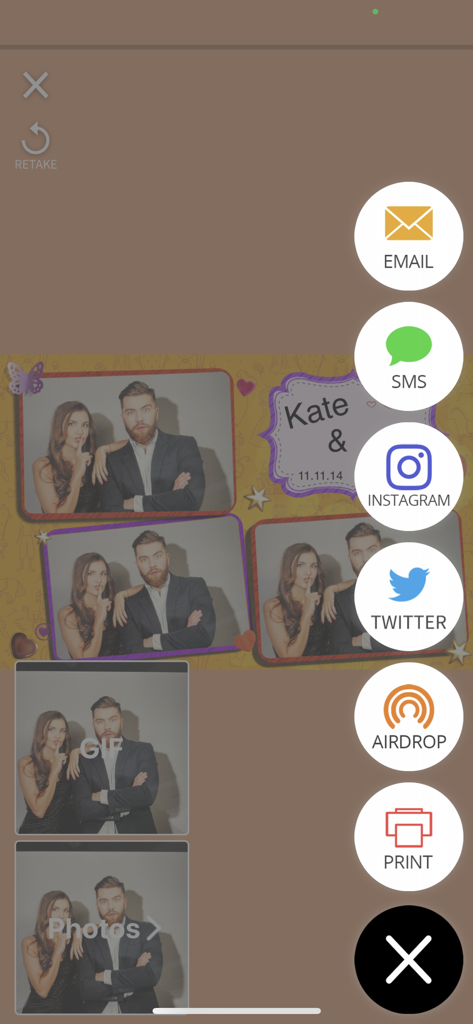
写真の共有および印刷アイコンが表示されたLumaBoothアプリの画面
写真の共有および印刷アイコンが表示されたLumaBoothアプリの画面

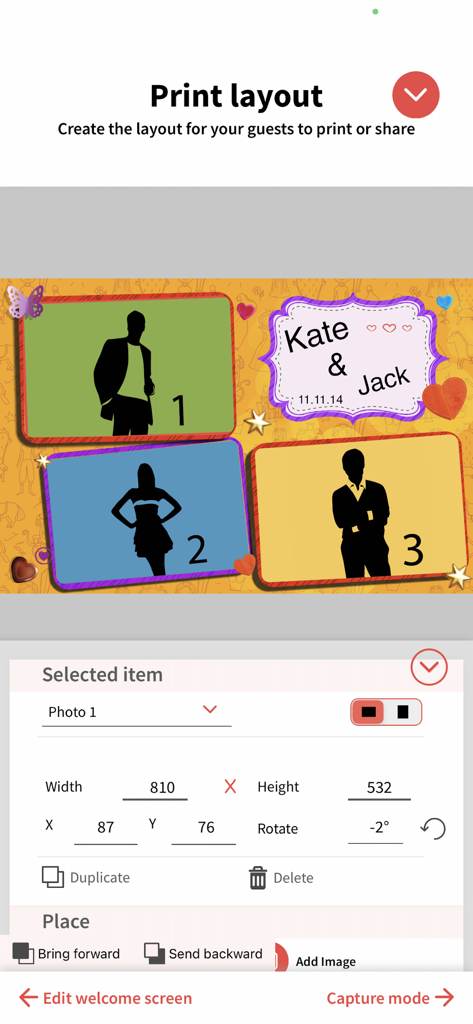
複数の写真プレースホルダーとパーソナライズされたテキストを使用してフォトブースの印刷レイアウトをカスタマイズするためのインターフェース
複数の写真プレースホルダーとパーソナライズされたテキストを使用してフォトブースの印刷レイアウトをカスタマイズするためのインターフェース

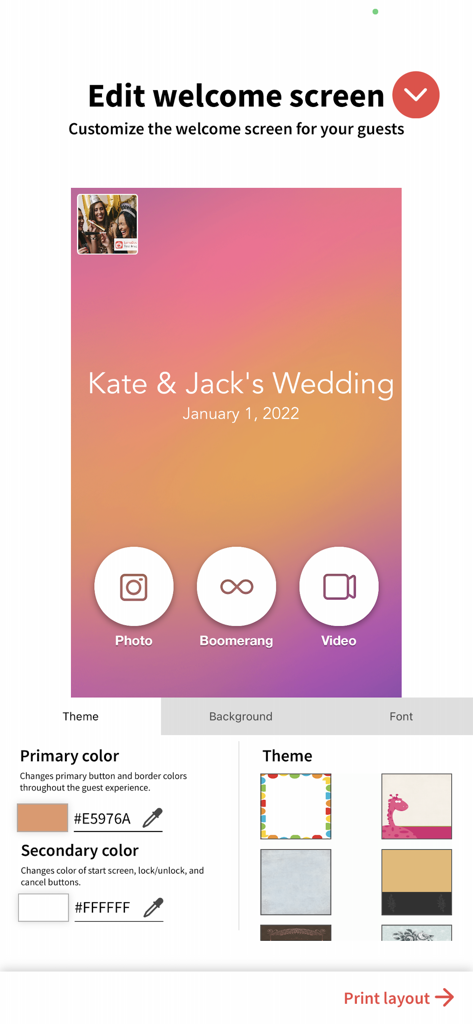
結婚式のテーマオプションを使用してフォトブースのウェルカム画面をカスタマイズするためのインターフェース
結婚式のテーマオプションを使用してフォトブースのウェルカム画面をカスタマイズするためのインターフェース

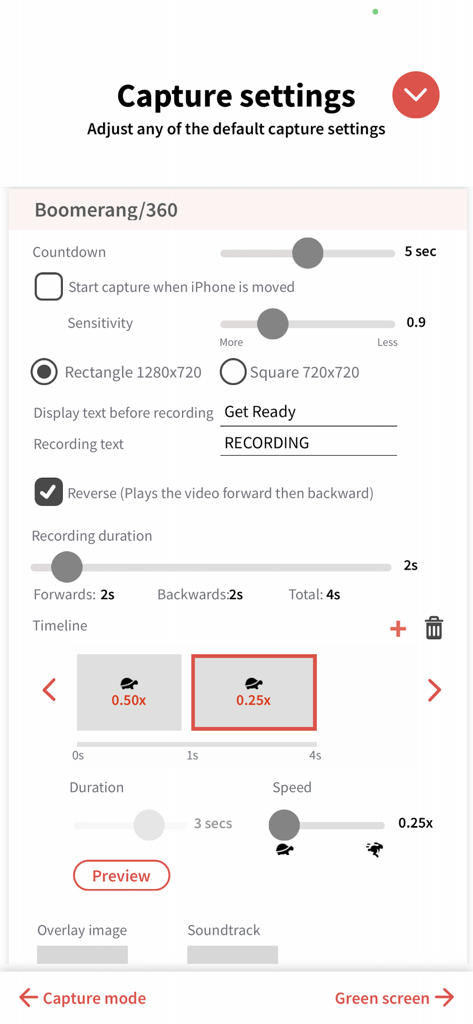
録画時間やスローモーション速度などの360ビデオおよびブーメランキャプチャ設定を調整するためのLumaBoothアプリのインターフェース。
録画時間やスローモーション速度などの360ビデオおよびブーメランキャプチャ設定を調整するためのLumaBoothアプリのインターフェース。

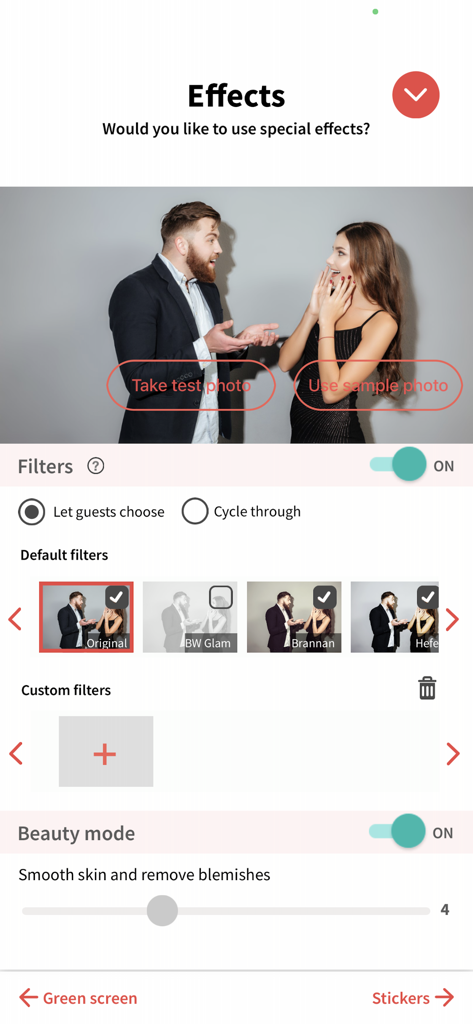
フォトフィルターとビューティーモード設定の構成を表示するLumaBoothアプリのインターフェース
フォトフィルターとビューティーモード設定の構成を表示するLumaBoothアプリのインターフェース

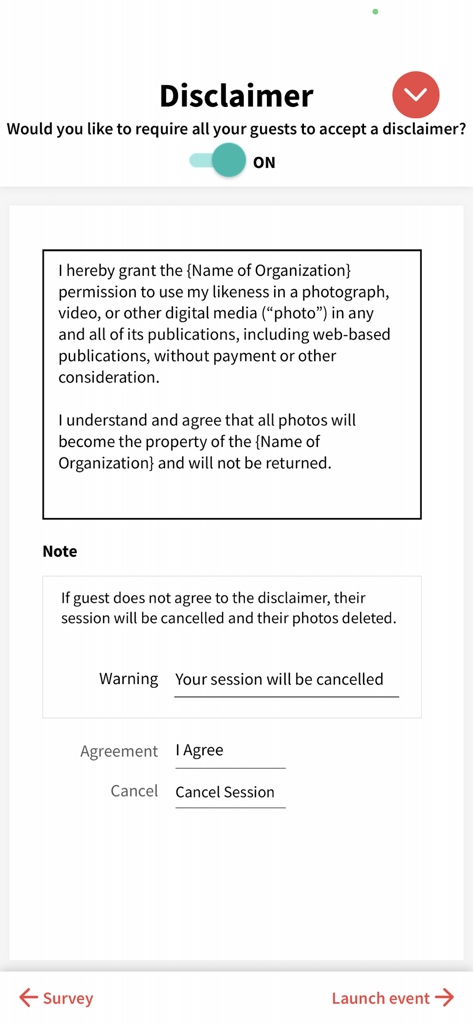
LumaBoothにおけるゲストの免責事項および写真公開同意書のセットアップ画面

LumaBoothにおけるゲストの免責事項および写真公開同意書のセットアップ画面

次回のイベントのためのプロフェッショナルツール

このアプリを際立たせるツール、 425K+ 人のユーザーが選択.

🎥

360度&スローモーションをマスター

高フレームレートのビデオスタビライザーとシネマティックなエフェクトで差別化を図り、プレミアムなレンタル料金を実現しましょう。

シームレスな即時共有

会場にWi-Fiがなくても機能する、超高速のSMS、QR、メール共有でエンゲージメントを高めましょう。

🤖

AI搭載の背景

グリーンスクリーンなしで即座に背景を入れ替えることができ、あらゆるアクティベーションに合わせたオーダーメイドのテーマを提供できます。

アプリについて

について知っておくべきこと LumaBooth Event Photo Booth.

説明

From the creators of dslrBooth, LumaBooth is the leading professional photo booth software for iPad, iPhone, and Mac. Perfect for easily running a professional-grade photo booth and video/360 booth at weddings, birthdays, company parties, and more. Easily run a professional-grade photo booth and video/360 booth. Photo Booth: • Custom Layouts and Editing: Use LumaBooth's user-friendly editor to craft personalized photo layouts. Incorporate images, logos, and text effortlessly. • Stickers and Filters: Engage your guests with a wide array of stickers, filters, and LUTs allowing them to personalize their photos for a truly interactive experience. • Versatile Printing Options: Enjoy the flexibility of printing with any AirPrint-compatible printer or connect to professional photo printers through the LumaBooth Assistant app. Exclusive support for DNP printers via the DNP WPS Pro print server enhances your printing capabilities. 360/Video Booth: • Capture high-quality videos and slow-motion using built-in or professional cameras. • Customize videos by adding image overlays, animated video overlays, pre-roll and post-roll videos, and a backing soundtrack to fit your event. • Speed up or slow down sections of the recorded video. • Using the high frame-rate cameras in recent iPads and iPhone, you can shoot at 240fps perfect for slow-mo effects. • Video stabilization to ensure that your slow-motion video is captured with the utmost clarity and smoothness. • Optionally start a session by moving the iPad or iPhone. Key Features: • Camera Support: Capture seamlessly with built-in cameras and offers advanced compatibility with Canon, Sony and Nikon professional cameras. Optionally setup custom camera settings such as: exposure, white balance, and video stabilization. • Live background removal: Remove your background using AI Removal or green screen, your photos and videos will be as unique as your event. • Guest Interaction: Guide guests through the photo booth experience using video and audio prompts. • Surveys and Disclaimers: Turn on surveys for data collection and require a disclaimer if needed. • Start Screen Customization: Fully customize the start screen with beautiful built-in themes. • Professional Online Gallery: Your photos and videos are hosted in a microsite per event which you can customize to fit your event theme. • Optionally trigger using a wireless remote. Sharing Features: • Fully customize the start screen with beautiful built-in themes, and allow your guests to share using e-mail, SMS, Airdrop, QR code, WhatsApp, and Instagram whether online of offline. • Streamline your photo booth by letting guests view and share photos, prints, and GIFs on another iPad using our companion LumaShare iPad app. Also run a live photo or video slideshow. LumaBooth requires a subscription which offers unlimited events with no watermark, sharing using SMS, E-mail, Facebook, and Twitter: • The LumaBooth monthly renewable subscription costs $19.99 USD. • Payment will be charged to iTunes Account at confirmation of purchase. • Subscription automatically renews unless auto-renew is turned off at least 24-hours before the end of the current period • Account will be charged for renewal within 24-hours prior to the end of the current period, and identify the cost of the renewal • Subscriptions may be managed by the user and auto-renewal may be turned off by going to the user's Account Settings after purchase • No cancellation of the current subscription is allowed during active subscription period • Please go to dslrbooth.com/terms-of-service/ and dslrbooth.com/privacy-policy for more information.

最新バージョン

4.6.4

サイズ

224.9 MB

リリース日

2016年10月28日

プロフェッショナルなイベントビジネスを開始する準備はできましたか?

ハイエンドな結婚式、企業のプロモーション、拡散性の高い360ビデオ体験のために、LumaBoothを信頼している425,000人以上のプロフェッショナルに加わりましょう。今日、最初のイベントを始めましょう。

ダウンロード: App Store
FAQ

よくある質問

について知っておくべきこと LumaBooth Event Photo Booth

LumaBooth Event Photo Boothの月額料金はいくらですか?

LumaBooth Event Photo Boothの月額更新サブスクリプションは19.99ドルです。このサブスクリプションでは、イベントの無制限利用と、SMS、Eメール、Facebook、Twitter経由での透かしなし共有が可能です。

LumaBoothソフトウェアはどのような種類のブースをサポートしていますか?

LumaBoothは、プロ仕様のフォトブース、ビデオブース、360ブースをサポートしています。イベント用途ではiPad、iPhone、Macデバイスで動作します。

ユーザーはLumaBoothで写真のレイアウトをカスタマイズできますか?

はい、LumaBoothには、パーソナライズされた写真レイアウトを作成するための使いやすいエディタが搭載されています。ユーザーは画像、ロゴ、テキストをデザインに組み込むことができます。

LumaBooth Event Photo Boothで利用できる印刷オプションは何ですか?

LumaBoothは、AirPrint対応プリンターであればどのプリンターでも印刷をサポートしています。また、LumaBooth Assistantアプリ経由でプロの写真プリンターに接続でき、DNP WPS Proプリントサーバーを通じてDNPプリンターのみをサポートしています。

LumaBoothは写真やビデオの背景除去機能を提供していますか?

はい、LumaBoothはAIリムーブまたはグリーンバック技術を使用したライブ背景除去機能を提供しています。この機能により、ユニークでカスタマイズされた写真やビデオを作成できます。

LumaBooth Event Photo Boothと互換性のあるプロ用カメラは何ですか?

LumaBoothは、Canon、Sony、Nikonのプロ用カメラとの高度な互換性を提供しています。ユーザーは露出、ホワイトバランス、ビデオ安定化などのカスタムカメラ設定も行うことができます。

ゲストはLumaBoothイベントから写真やビデオをどのように共有できますか?

ゲストは、Eメール、SMS、AirDrop、QRコード、WhatsApp、Instagram経由で写真やビデオを共有できます。共有はオンラインとオフラインの両方で利用可能です。

LumaBoothはスローモーションビデオを作成できますか?

はい、LumaBoothは高品質なビデオとスローモーション映像を撮影できます。効果的なスローモーション効果のために、最近のiPadとiPhoneで240fpsでの撮影をサポートしており、ビデオ安定化機能も含まれています。

LumaBoothは、ゲストが参加前に免責事項に同意することを要求できますか?

はい、LumaBoothでは免責事項の入力をオンにすることができます。ゲストは免責事項に同意する必要があります。同意しない場合、セッションはキャンセルされ、写真は削除されます。

LumaBooth Event Photo Boothのスタート画面はカスタマイズ可能ですか?

はい、ユーザーはLumaBoothのスタート画面を完全にカスタマイズできます。組み込みのテーマが用意されており、色、背景、フォントを調整して、パーソナライズされたゲスト体験を提供できます。

App information, icons, screenshots, and descriptions displayed on this page are sourced from the Apple App Store and are the property of their respective developers. Download estimates and rankings are based on MWM's proprietary models and may not reflect actual figures. This page is provided for informational and analytical purposes only.

Believe this page infringes your intellectual property? File a dispute