Maple Calculator: Math Solver
ダウンロード: App Store

このページはアプリまたはその開発者の公式ページではなく、情報提供および論評を目的として作成された独立した編集出版物です。明示的に別段の記載がない限り、アプリおよびその開発者は、MWM、Apple、Google Play、アプリのパブリッシャー、またはアプリの開発者と提携、承認、後援、認可、またはその他の公式的な関係はなく、このページのいかなる内容も、アプリがMWMのサービスを使用して開発されたことを意味するものではありません。すべての商標、ロゴ、スクリーンショット、その他のコンテンツはそれぞれの所有者の財産です。

ロゴ: Maple Calculator: Math Solver
ダウンロード: App Store

Maple Calculator: Math Solver

世界で最も高度な数学エンジンを搭載。複雑な方程式を写真で解き、3Dグラフを視覚化し、STEMの宿題をオンラインまたはオフラインですぐに終わらせましょう。

主要数値

ダウンロード

334K+

ユーザー評価

4.8/5

評価数

3K+

開発元

Maplesoft

カテゴリ

Education

対応言語

11

最新バージョン

4.3.0

サイズ

80.4 MB

リリース日

2019年9月13日
機能

STEMコースを自信を持ってマスターしよう

高校の代数から大学レベルの微積分まで、世界で最も高度な数学エンジンによる即時ステップバイステップの解法と強力な視覚化を手に入れましょう。

写真を撮って、解答を入手

複雑な方程式の入力はやめましょう。カメラを使って手書きの宿題や教科書の問題をスキャンし、オフラインでも即座に解答を得ましょう。

ステップバイステップガイドで学ぼう

結果を見つけるだけでなく、論理を理解しましょう。詳細でわかりやすい解説に従って、難しい概念をマスターし、成績を向上させましょう。

以下のスクリーンショットと説明は、アプリの公式ストアリスティングから直接取得されたものであり、アプリ開発者の所有物です。

アプリストア

スクリーンショット
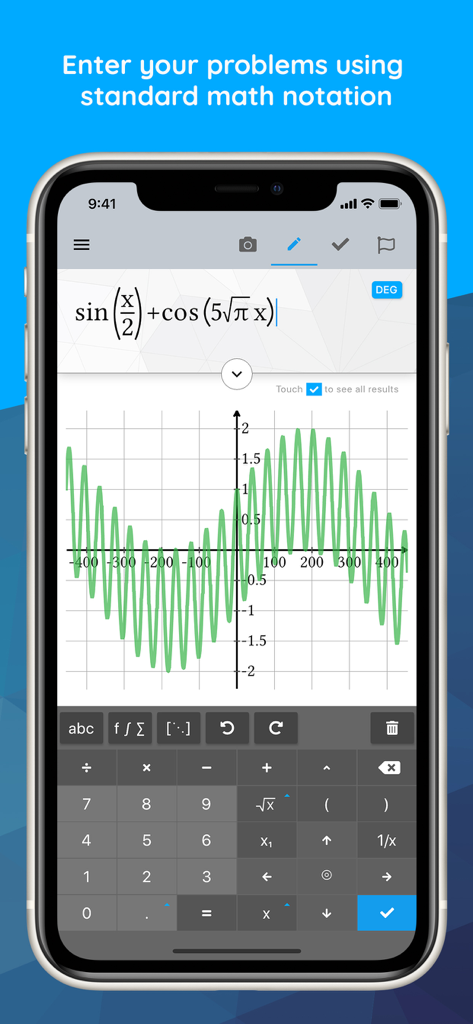
Maple Calculator: Math Solver - Maple Calculatorアプリのインターフェースに、三角関数の2Dグラフと数学キーボードが表示されています。
Maple Calculatorアプリのインターフェースに、三角関数の2Dグラフと数学キーボードが表示されています。

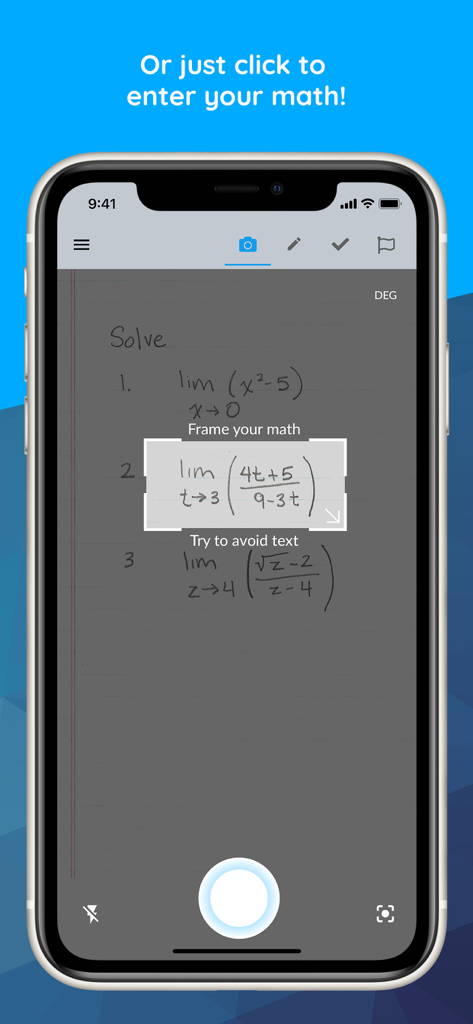
Maple Calculator: Math Solver - Maple Calculatorアプリを使用して、スマートフォンのカメラでノートに書かれた極限の問題をスキャンしている人物。
Maple Calculatorアプリを使用して、スマートフォンのカメラでノートに書かれた極限の問題をスキャンしている人物。

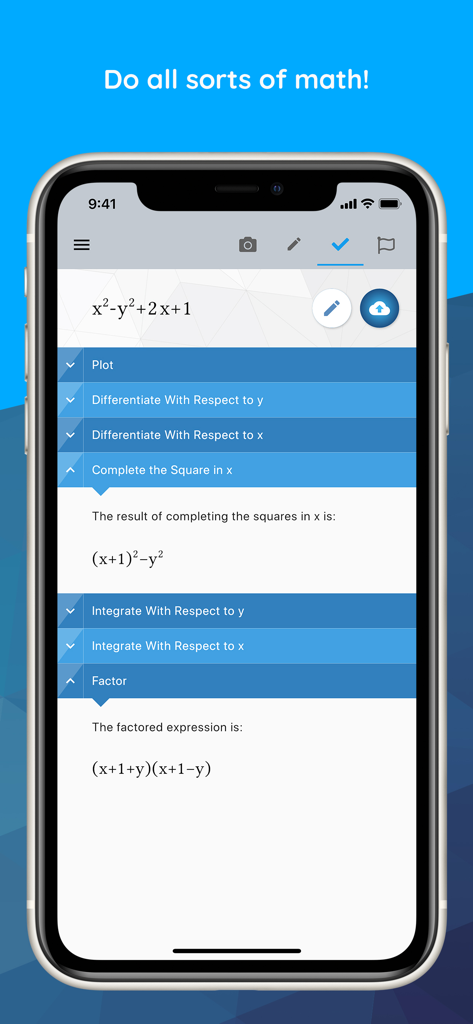
Maple Calculator: Math Solver - Maple Calculatorアプリのインターフェースに、代数方程式のステップバイステップの数学問題解決と因数分解が表示されています。
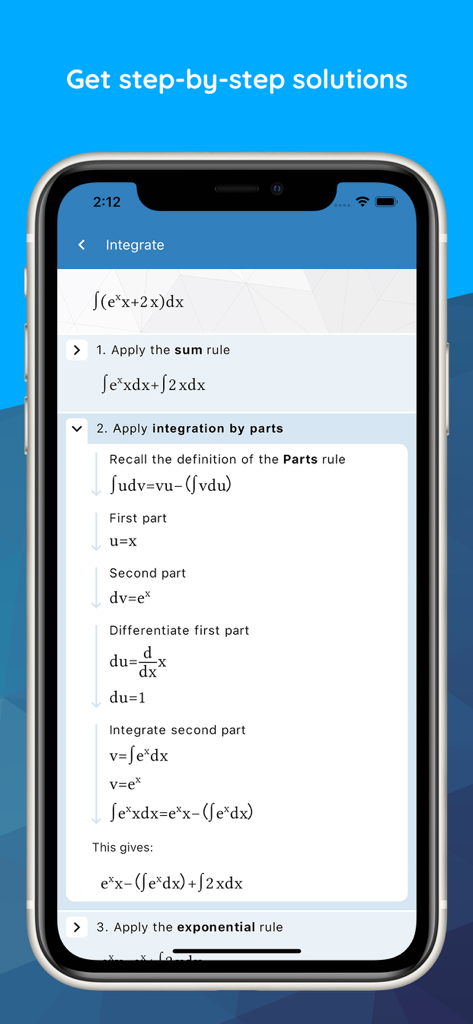
Maple Calculatorアプリのインターフェースに、代数方程式のステップバイステップの数学問題解決と因数分解が表示されています。

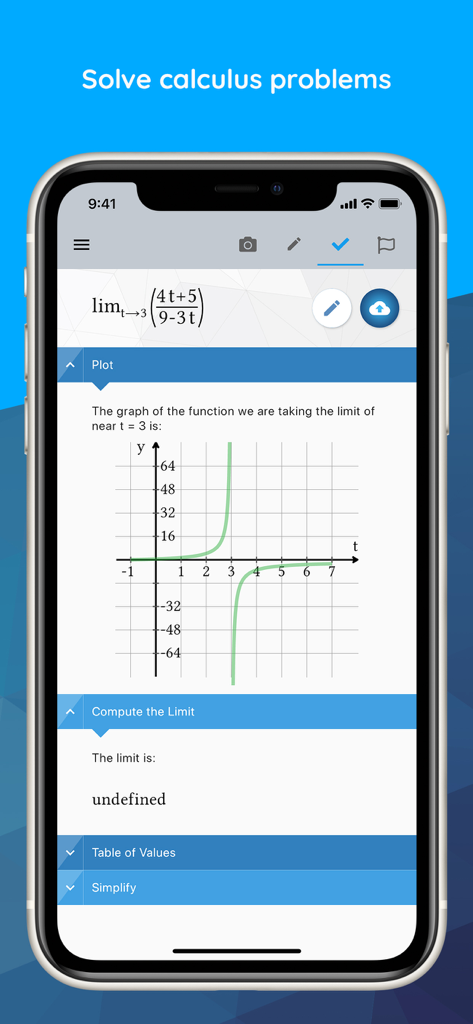
Maple Calculator: Math Solver - Maple Calculatorアプリに、微積分の極限問題のステップバイステップの解法とグラフの視覚化が表示されています。
Maple Calculatorアプリに、微積分の極限問題のステップバイステップの解法とグラフの視覚化が表示されています。

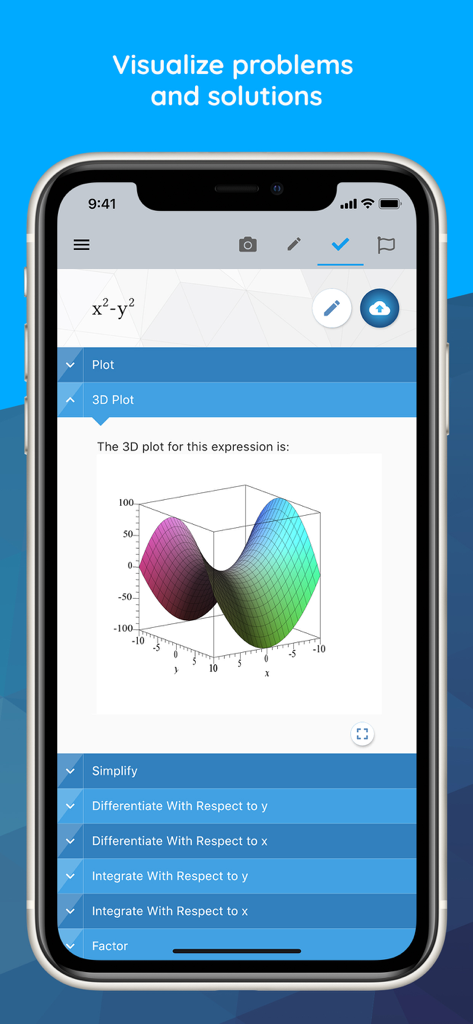
Maple Calculator: Math Solver - Maple Calculatorモバイルアプリ内で、数学的表現の3Dグラフの視覚化。
Maple Calculatorモバイルアプリ内で、数学的表現の3Dグラフの視覚化。

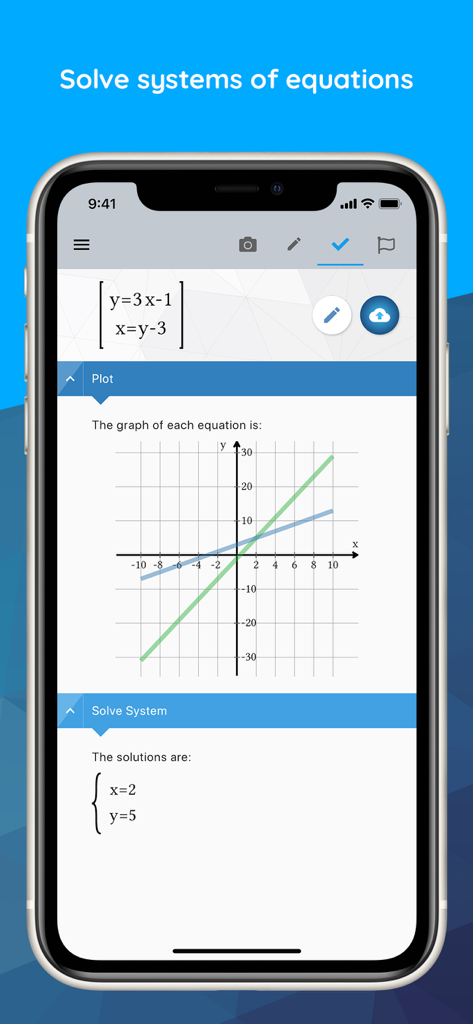
Maple Calculator: Math Solver - Maple Calculatorアプリのインターフェースに、2Dグラフと座標解で解かれた連立方程式が表示されています。
Maple Calculatorアプリのインターフェースに、2Dグラフと座標解で解かれた連立方程式が表示されています。

Maple Calculator: Math Solver - Maple Calculatorアプリが、グラフの視覚化とともに微積分の極限問題を解いています。
Maple Calculatorアプリが、グラフの視覚化とともに微積分の極限問題を解いています。

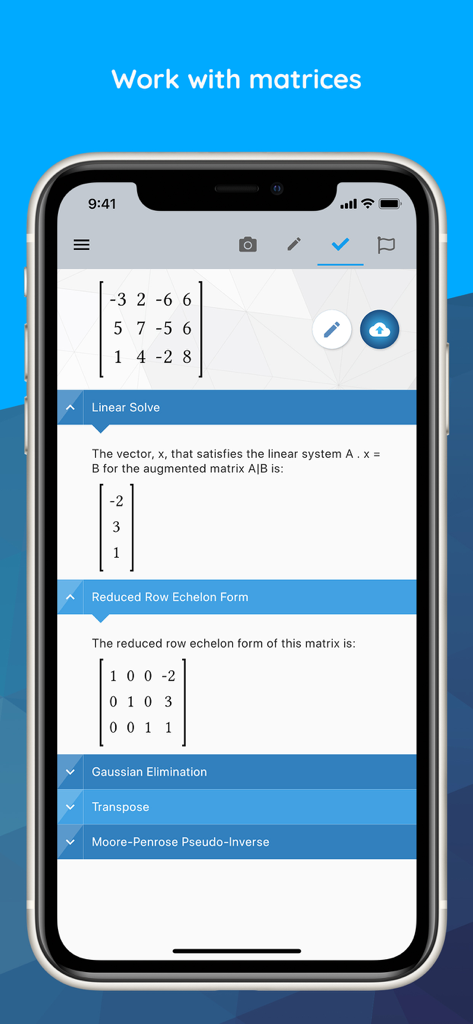
Maple Calculator: Math Solver - Maple Calculatorアプリのインターフェースに、線形代数のステップで解かれた行列が表示されています。
Maple Calculatorアプリのインターフェースに、線形代数のステップで解かれた行列が表示されています。

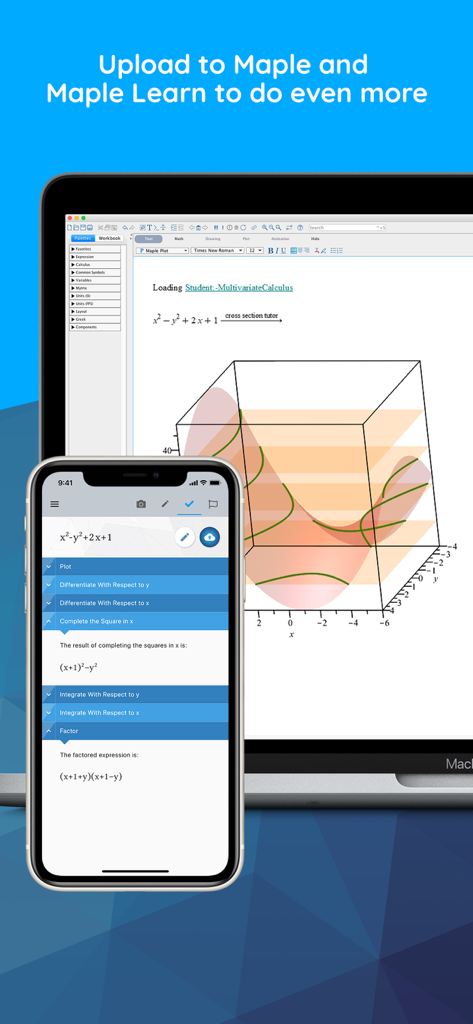
Maple Calculator: Math Solver - 電話上のMaple Calculatorアプリが、ラップトップと3D数学グラフを同期しています。

電話上のMaple Calculatorアプリが、ラップトップと3D数学グラフを同期しています。

Maple Calculator: Math Solver - Maple Calculatorアプリの画面に、Sumzle数学方程式パズルゲームが表示されています。

Maple Calculatorアプリの画面に、Sumzle数学方程式パズルゲームが表示されています。

説明

Powered by Maple, the most powerful math engine in the world, this all-in-one calculator solves math problems, generates 2-D and 3-D visualizations, and provides step-by-step solutions for a wide variety of math homework problems encountered at high school and university. [STEP BY STEP MATH SOLUTIONS FOR HOMEWORK] This app is a graphing calculator, scientific calculator, algebra calculator, calculus calculator, and integration calculator combined all into one! Take a picture of your problem using your phone's camera or enter it via the app's built-in math editor to see the final answer or get step-by-step solutions. [QUICK AND POWERFUL MATH SOLVER] No matter how you enter your problem, you can find derivatives and integrals, factor polynomials, invert matrices, solve systems of equations, solve ODEs, and much more. Our calculator has the power of the world-leading Maple math engine behind it, so it can do a LOT of math! [GRAPH PROBLEMS AND RESULTS] See 2-D and 3-D graphs of your expressions instantly, and watch how the graph changes as you change the expression. On this calculator you can zoom in, pan, and even rotate 3-D plots to get a closer look at areas of interest. [PLAY A BUILT-IN FUN MATH GAME] Play our calculator’s built in game, Sumzle, which is like Wordle but for math and equations. FEATURES: • Enter Math Problems Using Your Camera Or By Drawing them with the Handwriting Palette Or By Entering Directly with the Built-in Math Keyboard • Do All Sorts Of Math Operations And Get Step By Step Solutions • Get Answers Even When You Are Offline • Take Quality Math Notes Through Maple Learn. Use The Calculator Camera To Automatically Send Your Handwritten Steps To Maple Learn Where You Can Uncover Mistakes And Share Your Work With Others. • You Can Upload Mathematical Expressions From Our Calculator To Maple Desktop • International Language Support (English, Spanish, French, German, Russian, Danish, Swedish, Japanese, Hindi, And Simplified Chinese) MATH CAPABILITIES ON OUR CALCULATOR: • Basic Math: Arithmetic, Fractions, Decimals, Integers, Factors, Square Roots, Powers • Algebra: Solving And Graphing Linear Equations, Solving And Graphing Systems Of Equations, Working With Polynomials, Quadratic Equations, And Functions, Logarithmic And Exponential Functions, Trigonometric Functions, Trigonometric Identities • Precalculus: Graphing, Piecewise Functions, Absolute Value, Inequalities, Implicit Functions • Linear Algebra: Finding The Determinant, Inverse, Transpose, Eigenvalues, And Eigenvectors, Solving Matrices (Reduced Echelon Form & Gaussian Elimination) • Differential Equations: Solving Ordinary Differential Equations • And more

Download

ダウンロード: App Store

このページはアプリまたはその開発者の公式ページではなく、情報提供および論評を目的として作成された独立した編集出版物です。明示的に別段の記載がない限り、アプリおよびその開発者は、MWM、Apple、Google Play、アプリのパブリッシャー、またはアプリの開発者と提携、承認、後援、認可、またはその他の公式的な関係はなく、このページのいかなる内容も、アプリがMWMのサービスを使用して開発されたことを意味するものではありません。すべての商標、ロゴ、スクリーンショット、その他のコンテンツはそれぞれの所有者の財産です。








