MC-Timer
MC-Timer
ダウンロード: App Store

このページはアプリまたはその開発者の公式ページではなく、情報提供および論評を目的として作成された独立した編集出版物です。明示的に別段の記載がない限り、アプリおよびその開発者は、MWM、Apple、Google Play、アプリのパブリッシャー、またはアプリの開発者と提携、承認、後援、認可、またはその他の公式的な関係はなく、このページのいかなる内容も、アプリがMWMのサービスを使用して開発されたことを意味するものではありません。すべての商標、ロゴ、スクリーンショット、その他のコンテンツはそれぞれの所有者の財産です。

ロゴ: MC-Timer
ダウンロード: App Store

MC-Timer

時計を見るのをやめて、フローに入りましょう。同期されたオーディオキュー、音声アナウンスによるエクササイズ、そして正確にワークアウト時に流れるハイテンションなビートで、HIITとタバタセッションをカスタムビルドしましょう。

主要数値

ダウンロード

1K+

ユーザー評価

1.0/5

評価数

0

開発元

Eric Roller

カテゴリ

Health & Fitness

対応言語

1

最新バージョン

1.9.2

サイズ

8.9 MB

リリース日

2021年2月20日
機能

サウンドで強度をマスター

お気に入りの音楽を高パフォーマンスコーチに変えましょう。MC-Timerは、プレイリストをルーチンに完璧に同期させ、集中力を最大限に高め、気を散らすものをゼロにします。

音楽主導のフロー

音楽が流れている時にワークし、止まっている時に休憩しましょう。プレイリストにペースを決めさせ、時計をチェックする代わりにレップに集中できるようにしましょう。

曲の「心臓部」

遅いイントロはスキップしましょう。最も強度の高いエクササイズセットが始まる正確なタイミングで、各トラックの最もエネルギッシュなコア部分を自動的にトリガーしましょう。

以下のスクリーンショットと説明は、アプリの公式ストアリスティングから直接取得されたものであり、アプリ開発者の所有物です。

アプリストア

スクリーンショット
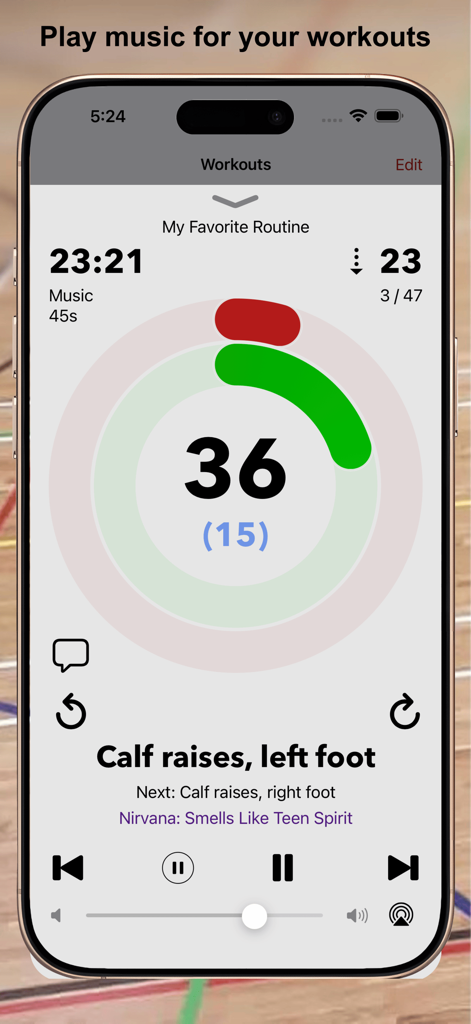
MC-Timer - MC-Timerアプリのインターフェース。音楽とエクササイズ名が表示されたフィットネスインターバルタイマーが表示されています。
MC-Timerアプリのインターフェース。音楽とエクササイズ名が表示されたフィットネスインターバルタイマーが表示されています。

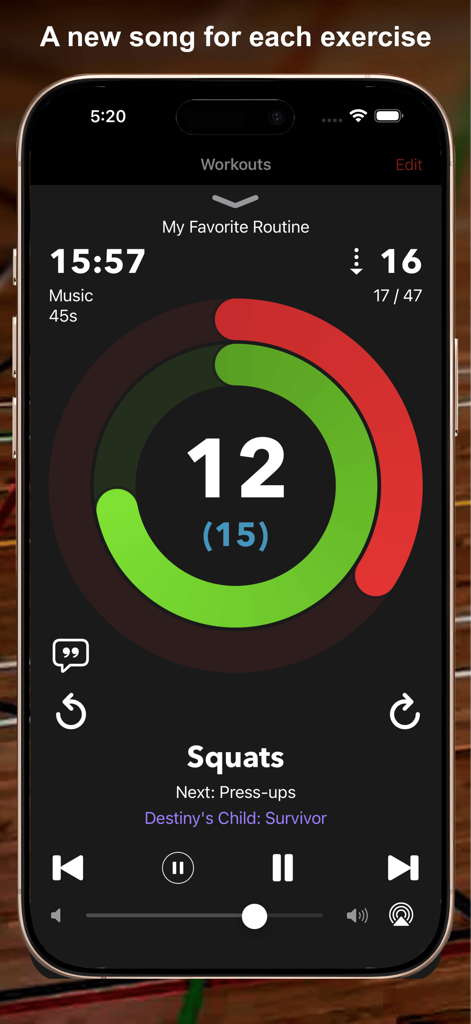
MC-Timer - MC-Timerアプリ。スクワットのカウントダウンタイマー、進捗リング、音楽統合が表示されています。
MC-Timerアプリ。スクワットのカウントダウンタイマー、進捗リング、音楽統合が表示されています。

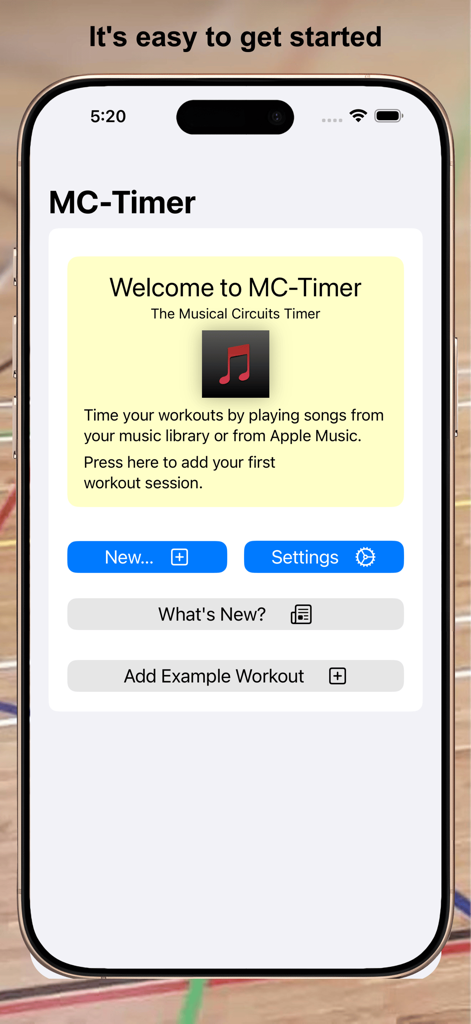
MC-Timer - iPhone上のMC-Timerアプリのウェルカムスクリーン。新しいワークアウトセッションを開始するオプションが表示されています。
iPhone上のMC-Timerアプリのウェルカムスクリーン。新しいワークアウトセッションを開始するオプションが表示されています。

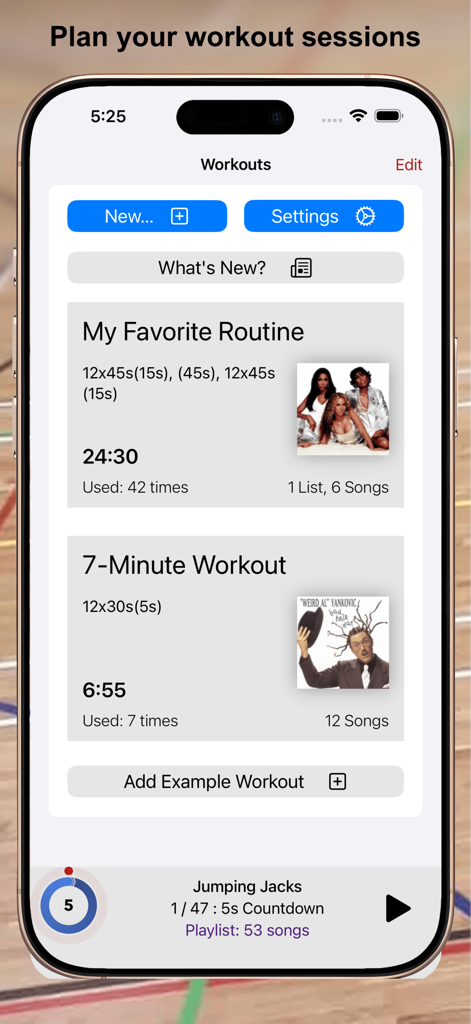
MC-Timer - モバイルアプリのインターフェース。カスタムワークアウトルーチンのリストに、音楽アルバムアートとタイミングの詳細が表示されています。
モバイルアプリのインターフェース。カスタムワークアウトルーチンのリストに、音楽アルバムアートとタイミングの詳細が表示されています。

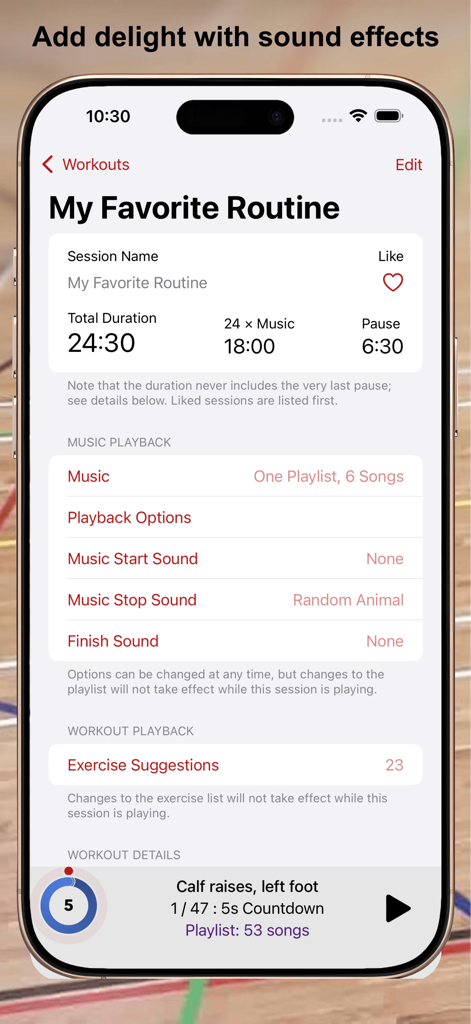
MC-Timer - MC-Timerアプリのインターフェース。音楽と効果音を使用したワークアウトルーチンのカスタマイズ用。
MC-Timerアプリのインターフェース。音楽と効果音を使用したワークアウトルーチンのカスタマイズ用。

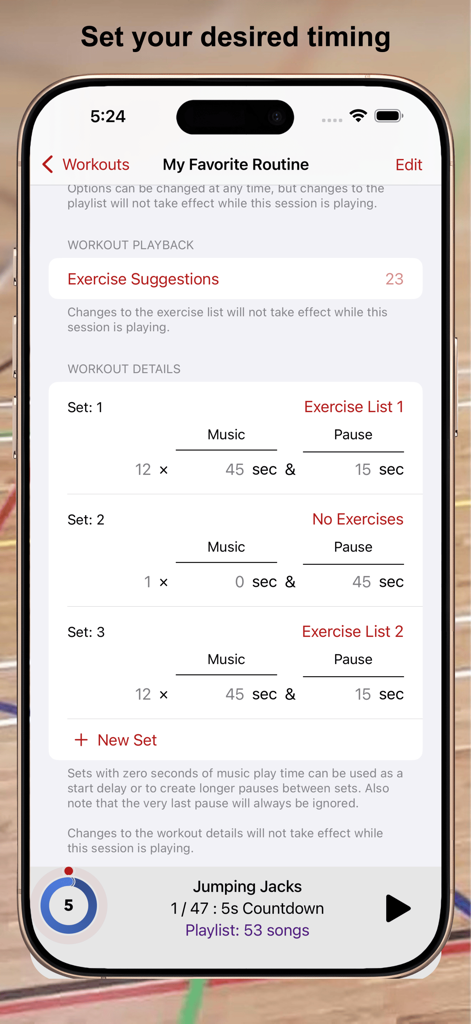
MC-Timer - MC-Timerアプリのカスタムワークアウトインターバル設定画面。異なるセットのカスタム音楽と一時停止時間が表示されています。
MC-Timerアプリのカスタムワークアウトインターバル設定画面。異なるセットのカスタム音楽と一時停止時間が表示されています。

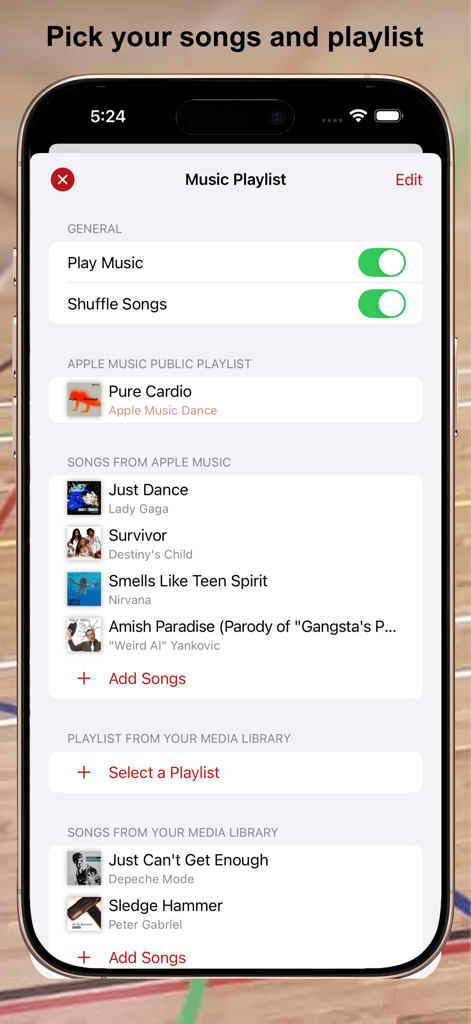
MC-Timer - MC-Timerアプリの音楽プレイリスト設定画面。選択された曲とシャッフルオプションが表示されています。
MC-Timerアプリの音楽プレイリスト設定画面。選択された曲とシャッフルオプションが表示されています。

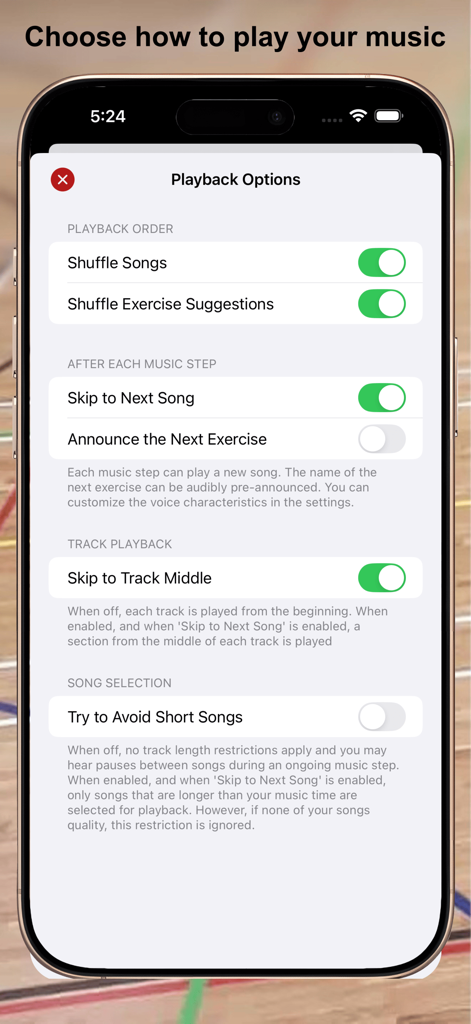
MC-Timer - MC-Timerアプリの再生オプションメニュー。iPhone上の音楽シャッフルとトラック再生設定が表示されています。
MC-Timerアプリの再生オプションメニュー。iPhone上の音楽シャッフルとトラック再生設定が表示されています。

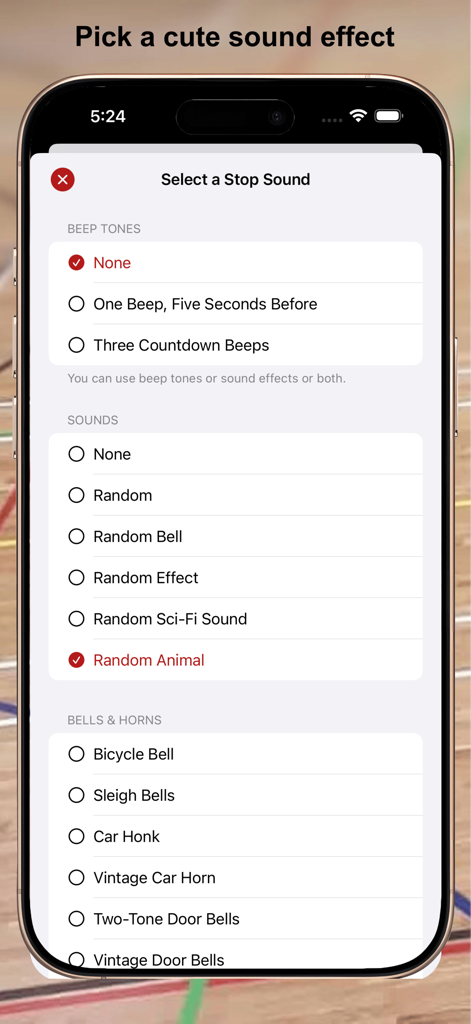
MC-Timer - MC-Timerアプリのワークアウトインターバル効果音選択画面。

MC-Timerアプリのワークアウトインターバル効果音選択画面。

MC-Timer - MC-Timerアプリのインターフェースのスクリーンショット。iPhone上のカスタマイズ可能なエクササイズリストと再生設定が表示されています。

MC-Timerアプリのインターフェースのスクリーンショット。iPhone上のカスタマイズ可能なエクササイズリストと再生設定が表示されています。

説明

MC-Timer plays music for timed intervals. You can use this app to have some fun during workout sessions like Tabata, intervals, HIIT, or circuit training, where you have multiple, timed sets of exercise and rest phases. For more complex routines, the names of your exercises can be shown and randomized, optionally also audibly announced. MC-Timer will guide you through your planned workout by playing music during the high-effort exercise phases and by being quiet during the pauses. No need to constantly look at your watch. Just listen to the music. Your music. When the work phases are shorter than the typical duration of a song, then you can nicely play a new song for each set. Let yourself be surprised and allow MC-Timer to play a randomly chosen song for each set. And if you do not want to listen to mellow song intros, you can set MC-Timer to play a suitably long section from the "heart" of the song. While the workout is playing, you can see your progress within each set and within the entire session by looking at the progress rings and the countdown timers. The progress rings are distinct and remain legible even from the other side of the room. To make this possible, the display will stay on while MC-Timer is playing your session. MC-Timer synchronizes the workout definitions across your devices. If you like to use a bigger screen, play the workouts using MC-Timer on iPad or Apple TV. The workout details are fully customizable. You can, but you don't have to: - define any number of repeated sets of "music" and "pause" phases; - insert special sets without music to create longer pauses; - define one or more lists of exercise names to be shown or announced; - choose all the songs that will be played; - use the playlist or exercise lists as is or randomized; - select whether you want to skip to the next song for each set; - play tracks from the beginning or from the middle. Alerts!!! - optionally, use countdown beeps or just a single warning beep; - pick a fun alert sound to play at the start or end of each music phase, or at the end of the session; - select from 62 custom sounds: bells, horns, special effects, Science Fiction and cute animals; A few geeky details: - Each set consists of a "music" phase and a "pause" phase, optionally repeated multiple times. - Music and pause times are entered in seconds. - The start delay (or the default 5-second countdown) is not counted for the workout duration. - A complete session always ends at its last music phase, i.e. the very last pause is skipped. - When you have multiple exercise lists, you can assign which list to use for which set. - You can define exercise pairs like "lunges, left/right" which can be split into "lunges, left" followed by "lunges, right". - You can enable or randomize lead phrases like "Next up: " for the voice announcements or define your own. - MC-Timer accurately times your workout; unlike other apps, there are no timing errors that accumulate as the session progresses. - The counters/timers in the playback view can be tapped to toggle between counting up or down. - The shuffle mode randomises the order in which the songs are played. That is to say: songs will not be repeated until all songs in the playlist have been played. - You can override the default system-wide appearance and always use the app in its dark or light appearance. Medical Advice Please consult with a physician prior to engaging in a new exercise program; even more so if this is not something that you are used to. MC-Timer on the Apple TV You can easily playback your workout sessions directly on Apple TV by using the MC-Timer companion app for Apple TV. However, you cannot edit the sessions there; you need to do that on your iPhone or iPad and sync your changes via iCloud. Also note that since your (iTunes) media library is not available on Apple TV, you will need an Apple Music subscription in order to play music on Apple TV.

Download

ダウンロード: App Store

このページはアプリまたはその開発者の公式ページではなく、情報提供および論評を目的として作成された独立した編集出版物です。明示的に別段の記載がない限り、アプリおよびその開発者は、MWM、Apple、Google Play、アプリのパブリッシャー、またはアプリの開発者と提携、承認、後援、認可、またはその他の公式的な関係はなく、このページのいかなる内容も、アプリがMWMのサービスを使用して開発されたことを意味するものではありません。すべての商標、ロゴ、スクリーンショット、その他のコンテンツはそれぞれの所有者の財産です。