
このページはアプリまたはその開発者の公式ページではなく、情報提供および論評を目的として作成された独立した編集出版物です。明示的に別段の記載がない限り、アプリおよびその開発者は、MWM、Apple、Google Play、アプリのパブリッシャー、またはアプリの開発者と提携、承認、後援、認可、またはその他の公式的な関係はなく、このページのいかなる内容も、アプリがMWMのサービスを使用して開発されたことを意味するものではありません。すべての商標、ロゴ、スクリーンショット、その他のコンテンツはそれぞれの所有者の財産です。

Microsoft SharePoint
AIがあなたの業務文脈を深く理解し、必要な情報を先回りして提示。移動中も、組織の全知識があなたの掌にある。
ダウンロード
12.5M+ユーザー評価
評価数
426.2K開発元
カテゴリ
Productivity対応言語
31最新バージョン
5.0.0サイズ
76.0 MBリリース日
2016年6月20日Microsoft SharePoint モバイルアプリ分析
移動中およびリモート環境での生産性を最大化する主要機能
AIによるパーソナライズされた生産性
AIがユーザーの業務内容、働き方、同僚との関連性を学習し、モバイルアプリ体験全体を最適化することで、移動中でも集中力と生産性を維持します。
外出先からの情報発信
移動中でもニュース投稿を作成し、更新情報、レポート、ステータス、経験をチームと共有することで、情報伝達を効率化します。
パーソナライズされたコンテンツ発見
組織内外のファイル、ニュース、サイト、人物を個別に最適化された形で発見し、効率的な情報収集を支援します。
効率的なコンテンツ検索
重要なコンテンツを迅速に検索・発見し、必要な情報へのアクセスを効率化します。
チームおよびコミュニケーションサイト連携
チームサイト、コミュニケーションサイト、ニュース投稿のパーソナライズされたビューにアクセスでき、関連性の高い情報を効率的に把握します。
直前の作業への迅速な復帰
サイト、ファイル、人物などを簡単に閲覧し、以前作業していた内容に速やかに戻ることが可能です。
同僚の連絡先と業務状況確認
ユーザーをタップするだけで連絡先カードを表示し、その人物が誰と協力し、どのような業務に取り組んでいるかを確認できます。
ハイブリッド環境対応
クラウドまたはオンプレミス環境にあるSharePointサイトにサインインでき、SharePoint OnlineおよびSharePoint Server 2013以降のバージョンに対応しています。
よくある質問
について知っておくべきこと Microsoft SharePoint
What is the Microsoft SharePoint mobile app?
The Microsoft SharePoint mobile app personalizes finding files, news, sites, and people across your organization. It uses AI to keep you productive by understanding your work and colleagues' connections.
Can I search for content within the Microsoft SharePoint app?
Yes, the Microsoft SharePoint app includes a search function to find and discover important content. You can search across sites, files, people, and news.
Does the Microsoft SharePoint app support on-premises servers?
Yes, the Microsoft SharePoint app works with both SharePoint Online (cloud) and on-premises SharePoint Server versions 2013 and higher. Users sign in to their respective SharePoint sites.
Can I create news posts using the Microsoft SharePoint app?
Yes, you can create news posts on the go using the Microsoft SharePoint app. This allows you to share updates, reports, status, and experiences with your team.
What are the requirements to sign in to the Microsoft SharePoint app?
To sign in to the Microsoft SharePoint app, your organization requires an Office 365 subscription that includes SharePoint Online or an on-premises SharePoint Server.
Can I manage multiple SharePoint accounts in the app?
Yes, the Microsoft SharePoint app allows you to add multiple accounts and easily switch between them. This feature supports various organizational needs.
How does the Microsoft SharePoint app personalize content?
The Microsoft SharePoint app infuses AI into the mobile experience. It builds an understanding of your work, how you work, and how colleagues' work relates to you to personalize content.
Can I view my recent and saved content in the Microsoft SharePoint app?
Yes, the Microsoft SharePoint app provides a personalized view of your content. You can access sections for "Recent" and "Saved" items within the app.
Does the Microsoft SharePoint app allow me to view colleagues' contact information?
Yes, you can tap on a user within the Microsoft SharePoint app to access their contact card. This also shows who they work with and what they are working on.
Is data processed outside the United States by the Microsoft SharePoint app?
Yes, data provided through the use of the Microsoft SharePoint app may be accessible to Microsoft and transferred, stored, and processed in the United States or any other country where Microsoft or its affiliates maintain facilities.
以下のスクリーンショットと説明は、アプリの公式ストアリスティングから直接取得されたものであり、アプリ開発者の所有物です。
アプリストア
スクリーンショット
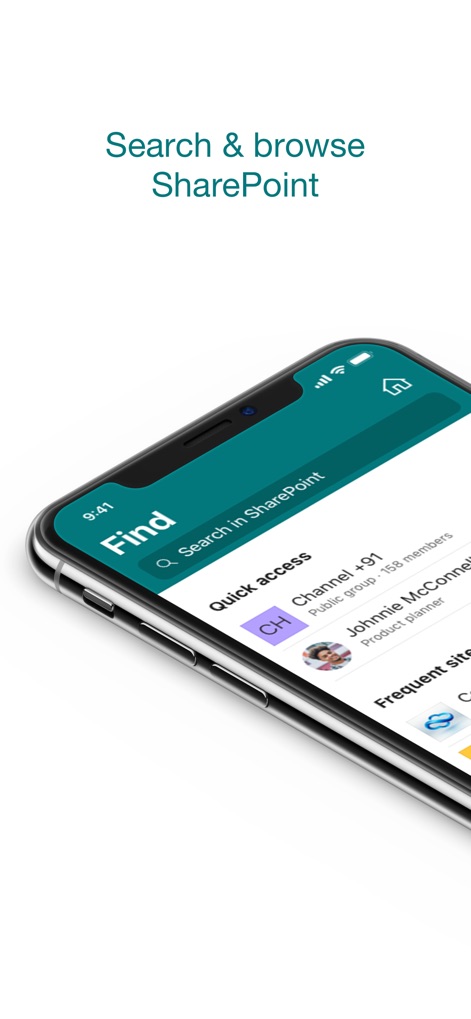
SharePointを検索
この画面では、統合された検索バーとクイックアクセスセクションを通じて、SharePoint内の情報にすばやく到達できます。ユーザーは関連性の高い「クイックアクセス」や「よく使うサイト」から、頻繁に利用するコンテンツを効率的に見つけられます。
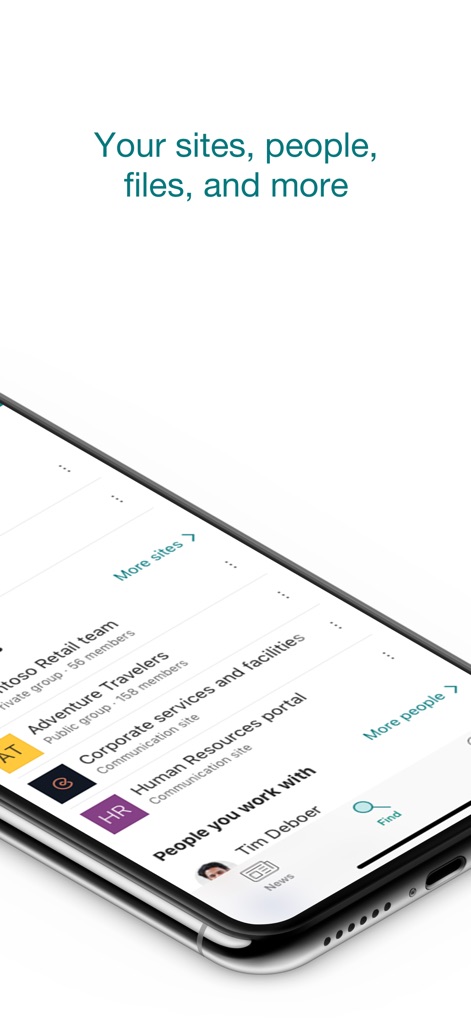
サイトと人々を発見
この画面は、個人のサイト、チームサイト、および同僚の一覧をまとめて表示し、アクセスを簡素化します。ユーザーは「もっと見る」オプションからより多くのサイトを探索したり、「一緒に仕事をする人々」のリストから同僚を見つけることができます。
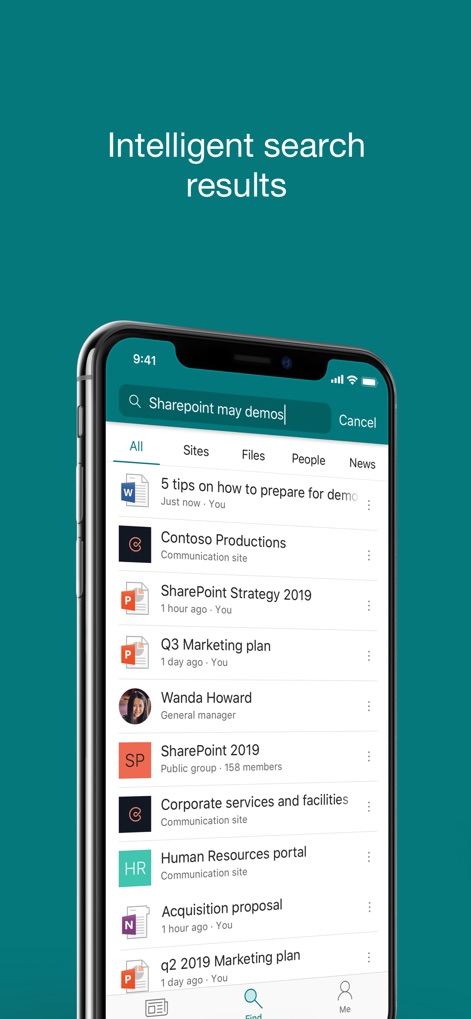
インテリジェントな検索結果
この画面は、入力されたクエリに基づいて関連性の高い検索結果を動的に表示します。ユーザーは結果を「すべてのコンテンツ」や「ファイル」などのカテゴリで絞り込み、特定の情報源に素早くアクセスできます。
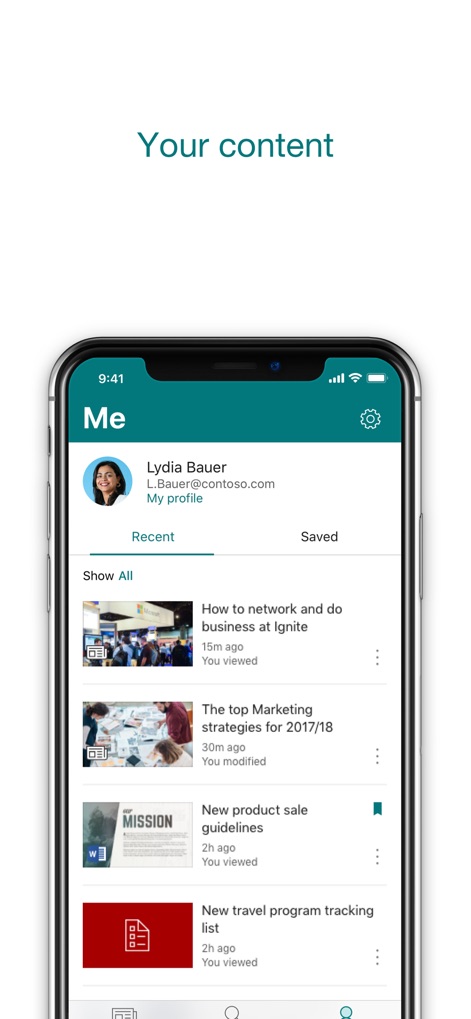
個人のコンテンツ管理
この画面は、ユーザー自身のプロフィール情報と最近の活動を一覧表示し、パーソナライズされた情報アクセスを提供します。ユーザーは「最近の項目」や「保存済み」のコンテンツを簡単に確認し、自身の作業に再開できます。
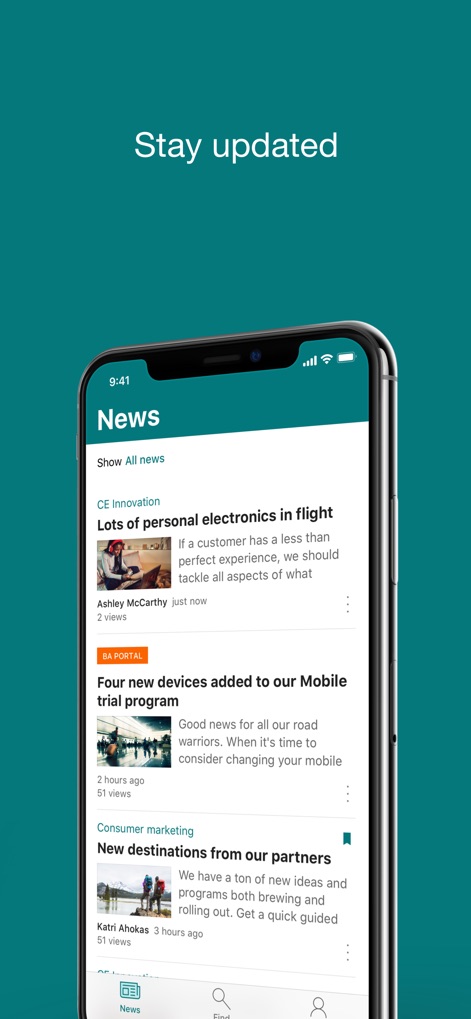
最新情報にアクセス
この画面では、組織全体の最新ニュース投稿や重要な更新情報が一目で確認できます。ユーザーは魅力的な「画像プレビュー」付きの「ニュース記事」を閲覧し、常に最新の情報を得られます。
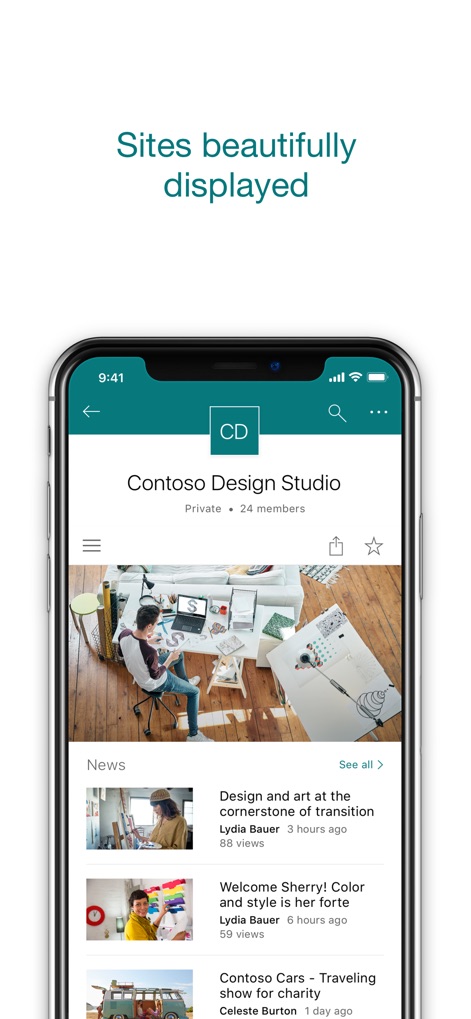
美しく表示されるサイト
この画面は、個々のSharePointサイトを視覚的に魅力的なレイアウトで提示し、そのサイト内のニュースやコンテンツを分かりやすく表示します。ユーザーはサイトの「ヘッダー画像」でブランディングを感じ、「ニュースフィード」で最新の更新情報を追うことができます。
説明
Download
類似アプリ
似た機能とユーザー体験を持つアプリ

MEGA
Mega Limited

Box: The power of Content + AI
Box, Inc.
Zoho WorkDrive
Zoho Corporation

阿里邮箱
Alibaba Cloud Computing Ltd.

Dropbox EMM
Dropbox, Inc.

Syncer
ARCTERA AM, LLC

SeaTalk
SEATALK PRIVATE LIMITED

Signet
SIGNET TECHNOLOGY PLATFORM COMPANY LIMITED

WPS会议
Zhuhai Kingsoft Office Software Co.,Ltd
このページはアプリまたはその開発者の公式ページではなく、情報提供および論評を目的として作成された独立した編集出版物です。明示的に別段の記載がない限り、アプリおよびその開発者は、MWM、Apple、Google Play、アプリのパブリッシャー、またはアプリの開発者と提携、承認、後援、認可、またはその他の公式的な関係はなく、このページのいかなる内容も、アプリがMWMのサービスを使用して開発されたことを意味するものではありません。すべての商標、ロゴ、スクリーンショット、その他のコンテンツはそれぞれの所有者の財産です。