
このページはアプリまたはその開発者の公式ページではなく、情報提供および論評を目的として作成された独立した編集出版物です。明示的に別段の記載がない限り、アプリおよびその開発者は、MWM、Apple、Google Play、アプリのパブリッシャー、またはアプリの開発者と提携、承認、後援、認可、またはその他の公式的な関係はなく、このページのいかなる内容も、アプリがMWMのサービスを使用して開発されたことを意味するものではありません。すべての商標、ロゴ、スクリーンショット、その他のコンテンツはそれぞれの所有者の財産です。


ダウンロード
5M+ユーザー評価
評価数
40.0K開発元
カテゴリ
Productivity対応言語
3最新バージョン
10.0.7サイズ
29.0 MBリリース日
2015年10月5日生産性向上を志向するユーザーのための直感的思考整理ツール
MindLine Mind Map: 主要機能の評価
クラウド同期とデータ保護
本アプリはクラウドサービスを介してファイルを自動的にバックアップし、異なるデバイス間での迅速な同期を可能にすることで、ユーザーのデータを安全に保ち、どこからでもアクセスできるようにします。
迅速かつ直感的なマインドマップ作成
ユーザーは、シンプルで分かりやすいデザインにより、思考やアイデアを素早く視覚的なマインドマップとして整理・構築できます。
アイデアの視覚的体系化
このツールは、複雑な情報や複数の概念を、論理的な構造を持つマインドマップ上で体系的に整理し、全体像の把握を容易にします。
効率的なブレインストーミング支援
アプリは、ユーザーが自由にアイデアを発想し、それらを即座に視覚化されたマインドマップに統合することで、創造的思考プロセスを最大限に引き出します。
タスクとプロジェクトの管理
ユーザーは、プロジェクトのタスクを効果的に計画、配置、追跡することができ、生産性向上に貢献する視覚的な管理機能を利用できます。
思考の記録とメモ機能
このアプリは、会議の議事録、学習ノート、個人的なアイデアなど、多様な情報を構造化された形式で記録・保存する機能を提供します。
よくある質問
について知っておくべきこと MindLine Mind Map
What is MindLine Mind Map used for?
MindLine Mind Map is a tool for building mind maps quickly. It helps users make notes, organize ideas, arrange tasks, and brainstorm effectively.
Does MindLine Mind Map offer cloud synchronization?
Yes, MindLine Mind Map supports cloud services for file backup and synchronization. This ensures data safety and quick access across different devices.
Can I create new mind maps using templates in MindLine Mind Map?
Yes, MindLine Mind Map allows users to select a template to start when creating a new mind map. Various pre-designed structures are available.
What are the editing features for mind map elements in MindLine?
MindLine offers editing features such as adding images, URLs, formulas, and audio to nodes. Users can also customize branch colors, text fonts, and overall layout.
How does MindLine Mind Map ensure the safety of user data?
MindLine Mind Map ensures data safety by providing a cloud service for backup and synchronization of user files. This makes data quickly available on different devices.
How do I contact technical support for MindLine Mind Map?
To contact support for MindLine Mind Map, users can send an email to mindline@126.com. This email addresses questions and suggestions directly.
Is there an auto-sync option in MindLine Mind Map?
Yes, MindLine Mind Map includes an auto-sync option. Enabling it automatically synchronizes files to the cloud after saving and downloads newer versions.
Can users change the style of their mind maps in MindLine?
Yes, users can change the style of their mind maps in MindLine. Options include customizing branch color, background color, text font, and compact layout settings.
What types of files can MindLine Mind Map manage?
MindLine Mind Map allows users to manage various files, including individual mind maps and organized folders. The app provides a dedicated file management interface.
Does MindLine Mind Map offer a dark or night display mode?
Yes, MindLine Mind Map offers an "Enable Night Display Mode" option in its settings. Users can configure this feature for their viewing preference.
以下のスクリーンショットと説明は、アプリの公式ストアリスティングから直接取得されたものであり、アプリ開発者の所有物です。
アプリストア
スクリーンショット

ユーザーは「Travel」を中央に据えたカラフルなマインドマップの作成と、キーボード上の豊富なテキスト編集オプション(例:太字、下線)を活用して、アイデアを視覚的に整理できます。
直感的マインドマップ作成
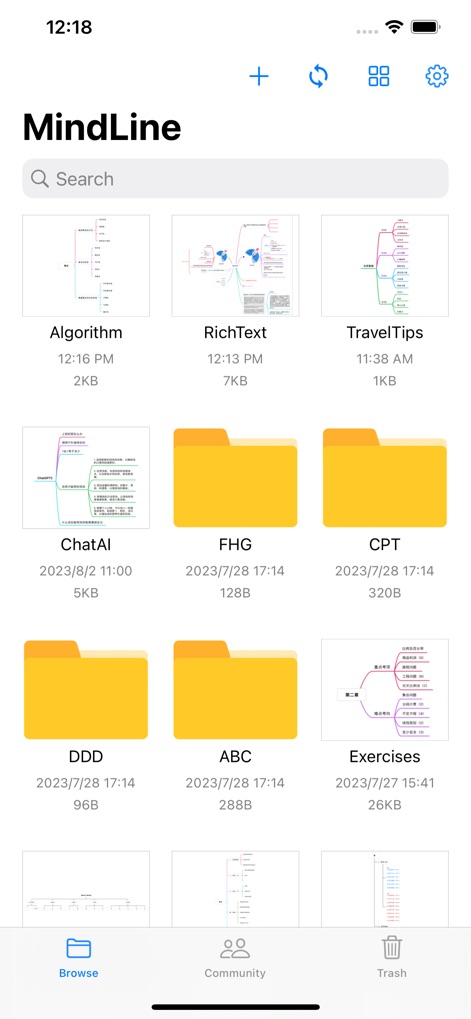
本アプリは、作成したマインドマップファイルをサムネイルプレビューで一覧表示し、フォルダ機能を用いて効率的なファイル整理を可能にします。
ファイルを一目で管理

ユーザーは多様なレイアウトのテンプレートギャラリーから最適なものを選択し、中央配置型やツリー型など、目的に応じたマインドマップを簡単に開始できます。
豊富なテンプレート

本ツールは、提案、移動、コピーなどの包括的な編集ツールバーと、ブランチの色やテキストフォントの変更が可能な詳細なスタイル設定を提供し、マインドマップを細部まで調整できます。
高度なカスタマイズ

ユーザーは視覚的に表現されたクラウド同期機能を通じて、複数のデバイス間でファイルを安全に同期でき、自動同期オプションにより常に最新のデータを利用可能です。
安全なクラウド同期
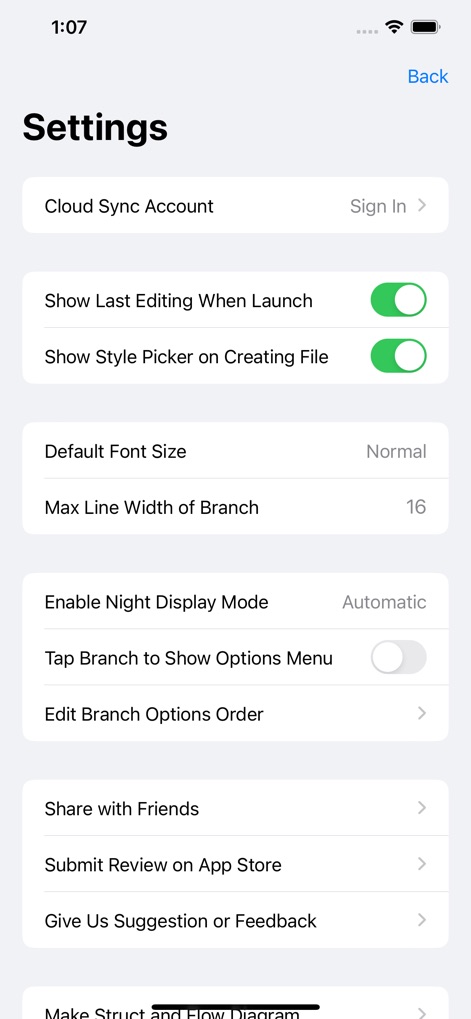
本アプリは、起動時の最終編集表示やスタイルピッカーの表示設定など、ユーザーインターフェースの動作に関する詳細な設定を提供し、ナイト表示モードやフォントサイズの調整により個人の好みに合わせて最適化できます。
詳細設定で最適化
説明
Download
類似アプリ
似た機能とユーザー体験を持つアプリ

Penned: Private Notes
Edwing H Santos Mena

Post-it®
3M Company
MindNode: Mind Map & Outline
IdeasOnCanvas GmbH

MindSpace - Mind Map
佳文 潘

SimpleMind Pro - Mind Mapping
xpt Software & Consulting B.V.

Ayoa MindMaps for Kids
OpenGenius Limited

Mind Map Maker - Mindomo
Expert Software Applications Srl

TouchMind-handwritten mind map
红霞 鲁

Inkflow Plus Visual Notebook
Qrayon, LLC
このページはアプリまたはその開発者の公式ページではなく、情報提供および論評を目的として作成された独立した編集出版物です。明示的に別段の記載がない限り、アプリおよびその開発者は、MWM、Apple、Google Play、アプリのパブリッシャー、またはアプリの開発者と提携、承認、後援、認可、またはその他の公式的な関係はなく、このページのいかなる内容も、アプリがMWMのサービスを使用して開発されたことを意味するものではありません。すべての商標、ロゴ、スクリーンショット、その他のコンテンツはそれぞれの所有者の財産です。