Moves by Maxon
Moves by Maxon
ダウンロード: App Store

このページはアプリまたはその開発者の公式ページではなく、情報提供および論評を目的として作成された独立した編集出版物です。明示的に別段の記載がない限り、アプリおよびその開発者は、MWM、Apple、Google Play、アプリのパブリッシャー、またはアプリの開発者と提携、承認、後援、認可、またはその他の公式的な関係はなく、このページのいかなる内容も、アプリがMWMのサービスを使用して開発されたことを意味するものではありません。すべての商標、ロゴ、スクリーンショット、その他のコンテンツはそれぞれの所有者の財産です。


ロゴ: Moves by Maxon
ダウンロード: App Store

Moves by Maxon

物理世界とデジタルの世界のギャップを埋める。iPhoneやiPadから直接、表情、全身の動き、高精細な3Dスキャンをキャプチャし、Cinema 4Dにシームレスに統合します。

主要数値

ダウンロード

84K+

ユーザー評価

2.8/5

評価数

100

開発元

Maxon Computer GmbH

カテゴリ

Graphics & Design

対応言語

1

最新バージョン

2026.0.0

サイズ

25.5 MB

リリース日

2020年2月28日
機能

ポケットに入るプログレードキャプチャ

高価なスタジオや数時間の手動キーフレーム入力をスキップ。MaxonのMovesは、顔、体、オブジェクトのキャプチャをCinema 4Dワークフローに直接もたらします。

高忠実度フェイスMoCap

TrueDepthカメラを使用して、マイクロエクスプレッションと感情をプロフェッショナルな精度で3Dキャラクターにマッピングします。

AI搭載ボディトラッキング

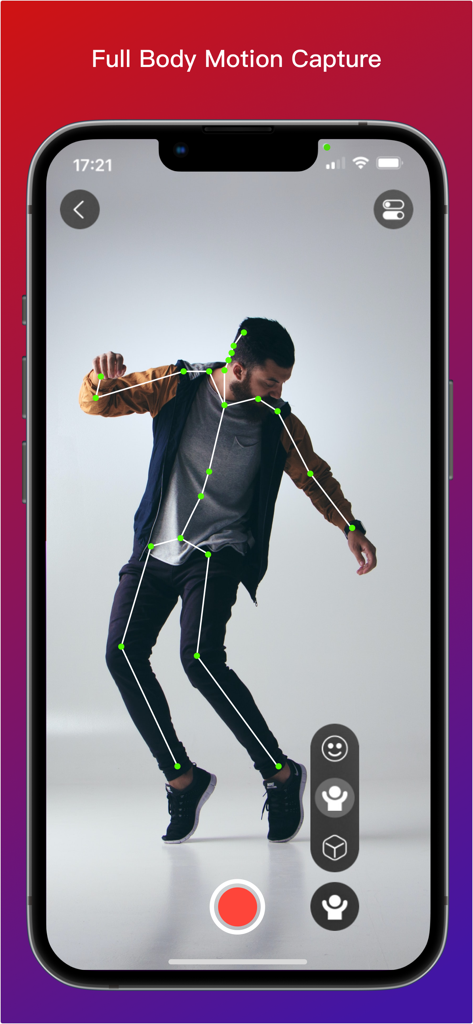
スーツなしで全身のパフォーマンスを記録。ARKitを活用して、リグされたアニメーションスケルトンを即座に生成します。

以下のスクリーンショットと説明は、アプリの公式ストアリスティングから直接取得されたものであり、アプリ開発者の所有物です。

アプリストア

スクリーンショット
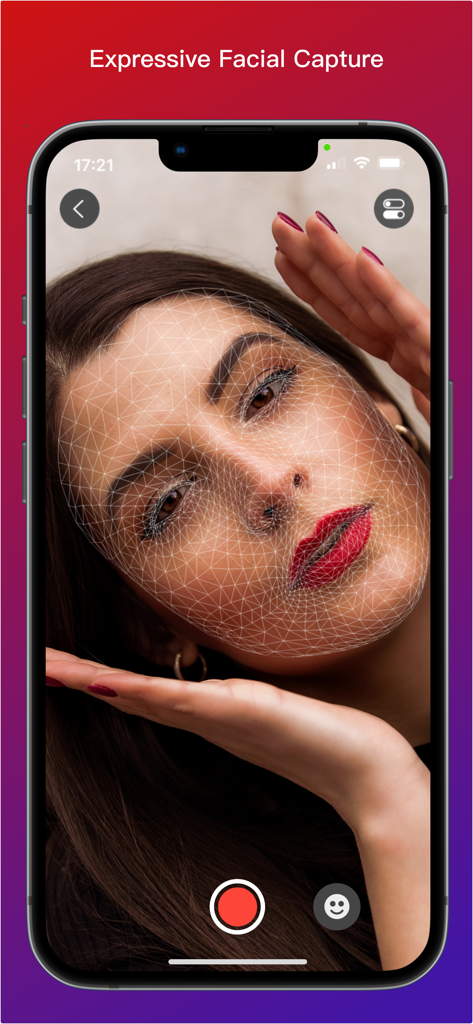
Moves by Maxon - MaxonのMovesアプリのインターフェイス。女性の顔にオーバーレイされた3Dワイヤーフレームメッシュが表示され、表情豊かな顔のキャプチャを示しています
MaxonのMovesアプリのインターフェイス。女性の顔にオーバーレイされた3Dワイヤーフレームメッシュが表示され、表情豊かな顔のキャプチャを示しています

Moves by Maxon - iPhone画面に、人物にオーバーレイされた3Dスケルトンを持つ全身モーションキャプチャが表示されています
iPhone画面に、人物にオーバーレイされた3Dスケルトンを持つ全身モーションキャプチャが表示されています

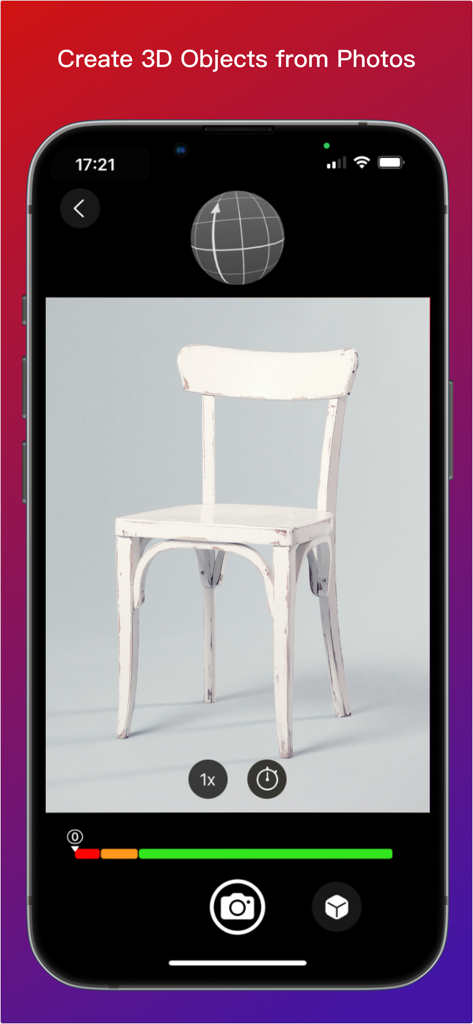
Moves by Maxon - MaxonのMovesアプリのインターフェイス。写真から椅子の3Dモデルを作成するためのフォトグラメトリを示しています

MaxonのMovesアプリのインターフェイス。写真から椅子の3Dモデルを作成するためのフォトグラメトリを示しています

説明

Moves by Maxon is available on the iOS App Store for all iPhones and iPads running iOS 15.0 and later. Get Your Moves On! -------------------- With Moves by Maxon for iPhone and iPad you can capture facial and full-body movement or scan 3D objects and then bring them into 3D space in Cinema 4D. Whether you want to bring your facial expressions, best dance moves or a model of your favorite teddy bear into the world of 3D, Moves by Maxon is the perfect app. Download it now! Object Capture ---------------- Photogrammetry based object capture couldn't be easier! Place the object you want to import in a well lit spot where it can be photographed from all angles. Start taking snapshots and the on-screen tool shows a record of where you have snapped. Moves by Maxon will let you know when there are enough images. Then connect and send the images to Cinema 4D and watch the magic happen! For best results, start practicing with simple objects such as a small stuffed toy or desktop sculpture. Note - Object Capture is only supported by Cinema 4D 2023 and later running on macOS Monterey. Facial Motion Capture ----------------------------- With Face Capture, you can capture facial expressions with iPad or iPhone. It's as easy as recording a selfie video. Start the camera and off you go. The app uses the capture data to generate a moving 3D model in real time, which you can then transfer to 3D geometry in Cinema 4D. The movements of your facial expressions are precisely detected and can be used to create impressive facial animations in Cinema 4D without any previous knowledge. Want to learn how? Check out our tutorials on www.cineversity.com. Body Motion Capture ---------------------------- You can record entire body movements as well! When videos are recorded in the Moves by Maxon app with your iPhone or iPad camera, Apple ARKit analyzes the movements in realtime and creates an animated 3D "skeleton" that is superimposed on the video. This provides a preview and the ability evaluate the recording of your moves. Once you've imported the capture data into Cinema 4D - a simple and intuitive process - you can adjust the data there and transfer it to a 3D figure to perform your very own moves. Please note: Capturing body motion is a relatively new feature of Apple's ARKit, so capturing clean full figure motion requires some preparation and finesse. Therefore, there are a few things you should consider when capturing body movements to ensure good results. Contrast Matters ---------------------- The person being captured should stand out from the background. So, choose dark clothes for light backgrounds and vice versa. Fitted clothing will produce better results than loose or baggy clothing. Extreme patterns in clothing are also not optimal. Don't Move Too Fast --------------------------- Due to the motion blur that occurs when recording fast movements, the contours can become blurred and no longer be precisely captured by the app. Pirouettes and similar fast movements should be avoided for best results. Avoid Overlapping ------------------------ Moves by Maxon may not be able to distinguish and interpret movements where arms or legs cross each other or are crossed in front of or behind the body correctly. This can cause captured movement to "fidget" for a short time. Quiet movements without repeatedly crossing the arms or legs provide more accurate recordings. Cinema 4D is required to utilize the captured movement and the Moves by Maxon connectivity comes preinstalled. If you do not have Cinema 4D, a free trial version is available at www.maxon.net.

Download

ダウンロード: App Store

このページはアプリまたはその開発者の公式ページではなく、情報提供および論評を目的として作成された独立した編集出版物です。明示的に別段の記載がない限り、アプリおよびその開発者は、MWM、Apple、Google Play、アプリのパブリッシャー、またはアプリの開発者と提携、承認、後援、認可、またはその他の公式的な関係はなく、このページのいかなる内容も、アプリがMWMのサービスを使用して開発されたことを意味するものではありません。すべての商標、ロゴ、スクリーンショット、その他のコンテンツはそれぞれの所有者の財産です。







