myAddress - Monitoring Tools
ダウンロード: App Store

このページはアプリまたはその開発者の公式ページではなく、情報提供および論評を目的として作成された独立した編集出版物です。明示的に別段の記載がない限り、アプリおよびその開発者は、MWM、Apple、Google Play、アプリのパブリッシャー、またはアプリの開発者と提携、承認、後援、認可、またはその他の公式的な関係はなく、このページのいかなる内容も、アプリがMWMのサービスを使用して開発されたことを意味するものではありません。すべての商標、ロゴ、スクリーンショット、その他のコンテンツはそれぞれの所有者の財産です。


ロゴ: myAddress - Monitoring Tools
ダウンロード: App Store

myAddress - Monitoring Tools

システムの健全性を監視し、リモートスクリーンショットでレンダリングの進捗を確認し、iCloud経由でアクションを実行します。設定不要で、外出中のプロフェッショナルに安心を提供します。

主要数値

ダウンロード

500

ユーザー評価

1.0/5

評価数

0

開発元

Benny Chan

カテゴリ

Utilities

対応言語

1

最新バージョン

2.9.4

サイズ

245.6 MB

リリース日

2013年5月3日
機能

離れていても生産性を維持

iCloudアカウントのセキュリティにより、Macのパフォーマンスを把握し、強力なリモートアクションで制御します。

設定不要のiCloud同期

複雑なVPNやファイアウォール設定は不要です。個人のiCloud経由で、あらゆるネットワークからMacのシステム統計情報とインベントリに即座にアクセスできます。

視覚的な進捗追跡

オンデマンドのスクリーンショットとFaceTimeカメラキャプチャで、長時間のビデオレンダリングやファイル転送を監視し、直接お使いの携帯電話に送信します。

以下のスクリーンショットと説明は、アプリの公式ストアリスティングから直接取得されたものであり、アプリ開発者の所有物です。

アプリストア

スクリーンショット
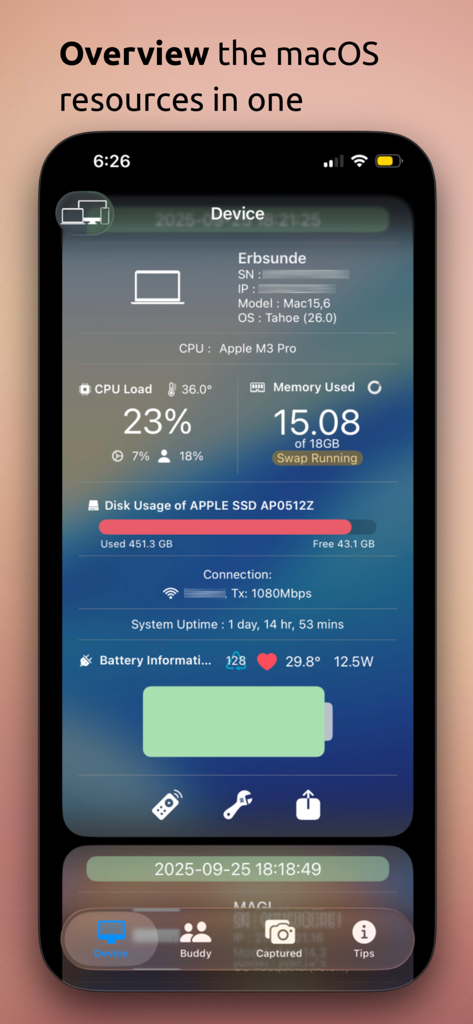
myAddress - Monitoring Tools - CPU負荷やメモリ使用量などのリモートMacシステム統計情報を表示するアプリ画面。
CPU負荷やメモリ使用量などのリモートMacシステム統計情報を表示するアプリ画面。

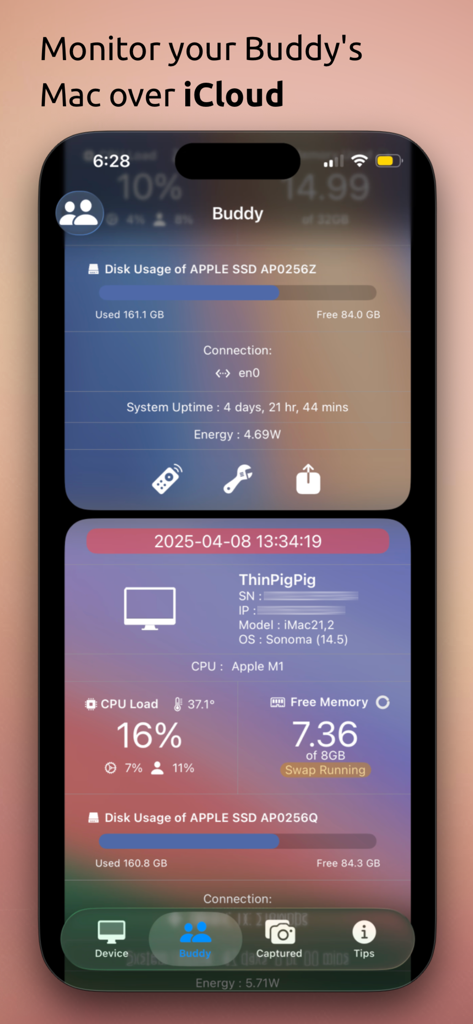
myAddress - Monitoring Tools - CPUとディスク使用率の統計情報を含む、バディ機能によるリモートMacシステム監視を表示するモバイルアプリインターフェイス。
CPUとディスク使用率の統計情報を含む、バディ機能によるリモートMacシステム監視を表示するモバイルアプリインターフェイス。

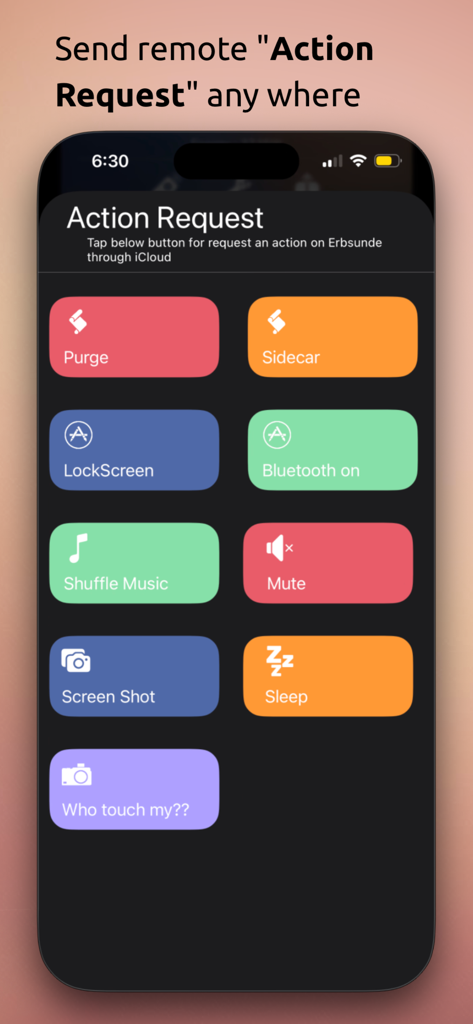
myAddress - Monitoring Tools - Mac監視用のリモートアクション要求ボタンを表示するiPhoneインターフェイス
Mac監視用のリモートアクション要求ボタンを表示するiPhoneインターフェイス

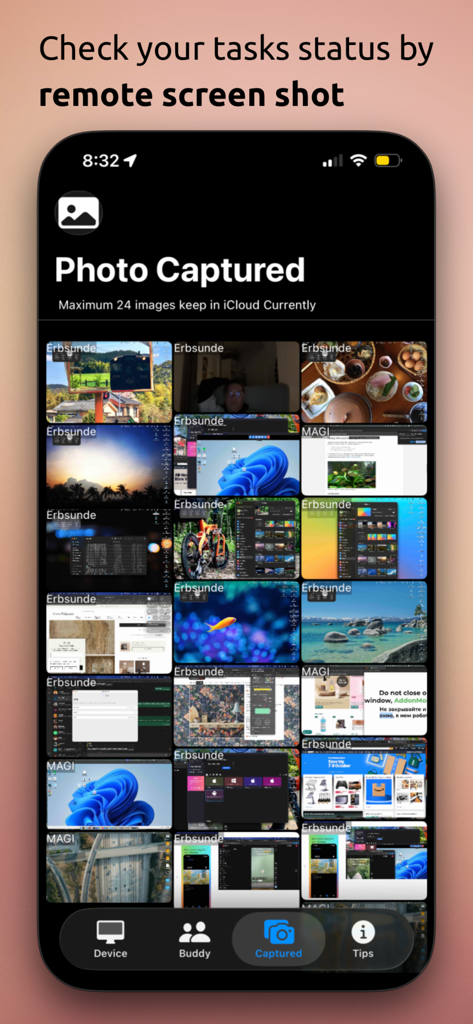
myAddress - Monitoring Tools - コンピューターのタスクステータスと画面アクティビティを監視するために使用されるmyAddressアプリ内のリモートMacスクリーンショットのグリッド
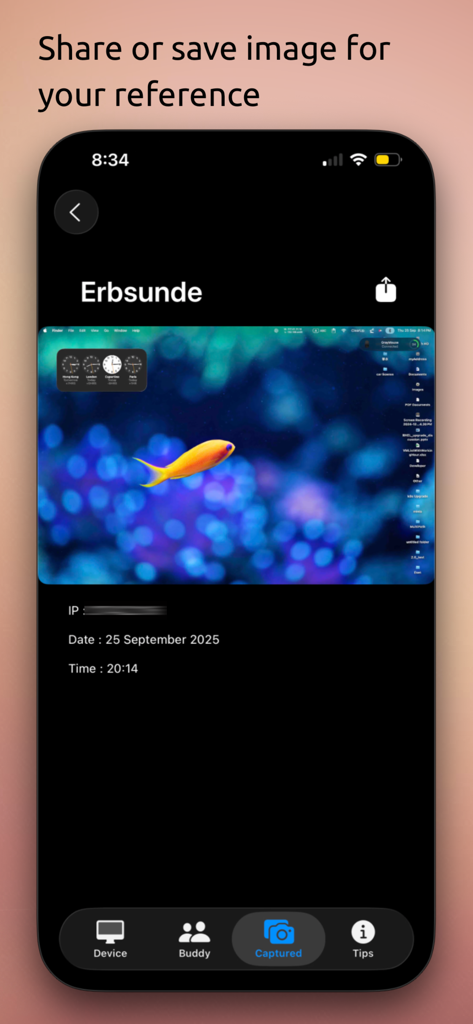
コンピューターのタスクステータスと画面アクティビティを監視するために使用されるmyAddressアプリ内のリモートMacスクリーンショットのグリッド

myAddress - Monitoring Tools - myAddress監視アプリのリモートMac画面キャプチャビュー

myAddress監視アプリのリモートMac画面キャプチャビュー

説明

'myAddress' has iOS version now! It displays overview of all your Mac(s) system informations on a single scroll view such as a personal inventory, Plus some remote features called "Action Request". Overview and "Action Request" features rely on your personal iCloud connection. It means you can take overview and execute remote action on Wi-FI/Mobile network they are connecting to internet without VPN/Firewall/Router configurations. "Photo Captured" page it shows your Mac screen shot / FaceTime camera capture remotely those requested by "Action Request" features. This is a convenient way to check the status if you doing some tasks like long time video rendering or huge amount of files copying without the person who near by your Mac. You can leave your computer and go shopping ,dinner or supper..... and check the status any where any time on your phone immediately by simple step. "Action Request" Features : - Sleep - Mute Speaker - Screen Shot - Silent photo capture by the Mac which has FaceTime camera "Buddy" - View your friend's Mac information and support "Remote Action" over different iCloud account. ( myAddress 5.0.0 Mac version required ) Requirement : • myAddress Mac version 4 or above running on Mac for full features. Otherwise, Only basic info can shows if you didn't install on Mac. !! 1 price for 2 platforms (macOS/iOS) !! Use below linking for download and understand more about macOS version "myAddress" https://apps.apple.com/us/app/myaddress-monitoring-tools/id627535992?mt=12

Download

ダウンロード: App Store

このページはアプリまたはその開発者の公式ページではなく、情報提供および論評を目的として作成された独立した編集出版物です。明示的に別段の記載がない限り、アプリおよびその開発者は、MWM、Apple、Google Play、アプリのパブリッシャー、またはアプリの開発者と提携、承認、後援、認可、またはその他の公式的な関係はなく、このページのいかなる内容も、アプリがMWMのサービスを使用して開発されたことを意味するものではありません。すべての商標、ロゴ、スクリーンショット、その他のコンテンツはそれぞれの所有者の財産です。








