
このページはアプリまたはその開発者の公式ページではなく、情報提供および論評を目的として作成された独立した編集出版物です。明示的に別段の記載がない限り、アプリおよびその開発者は、MWM、Apple、Google Play、アプリのパブリッシャー、またはアプリの開発者と提携、承認、後援、認可、またはその他の公式的な関係はなく、このページのいかなる内容も、アプリがMWMのサービスを使用して開発されたことを意味するものではありません。すべての商標、ロゴ、スクリーンショット、その他のコンテンツはそれぞれの所有者の財産です。


ダウンロード
2.5M+ユーザー評価
評価数
478.8K開発元
カテゴリ
Productivity対応言語
1最新バージョン
5.3.9サイズ
310.4 MBリリース日
2014年7月6日コネクテッドカー体験を向上させる主要機能の分析
'MyHyundai with Bluelink' アプリの技術評価
充電状況とスケジュール管理
EVおよびPHEV車両の所有者は、充電状況の確認、充電スケジュールの設定、および関連設定の管理を遠隔で行うことが可能です。
遠隔車両始動
ユーザーは、スマートフォンやスマートウォッチから車両を遠隔で始動させることができ、乗車前に車内を快適な温度に調整できます。
車両ステータスの確認
ユーザーは、車両の主要なステータス情報(ドアロック状態、燃料レベルなど)を遠隔で確認でき、車両の状態を常に把握するのに役立ちます。
ドアの遠隔ロック/アンロック
ユーザーは、離れた場所から車両のドアをロックまたはアンロックすることができ、セキュリティの確保や利便性の向上に貢献します。
関心地点(POI)の車両への送信
ユーザーは、スマートフォンで検索した関心地点(POI)を直接車両のナビゲーションシステムに送信することができ、旅行計画が効率化されます。
車両位置の特定
ユーザーは、広大な駐車場などで自分の車両の位置を迅速に特定することが可能であり、時間の節約と安心感に繋がります。
サービス予約
ユーザーは、アプリを通じて車両のサービス予約を簡単に行うことができ、メンテナンスプロセスが簡素化されます。
ホーンとライトの遠隔起動
ユーザーは、混雑した駐車場で車両を見つける際や、緊急時に注意を喚起するために、ホーンとライトを遠隔で起動させることができます。
よくある質問
について知っておくべきこと MyHyundai with Bluelink
How do I access Bluelink features in the MyHyundai app?
You access Bluelink features in the MyHyundai app using your MyHyundai.com ID, password, and PIN. An active Bluelink subscription is mandatory. You can conveniently log in with Touch ID or Face ID.
What Bluelink features are available with the MyHyundai app?
The MyHyundai app offers Bluelink features like remote vehicle start, lock/unlock, horn/lights activation, finding your car, and checking vehicle status. It also supports charging management for EV/PHEV and POI search/send with the Guidance package.
Can I remotely start my Hyundai vehicle using the MyHyundai app?
Yes, the MyHyundai app allows you to remotely start your vehicle. This feature requires an active Bluelink Remote Package subscription and a Bluelink-enabled vehicle. Screenshot #2 shows a 'Climate Start' button for this function.
Does the MyHyundai app support electric or hybrid vehicles?
Yes, the MyHyundai app supports hybrid, EV, fuel cell, and gas vehicles. For EV and PHEV vehicles, you can view charging status and manage charging schedules and settings remotely.
How do I schedule a service appointment for my Hyundai using the MyHyundai app?
Yes, you can schedule a car care service appointment directly through the MyHyundai app. Navigate to the 'Car Care' section, where you find options for 'Service Scheduling' and selecting a preferred dealer.
What vehicle information can I view in the MyHyundai app?
The MyHyundai app displays detailed vehicle status including battery charge, remaining range, door lock states, hood/trunk/window status, location, fuel range, and odometer readings. This information is accessible from the main dashboard.
Can I set alerts for my Hyundai vehicle using the MyHyundai app?
Yes, the MyHyundai app allows you to manage Bluelink Alert Settings. You can configure Speed Alerts, Valet Alerts, Curfew Alerts, and Geo-Fence Alerts to safeguard your vehicle and passengers based on custom parameters.
Does the MyHyundai app offer remote control features for Apple Watch?
Yes, the MyHyundai app supports Apple Watch. You can use voice commands or the smartwatch app menu to remotely start your vehicle, unlock/lock doors, activate the horn and lights, and find your car.
How do I find charging stations for my EV with the MyHyundai app?
The MyHyundai app allows you to quickly find nearby charging stations for your EV. You can search by zip code and send Points of Interest (POI) to your vehicle's navigation system directly from the app.
Is a Bluelink subscription required to use the MyHyundai app?
Yes, an active Bluelink subscription is required to use Bluelink features within the MyHyundai app. You can renew or upgrade your subscription packages (Remote or Guidance) via MyHyundai.com.
Can I manage multiple drivers with the MyHyundai app?
Yes, the MyHyundai app allows you to add additional drivers. As the primary Bluelink subscriber, you can invite secondary drivers to create their own unique Bluelink preferences and manage vehicle settings.
Where can I find technical assistance for the MyHyundai app?
For technical assistance concerning the MyHyundai app, you can directly contact the support team via email at AppsTeam@hmausa.com. This ensures direct communication with app specialists.
以下のスクリーンショットと説明は、アプリの公式ストアリスティングから直接取得されたものであり、アプリ開発者の所有物です。
アプリストア
スクリーンショット

このアプリは車両とのシームレスな接続を視覚的に示しており、ハンドルを握る手とメインテキストがHyundai車との一体感と操作の容易さを伝えています。
手軽な接続性
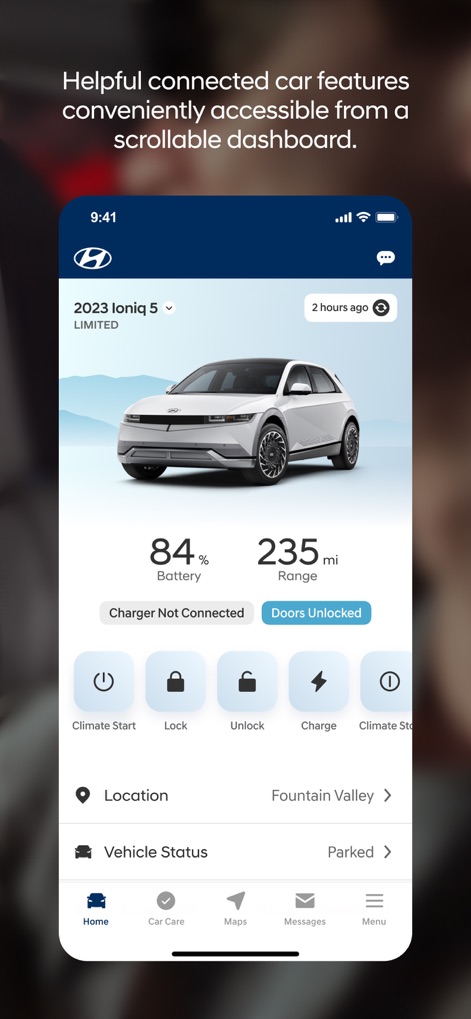
車両ダッシュボードには、84%のバッテリー残量や235マイルの走行可能距離など、Ioniq 5のリアルタイムステータスと、ロックや充電などのリモート操作ボタンが視覚的に表示されています。
車両リアルタイム情報

このスクリーンショットは、車の俯瞰図と「Doors Locked & Closed」「Windows Open」などの視覚的なステータスインジケーターを通じて、車両のあらゆる状態を詳細に把握できる機能を示しています。
詳細車両ステータス

このイメージは、ハイブリッド車、EV、燃料電池車、ガソリン車を含む幅広い車両タイプへのサポートを示唆しており、現代的な車のフロント部分と夜間のリラックスした雰囲気が特徴です。
全車種対応

この画面では、トグルスイッチで簡単にアラート設定を管理でき、特に「Speed Alert」と「Geo-Fence Alert」などの特定の安全機能により、車両の挙動を監視し安全を確保できます。
安心アラート設定

地図インターフェースには複数の充電ステーションがピンで表示されており、ユーザーは「Stevens Creek Walmart」や「Hyundai of San Jose」などの近くの施設をリストから確認し、簡単に充電場所を見つけられます。
充電ステーション検索

「Sarah Hyland」の主要ドライバープロファイルカードと「Additional Drivers」セクションは、複数のユーザーが個別のBluelink設定を管理できる柔軟なドライバー管理機能を示しています。
ドライバー管理

この画面には、「Vehicle Health」や「Service & Maintenance」などのアイコン付き車両ケアオプションのリストがあり、診断レポートの確認からサービス予約まで、車両のメンテナンスを効率的に支援します。
車両ケアセンター

地図上に表示されたディーラーの場所と、星評価や営業時間といった詳細情報を通じて、ユーザーは「Hyundai of San Jose」のような特定のディーラーを簡単に見つけ、サービス予約を行えます。
ディーラー検索
説明
Download
類似アプリ
似た機能とユーザー体験を持つアプリ

Toyota
Toyota Motor Sales, U.S.A., Inc.

myChevrolet
General Motors
My BMW
BMW NORTH AMERICA, LLC

Mercedes-Benz (USA/CA)
Mercedes-Benz USA LLC

LoJack
Spireon, Inc.
Tessie — For your Tesla
Tessie Technology LLC

Tesla
Tesla, Inc.

Ford™
Ford Motor Company
MyMazda
Mazda Motor Corporation
このページはアプリまたはその開発者の公式ページではなく、情報提供および論評を目的として作成された独立した編集出版物です。明示的に別段の記載がない限り、アプリおよびその開発者は、MWM、Apple、Google Play、アプリのパブリッシャー、またはアプリの開発者と提携、承認、後援、認可、またはその他の公式的な関係はなく、このページのいかなる内容も、アプリがMWMのサービスを使用して開発されたことを意味するものではありません。すべての商標、ロゴ、スクリーンショット、その他のコンテンツはそれぞれの所有者の財産です。