NeoServer: SSH Client|Terminal
ダウンロード: App Store

このページはアプリまたはその開発者の公式ページではなく、情報提供および論評を目的として作成された独立した編集出版物です。明示的に別段の記載がない限り、アプリおよびその開発者は、MWM、Apple、Google Play、アプリのパブリッシャー、またはアプリの開発者と提携、承認、後援、認可、またはその他の公式的な関係はなく、このページのいかなる内容も、アプリがMWMのサービスを使用して開発されたことを意味するものではありません。すべての商標、ロゴ、スクリーンショット、その他のコンテンツはそれぞれの所有者の財産です。

ロゴ: NeoServer: SSH Client|Terminal
ダウンロード: App Store

NeoServer: SSH Client|Terminal

DevOps、NASオーナー、AI研究者向けの究極のSSHクライアントとターミナル。Dockerコンテナの管理、リアルタイムGPU/CPUメトリクスのモニタリング、iCloud経由の安全な同期—すべてデータ追跡ゼロで。

主要数値

ダウンロード

60K+

ユーザー評価

4.9/5

評価数

0

開発元

Space-Time Transformation Technology Co., Ltd.

カテゴリ

Developer Tools

対応言語

5

最新バージョン

8.0.2

サイズ

60.2 MB

リリース日

2023年5月8日
機能

どこからでもインフラをマスター

モバイルでデスクトップクラスのコントロールを要求するDevOps、NAS愛好家、AI研究者向けに設計された、強力でプライバシーを最優先するSSHクライアント。

ビジュアルDocker管理

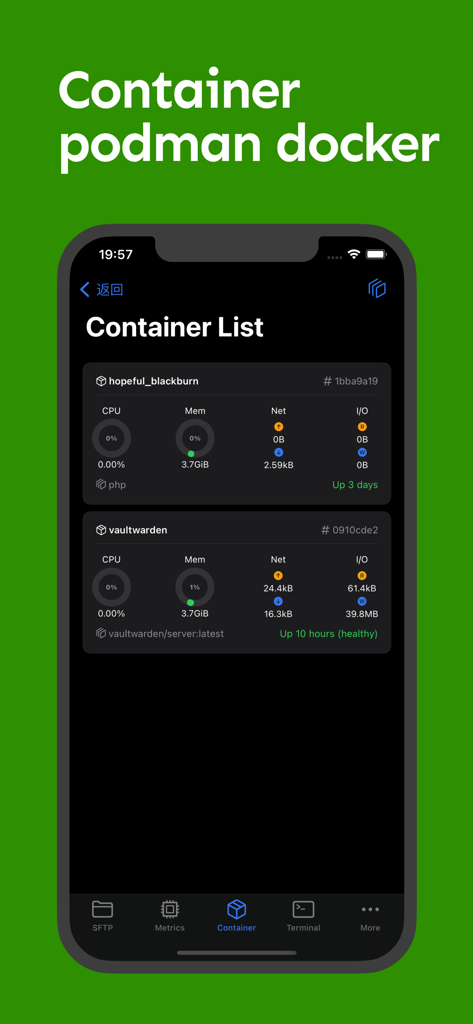
ログのモニタリングとコンテナの管理をワンタップで。コードを一行も入力せずにDockerとPodmanインスタンスを再起動、一時停止、または削除します。

リアルタイムヘルスモニタリング

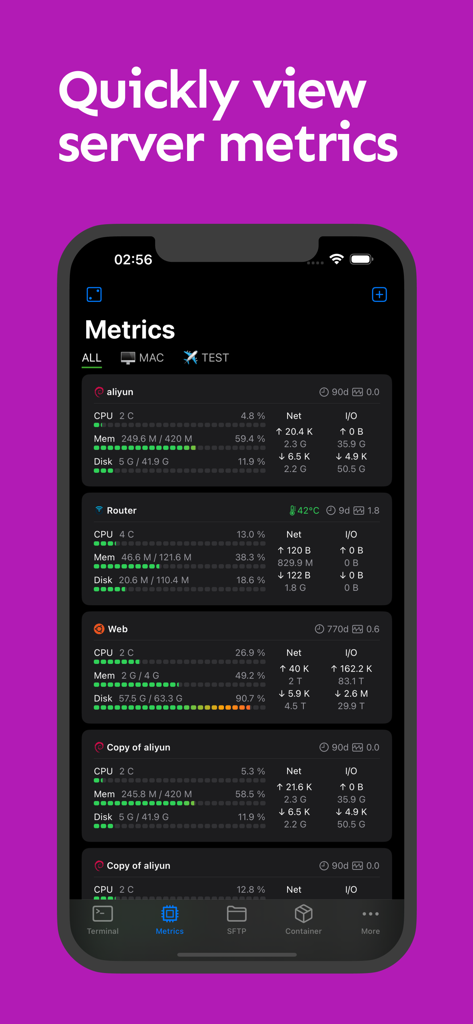
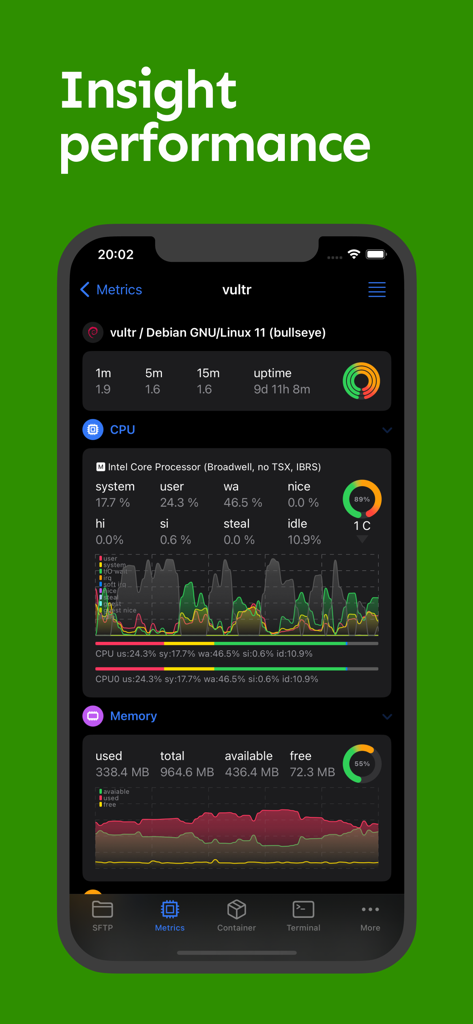
ハードウェアの視覚的な「ゴッドビュー」を取得。CPU、RAM、および専用GPUの使用率をリアルタイムで追跡—AIトレーニングとサーバー負荷のモニタリングに不可欠です。

以下のスクリーンショットと説明は、アプリの公式ストアリスティングから直接取得されたものであり、アプリ開発者の所有物です。

アプリストア

スクリーンショット

NeoServer: SSH Client|Terminal - NeoServer アプリのスクリーンショット。iPhone 上のリアルタイムサーバーメトリクス(CPU、メモリ、ディスク使用量など)を示すダッシュボードを表示。

NeoServer アプリのスクリーンショット。iPhone 上のリアルタイムサーバーメトリクス(CPU、メモリ、ディスク使用量など)を示すダッシュボードを表示。

NeoServer: SSH Client|Terminal - NeoServer アプリのダッシュボード。サーバーの CPU とメモリ使用率メトリクスを表示

NeoServer アプリのダッシュボード。サーバーの CPU とメモリ使用率メトリクスを表示

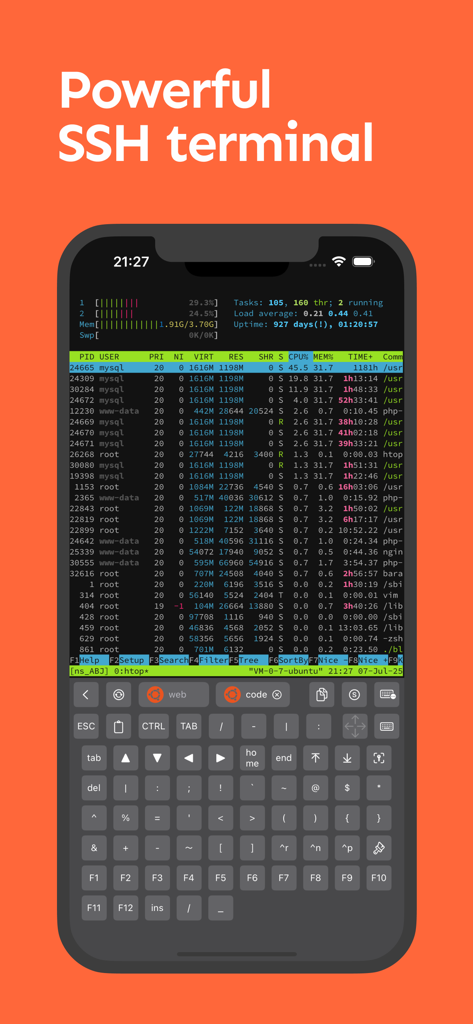
NeoServer: SSH Client|Terminal - NeoServer モバイル SSH ターミナル。サーバープロセスモニタリングと特殊な開発者用キーボードを表示。

NeoServer モバイル SSH ターミナル。サーバープロセスモニタリングと特殊な開発者用キーボードを表示。

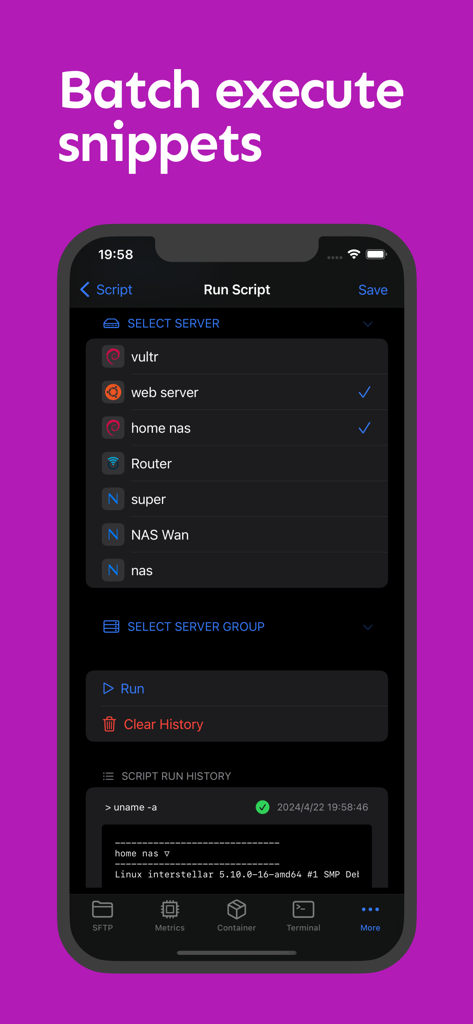
NeoServer: SSH Client|Terminal - NeoServer インターフェース。複数の選択されたサーバーでバッチスクリプトの実行を表示

NeoServer インターフェース。複数の選択されたサーバーでバッチスクリプトの実行を表示

NeoServer: SSH Client|Terminal - NeoServer モバイルアプリ。Docker および Podman コンテナのリストを表示し、CPU、メモリ、ネットワーク使用率のリアルタイムモニタリングを行う。

NeoServer モバイルアプリ。Docker および Podman コンテナのリストを表示し、CPU、メモリ、ネットワーク使用率のリアルタイムモニタリングを行う。

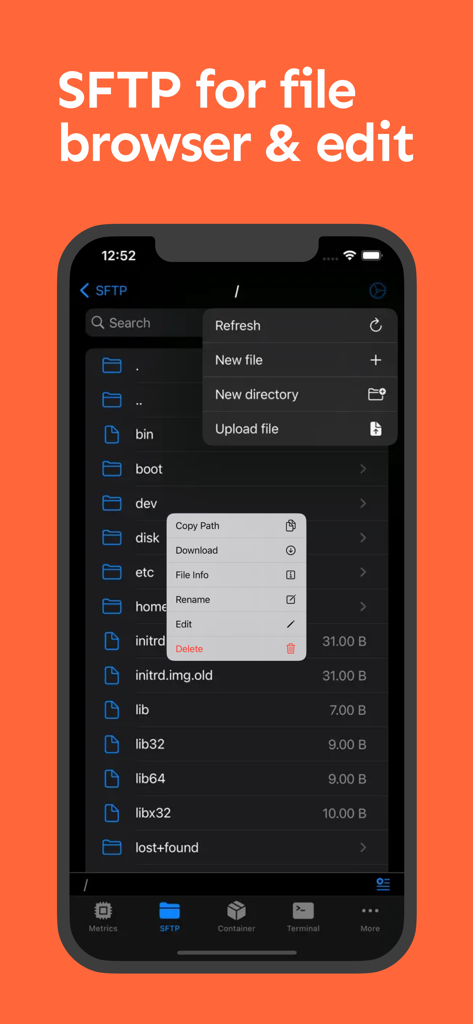
NeoServer: SSH Client|Terminal - NeoServer モバイルアプリのインターフェース。iPhone 画面上で SFTP ファイルブラウザとファイル管理オプションを表示

NeoServer モバイルアプリのインターフェース。iPhone 画面上で SFTP ファイルブラウザとファイル管理オプションを表示

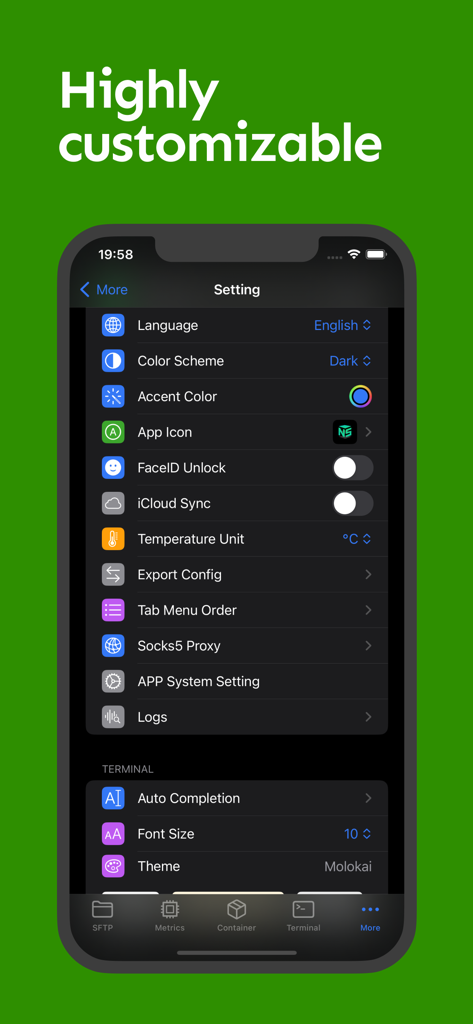
NeoServer: SSH Client|Terminal - NeoServer 設定画面。ターミナルテーマ、iCloud 同期、FaceID セキュリティのカスタマイズオプションを表示

NeoServer 設定画面。ターミナルテーマ、iCloud 同期、FaceID セキュリティのカスタマイズオプションを表示

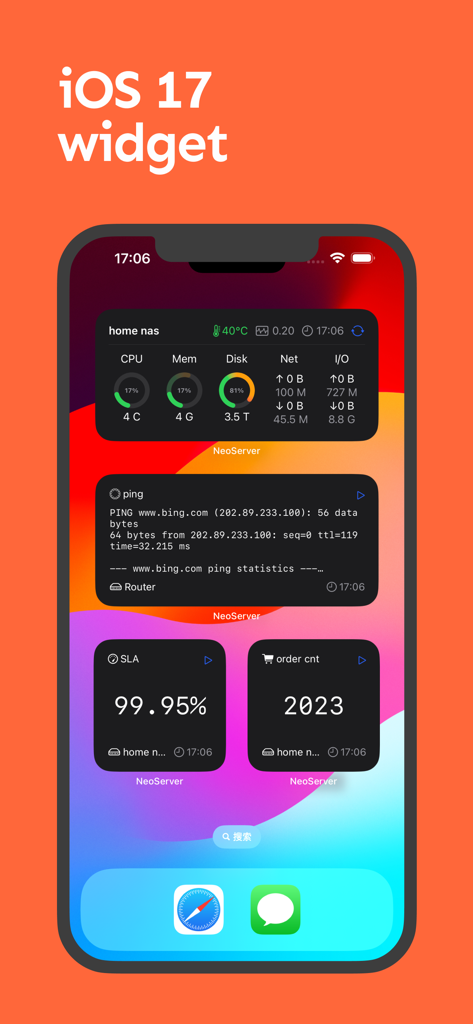
NeoServer: SSH Client|Terminal - iPhone ホーム画面。NeoServer の iOS 17 ウィジェットを表示し、サーバーパフォーマンスメトリクス、ping 統計、SLA アップタイムモニタリングを示す。

iPhone ホーム画面。NeoServer の iOS 17 ウィジェットを表示し、サーバーパフォーマンスメトリクス、ping 統計、SLA アップタイムモニタリングを示す。

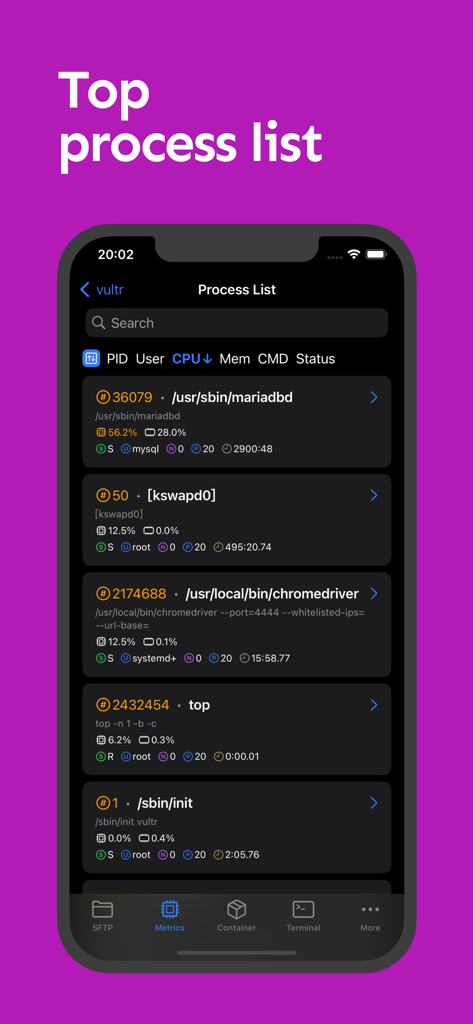
NeoServer: SSH Client|Terminal - NeoServer アプリのスクリーンショット。PID、CPU、メモリ使用率を含むアクティブなサーバープロセスの詳細リストを表示。

NeoServer アプリのスクリーンショット。PID、CPU、メモリ使用率を含むアクティブなサーバープロセスの詳細リストを表示。

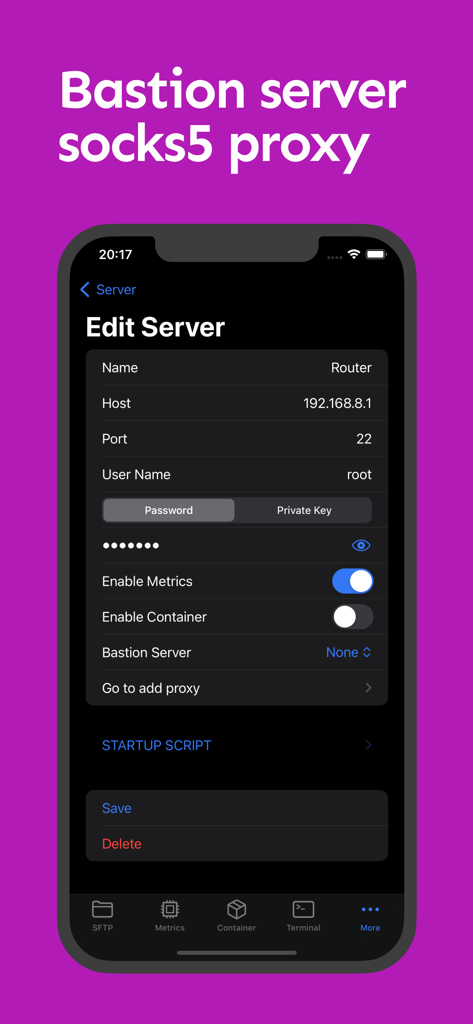
NeoServer: SSH Client|Terminal - NeoServer モバイルアプリのインターフェース。SSH サーバーの詳細設定(バステストと SOCKS5 プロキシオプションを含む)。

NeoServer モバイルアプリのインターフェース。SSH サーバーの詳細設定(バステストと SOCKS5 プロキシオプションを含む)。

説明

NeoServer offers a comprehensive management solution via SSH without additional software installation for your servers, NAS (Network Attached Storage), and Linux-based routers across iPhone, iPad, and Mac platforms. It supports terminal remote connections, multi-server script execution, container management, SFTP file management, and common performance data display. ◉ Free Features: ◦ Supports SFTP browsing of server files, allowing editing (with syntax highlighting for common languages), renaming, deletion, viewing file size and permissions, uploading and downloading files, etc. ◦ Supports running scripts and viewing historical records. It also allows batch execution on server groups or multiple servers. ◦ Displays server parameters and monitoring status, including CPU, memory, disk, and network metrics, with widgets for visualization. ◦ Uptime, system load over 1/5/15 minutes. ◦ CPU temperature, CPU model, CPU usage rate. ◦ GPU Usage & Task on the GPU ◦ Disk, IOPS, I/O Wait, read/write speed, total read/write size. ◦ Network, upload/download speed, total upload/download size. Click for network card details, IP binding, and network card UP/DOWN status. ◦ Supports SSH remote connection with copy, paste, special keyboard functionality in Terminal. It supports initializing shell scripts upon connection, tmux for session recovery, command line auto-completion, and double-click to trigger TAB. ◦ Displays the process list with PID, User, CPU Usage, Memory Usage, Command, and Status, with the ability to sort by header and send specified kill signals. ◦ Supports Docker/Podman container management, viewing container logs and inspection information, restarting, pausing, deleting containers, and managing container images. ◦ iOS 17 Widgets. ◦ Supports SSH server configuration, including password and key. Supports jump hosts/bastion servers, and SOCKS5 connections to corporate intranets. support Wake-on-LAN (WOL) ◦ Supports iCloud synchronization (using private iCloud space), FaceID to unlock the app. ◦ Apple multiplatform support: iOS/macOS, iPadOS. ◉ Premium Version ◦ Terminal Theme & Terminal Script Execution ◦ Container Operations: Create, Restart, Stop ◦ SFTP File Editing ◦ Socks Proxy & Jump Server ◦ Batch Server Script Execution ◉ NeoServer is popular among NAS (Synology, TrueNAS, QNAP, FreeNAS) players, self-hosting enthusiasts, website master, AI model researcher, and developers. ◉ Feedback and issues contact: h2eros.z@gmail.com. ◉ NeoServer is best iOS alternatives for putty,termux,juicessh ◉ Data Privacy: All data is stored on your device. NeoServer does not transmit data over the network to any servers outside of your configured servers, nor does it engage in any third-party statistics or advertising connections. Privacy Policy: https://www.playshare.cc/en/doc/neoserver-privacy.html Terms of Use: https://www.apple.com/legal/internet-services/itunes/dev/stdeula/

Download

ダウンロード: App Store

このページはアプリまたはその開発者の公式ページではなく、情報提供および論評を目的として作成された独立した編集出版物です。明示的に別段の記載がない限り、アプリおよびその開発者は、MWM、Apple、Google Play、アプリのパブリッシャー、またはアプリの開発者と提携、承認、後援、認可、またはその他の公式的な関係はなく、このページのいかなる内容も、アプリがMWMのサービスを使用して開発されたことを意味するものではありません。すべての商標、ロゴ、スクリーンショット、その他のコンテンツはそれぞれの所有者の財産です。