Noise Monitor and Analysis
ダウンロード: App Store

このページはアプリまたはその開発者の公式ページではなく、情報提供および論評を目的として作成された独立した編集出版物です。明示的に別段の記載がない限り、アプリおよびその開発者は、MWM、Apple、Google Play、アプリのパブリッシャー、またはアプリの開発者と提携、承認、後援、認可、またはその他の公式的な関係はなく、このページのいかなる内容も、アプリがMWMのサービスを使用して開発されたことを意味するものではありません。すべての商標、ロゴ、スクリーンショット、その他のコンテンツはそれぞれの所有者の財産です。

ロゴ: Noise Monitor and Analysis
ダウンロード: App Store

Noise Monitor and Analysis

憶測はやめて、記録を始めましょう。12時間以上の騒音を簡単に録音し、視覚的な色分けで繰り返されるパターンを特定し、近隣トラブルや管理組合の苦情を解決するための位置情報検証済みレポートを作成します。

主要数値

ダウンロード

20K+

ユーザー評価

1.0/5

評価数

0

開発元

John Hall

カテゴリ

Lifestyle

対応言語

1

最新バージョン

3.8.3

サイズ

68.6 MB

リリース日

2015年11月6日
機能

すべてのデシベルを精密に記録

主観的な迷惑行為を客観的なデータに変えます。当社の高度な監視ツールは、騒音障害のキャプチャ、分析、証明を容易にします。

12時間以上の連続録音

夜通し、または勤務時間中ずっと監視できます。最適化されたバックグラウンド録音により、バッテリーを消耗させることなく長期間の証拠をキャプチャします。

視覚的なサウンドマッピング

色分けされた周波数分析で、パターンを即座に特定します。無音区間をスキップし、高速レビュー機能を使用して、重要なイベントを数秒で見つけることができます。

以下のスクリーンショットと説明は、アプリの公式ストアリスティングから直接取得されたものであり、アプリ開発者の所有物です。

アプリストア

スクリーンショット
Noise Monitor and Analysis - 騒音証拠を録音するための騒音モニターと分析アプリのインターフェース

騒音証拠を録音するための騒音モニターと分析アプリのインターフェース

Noise Monitor and Analysis - 騒音証拠収集のための色分けされたオーディオ周波数グラフを表示する騒音モニターと分析アプリのインターフェース
騒音証拠収集のための色分けされたオーディオ周波数グラフを表示する騒音モニターと分析アプリのインターフェース

Noise Monitor and Analysis - 周波数分析と色分けされたデータを含むセッション概要グラフを表示する騒音モニターアプリの視覚的インターフェース
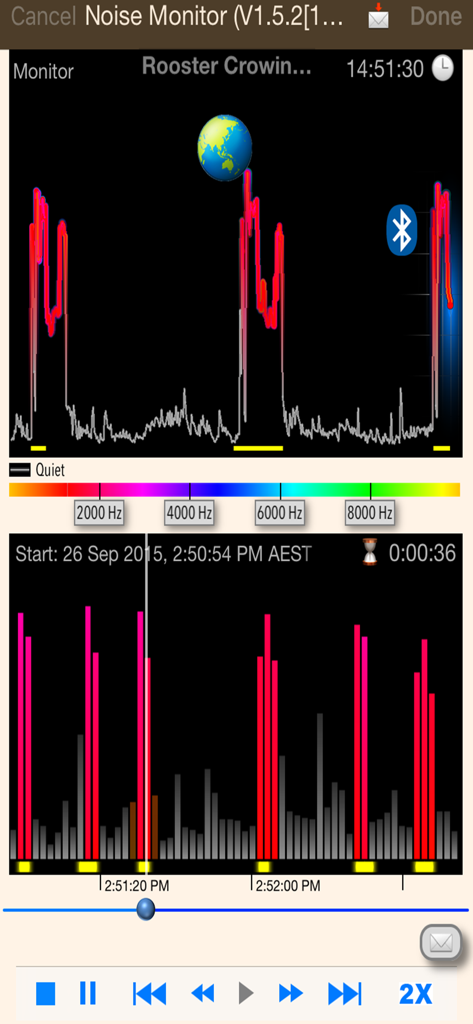
周波数分析と色分けされたデータを含むセッション概要グラフを表示する騒音モニターアプリの視覚的インターフェース

Noise Monitor and Analysis - リアルタイムの音響周波数分析と視覚的なセッション概要を表示する騒音モニターアプリのインターフェース
リアルタイムの音響周波数分析と視覚的なセッション概要を表示する騒音モニターアプリのインターフェース

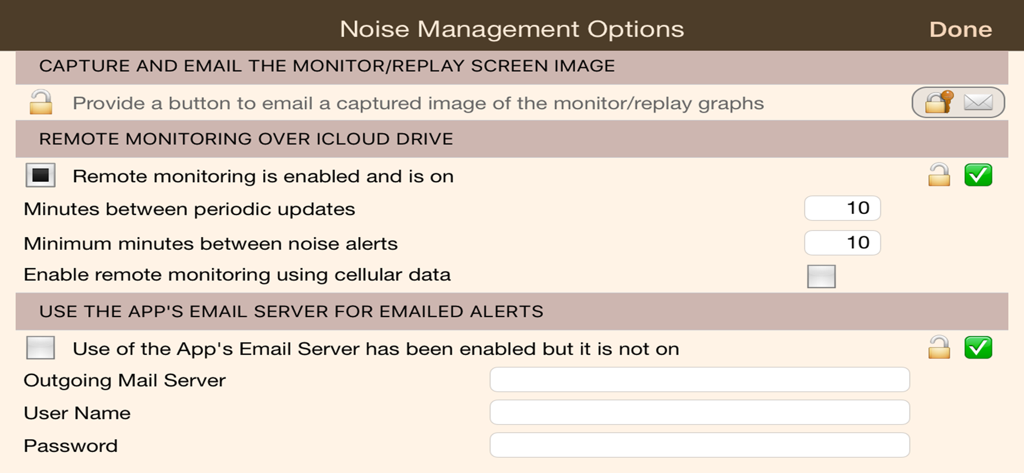
Noise Monitor and Analysis - iCloud経由のリモート監視とメールアラート設定を表示する騒音管理オプション画面

iCloud経由のリモート監視とメールアラート設定を表示する騒音管理オプション画面

説明

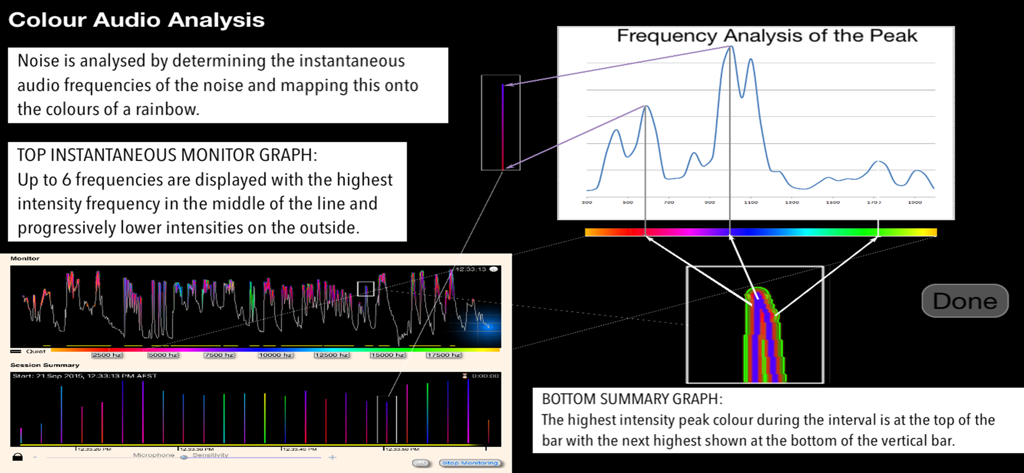
Are you subjected to unwanted noise? Quickly set up a monitoring session to record noise. ‘Noise Monitor' has low disk and battery usage with background and screen-locked recording enabling you to monitor well in excess of 12 hours. Noise is color encoded so that you can visually identify similar noises throughout the monitoring session. Noise is analysed for you by determining the instantaneous audio frequencies of the noise and mapping it onto the colors of a rainbow. On the top instantaneous graph up to 6 frequencies are displayed with the highest intensity frequency in the middle of the line and progressively lower intensities on the outside. The bottom graph shows you a summary of the entire monitoring session. The vertical bars here summarise an interval with the highest intensity peak colour during the interval at the top of the bar and the next highest shown at the bottom of the bar. Similar noises show you similar color patterns though louder noises will show in brighter colors. The yellow bars at the bottom of each graph show where the app has detected a noise peak. Fast review features save you time: Visually review noise, selectively replay noisy sections, skip and play noisy intervals, double speed playback. You have at your disposal further optional features as required: ・ Change the audio frequency range to analyse ・ Capture and email of the monitoring and playback screen ・ Remote monitoring over iCloud drive ・ Emailed periodic updates and noise alerts ・ Alter the conditions that trigger a noise alert ・ Export 48000Hz copies of monitor recordings to Documents or iCloud Drive ・ Email download links to recording copies in iCloud Drive using iOS mail ・ Email of download links to guaranteed unaltered copies ・ Use of location services to prove where the monitoring took place (with the unlimited version) Note: If the noise you are wishing to monitor is barking dogs then please have a look at our premium dog related app "Bark'n Mad".

Download

ダウンロード: App Store

このページはアプリまたはその開発者の公式ページではなく、情報提供および論評を目的として作成された独立した編集出版物です。明示的に別段の記載がない限り、アプリおよびその開発者は、MWM、Apple、Google Play、アプリのパブリッシャー、またはアプリの開発者と提携、承認、後援、認可、またはその他の公式的な関係はなく、このページのいかなる内容も、アプリがMWMのサービスを使用して開発されたことを意味するものではありません。すべての商標、ロゴ、スクリーンショット、その他のコンテンツはそれぞれの所有者の財産です。