
このページはアプリまたはその開発者の公式ページではなく、情報提供および論評を目的として作成された独立した編集出版物です。明示的に別段の記載がない限り、アプリおよびその開発者は、MWM、Apple、Google Play、アプリのパブリッシャー、またはアプリの開発者と提携、承認、後援、認可、またはその他の公式的な関係はなく、このページのいかなる内容も、アプリがMWMのサービスを使用して開発されたことを意味するものではありません。すべての商標、ロゴ、スクリーンショット、その他のコンテンツはそれぞれの所有者の財産です。


NYC ACCESS HRA
ニューヨーク市の公共支援を受ける住民は、このアプリを通して、かつてないほど自分の支援プログラムを掌握できる。HRAとの連携は煩雑になりがちだが、このアプリはそれを過去のものにする。
ダウンロード
1M+ユーザー評価
評価数
130.3K開発元
カテゴリ
Health & Fitness対応言語
7最新バージョン
4.6サイズ
97.2 MBリリース日
2017年3月17日公的扶助受給者向けの主要機能とユーザーへの影響評価
NYC ACCESS HRA アプリケーション機能分析
必要書類のアップロード
本ツールは、申請、再認定、定期報告、または特別助成金リクエストをサポートするために提出が必要な書類リストを表示します。ユーザーは、各書類の写真を撮影したり、カメラロールから画像を選択したりして、直接アップロードできます。
リアルタイム通知機能
ユーザーは、ケースに関するリアルタイム通知をスマートフォンで受け取ることが可能です。これにより、ケースの「再認定」期限、オンライン申請提出の確認、今後の予約、必要書類、および電子通知などの重要な情報を見逃しません。
ケース詳細とEBT残高の確認
本アプリは、SNAPまたは現金給付ケースの現在のステータス、各給付のEBT残高、および今後の再認定日を確認する機能を提供します。ユーザーは、Fair Fares NYC割引ステータス、Fair Fares NYC更新期間、またはAccess-A-Rideステータスも追跡できます。
多言語対応
本アプリは、英語、スペイン語、アラビア語、フランス語、韓国語、ロシア語、および簡体字中国語で利用可能です。これにより、幅広いユーザーが自身の母国語でサービスを利用できます。
予約の確認とリマインダー
ユーザーは、本アプリを通じて、今後の予約、見逃した予約、完了した予約を確認できます。また、電話やタブレットに予約のリマインダーを追加することも可能です。
支払いの履歴と予定の確認
このアプリは、家主、電力会社、またはEBTカードへの支払いなど、今後の支払いおよび過去の支払い履歴をユーザーが確認できる機能を提供します。
受理済み書類の確認
ユーザーは、本アプリを通じて、当局がケースに関してユーザーから受領した書類のリストを確認できます。受理された各書類は、受理日から60日間リストに表示されます。
プロフィール情報の管理
このアプリは、当局に以前提供された連絡先情報と通知設定を表示します。ユーザーは、自身のプロフィール情報を更新できます。
よくある質問
について知っておくべきこと NYC ACCESS HRA
What is NYC ACCESS HRA mobile?
NYC ACCESS HRA mobile is an app that allows users to manage their benefits on-the-go. It provides access to case details, EBT balances, appointments, payments, and required documents for various assistance programs.
Can I view my EBT balance with the NYC ACCESS HRA app?
Yes, the NYC ACCESS HRA app allows users to view the EBT balance for each of their benefits, including SNAP or Cash Assistance cases, in the Cases section.
How do I check my upcoming appointments in the NYC ACCESS HRA app?
Users can view upcoming, missed, or completed appointments in the Appointments section of the NYC ACCESS HRA app. It also provides an option to add reminders to a phone or tablet.
How long do uploaded documents stay visible in NYC ACCESS HRA?
Submitted documents remain visible on the 'My Uploads' screen for 100 days. Accepted documents stay on the 'Documents' list for 60 days from their acceptance date.
Can I update my profile information in the NYC ACCESS HRA app?
Yes, the Profile section allows users to view and update contact information and notification preferences. Users with CA or SNAP cases can update every 24 hours; Fair Fares NYC clients can update as needed.
What types of payments can I view in the NYC ACCESS HRA app?
The Payments section displays upcoming and past payments related to a case. This includes payments made to landlords, utility companies, or directly to an EBT card.
Does NYC ACCESS HRA send notifications?
Yes, NYC ACCESS HRA provides real-time notifications. These alerts cover case updates like recertification due dates, online application confirmations, upcoming appointments, and required documentation.
What languages does the NYC ACCESS HRA mobile app support?
The NYC ACCESS HRA mobile app is available in multiple languages. These include English, Spanish, Arabic, French, Korean, Russian, and Simplified Chinese for broad accessibility.
How do I submit required documents using the NYC ACCESS HRA app?
The Required Documents section lists needed documents. Users can take a photo of each document or select an image from their camera roll directly from this list to submit them.
Can I see my Fair Fares NYC discount status in the app?
Yes, the NYC ACCESS HRA app allows users to track their Fair Fares NYC discount status and renewal period directly within the Cases section of the application.
以下のスクリーンショットと説明は、アプリの公式ストアリスティングから直接取得されたものであり、アプリ開発者の所有物です。
アプリストア
スクリーンショット
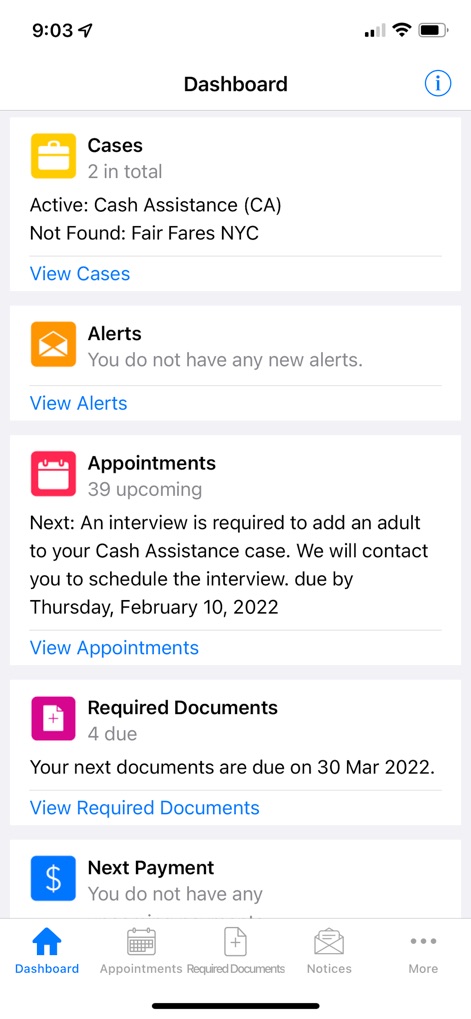
本アプリのダッシュボードでは、ユーザーは「ケース」セクションでアクティブなケース状況を、また「アポイントメント」セクションで今後の面談詳細を迅速に確認できます。
主要機能を一目で
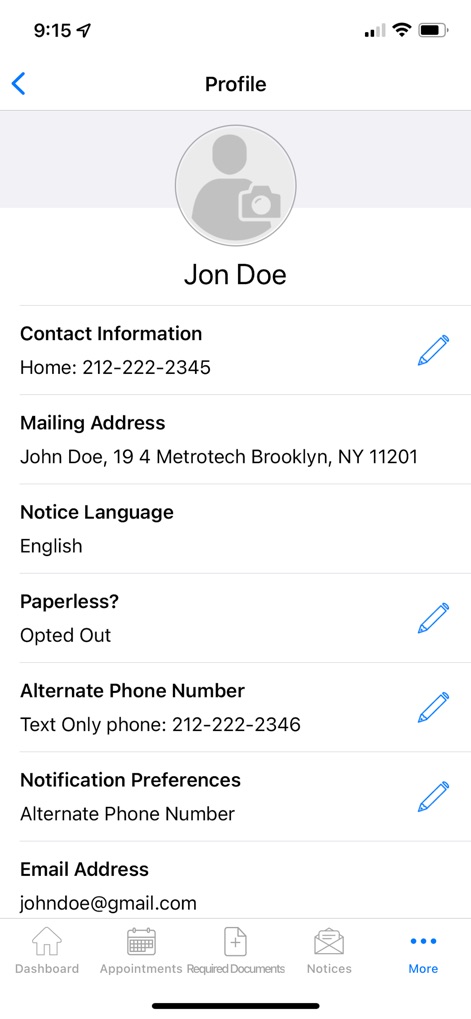
ユーザーは「プロフィール」画面で、登録済みの「連絡先情報」を確認・編集し、正確な「郵送先住所」を管理することで、重要な通知を確実に受け取ることができます。
プロフィールを管理
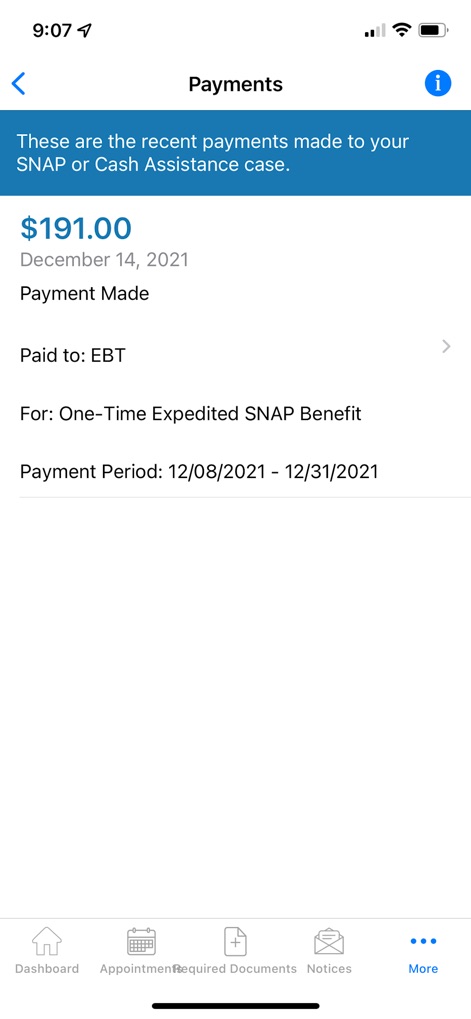
この画面では、ユーザーは最近の支払いを簡単に確認でき、例えば特定の「支払額」や、その支払いに対応する「支払い期間」といった重要な詳細を把握できます。
支払い履歴を追跡
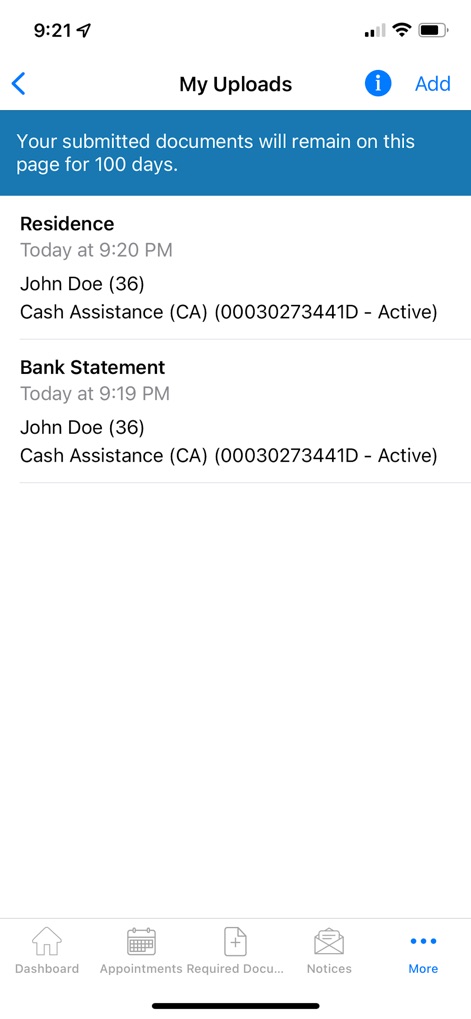
ユーザーは「My Uploads」セクションで、提出済みの「住居関連書類」や「銀行取引明細書」などの一覧を確認でき、提出された書類が「100日間」保存されることを把握できます。
書類提出履歴
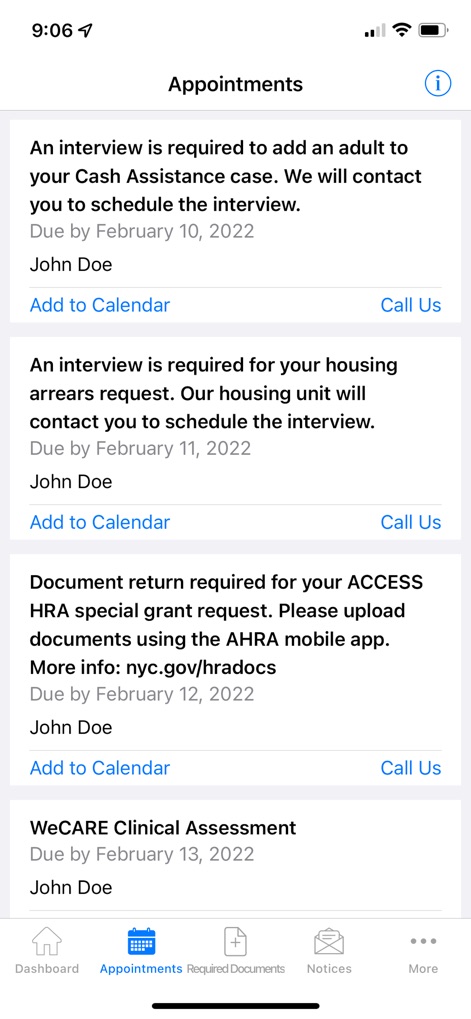
この「アポイントメント」画面では、ユーザーは現金給付申請のための「面談」など、今後の重要な予定を一覧で確認し、各アポイントメントを個人のカレンダーに「追加」できます。
予定を把握
説明
Download
類似アプリ
似た機能とユーザー体験を持つアプリ

Propel: EBT, SNAP, WIC, & more
Propel Inc

Netspend
NETSPEND CORPORATION

Your Texas Benefits
Texas Health and Human Services Commission
Direct Express® Mobile
Comerica Bank

Xpectations!® Plus
Green Dot Corporation

Netspend Wallet
NETSPEND CORPORATION
U.S. Bank ReliaCard
U.S. Bancorp
Serve
HI Technology Corp

Vプリカ+
LIFECARD CO.,LTD.
このページはアプリまたはその開発者の公式ページではなく、情報提供および論評を目的として作成された独立した編集出版物です。明示的に別段の記載がない限り、アプリおよびその開発者は、MWM、Apple、Google Play、アプリのパブリッシャー、またはアプリの開発者と提携、承認、後援、認可、またはその他の公式的な関係はなく、このページのいかなる内容も、アプリがMWMのサービスを使用して開発されたことを意味するものではありません。すべての商標、ロゴ、スクリーンショット、その他のコンテンツはそれぞれの所有者の財産です。