On Shelf
On Shelf
ダウンロード: App Store

このページはアプリまたはその開発者の公式ページではなく、情報提供および論評を目的として作成された独立した編集出版物です。明示的に別段の記載がない限り、アプリおよびその開発者は、MWM、Apple、Google Play、アプリのパブリッシャー、またはアプリの開発者と提携、承認、後援、認可、またはその他の公式的な関係はなく、このページのいかなる内容も、アプリがMWMのサービスを使用して開発されたことを意味するものではありません。すべての商標、ロゴ、スクリーンショット、その他のコンテンツはそれぞれの所有者の財産です。


ロゴ: On Shelf
ダウンロード: App Store

On Shelf

売れない商品にお金を無駄にするのはやめましょう。一目で「売れ筋」商品を特定し、バーコードを簡単にスキャンし、iPadで在庫全体を管理できます。当社のビジュアル在庫コマンドセンターで。

主要数値

ダウンロード

79K+

ユーザー評価

4.4/5

評価数

100

開発元

Dawn Malsbury

カテゴリ

Business

対応言語

1

最新バージョン

8.4.0

サイズ

10.7 MB

リリース日

2012年4月9日
機能

在庫を収益マシンに変える

On Shelfは、死蔵在庫にお金を無駄にするのをやめ、実際に売れるものに集中する必要がある、実践的なオーナーのために設計された直感的なiPadソリューションです。

「売れ筋」トレンドを即座に把握

カラフルなインサイトで販売実績を可視化します。一目で動きの速い商品を見つけ、在庫レベルを最適化して、1ドル1ドルを最大化しましょう。

スキャンして楽々販売

手入力はもう不要です。iPadカメラを使用してバーコードをスキャンし、店舗の現場から直接、在庫の更新、販売請求書、在庫チェックを驚くほど速く行えます。

以下のスクリーンショットと説明は、アプリの公式ストアリスティングから直接取得されたものであり、アプリ開発者の所有物です。

アプリストア

スクリーンショット
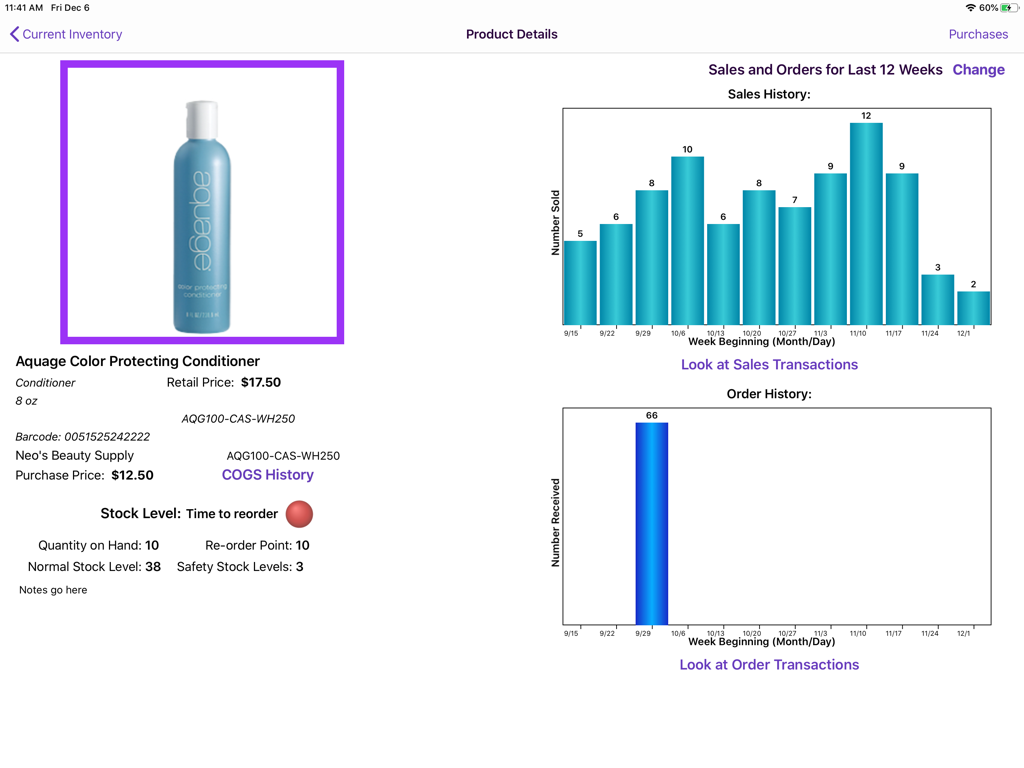
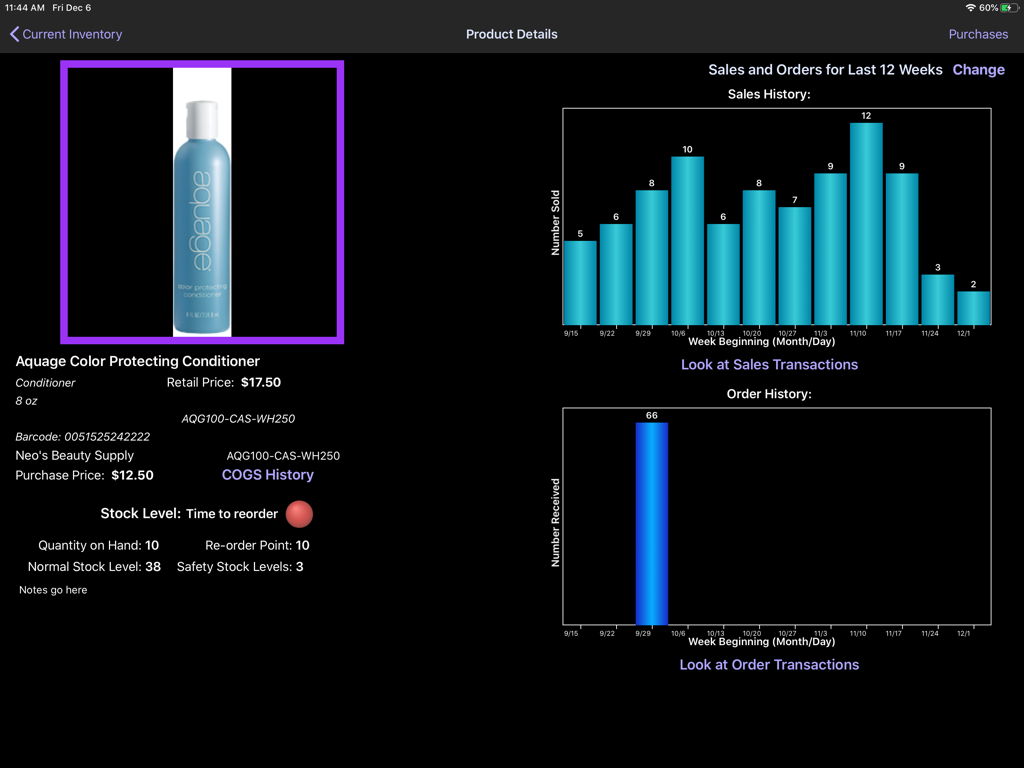
On Shelf - On Shelf iPadアプリの製品在庫詳細ページ。在庫レベルと販売履歴グラフが表示されています。
On Shelf iPadアプリの製品在庫詳細ページ。在庫レベルと販売履歴グラフが表示されています。

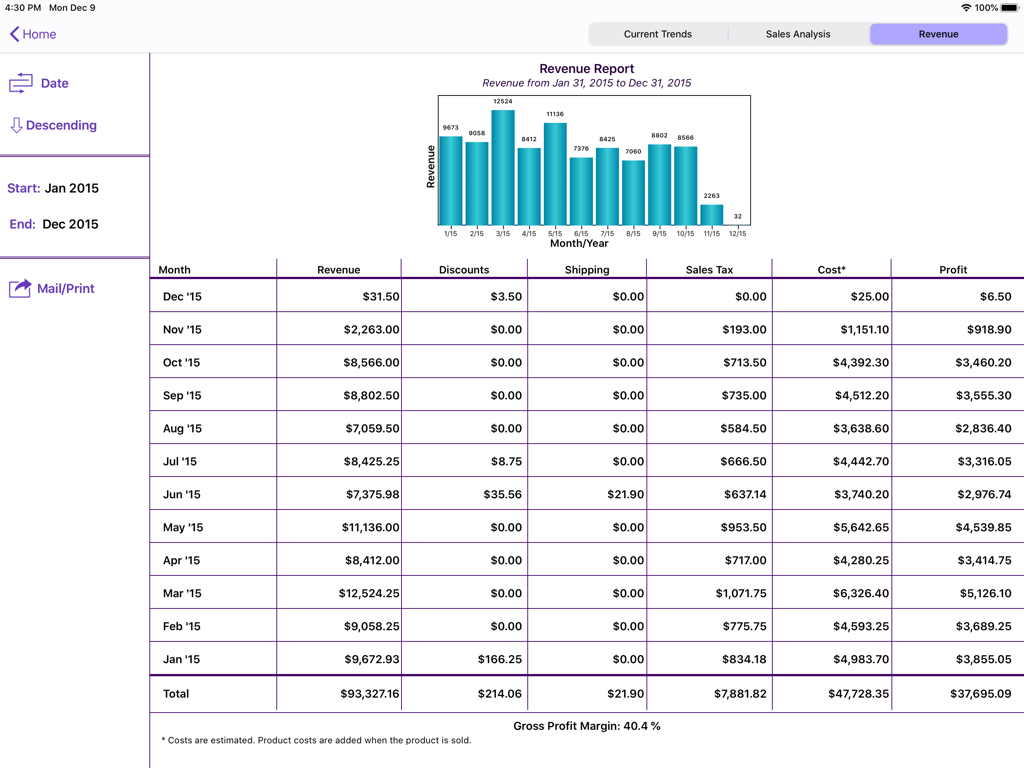
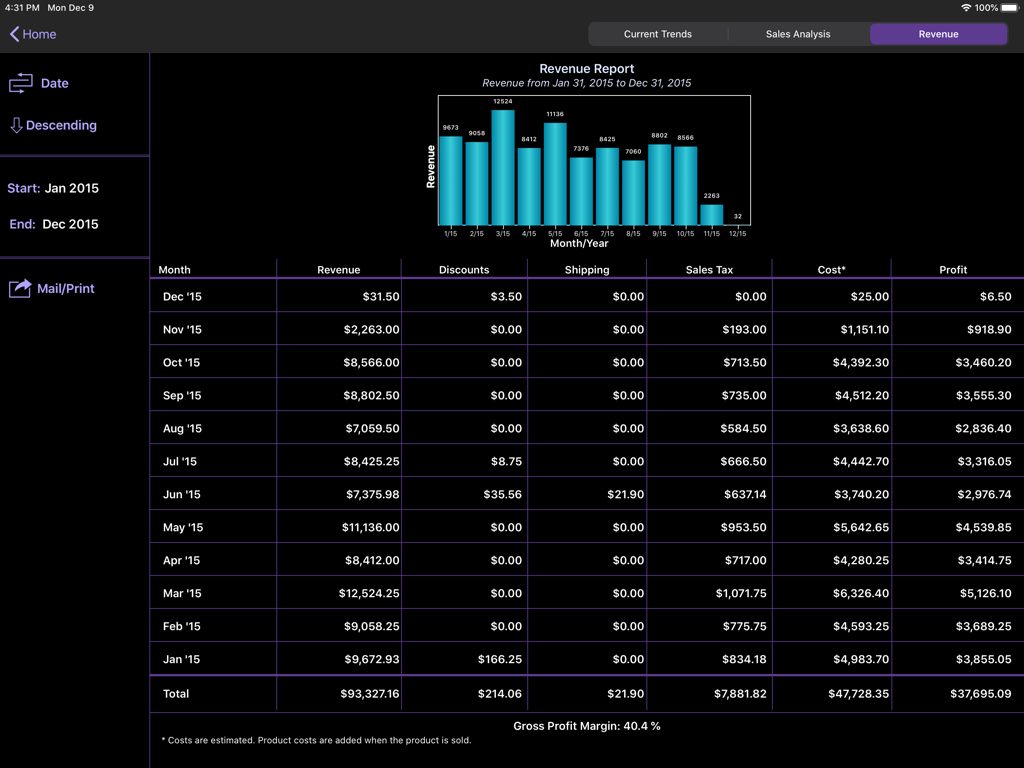
On Shelf - iPadの収益レポートダッシュボード。月間売上棒グラフと詳細な財務利益表が表示されています。
iPadの収益レポートダッシュボード。月間売上棒グラフと詳細な財務利益表が表示されています。

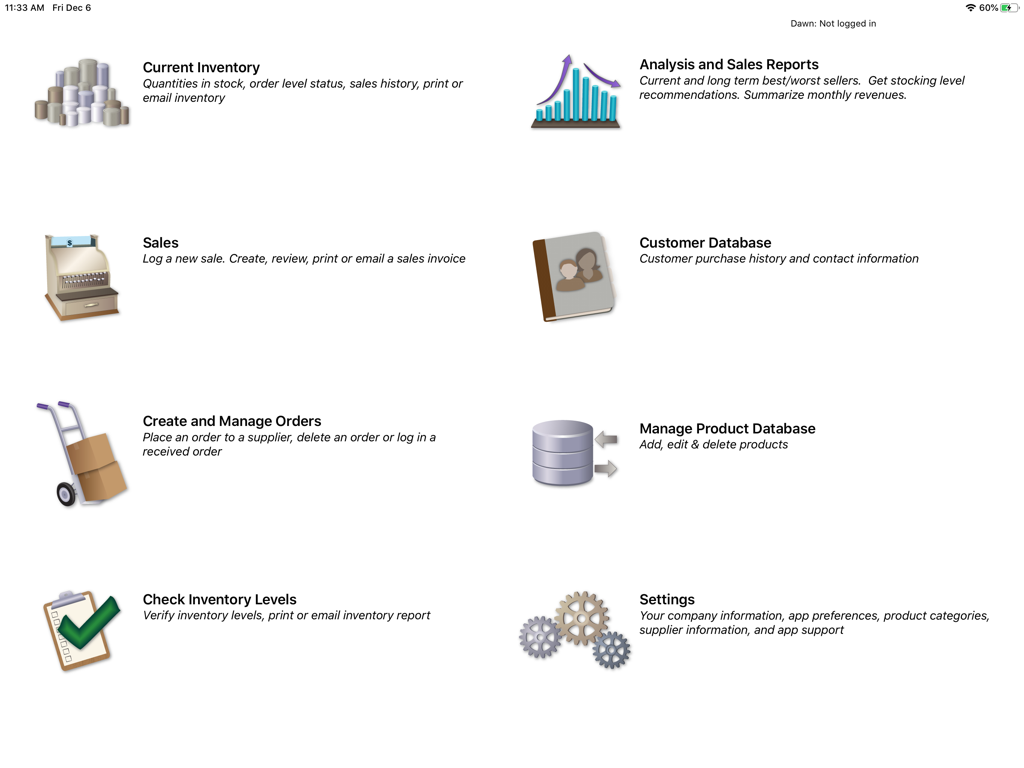
On Shelf - On Shelf在庫管理アプリのiPad上のメインダッシュボード。在庫販売レポートや顧客データベースなどの機能が表示されています。
On Shelf在庫管理アプリのiPad上のメインダッシュボード。在庫販売レポートや顧客データベースなどの機能が表示されています。

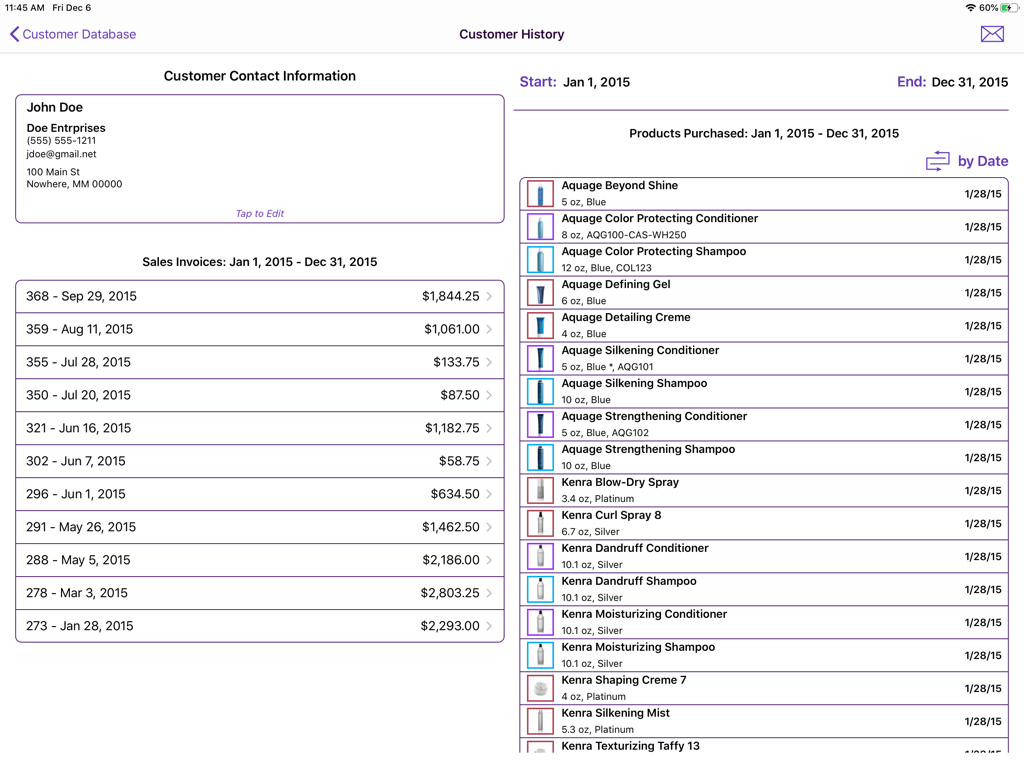
On Shelf - On Shelfアプリの顧客履歴画面。連絡先情報、請求書、購入した商品が表示されています。
On Shelfアプリの顧客履歴画面。連絡先情報、請求書、購入した商品が表示されています。

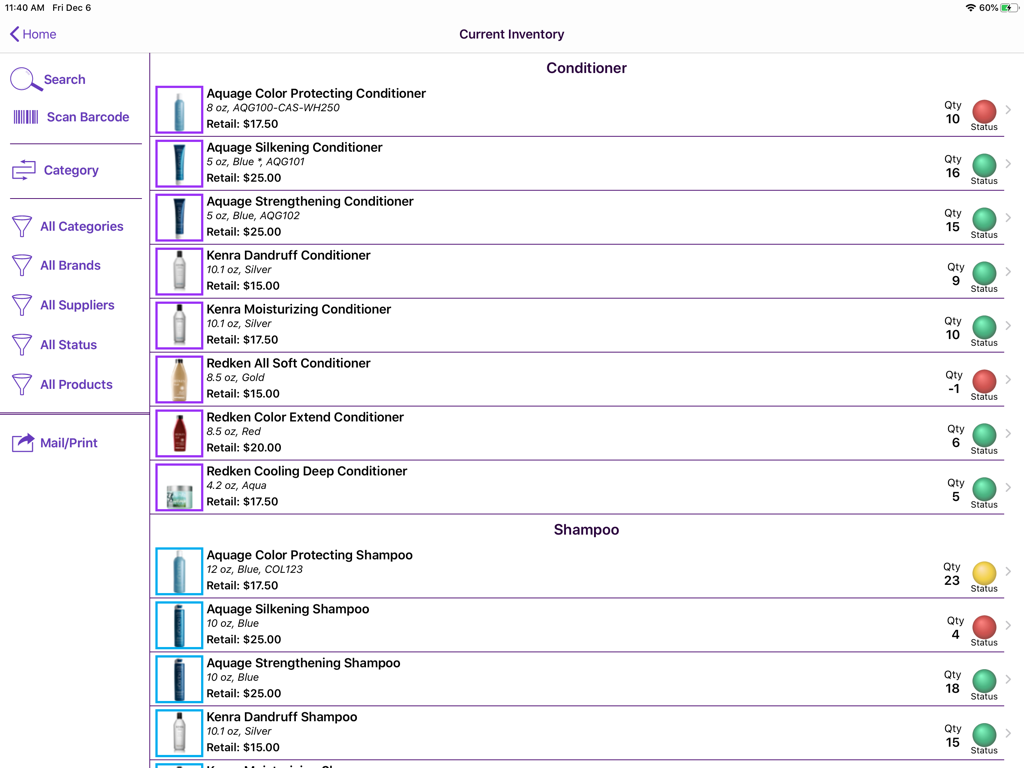
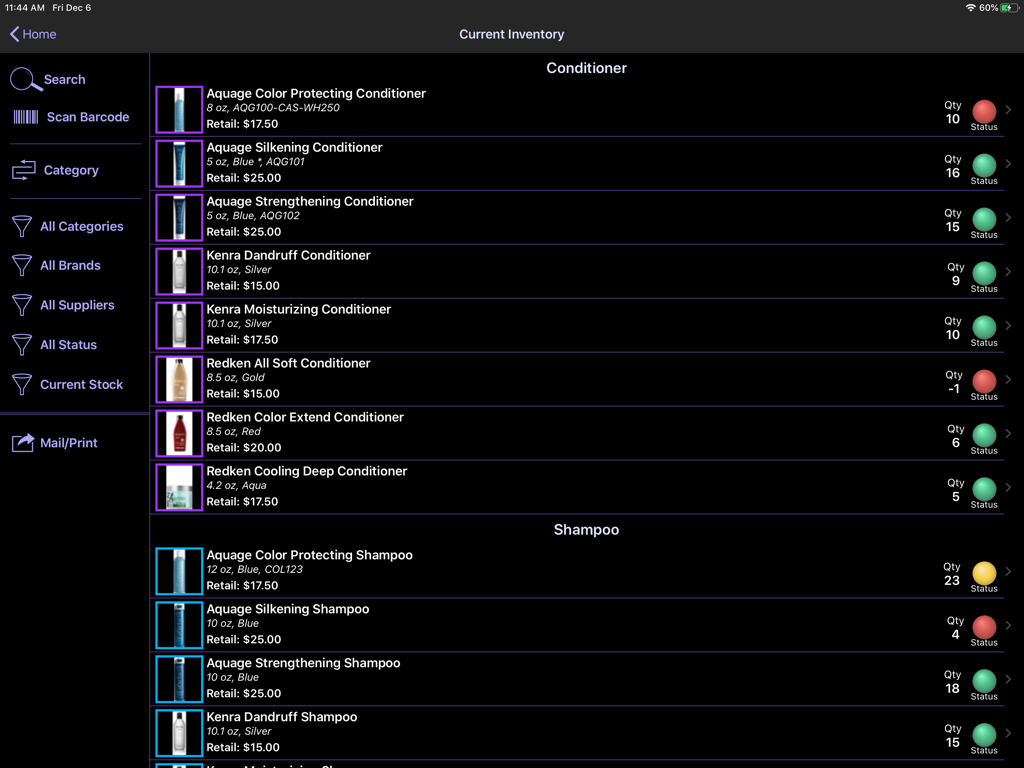
On Shelf - iPad画面。On Shelfアプリの現在の在庫リストに、在庫状況インジケーターが表示されています。
iPad画面。On Shelfアプリの現在の在庫リストに、在庫状況インジケーターが表示されています。

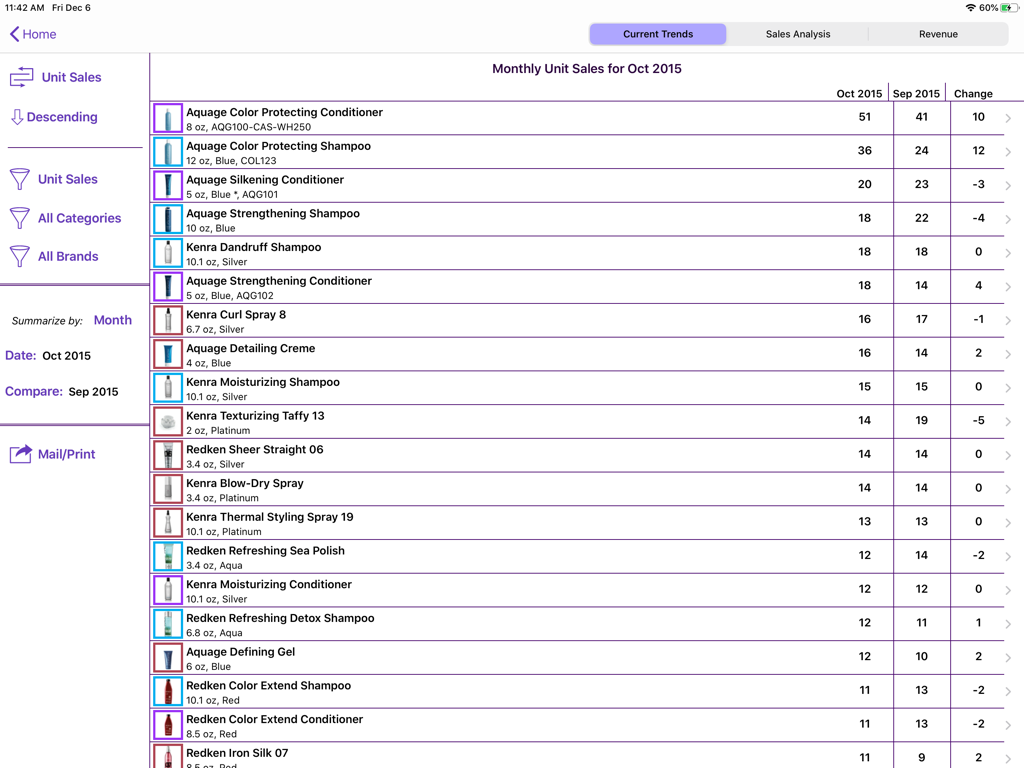
On Shelf - iPad画面。On Shelfアプリの月間ユニット販売レポート。サロン製品のリストと販売トレンドが表示されています。
iPad画面。On Shelfアプリの月間ユニット販売レポート。サロン製品のリストと販売トレンドが表示されています。

On Shelf - On Shelf iPadアプリの在庫製品詳細画面。販売履歴グラフと在庫アラートが表示されています。
On Shelf iPadアプリの在庫製品詳細画面。販売履歴グラフと在庫アラートが表示されています。

On Shelf - iPadアプリ画面。棒グラフと中小企業の財務データテーブルを含む詳細な月次収益レポートが表示されています。
iPadアプリ画面。棒グラフと中小企業の財務データテーブルを含む詳細な月次収益レポートが表示されています。

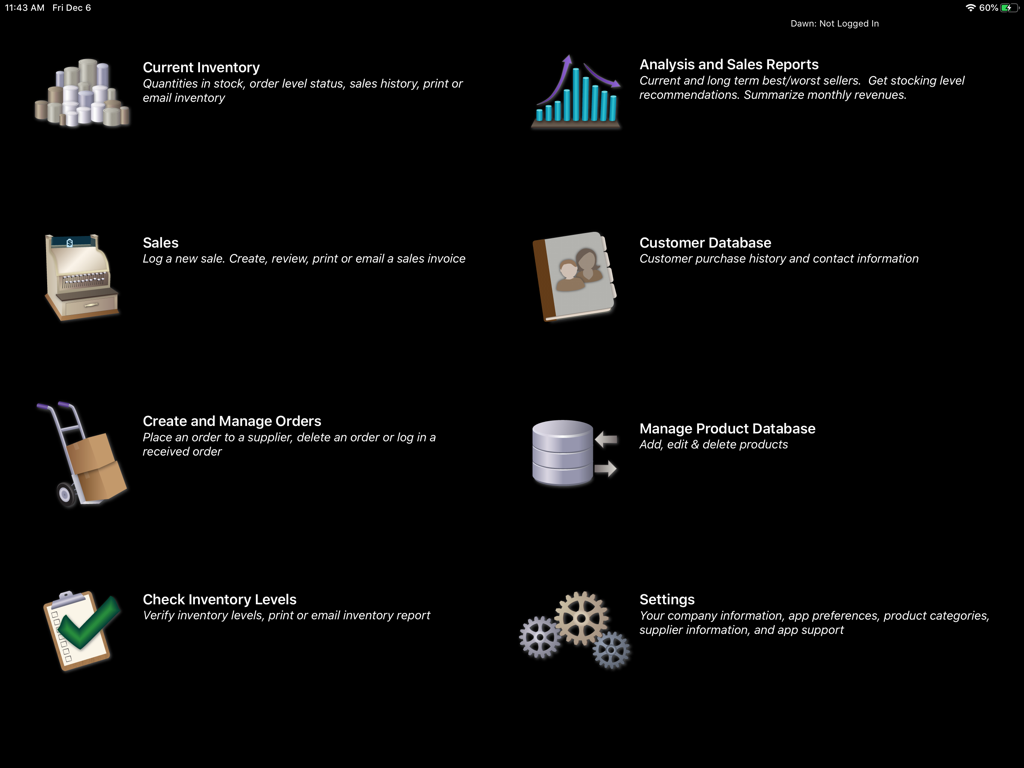
On Shelf - On Shelf iPadアプリのメインメニュー。在庫販売レポート、顧客データベース、注文管理のアイコンと説明が表示されています。
On Shelf iPadアプリのメインメニュー。在庫販売レポート、顧客データベース、注文管理のアイコンと説明が表示されています。

On Shelf - On Shelfアプリの現在の在庫画面。サロン製品の在庫数量と色分けされたステータスインジケーターが表示されています。

On Shelfアプリの現在の在庫画面。サロン製品の在庫数量と色分けされたステータスインジケーターが表示されています。

説明

Maximize your retail business by using On Shelf to help optimize your inventory levels. Don’t waste money on items that just sit on your shelves. Easily see which items are “hot” and those that are not. On Shelf is versatile - users include salons, bars, lounges and small stores. Note: On Shelf will leave the app store on 1 May 2026 OPTIMIZE YOUR INVENTORY LEVELS - On Shelf recommends the correct inventory levels for each product to maximize your potential sales. - Minimize the money wasted on items that are not selling well. - Determine which products are the most profitable - Inventory items with the most and the least movement are highlighted on a short-term and long-term basis. - Select the time periods that you wish to examine. SYNC YOUR DATA BETWEEN MULTIPLE USERS/DEVICES - Your first month is free for the first user - Your data is stored on each iPad and in the cloud - You can work offline, your data will sync when you log back into your account - Ability to sync between multiple users – no need to share your password! - Syncing with an iPhone requires the purchase of On Shelf for iPhone - Note: A sync account is only required if you wish to sync data between different devices. Your data may be deleted from the sync server six months after your subscription expires. SCAN BARCODES - Quickly scan products to add to a sales invoice, adjust the order quantity, check the amount of inventory in stock or to edit the product information. - Note this feature only works for 3rd Generation and later models (i.e., not the original iPad or the iPad 2). - Reads UPC-E, Code 39, Code 39 mod 43, EAN-13 (including UPC-A), EAN-8, Code 93, Code 128, and PDF417 barcodes. VIEW CUSTOMER HISTORY - Review your customers’ purchase history. - Mail customers who have purchased a specific product. - Import your customer information from the contacts app. - Email all of your customers TRACK ITEMS CURRENTLY IN STOCK - Identifies products with low inventory levels. - Graphs show the weekly and monthly sales trends for each product. - A glance tells you if demand for a product is increasing or decreasing QUICKLY DETERMINE WHAT ITEMS ARE LOW IN STOCK -Place an order with a supplier at a touch of a button. The order can be printed or sent directly to your supplier. - Check an order into inventory quickly. - Inventory levels are automatically updated. TRACK INVENTORY MOVEMENT - Use the sales screen to log an individual or daily sales - Or, use the check inventory screen to enter sales - Inventory levels are tracked with integers, not fractional, units - Choose whether or not you want to display the sales transaction amounts IMPORT/EXPORT PRODUCT DESCRIPTIONS - Edit your product descriptions using the export/import feature (New Feature) - Save time by importing your product descriptions into On Shelf - Enter your product information in your favorite spreadsheet program - Save it as a tab-delimited file and import it into On Shelf SEND AND PRINT REPORTS - Email tab-delimited attachments that are easily imported into spreadsheets - Reports include current inventory levels, order history, recent sales history, and the best and worst selling products - Sales invoices can be printed out or sent to customers using your business logo For more information, please see our website: littletandog.com. SUPPORT If you have any questions, we’d love to hear from you. Contact us by e-mail at support@littletandog.com.

Download

ダウンロード: App Store

このページはアプリまたはその開発者の公式ページではなく、情報提供および論評を目的として作成された独立した編集出版物です。明示的に別段の記載がない限り、アプリおよびその開発者は、MWM、Apple、Google Play、アプリのパブリッシャー、またはアプリの開発者と提携、承認、後援、認可、またはその他の公式的な関係はなく、このページのいかなる内容も、アプリがMWMのサービスを使用して開発されたことを意味するものではありません。すべての商標、ロゴ、スクリーンショット、その他のコンテンツはそれぞれの所有者の財産です。








