Password management
Password management
ダウンロード: App Store

このページはアプリまたはその開発者の公式ページではなく、情報提供および論評を目的として作成された独立した編集出版物です。明示的に別段の記載がない限り、アプリおよびその開発者は、MWM、Apple、Google Play、アプリのパブリッシャー、またはアプリの開発者と提携、承認、後援、認可、またはその他の公式的な関係はなく、このページのいかなる内容も、アプリがMWMのサービスを使用して開発されたことを意味するものではありません。すべての商標、ロゴ、スクリーンショット、その他のコンテンツはそれぞれの所有者の財産です。


ロゴ: Password management
ダウンロード: App Store

Password management

軍事グレードの暗号化と瞬時のFaceIDアクセスでパスワード疲れに終止符を。資格情報を安全に、そして完全にオフラインでデバイスに保管し、究極の安心感を得ましょう。

主要数値

ダウンロード

351K+

ユーザー評価

4.5/5

評価数

40K+

開発元

TSUKUTTEMITA, K.K.

カテゴリ

Productivity

対応言語

1

最新バージョン

9.6.0

サイズ

34.7 MB

リリース日

2014年11月17日
機能

デジタルセキュリティを管理する

シンプルさ、プライバシー、そして超高速アクセスを追求して設計されたパスワードマネージャーで、究極の安心感を体験してください。

オフラインファーストのプライバシー

機密データはサーバーではなく、デバイス上に保管されます。AES-256暗号化を使用し、ハッカーから情報をプライベートかつ安全に保ちます。

シームレスな生体認証アクセス

タイピングはスキップして、瞬時にログイン。FaceIDまたはTouchIDを使用して、Vaultにアクセスし、Safariで直接資格情報を自動入力して、スムーズな体験を実現します。

以下のスクリーンショットと説明は、アプリの公式ストアリスティングから直接取得されたものであり、アプリ開発者の所有物です。

アプリストア

スクリーンショット
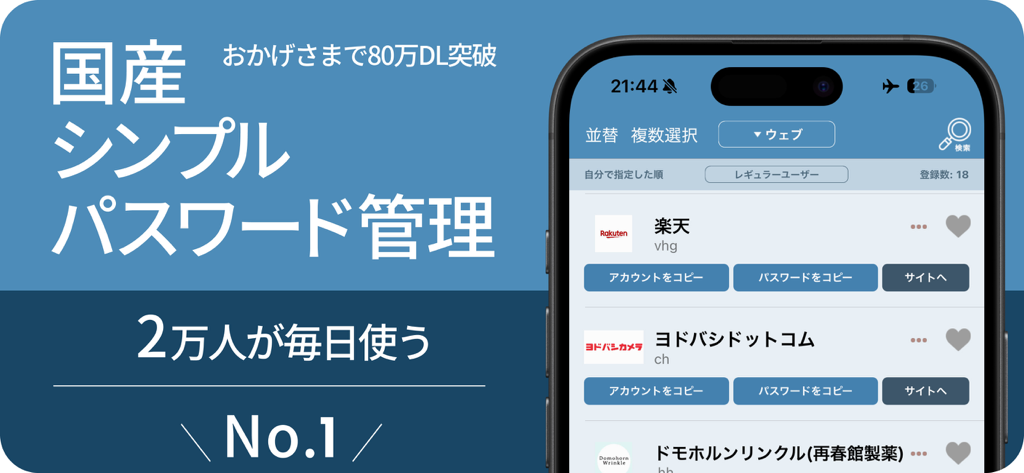
Password management - PassManagerアプリのインターフェイスがiPhoneに表示され、保存されたパスワードとアカウントのリストが表示されています。
PassManagerアプリのインターフェイスがiPhoneに表示され、保存されたパスワードとアカウントのリストが表示されています。

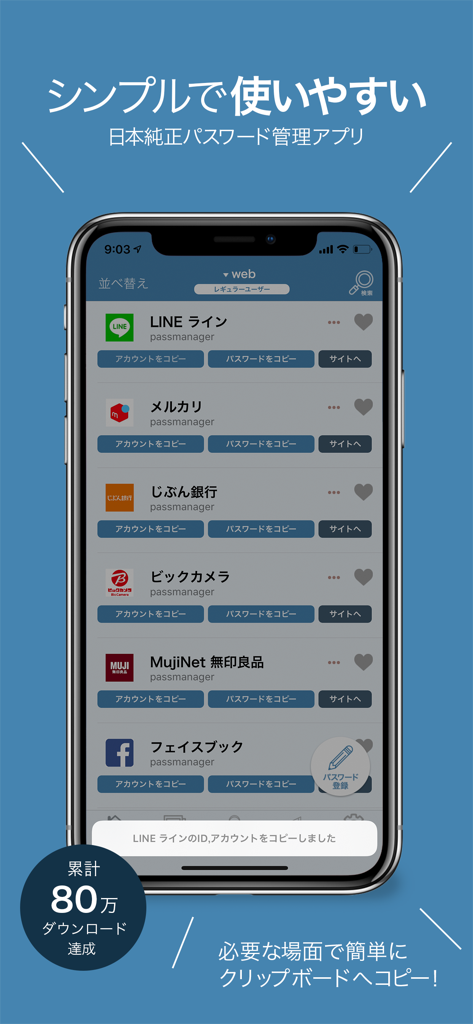
Password management - iPhone上のPassManagerアプリのインターフェイスで、LINEやFacebookなどの保存されたアカウントパスワードのリストが表示されています。
iPhone上のPassManagerアプリのインターフェイスで、LINEやFacebookなどの保存されたアカウントパスワードのリストが表示されています。

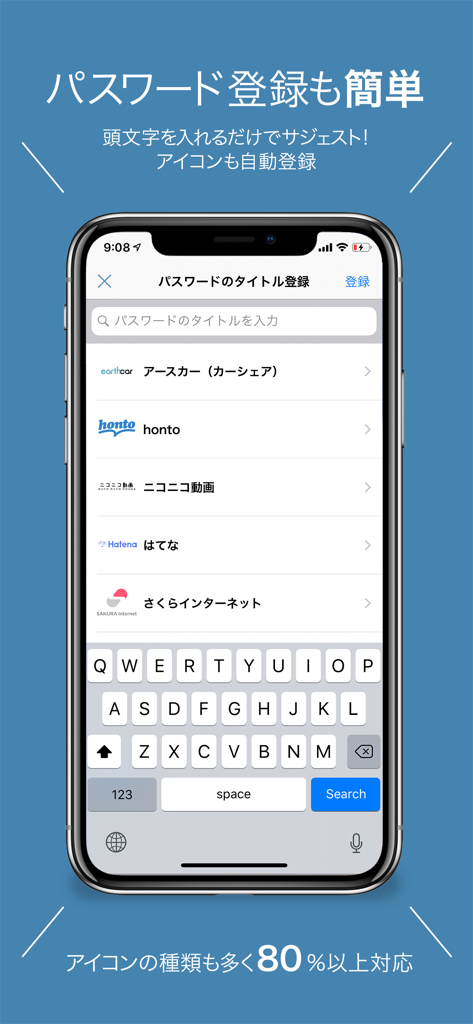
Password management - PassManagerアプリのスクリーンショットがiPhoneに表示され、サービス候補とアイコンを備えた簡単なパスワード登録画面が表示されています。
PassManagerアプリのスクリーンショットがiPhoneに表示され、サービス候補とアイコンを備えた簡単なパスワード登録画面が表示されています。

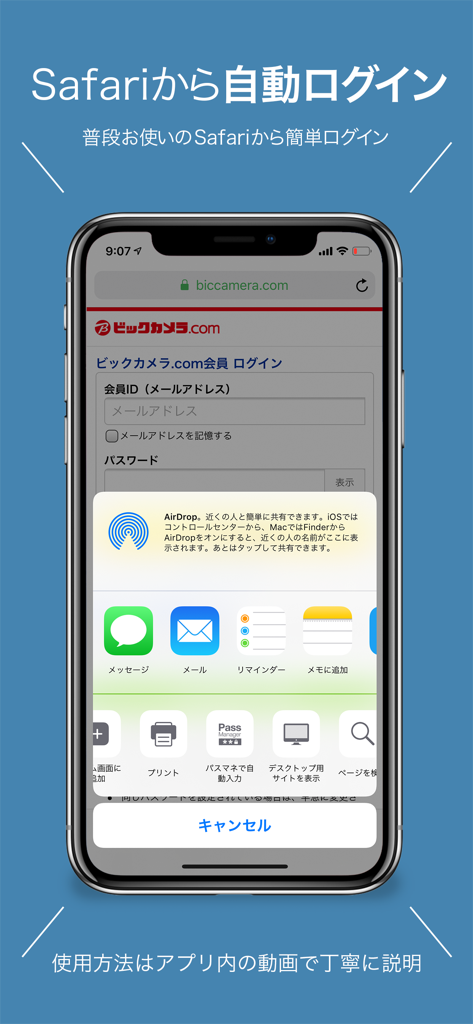
Password management - iPhone画面にSafariのPassManagerアプリ拡張機能が表示され、ウェブサイトへのシームレスな自動ログインを実現しています。
iPhone画面にSafariのPassManagerアプリ拡張機能が表示され、ウェブサイトへのシームレスな自動ログインを実現しています。

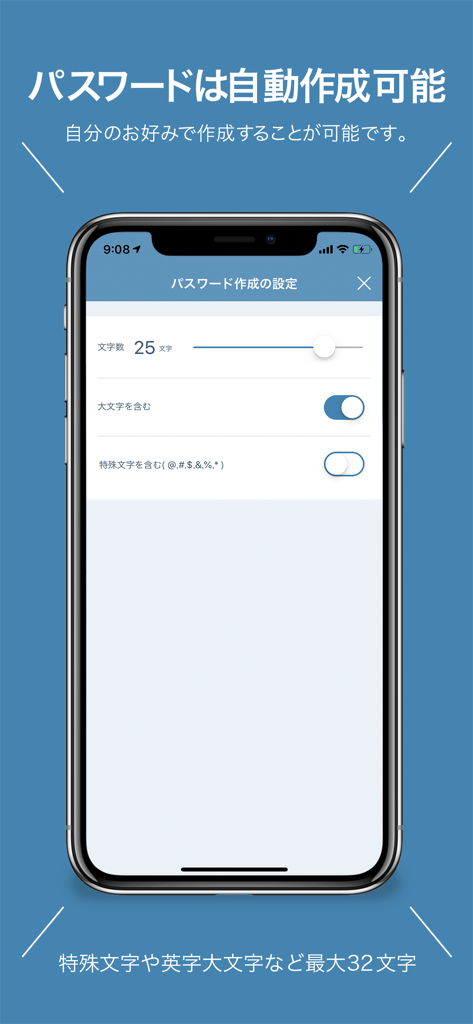
Password management - PassManagerアプリのインターフェイスがiPhoneに表示され、長さや文字オプションを含む自動パスワード生成の設定が表示されています。

PassManagerアプリのインターフェイスがiPhoneに表示され、長さや文字オプションを含む自動パスワード生成の設定が表示されています。

説明

PassManager (path manager) is an application that can easily manage passwords. It is no exaggeration to go with the definitive version of the password management application. Main functions of PassManager: -------------------- ■ Automatic login from safari ■ Input fewer login faster! ■ Touch ID FaceID correspondence (face authentication) ■ One jump to the basic authentication site. Continue to login screen ■ Automatic generation of strong password ■ Jump easily in Chrome or safari ■ Export passwords as csv and back up ■ Copy from the notification center is possible ■ CSV / iCloud backup Powerful search function [Sites that can not auto-login at the moment] Hot Pepper Beauty GMAIL Price Com Desk net Other non-survey Fingerprint authentication can be used on ios terminals with iOS 8 or later and Touch ID Face ID. With ios 8, you can use it by entering a password even if it does not support fingerprint authentication. You can log in to the registered Basic certified site with just one button. Have you ever experienced such a problem? -ID, I do not remember much account password. - Many accounts use the same password - Did you forget your password? What shall I do - I can not manage more than one account and password We will solve these problems. Reason for PassManager (path manager) to be safe · Do not connect to the Internet · Fingerprint authentication adopted · The built-in password generator generates a password. It is possible to generate a high-intensity random password. It is simpler to make than any password management application. Register the password you want to register from the button on the upper right. All passwords are managed with 1 password (one password). Log in with fingerprint authentication when starting up. Tap the button from the password list you registered. Then the password is copied to the clipboard and you can jump directly to the WEB site. You can manage passwords on the web, applications, You can manage various passwords and ID such as basic authentication. [Security · Encryption method] AES 256 Leave the management for personal information 【About monthly fee function】 The monthly charged feature is called platinum user. You can use it by paying monthly 180 yen It is automatic continuing billing once a month. Function · Delete ad · Automatic password creation · Basic authentication breaking function · Automatic login function · Abolition of categories creation restrictions · ICloud backup · ICloud auto backup · CSV export of password · CSV import of password · Abolition of the maximum number of favorites list · Automatic login function from Safari · Icon free selection function 【About automatic continuing billing】 • The contract term will be updated if it is not canceled more than 24 hours before the end of the term. • Payment will be charged to your iTunes account. • Registration will be automatically renewed unless automatic renewal has been turned off for at least 24 hours before the end of the current period • The account will be charged for updates within 24 hours prior to the end of the current period and the cost of the update will be identified • Subscriptions are managed by users and automatic updates may turn off when you go to your account settings after purchase • The unused portion of the free trial period expires if the user purchases a subscription to the book, if applicable • Subscription period one month 【Confirmation and Cancellation of Automatic Update】 Select "Recommended" at the bottom of the AppStore application -> Select AppleID -> select "passmanager" from "Administration" in subscription. From this screen you can check the next automatic update timing and cancel / set automatic update. 【terms of use and privacy policy】 https://ynmain.github.io/passmanager/app/passmanager/privacy.html

Download

ダウンロード: App Store

このページはアプリまたはその開発者の公式ページではなく、情報提供および論評を目的として作成された独立した編集出版物です。明示的に別段の記載がない限り、アプリおよびその開発者は、MWM、Apple、Google Play、アプリのパブリッシャー、またはアプリの開発者と提携、承認、後援、認可、またはその他の公式的な関係はなく、このページのいかなる内容も、アプリがMWMのサービスを使用して開発されたことを意味するものではありません。すべての商標、ロゴ、スクリーンショット、その他のコンテンツはそれぞれの所有者の財産です。







