
このページはアプリまたはその開発者の公式ページではなく、情報提供および論評を目的として作成された独立した編集出版物です。明示的に別段の記載がない限り、アプリおよびその開発者は、MWM、Apple、Google Play、アプリのパブリッシャー、またはアプリの開発者と提携、承認、後援、認可、またはその他の公式的な関係はなく、このページのいかなる内容も、アプリがMWMのサービスを使用して開発されたことを意味するものではありません。すべての商標、ロゴ、スクリーンショット、その他のコンテンツはそれぞれの所有者の財産です。

ダウンロード
5M+ユーザー評価
評価数
57.3K開発元
カテゴリ
Photo & Video対応言語
4最新バージョン
3.16.1サイズ
55.9 MBリリース日
2017年2月28日主要機能とユーザーインパクト評価
Picsew - スクリーンショットスティッチング アプリ分析
スクロールショット録画
アプリは、画面を録画することで自動的にスクロールショットを生成し、ユーザーが個別にスクリーンショットを撮影する手間を省きます。
注釈と編集機能
ユーザーは、ウォーターマークの追加、機密情報のぼかし、注釈付け、スクリーンショットのフレーム設定を簡単に行うことができます。
スマート最適化(ステータスバー除去)
アプリは、ステータスバーを自動的に削除し、よりクリーンでプロフェッショナルなスクリーンショットを作成します。
スマート自動スティッチング
本アプリは、高度な自動スティッチングアルゴリズムにより、滑らかで継ぎ目のない結合結果を提供します。
ウェブページ全体キャプチャ
ユーザーは、ワンタップでウェブページ全体をキャプチャできます。
高解像度出力
アプリは、高解像度で画像を結合し、細部まで完璧に捉えることができます。
多様なエクスポートオプション
本アプリは、PDFまたはスライスとしてのエクスポートオプションを提供し、ユーザーの共有と編集をより便利にします。
バッチ処理
本ツールは、一度に最大300枚の画像を結合でき、ユーザーに高速かつ効率的な処理を提供します。
よくある質問
について知っておくべきこと Picsew - Screenshot Stitching
What is Picsew?
Picsew is an award-winning screenshot stitching tool that seamlessly stitches various scrollable content, including chat logs, articles, and web pages. It simplifies the process of combining multiple screenshots.
How does Picsew stitch screenshots automatically?
Yes, Picsew utilizes an advanced auto-stitching algorithm for smart stitching, producing smooth and seamless results. It also offers Scrollshot Recording to automatically generate scrollshots by recording the screen.
Does Picsew allow both vertical and horizontal stitching?
Yes, Picsew supports both vertical and horizontal stitching. This feature provides the flexibility to handle complex scenarios and diverse content layouts effectively.
Can Picsew combine photos other than screenshots?
Yes, Picsew offers Photo Stitching to seamlessly stitch regular photos into a large image. This extends its functionality beyond just combining screenshots.
How many images can Picsew process at once?
Picsew supports batch processing, allowing users to stitch up to 300 images at once. This ensures fast and efficient handling of large sets of screenshots.
Does Picsew allow editing and annotations on stitched images?
Yes, Picsew includes annotations and editing features. Users can add watermarks, blur sensitive information, annotate, and frame their screenshots with ease.
Can Picsew capture entire web pages?
Yes, Picsew provides a Web Snapshot Extension that captures full-length web pages with a single tap. This feature simplifies saving complete web content.
Does Picsew support accessibility features like VoiceOver?
Yes, Picsew fully supports VoiceOver, providing an accessible experience for more users. This demonstrates its commitment to inclusive design.
Does the Picsew app display advertisements?
No, Picsew features a minimalist design with no ads. It offers smooth operation and a clean, simple interface for an uninterrupted user experience.
Can Picsew automatically remove status bars from screenshots?
Yes, Picsew includes Smart Optimization to automatically remove status bars from screenshots. This creates cleaner and more professional images without manual editing.
以下のスクリーンショットと説明は、アプリの公式ストアリスティングから直接取得されたものであり、アプリ開発者の所有物です。
アプリストア
スクリーンショット

メッセージスレッドなどのチャット履歴を縦方向に自動で結合し、連続的なスクロールショットを生成できます。
自動スクロール結合

複数画像を縦方向または横方向に自在に結合し、柔軟なレイアウト調整で一つの大きな画像として出力します。
縦横シームレス結合
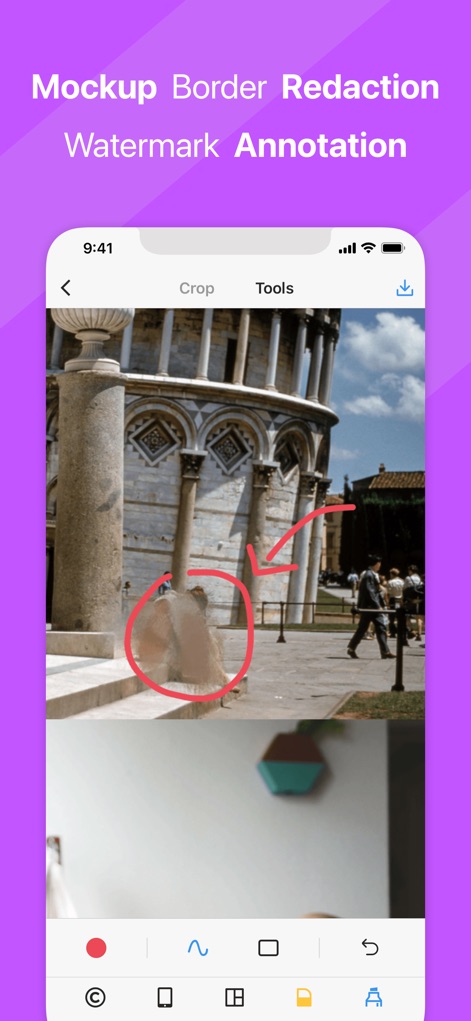
スクリーンショットに円や矢印で視覚的な注釈を追加し、重要情報をぼかすことでプライバシー保護を実現します。
注釈と加工
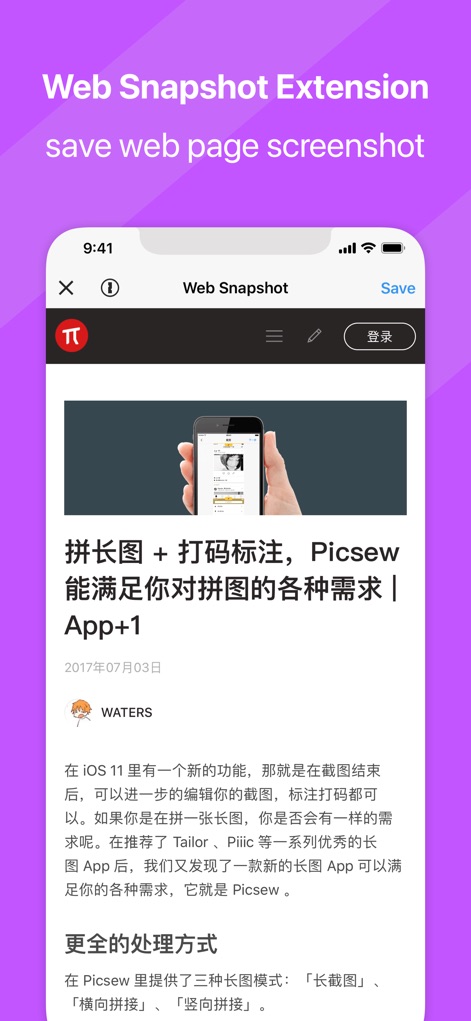
Webスナップショット拡張機能により、ブラウザで表示中のウェブページ全体を一枚の画像としてキャプチャし保存可能です。
ウェブページ保存

「今日のウィジェット」から直接、最近のスクリーンショットを検出して結合し、アプリを開く手間なく操作を完結できます。
ウィジェット連携
説明
Download
類似アプリ
似た機能とユーザー体験を持つアプリ

Photo Stitch!
Thanh Hai Le

StitchPics-Stitch Screenshots
磊 马
Pic Stitch:stitch long image
Hangzhou Keyi Network Technology Co., Ltd

ScreenShot-Webpage Snapshoot
潇 罗

Frame Grabber
Appcano LLC

Castly+
HONGKONG BLUE WHALE AND OCEAN TECHNOLOGY CO., LIMITED

Panorama 360 Camera
松滔 袁

Auto Screenshots Stitch Tailor
Xiamen Dehui Chengzhen Network Technology Co., Ltd.

Tailor - Screenshot Stitching
Foundry 63, LLC
このページはアプリまたはその開発者の公式ページではなく、情報提供および論評を目的として作成された独立した編集出版物です。明示的に別段の記載がない限り、アプリおよびその開発者は、MWM、Apple、Google Play、アプリのパブリッシャー、またはアプリの開発者と提携、承認、後援、認可、またはその他の公式的な関係はなく、このページのいかなる内容も、アプリがMWMのサービスを使用して開発されたことを意味するものではありません。すべての商標、ロゴ、スクリーンショット、その他のコンテンツはそれぞれの所有者の財産です。