
このページはアプリまたはその開発者の公式ページではなく、情報提供および論評を目的として作成された独立した編集出版物です。明示的に別段の記載がない限り、アプリおよびその開発者は、MWM、Apple、Google Play、アプリのパブリッシャー、またはアプリの開発者と提携、承認、後援、認可、またはその他の公式的な関係はなく、このページのいかなる内容も、アプリがMWMのサービスを使用して開発されたことを意味するものではありません。すべての商標、ロゴ、スクリーンショット、その他のコンテンツはそれぞれの所有者の財産です。


Pixelmator Pro: Edit Images
Apple Creator Studioの一員であるこのアプリは、あなたのクリエイティブなビジョンをMacとiPadでシームレスに実現する、洗練されたツール群を提供する。写真編集からデジタルペインティングまで、作業を飛躍的に加速させるだろう。
ダウンロード
50k+ユーザー評価
評価数
355開発元
カテゴリ
Graphics & Design対応言語
11最新バージョン
4.2サイズ
679.8 MBリリース日
2026年1月28日プロのクリエイターと熱心な愛好家向けの包括的なツールセット
Pixelmator Pro: Edit Images の主要機能分析
RAW画像フルサポート
このアプリは、750種類以上の人気デジタルカメラからのRAW画像を完全にサポートしており、高品質な画像編集体験を提供します。
Apple Pencilとグラフィックタブレットのサポート
このアプリは、iPadでのApple PencilとMacでのグラフィックタブレットを完全にサポートしており、筆圧と傾き感度を利用した直感的な描画やペイントを可能にします。
広範なファイル形式互換性
このアプリは、JPEG、PNG、PSD、SVG、AI、MP4など、画像や動画の幅広い人気ファイル形式に対応しており、多様なワークフローにシームレスに統合することを可能にします。
プログレードの色調整
このアプリは、プログレードの色調整ツールを豊富に備えており、写真や動画の色を自在に調整することを可能にします。
レイヤーベース編集とベクター・タイポグラフィ
本ツールは、ベクターシェイプ、タイポグラフィ機能、さらには動画もサポートするレイヤーベースの編集を提供し、ポスター、ウェブページ、アプリなどのデザインをゼロから作成することを可能にします。
包括的なベクターグラフィックツール
本ツールは、ペンツールやフリーフォームペンツールを含む完全なベクターツールセットを提供し、ユーザーが高品質なベクターグラフィックをデザインすることを可能にします。
機械学習による自動化ツール
本ツールは、機械学習を活用したツールを提供し、画像の背景自動削除、色の強化、解像度の向上などを効率的に実行することを可能にします。
高度なレイヤースタイル
ユーザーは、塗りつぶし、ストローク、ドロップシャドウ、インナーシャドウなどのレイヤースタイルを使用して、レイヤーの外観を詳細にカスタマイズできます。
高品質なデュアルテクスチャブラシ
ユーザーは、美しく手作りされたデュアルテクスチャブラシのコレクションを使用して、自然な描画体験を楽しむことができます。
豊富なプリセットとエフェクト
ユーザーは40以上のカラー調整プリセットと70以上の多機能エフェクトを利用して、印象的なビジュアルを迅速に作成し、多様な芸術的表現や特殊なルックを実現できます。
よくある質問
について知っておくべきこと Pixelmator Pro: Edit Images
What is Pixelmator Pro?
Pixelmator Pro is a powerful creative application designed for editing photos, drawing illustrations, painting digital art, and creating various designs. It is also part of Apple Creator Studio.
Is Pixelmator Pro available on iPad?
Yes, Pixelmator Pro is available for iPad, offering a reimagined editing experience optimized for touch and full Apple Pencil support. Users can also sync edits via iCloud between iPad and Mac versions.
Can Pixelmator Pro remove backgrounds from images?
Yes, Pixelmator Pro includes machine learning-powered tools that automatically remove image backgrounds with one click. This feature enhances photo editing workflows efficiently.
Does Pixelmator Pro support Apple Pencil?
Yes, Pixelmator Pro fully supports Apple Pencil on iPad, including hover, squeeze, double-tap, and palm rejection for precise design and painting. It also supports graphics tablets on Mac.
What file formats does Pixelmator Pro support?
Pixelmator Pro opens a wide range of popular image and video formats, including JPEG, PNG, PSD, TIFF, HEIF, SVG, AI, PDF, GIF, BMP, MP4, MOV, and HDR images.
Can I use Pixelmator Pro to design mockups?
Yes, Pixelmator Pro features a new Warp tool and two collections of premium product and apparel mockups. These enable users to quickly showcase designs on various items.
Is Pixelmator Pro suitable for video editing?
Pixelmator Pro supports adjusting colors in videos and can incorporate video layers into designs. It handles various video formats, including MP4 and MOV, with easy-to-use controls.
Can Pixelmator Pro enhance image resolution?
Yes, Pixelmator Pro includes machine learning-powered tools designed to increase the resolution of images. This feature is referred to as "Magical image upscaling."
Does Pixelmator Pro offer color adjustment presets?
Yes, Pixelmator Pro includes over 40 color adjustment presets. Users can combine these with over 70 versatile effects to achieve various artistic or special looks.
Can Pixelmator Pro be used for vector graphics?
Yes, Pixelmator Pro provides a full set of vector tools, including Pen and Freeform Pen tools, to design vector graphics. It also offers customizable Smart Shapes for quick illustration creation.
以下のスクリーンショットと説明は、アプリの公式ストアリスティングから直接取得されたものであり、アプリ開発者の所有物です。
アプリストア
スクリーンショット
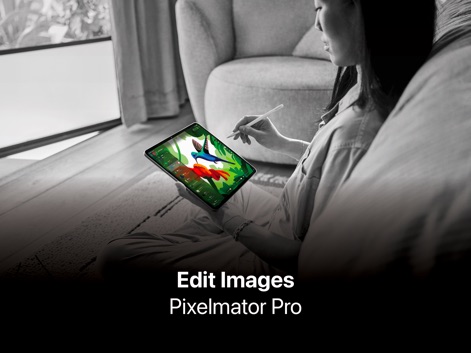
本アプリは、iPad上での直感的な操作と、鮮やかなデジタルイラストレーション作成を可能にします。
iPadで創作体験
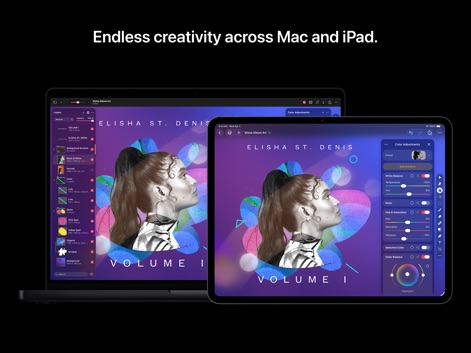
MacとiPad間でシームレスな編集を体験し、高度なレイヤーベース編集と正確な色調整で作品を完璧に仕上げられます。
デバイスを越えた創造
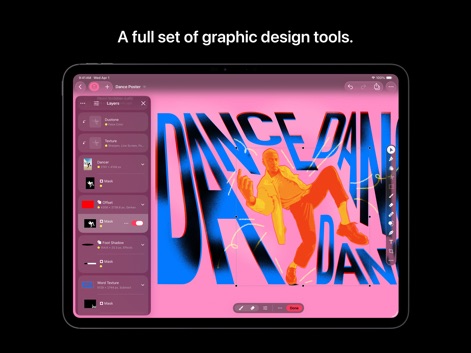
強力なグラフィックデザインツールと、複雑な作品を管理するレイヤー構成、そして魅力的なテキストエフェクトで、プロフェッショナルなデザインを実現します。
グラフィックデザインの真髄
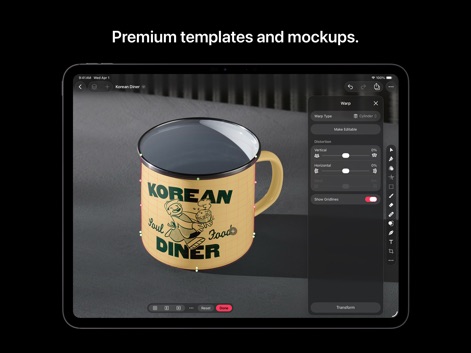
多彩なプレミアムモックアップを活用し、ワープツールでデザインを自在に変形させることで、視覚的に魅力的なプレゼンテーションを作成できます。
テンプレートとモックアップ
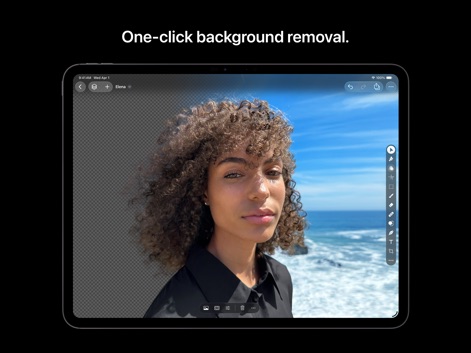
ワンクリックで写真の背景を簡単に除去でき、被写体を際立たせるポートレート編集を直感的に行えます。
背景を瞬時に除去

精密な色彩調整ツールにより、選択的なクラリティ調整と、正確な色相・彩度コントロールで、写真の雰囲気を思いのままに変えられます。
高度な色彩調整
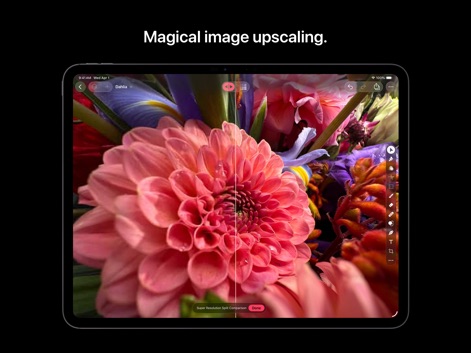
スーパー解像度機能により画像の品質を向上させ、分割比較ビューで効果を即座に確認できます。
魔法の画像高解像化
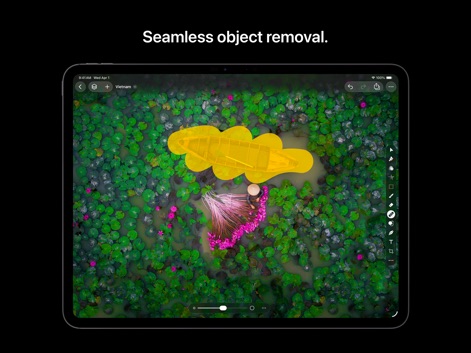
シームレスなオブジェクト除去機能により、写真から不要な要素を簡単に消し去り、コンテンツに応じた補間処理で自然な仕上がりを実現します。
不要なオブジェクト消去
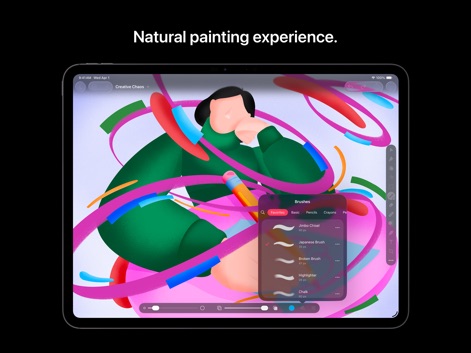
多彩なカスタムブラシを使用して、圧力と傾き感度による自然なペイント体験を提供し、デジタルアートの表現を豊かにします。
直感的なペイント体験
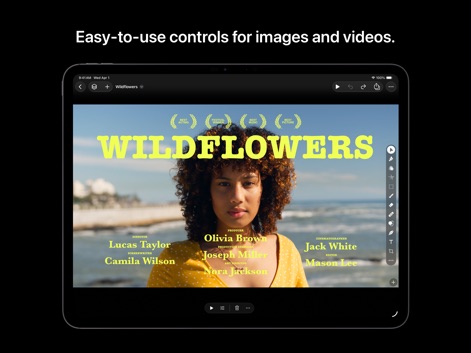
直感的なタイムラインコントロールと、テキストオーバーレイ機能を用いて、動画コンテンツを簡単に編集し、プロ品質のタイトルやクレジットを追加できます。
動画編集も自由自在
説明
Download
類似アプリ
同じカテゴリのトップランクアプリ

Kling AI: AI Image&Video Maker
LOHAS GAMES PTE. LTD.

iScreen - Widgets & Wallpaper
Xiamen ShenZhuo Information Technology Co., Ltd.

Dreamina AI: Image&Video Maker
BYTEDANCE PTE. LTD.

Home AI - AI Interior Design
HUBX YAZILIM HIZMETLERI ANONIM SIRKETI

ibis Paint X
ibis inc.

ThemeKit: Widget & Icon Themes
Woohoo Tech. Ltd.

Sketchbook®
Sketchbook, Inc.

Colorful Widget- Widget&Themes
Guangzhou ZHIFENG Information Technology Co.,Ltd.

ReRoom AI: Interior Design
GM UniverseApps Limited
このページはアプリまたはその開発者の公式ページではなく、情報提供および論評を目的として作成された独立した編集出版物です。明示的に別段の記載がない限り、アプリおよびその開発者は、MWM、Apple、Google Play、アプリのパブリッシャー、またはアプリの開発者と提携、承認、後援、認可、またはその他の公式的な関係はなく、このページのいかなる内容も、アプリがMWMのサービスを使用して開発されたことを意味するものではありません。すべての商標、ロゴ、スクリーンショット、その他のコンテンツはそれぞれの所有者の財産です。