
このページはアプリまたはその開発者の公式ページではなく、情報提供および論評を目的として作成された独立した編集出版物です。明示的に別段の記載がない限り、アプリおよびその開発者は、MWM、Apple、Google Play、アプリのパブリッシャー、またはアプリの開発者と提携、承認、後援、認可、またはその他の公式的な関係はなく、このページのいかなる内容も、アプリがMWMのサービスを使用して開発されたことを意味するものではありません。すべての商標、ロゴ、スクリーンショット、その他のコンテンツはそれぞれの所有者の財産です。


Planit - To-Do List & Calendar
時間とタスクをカードで視覚化し、日々の計画を直感的に操る。このアプリは、あなたの生産性を新たなレベルへ引き上げる。
ダウンロード
750k+ユーザー評価
評価数
37.9K開発元
カテゴリ
Productivity対応言語
1最新バージョン
9.3.6サイズ
175.7 MBリリース日
2022年2月18日現代的なAppleユーザーのニーズに応える効率的な計画ツール
アプリ「Planit - To-Do List & Calendar」の主要機能分析
便利なウィジェット機能
ユーザーは、ホーム画面から直接タスクや予定を確認でき、重要な情報への迅速なアクセスが可能です。
高機能なTo-Doリスト管理
ユーザーは、日々のタスクや長期的な目標を効率的に整理し、進捗を追跡することが可能です。
スマートなリマインダー機能
本アプリは、設定した時間や場所に合わせたリマインダーを提供し、ユーザーは重要なタスクや予定を見逃すことがありません。
シームレスなAppleデバイス連携
本ツールは、Appleデバイス間でデータを同期し、ユーザーはどこからでもタスクやスケジュールにアクセスできます。
統合型カレンダービュー
本アプリは、予定やイベントを直感的なカレンダー形式で表示し、ユーザーはスケジュール全体を把握することができます。
視覚的に整理されたカードUI
このアプリは、モダンで視覚的に明確なカードベースのインターフェースを提供し、ユーザーはタスクや計画を容易に管理できます。
よくある質問
について知っておくべきこと Planit - To-Do List & Calendar
What is Planit?
Planit is a mobile application designed to help users plan their day efficiently through an integrated to-do list and calendar system, enabling detailed task organization and event scheduling.
Does Planit include a calendar feature?
Yes, Planit features a comprehensive calendar view where users can see their scheduled tasks and events, facilitating clear organization of daily, weekly, and monthly commitments.
How does Planit organize tasks?
Planit allows users to organize tasks into distinct categories like 'Today' and 'Someday.' Users can add tasks with specific dates, reminders, and assign them to custom groups like 'Family' or 'Important.'
Can Planit sync tasks across multiple devices?
Yes, Planit supports synchronization across multiple devices. This feature allows users to access and manage their to-do lists and calendar events seamlessly on different platforms.
Does Planit offer widgets for the home and lock screen?
Yes, Planit offers both Lock Screen Widgets and Home Widgets. These widgets provide quick access to view upcoming tasks and calendar events directly from the device's main screens.
How do I add a new to-do item in Planit?
To add a new to-do item in Planit, users navigate to the main task view and select the '+ Add a Task' button. They then input the task details, including date, reminders, and categories.
Where can I find the privacy policy for Planit?
The privacy policy for the Planit app is accessible at the provided URL: https://www.notion.so/Privacy-Policy-44e805eaaa4b428fae5a2a3256dcdb28?pvs=4.
Where can I find the terms of use for Planit?
The terms of use for the Planit application are available at the following URL: https://www.apple.com/legal/internet-services/itunes/dev/stdeula/.
以下のスクリーンショットと説明は、アプリの公式ストアリスティングから直接取得されたものであり、アプリ開発者の所有物です。
アプリストア
スクリーンショット

このアプリは、カラフルなタスクカードと「Today」「Someday」といった明確なカテゴリ分けにより、毎日の計画を視覚的に整理します。
タスクを整理
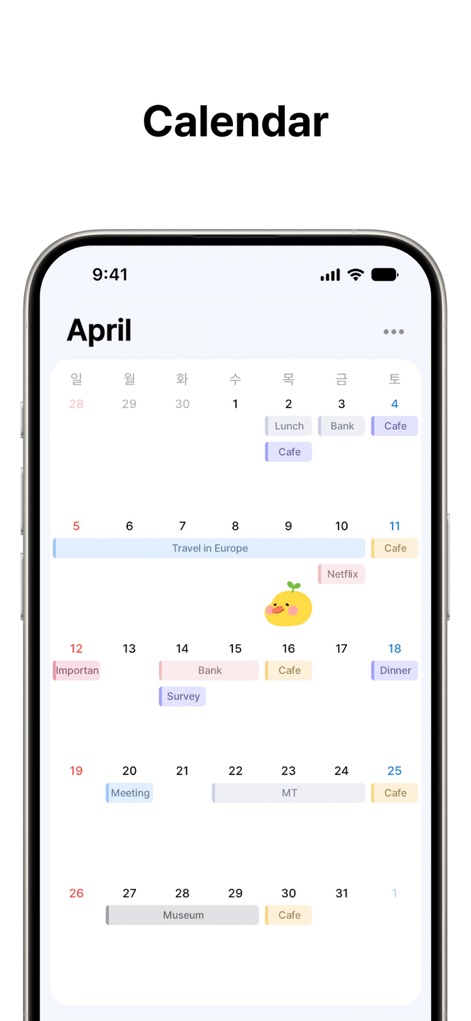
月間カレンダー表示により、ユーザーは全体像を把握でき、色分けされたイベントブロックと日付に直接表示されるタスクで、視覚的にスケジュールを管理できます。
全体像を把握
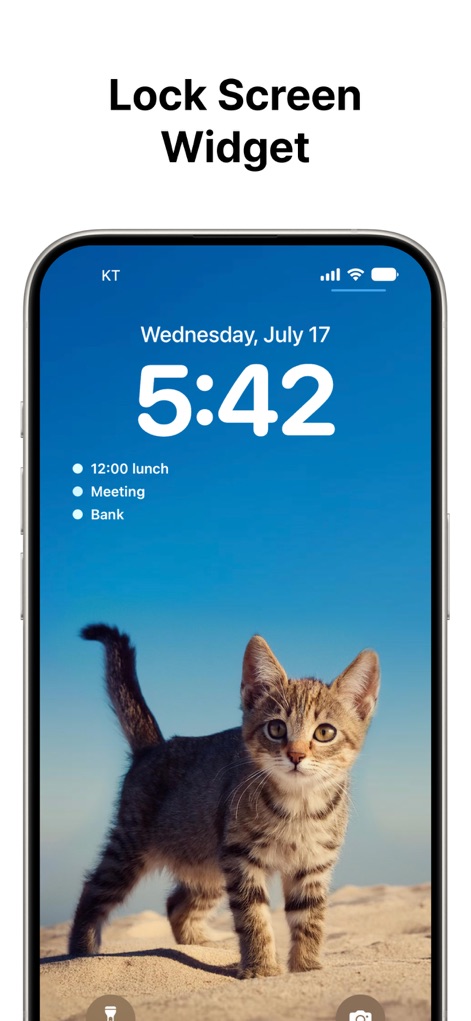
ロック画面ウィジェットは、時刻と日付とともに今日の重要な予定を一覧表示し、ユーザーがアプリを開くことなく、迅速にタスクを確認できる機能を提供します。
即座に確認
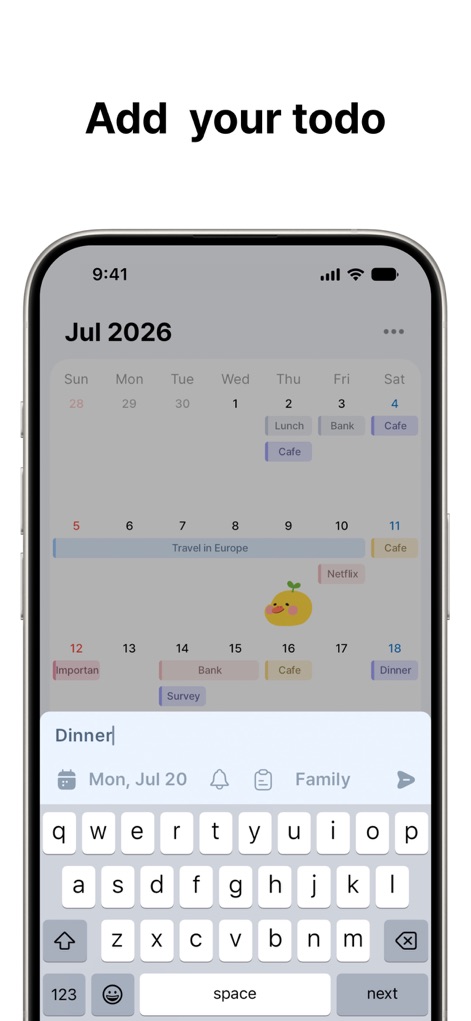
タスク追加画面では、下部の入力フィールドから新しい予定を簡単に入力でき、日付選択やタグ付けオプションで詳細を設定することが可能です。
簡単タスク作成

このアプリは、ラップトップやタブレットなど複数のデバイス間でスケジュールデータを同期し、ユーザーは常に最新の情報を異なる画面で確認できます。
デバイス間で同期

複数のホーム画面ウィジェットを提供し、ユーザーはカレンダーの月間概要や今後のタスクリストをホーム画面から直接確認でき、必要な情報に素早くアクセスできます。
一目で把握
説明
Download
類似アプリ
似た機能とユーザー体験を持つアプリ

Smile Todo - Time Management
EMMO Corp.

That Shopping List
Markus Liebschner

Lists To do
Thomas Tsopanakis

To Do List Widget
TAPUNIVERSE LLC

Daily Planner & Task Manager
Konstantin Bolgar

DailyTodo - To-Do List & Tasks
SEOLHEE LEE
Table Notes Spreadsheet maker
WEBDIA INC.

Minimal Tabbed ToDo List
App Palette LLC

Do! - Simple To Do List
SIMPLERION Co., Ltd
このページはアプリまたはその開発者の公式ページではなく、情報提供および論評を目的として作成された独立した編集出版物です。明示的に別段の記載がない限り、アプリおよびその開発者は、MWM、Apple、Google Play、アプリのパブリッシャー、またはアプリの開発者と提携、承認、後援、認可、またはその他の公式的な関係はなく、このページのいかなる内容も、アプリがMWMのサービスを使用して開発されたことを意味するものではありません。すべての商標、ロゴ、スクリーンショット、その他のコンテンツはそれぞれの所有者の財産です。