
このページはアプリまたはその開発者の公式ページではなく、情報提供および論評を目的として作成された独立した編集出版物です。明示的に別段の記載がない限り、アプリおよびその開発者は、MWM、Apple、Google Play、アプリのパブリッシャー、またはアプリの開発者と提携、承認、後援、認可、またはその他の公式的な関係はなく、このページのいかなる内容も、アプリがMWMのサービスを使用して開発されたことを意味するものではありません。すべての商標、ロゴ、スクリーンショット、その他のコンテンツはそれぞれの所有者の財産です。


ダウンロード
12.5M+ユーザー評価
評価数
12.6K開発元
カテゴリ
Utilities対応言語
3最新バージョン
4.0.0サイズ
213.3 MBリリース日
2014年5月28日高効率なメール管理とクロスボーダーコミュニケーションのための包括的ツール
QQ邮箱HD 主要機能分析
外国語メールの中国語翻訳
本アプリは、外国語のメールを中国語に翻訳する機能を提供し、国際的なコミュニケーションとクロスボーダービジネスの効率を大幅に向上させます。
大容量ファイル転送ステーション
本ツールは、ネットワーク上の大容量ファイルを一時的に保存および共有するための転送ステーション機能を提供し、大容量ファイルの送信要件に対応します。
複数メールボックス管理とユニバーサルプロトコルサポート
このアプリは、QQメール以外の様々なメールボックスも追加できる汎用メールプロトコルを完全にサポートしており、ユーザーは複数のメールアカウントを一元的に管理できます。
多様な添付ファイルのオンラインプレビュー
本ツールは、ドキュメント、画像、音声、ビデオファイル、圧縮パッケージ、emlファイルなど、様々な種類の添付ファイルをオンラインでプレビューする機能を提供し、効率的な情報確認を可能にします。
カレンダープラグインによるイベント管理
このアプリは、カレンダープラグインを有効にすることで、イベントを効率的に管理する機能を提供し、ユーザーのスケジュール管理をサポートします。
インテリジェントな広告メール集約
本ツールは、広告メールをインテリジェントに集約する機能を追加し、ユーザーは重要なメールに集中し、受信トレイの整理を維持できます。
効率的な連絡先管理
このアプリは、連絡先を効率的に管理し、最近の会話を素早く見つける機能を提供するため、ユーザーは迅速なコミュニケーションが可能です。
夜間モードによる新着メール通知ミュート
本ツールは、夜間モードを有効にすることで、夜間の新着メール通知をミュートする機能を提供し、ユーザーは中断されることなく休息できます。
よくある質問
について知っておくべきこと QQ邮箱HD
What is QQ邮箱HD?
QQ邮箱HD is an email client that supports general mail protocols, allowing users to manage all their mailboxes on their phone. It offers features like multi-account support, attachment preview, and various plug-ins.
Does QQ Mail support multiple email accounts?
Yes, QQ Mail supports multiple email accounts. It fully supports general mail protocols, enabling users to add various other mailboxes alongside QQ Mail, such as Gmail, Outlook, and Exchange.
Can QQ邮箱HD preview attachments?
Yes, QQ邮箱HD supports online preview of various attachment types. Users can preview documents, images, audio, video files, compressed packages, and EML files directly within the app.
How can I manage new mail notifications in QQ Mail?
QQ Mail allows flexible notification management. Users can set notifications only for starred contacts, configure options for different email accounts, choose multiple sound effects, and enable Night Mode to mute new mail notifications at night.
Does QQ邮箱HD include a calendar feature?
Yes, QQ邮箱HD includes a Calendar plug-in. This feature enables users to manage events efficiently directly within the application. The calendar allows for flexible event management and reminders.
Can QQ Mail translate foreign language emails?
Yes, QQ Mail translates foreign language emails. The app provides a new feature to translate mails in foreign languages into Chinese, enhancing communication for users.
How does QQ邮箱HD handle large file transfers?
QQ邮箱HD utilizes a Transfer Station plug-in for large file transfers. This feature provides temporary storage on the network for large files, making it convenient for users to manage and share them.
Can I send greeting cards using QQ邮箱HD?
Yes, QQ邮箱HD allows users to send greeting cards. A new feature enables sending greeting cards directly from your phone, and a Mailbox Plug-in specifically supports selecting a greeting card to convey blessings.
Can QQ邮箱HD import WeChat files?
Yes, QQ邮箱HD can import WeChat files. The File Transfer feature allows for easy import of WeChat files, eliminating concerns about file expiration.
以下のスクリーンショットと説明は、アプリの公式ストアリスティングから直接取得されたものであり、アプリ開発者の所有物です。
アプリストア
スクリーンショット
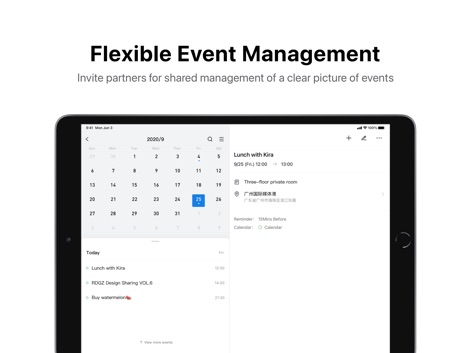
ユーザーは、カレンダービューで日付を選択し、イベントの詳細情報(時間、場所、リマインダー)を確認できます。
柔軟なイベント管理

メール作成画面では、イベントやオンラインドキュメントを直接挿入でき、本文にはリンクや添付ファイルを追加できます。
多彩なメール作成

このアプリは、中国語(簡体字)のメニュー表示に対応しており、「すべての受信箱」や「QQの受信箱」といった項目が確認できます。
多言語インターフェース

この画面では、GmailやOutlookなど複数のメールサービスを追加するオプションと、QQメールやTencent Exmailなどの中国系サービスが一覧表示されています。
複数アカウント対応

さまざまなファイル形式(動画、スプレッドシート、画像)が一覧で表示され、各ファイルのサイズと状態を確認できます。
ファイル転送機能
説明
Download
類似アプリ
似た機能とユーザー体験を持つアプリ

Microsoft Outlook
Microsoft Corporation

Mail: Email, Cloud, Calendar
V Kontakte OOO

Yandex Mail: Email & Cloud
DIRECT CURSUS COMPUTER SYSTEMS TRADING LLC

Gmail - Email by Google
Google LLC

Yahoo Mail
Yahoo Inc.

Proton Mail - Encrypted Email
Proton AG

Email - Edison Mail
Edison Software Inc.

Zoho Mail - Email and Calendar
Zoho Corporation

GMX - Mail & Cloud
1&1 Mail & Media GmbH
このページはアプリまたはその開発者の公式ページではなく、情報提供および論評を目的として作成された独立した編集出版物です。明示的に別段の記載がない限り、アプリおよびその開発者は、MWM、Apple、Google Play、アプリのパブリッシャー、またはアプリの開発者と提携、承認、後援、認可、またはその他の公式的な関係はなく、このページのいかなる内容も、アプリがMWMのサービスを使用して開発されたことを意味するものではありません。すべての商標、ロゴ、スクリーンショット、その他のコンテンツはそれぞれの所有者の財産です。