
このページはアプリまたはその開発者の公式ページではなく、情報提供および論評を目的として作成された独立した編集出版物です。明示的に別段の記載がない限り、アプリおよびその開発者は、MWM、Apple、Google Play、アプリのパブリッシャー、またはアプリの開発者と提携、承認、後援、認可、またはその他の公式的な関係はなく、このページのいかなる内容も、アプリがMWMのサービスを使用して開発されたことを意味するものではありません。すべての商標、ロゴ、スクリーンショット、その他のコンテンツはそれぞれの所有者の財産です。


QQ邮箱
言語の壁を破壊し、混沌としたコミュニケーションを統べる、プロフェッショナルのためのデジタル覇権ツール。
ダウンロード
100M+ユーザー評価
評価数
138.9K開発元
カテゴリ
Productivity対応言語
3最新バージョン
7.1.5サイズ
166.8 MBリリース日
2011年10月24日QQ邮箱の包括的分析:プロフェッショナル向け主要機能評価
高度なメール管理と生産性向上ツールがビジネスコミュニケーションを加速
外国語メールの翻訳機能
本ツールは、外国語で受信したメールを中国語に翻訳する機能を提供し、多言語間でのビジネスコミュニケーションを円滑にします。特に国際的なやり取りが多いユーザーにとって非常に有用です。
複数アカウント管理
このアプリは、QQメールアカウントに加えて、様々なプロトコルに対応した他のメールサービスアカウントを一元的に追加し、管理する機能を提供します。ユーザーは異なるメールボックスを一つのインターフェースで効率的に運用することが可能です。
高度なメール送受信管理
ユーザーは、複数のメールボックスからのメールを同期的に受信し、一括して管理できます。また、広告メールのインテリジェントな集約機能が備わっており、受信トレイの整理に貢献します。
多種多様な添付ファイルのオンラインプレビュー
ドキュメント、画像、音声、ビデオファイル、圧縮パッケージ、EMLファイルなど、多岐にわたる種類の添付ファイルをオンラインで直接プレビューする機能が提供されます。これにより、ユーザーはファイルをダウンロードする手間なく内容を確認できます。
大容量ファイル転送ステーション
ユーザーは、ネットワーク上で一時的に大容量ファイルを保存・共有できる転送ステーションを利用することが可能です。これにより、ビジネスにおける大きなファイルの受け渡しがスムーズに行えます。
高度なメール通知設定
このアプリは、スター付き連絡先からのメールのみ通知を有効にする機能や、複数のサウンドエフェクト、夜間モードでの通知ミュートなど、きめ細やかな通知設定を可能にします。ユーザーは集中力を維持し、重要なメールにのみ注意を払うことができます。
効率的な連絡先管理
ユーザーは、アプリ内の連絡先機能を通じて、重要な連絡先を管理し、過去の会話履歴を素早く検索することが可能です。これにより、コミュニケーションの効率が向上します。
カレンダー連携
本ツールはカレンダープラグインとの連携機能を提供し、ユーザーはメールと連動して重要なイベントや会議を効率的に管理し、スケジュールを見逃すことなく業務を進めることができます。
よくある質問
について知っておくべきこと QQ邮箱
What is QQ Mail?
QQ Mail is an email application that supports various mail protocols, allowing users to manage multiple mailboxes. It provides features like mail synchronization, attachment preview, and notification customization.
Does QQ Mail support multiple email accounts?
Yes, QQ Mail supports multiple email accounts. It offers full support for general mail protocols, allowing users to add and manage various mailboxes beyond QQ Mail, including Gmail and Outlook.
Can I preview attachments directly in the QQ Mail app?
Yes, QQ Mail supports online preview of various attachment types. This includes documents, images, audio and video files, compressed packages, and eml files.
How much does QQ Mail VIP auto-renewal cost monthly?
The QQ Mail VIP Monthly Auto-Renewal subscription costs RMB 22 per month. This amount is charged to your Apple iTunes account within 24 hours before expiration.
How do I cancel my QQ Mail VIP auto-renewal subscription?
To cancel your QQ Mail VIP subscription, go to Settings > Apple ID > Subscriptions, select the QQ Mail VIP subscription, and tap Cancel Subscription. You must do this at least 24 hours before the billing period ends.
Does QQ Mail offer translation services for emails?
Yes, QQ Mail offers a translation feature. It can translate mails in foreign languages into Chinese, enhancing user convenience for international communication.
What is QQMail Drive and its features?
QQMail Drive is a feature for file storage with no expiration date. It supports multi-device synchronization and facilitates easy sharing of files within the QQ Mail app.
Can QQ Mail help manage calendar events?
Yes, QQ Mail can help manage calendar events. It includes a Calendar plug-in to efficiently manage events and offers flexible event management capabilities.
What types of email accounts can I add to QQ Mail?
QQ Mail supports adding various email accounts, including QQ Mail, Tencent Exmail, 163 Mail, 126 Mail, Gmail, Outlook, Microsoft 365, and Exchange, among others.
Does QQ Mail provide options for temporary storage of large files?
Yes, QQ Mail includes a Transfer Station plug-in. This feature allows for the temporary storage of large files on the network, accessible within the application.
以下のスクリーンショットと説明は、アプリの公式ストアリスティングから直接取得されたものであり、アプリ開発者の所有物です。
アプリストア
スクリーンショット

セキュアなファイル管理
QQメールドライブ機能は、ドキュメントや画像ファイルなど多様なデータを無期限に保存し、Last Modified順でのソートや転送ステーションでの管理が可能です。

豊富なコンテンツ作成
メール作成時にイベントやオンラインドキュメントを簡単に添付でき、より豊かで詳細な情報を効率的に共有できます。
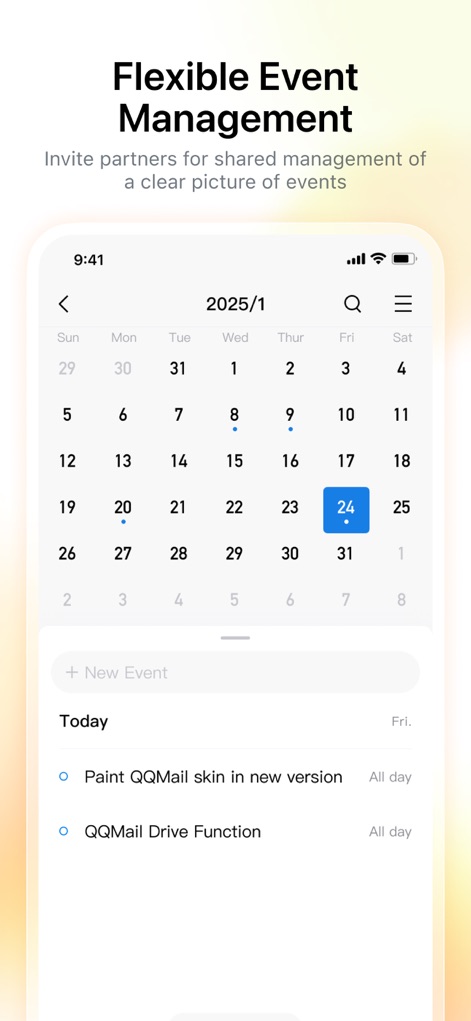
柔軟なイベント管理
統合されたカレンダー機能により、新しいイベントの追加や既存のイベント表示を通じて、ユーザーはスケジュールを柔軟に管理できます。
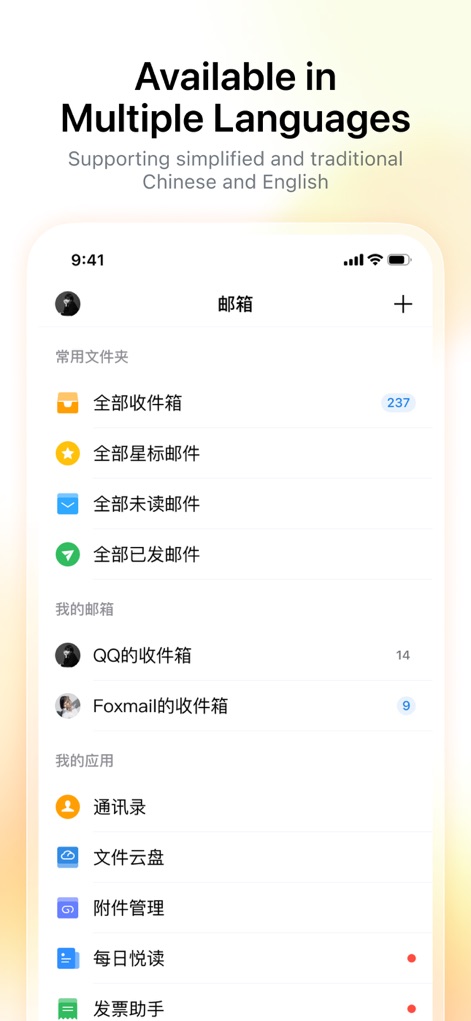
多言語対応メール
日本語を含む多言語に対応し、全ての受信箱や連絡先へのスムーズなアクセスを提供することで、グローバルなビジネスコミュニケーションを強力にサポートします。
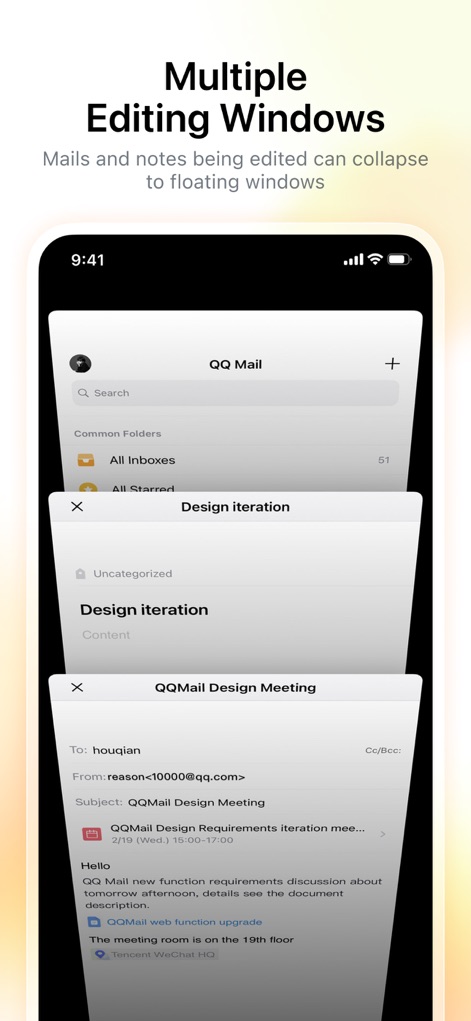
複数ウィンドウ作業
複数の編集ウィンドウをフローティング表示で同時に操作できるため、メール作成とノート編集などのマルチタスク作業が格段に効率化されます。

複数アカウント連携
GmailやOutlookといった主要なメールサービスを含め、複数のアカウントを本アプリ一つで簡単に追加し、一元的に管理できます。
説明
Download
類似アプリ
似た機能とユーザー体験を持つアプリ

Microsoft Outlook
Microsoft Corporation

Mail: Email, Cloud, Calendar
V Kontakte OOO

Yandex Mail: Email & Cloud
DIRECT CURSUS COMPUTER SYSTEMS TRADING LLC

Gmail - Email by Google
Google LLC

Yahoo Mail
Yahoo Inc.

Proton Mail - Encrypted Email
Proton AG

Email - Edison Mail
Edison Software Inc.

Zoho Mail - Email and Calendar
Zoho Corporation

GMX - Mail & Cloud
1&1 Mail & Media GmbH
このページはアプリまたはその開発者の公式ページではなく、情報提供および論評を目的として作成された独立した編集出版物です。明示的に別段の記載がない限り、アプリおよびその開発者は、MWM、Apple、Google Play、アプリのパブリッシャー、またはアプリの開発者と提携、承認、後援、認可、またはその他の公式的な関係はなく、このページのいかなる内容も、アプリがMWMのサービスを使用して開発されたことを意味するものではありません。すべての商標、ロゴ、スクリーンショット、その他のコンテンツはそれぞれの所有者の財産です。