QuiltSize
QuiltSize
ダウンロード: App Store

このページはアプリまたはその開発者の公式ページではなく、情報提供および論評を目的として作成された独立した編集出版物です。明示的に別段の記載がない限り、アプリおよびその開発者は、MWM、Apple、Google Play、アプリのパブリッシャー、またはアプリの開発者と提携、承認、後援、認可、またはその他の公式的な関係はなく、このページのいかなる内容も、アプリがMWMのサービスを使用して開発されたことを意味するものではありません。すべての商標、ロゴ、スクリーンショット、その他のコンテンツはそれぞれの所有者の財産です。

ロゴ: QuiltSize
ダウンロード: App Store

QuiltSize

理想的なキルト作りは、計算ではなくクリエイティビティに集中すべきです。計算用のメモ帳を使わずに、レイアウトの視覚化、マットレスサイズの設定、正確なブロック数の算出を瞬時に行えます。

主要数値

ダウンロード

51K+

ユーザー評価

1.3/5

評価数

0

開発元

NNN Software LLC

カテゴリ

Lifestyle

対応言語

1

最新バージョン

2.5.2

サイズ

14.6 MB

リリース日

2015年12月21日
機能

悩まずに理想のキルトをデザイン

QuiltSizeが複雑な計算を処理するので、あなたはキルト作りの創造的な側面に集中できます。レイアウトを計画し、フィット感を確認して、自信を持って次のプロジェクトを始めましょう。

あらゆるベッドにフィット

標準的なマットレスサイズを選択するか、サイドの垂れ幅や枕の折り込み分を考慮したカスタム寸法を作成して、プロのような仕上がりに。

即座に視覚化

ストレートやオンポイントのレイアウト、サッシング、複数のボーダーオプションを試しながら、リアルタイムで図面が更新されるのを確認できます。

以下のスクリーンショットと説明は、アプリの公式ストアリスティングから直接取得されたものであり、アプリ開発者の所有物です。

アプリストア

スクリーンショット
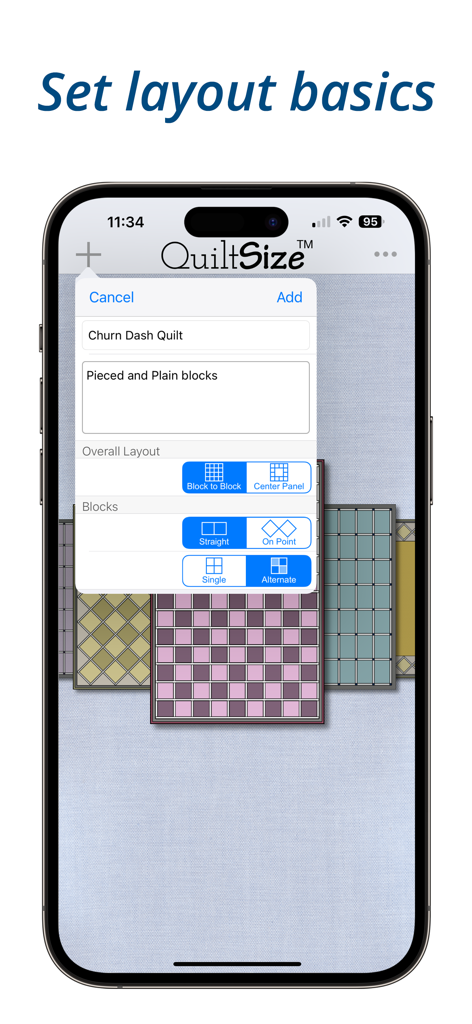
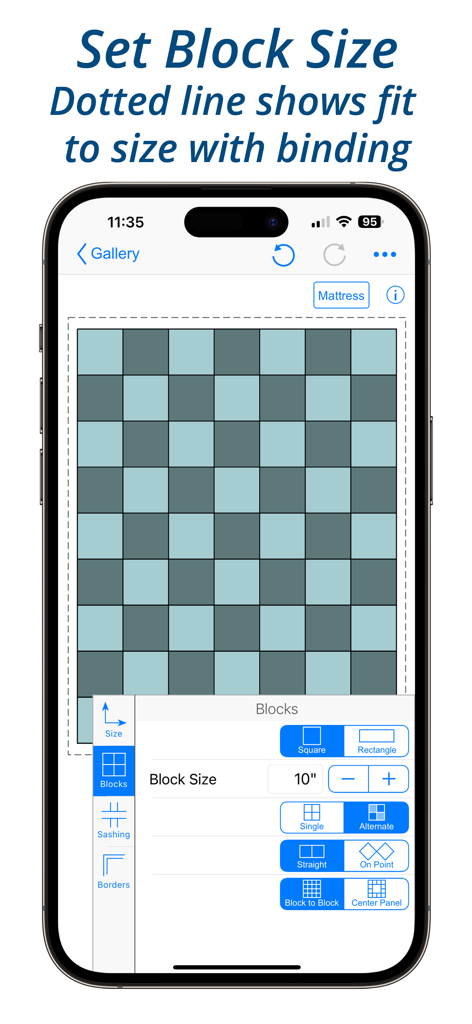
QuiltSize - キルトの基本レイアウトとブロックパターンを設定するためのQuiltSizeアプリのインターフェース
キルトの基本レイアウトとブロックパターンを設定するためのQuiltSizeアプリのインターフェース

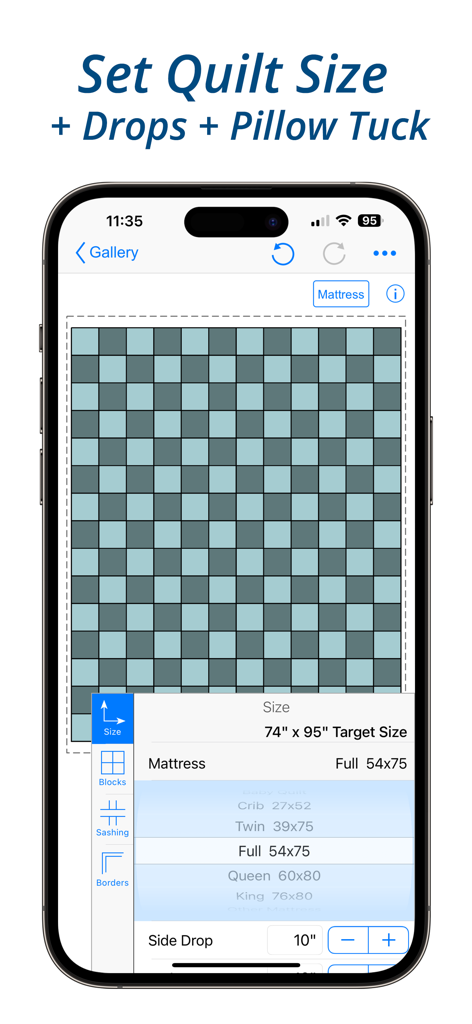
QuiltSize - キルトのレイアウトとマットレスのサイズオプションを表示するQuiltSizeアプリの画面
キルトのレイアウトとマットレスのサイズオプションを表示するQuiltSizeアプリの画面

QuiltSize - キルトブロックのレイアウトオプションとプレビュー図を表示するスマートフォンの画面
キルトブロックのレイアウトオプションとプレビュー図を表示するスマートフォンの画面

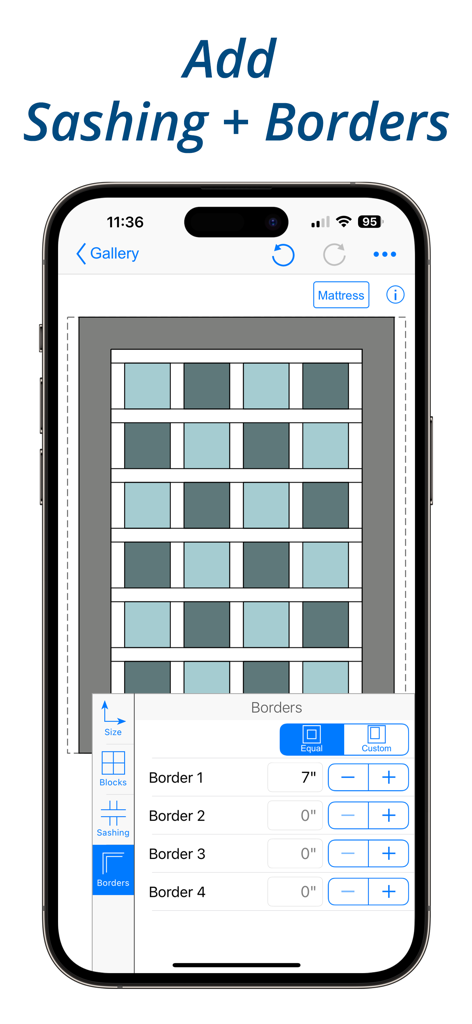
QuiltSize - サッシングとボーダーの幅をカスタマイズするオプション付きのキルトレイアウト図面を表示する画面
サッシングとボーダーの幅をカスタマイズするオプション付きのキルトレイアウト図面を表示する画面

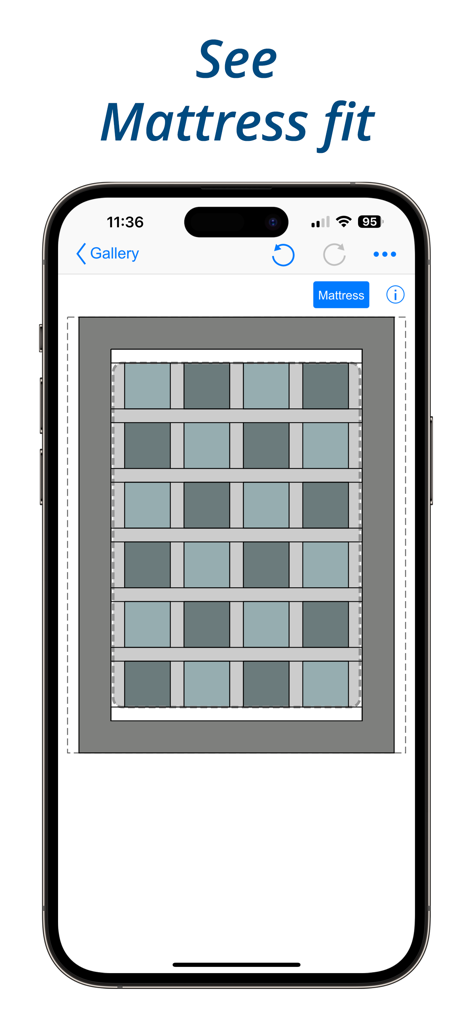
QuiltSize - マットレスへのフィット感を視覚化して表示するQuiltSizeアプリのキルトレイアウト図面
マットレスへのフィット感を視覚化して表示するQuiltSizeアプリのキルトレイアウト図面

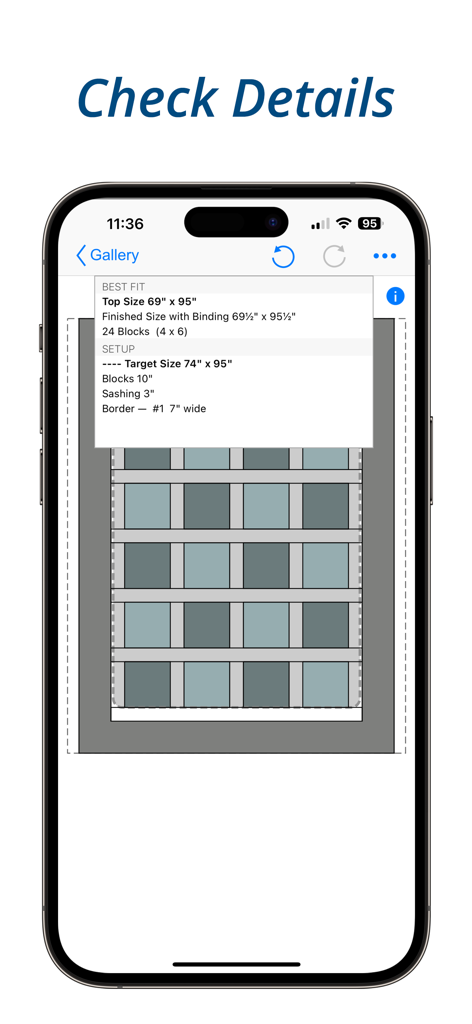
QuiltSize - キルトの寸法とブロックレイアウトの詳細を表示するモバイル画面

キルトの寸法とブロックレイアウトの詳細を表示するモバイル画面

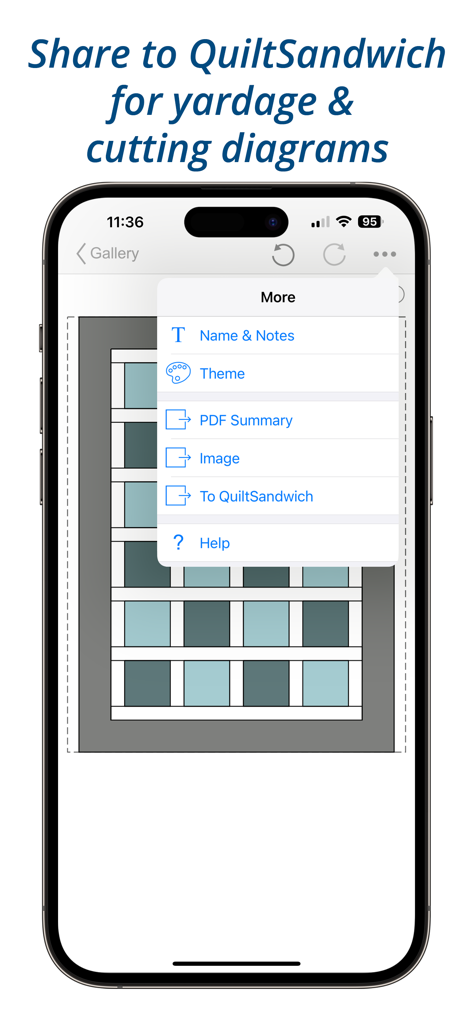
QuiltSize - 布地の必要量や裁断図のためにQuiltSandwichへキルトレイアウトを共有するオプションを表示したメニュー画面

布地の必要量や裁断図のためにQuiltSandwichへキルトレイアウトを共有するオプションを表示したメニュー画面

説明

“How many blocks do I need?” Using quilt and block size QuiltSize calculates the number of blocks and creates a diagram. Refine the layout with borders, sashing, and setting — the diagram instantly adds and subtracts blocks to show how closely quilt layout fits to the size quilt you wanted. IMPORTANT NOTE: Neither QuiltSize nor QuiltSandwich provide block designs. There are marvelous resources available to quilters for block designs — from fancy programs to pencil and paper. If you want to use pencil and paper, check out the app QuiltPaper. QuiltPaper creates unique quilter’s graph papers that can be printed or colored on your device. Three steps (no in-app purchases!) is all it takes to know exactly how many blocks you’ll need — STEP 1. Set the ideal size for the quilt. Tap to choose a standard mattress or set a custom size. Then, add side drops, end drops and a pillow tuck until it is just right. STEP 2. Use menus to select an overall layout, choose setting, set block size, and add sashing and borders: Layout — Choice of Block-to-block or Center panel Setting — Tap to switch between Straight or On point Blocks — Choose Squares or Rectangles Pattern — Tap to switch between a pattern of Single or Alternating blocks Sashing — Choice of Horizontal or Vertical layout and Cornerstone options Borders — Ability to add four borders, width can vary on each side STEP 3. How’s the diagram look? Not quite right? Play with menu options to instantly update the layout until it is just right! It’s your plan, so of course you can share it! Share your project layout diagram as an Image or with notes as a PDF. ***** Want help with the quilt math to create your project? QuiltSandwich does the quilt math so you can quickly answer the question, “How much fabric do I need?” Just a tap will share the QuiltSize layout to QuiltSandwich! QuiltSize sends the blocks as placeholders, and adds the pieces for sashing, borders, center panel, binding, batting and backing. QuiltSandwich creates yardage and cutting diagrams for all the pieces. Replace the placeholder blocks with the size and count of the block pieces and you’ll have a full set of yardage and cutting diagrams. Got questions or comments? We’re here to help! Go to our website at http://www.quiltingapps.com/support-for-quiltsize.html for tips and video helps or to send a message. Your design. Your project. Our math.

Download

ダウンロード: App Store

このページはアプリまたはその開発者の公式ページではなく、情報提供および論評を目的として作成された独立した編集出版物です。明示的に別段の記載がない限り、アプリおよびその開発者は、MWM、Apple、Google Play、アプリのパブリッシャー、またはアプリの開発者と提携、承認、後援、認可、またはその他の公式的な関係はなく、このページのいかなる内容も、アプリがMWMのサービスを使用して開発されたことを意味するものではありません。すべての商標、ロゴ、スクリーンショット、その他のコンテンツはそれぞれの所有者の財産です。