Realsee 3D virtual tour
ダウンロード: App Store

このページはアプリまたはその開発者の公式ページではなく、情報提供および論評を目的として作成された独立した編集出版物です。明示的に別段の記載がない限り、アプリおよびその開発者は、MWM、Apple、Google Play、アプリのパブリッシャー、またはアプリの開発者と提携、承認、後援、認可、またはその他の公式的な関係はなく、このページのいかなる内容も、アプリがMWMのサービスを使用して開発されたことを意味するものではありません。すべての商標、ロゴ、スクリーンショット、その他のコンテンツはそれぞれの所有者の財産です。


ロゴ: Realsee 3D virtual tour
ダウンロード: App Store

Realsee 3D virtual tour

スマートフォンで物理的な空間を没入感のある3Dウォークスルーに変換。不動産、建築、建設のプロフェッショナルが、高解像度の空間データをキャプチャ、編集、共有するためのオールインワンソリューションです。

主要数値

ダウンロード

10K+

ユーザー評価

4.4/5

評価数

0

開発元

Beike-Realsee-Technology-HK-Limited

カテゴリ

Lifestyle

対応言語

6

最新バージョン

3.59.1

サイズ

603.6 MB

リリース日

2022年8月4日
機能

プロフェッショナルな3Dデジタルツインでビジネスを強化

数分で没入感のあるバーチャルツアーをキャプチャ、作成、共有できます。不動産業者でも建築家でも、Realseeは比類のない精度で空間を提示するためのツールを提供します。

スマートフォン対応3Dキャプチャ

高価な機器は不要です。スマートフォンまたは360度カメラを使用して、現場で即座に忠実度の高いVRウォークスルーを生成します。

精密CAD・BIMエクスポート

ダウンロード可能な間取り図、点群(E57)、OBJモデルで技術ワークフローを合理化し、AutoCADおよびRevitですぐに使用できます。

以下のスクリーンショットと説明は、アプリの公式ストアリスティングから直接取得されたものであり、アプリ開発者の所有物です。

アプリストア

スクリーンショット
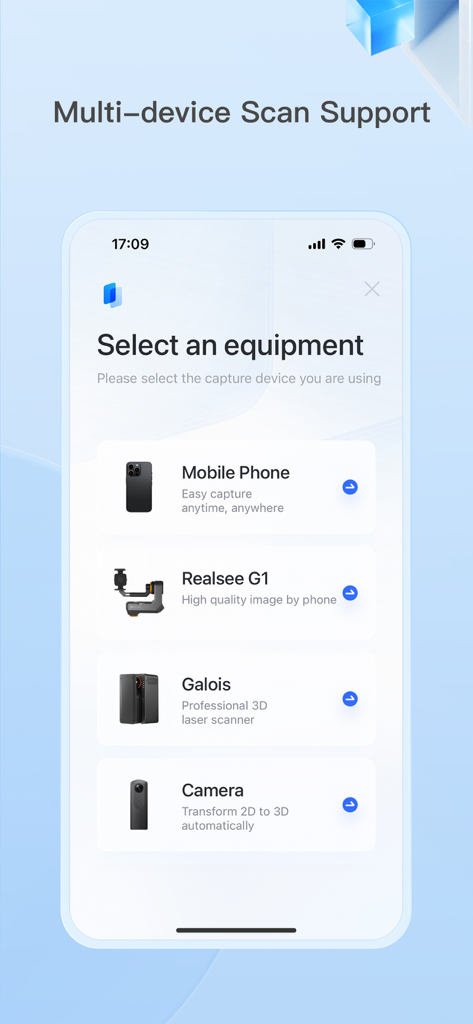
Realsee 3D virtual tour - モバイルアプリのインターフェースに、携帯電話、Realsee G1、Galoisレーザースキャナー、3Dカメラなどのスキャン機器を選択するオプションが表示されています。
モバイルアプリのインターフェースに、携帯電話、Realsee G1、Galoisレーザースキャナー、3Dカメラなどのスキャン機器を選択するオプションが表示されています。

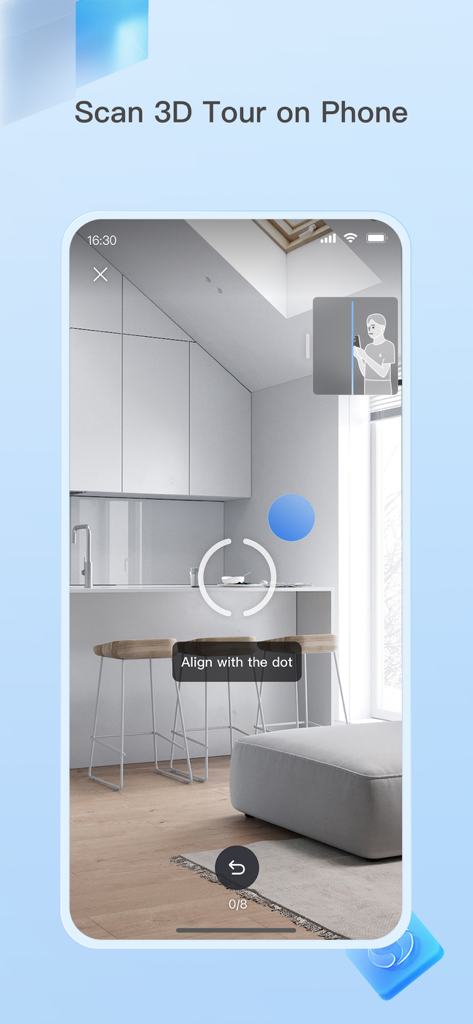
Realsee 3D virtual tour - Realseeアプリのスマートフォンインターフェースに、ドットに合わせて指示を出す、部屋の3Dスキャンプロセスが表示されています。
Realseeアプリのスマートフォンインターフェースに、ドットに合わせて指示を出す、部屋の3Dスキャンプロセスが表示されています。

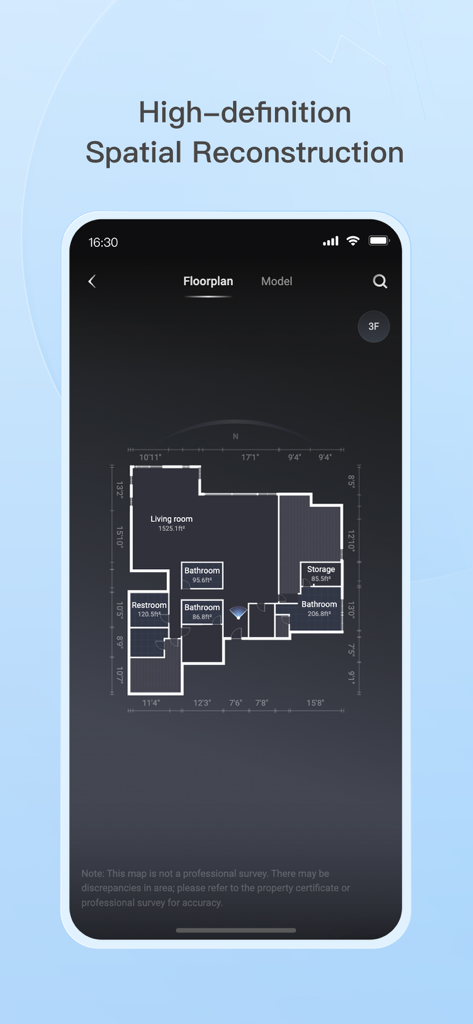
Realsee 3D virtual tour - Realseeアプリのインターフェースに、部屋のラベルと正確な測定値が付いた詳細な間取り図が表示され、空間再構築が行われています。
Realseeアプリのインターフェースに、部屋のラベルと正確な測定値が付いた詳細な間取り図が表示され、空間再構築が行われています。

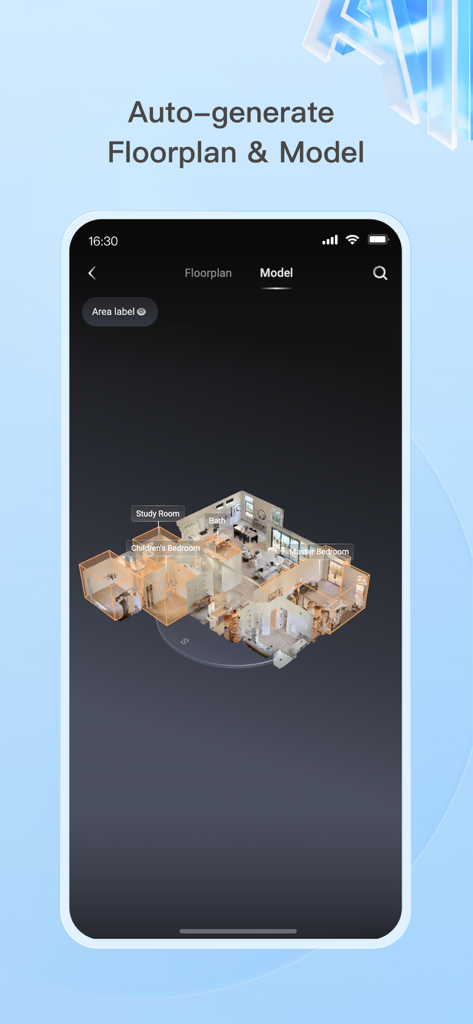
Realsee 3D virtual tour - スマートフォン画面に、書斎やマスターベッドルームなどのラベル付き部屋があり、自動生成された3D住宅モデルと間取り図が表示されています。
スマートフォン画面に、書斎やマスターベッドルームなどのラベル付き部屋があり、自動生成された3D住宅モデルと間取り図が表示されています。

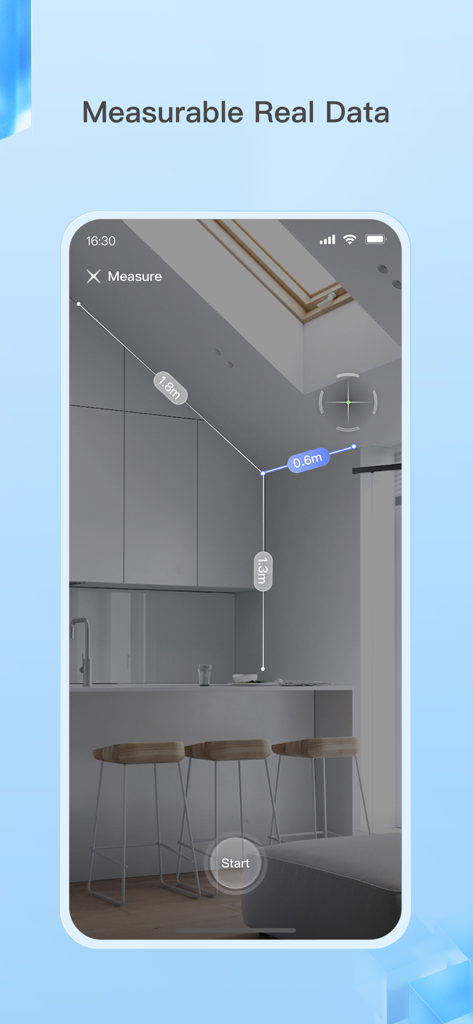
Realsee 3D virtual tour - スマートフォンインターフェースに、3Dバーチャルツアー内のキッチンの内寸を測定しているRealseeアプリが表示されています。
スマートフォンインターフェースに、3Dバーチャルツアー内のキッチンの内寸を測定しているRealseeアプリが表示されています。

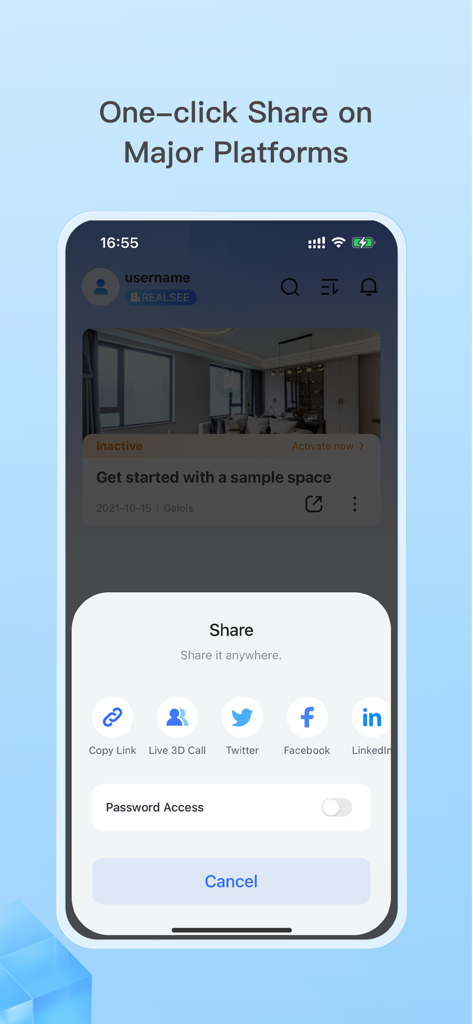
Realsee 3D virtual tour - モバイルアプリのインターフェースに、LinkedIn、Facebook、Twitterで3Dバーチャルツアーを共有するためのワンクリック共有オプションが表示されています。

モバイルアプリのインターフェースに、LinkedIn、Facebook、Twitterで3Dバーチャルツアーを共有するためのワンクリック共有オプションが表示されています。

説明

The Realsee app lets you capture 3D virtual tours of real-world spaces using your smartphone, Insta360 camera, Ricoh Theta camera, or a compatible 3D lidar scanner. Here's what you can do: 1. Capture 3D Tours: Simply download the app and scan your space anytime with various device options. Realsee automatically creates a 3D walkthrough (VR tour) for you. 2. Edit and Manage Your Space: Realsee offers basic in-app editing tools like adding guided tours, hotspots, and labels. Additionally, the PC console unlocks powerful features like floor plan creator, custom branding options, route creation, high-resolution downloads (16K panoramas, videos) and point cloud E57 files, obj models, dwg CAD files which can be used in autocad or other 3D modeling softwares. 3. Share and Collaborate: Easily share your 3D virtual tour using a link on your own website, social media, or with clients. This is ideal for showcasing real estate properties, room design, marketing hotels and restaurants, or remotely inspecting facilities and construction sites. Additional Benefits: Realsee offers all in one function like capture, upload, preview, and storage. You can also create DIY floor plans, sync with Google Street View, and add your own marketing materials while clients explore the space. Who Can benefit from Realsee? Realsee's 3D digital twin technology empowers a wide range of professionals and individuals: - Photographers: Expand your services by offering 3D capture and virtual tours alongside traditional photography. Provide a more comprehensive solution by combining stunning visuals with immersive 3D experiences. - Real Estate Professionals: - Realtors and Brokers: Create virtual tours to showcase properties, allowing potential buyers to explore listings remotely, saving time and increasing engagement. - Property Managers: Showcase rental properties virtually, reducing the need for physical tours and attracting a wider audience. - Architects and Home builders: Share 3D models with clients for better visualization and collaboration on design projects. - Construction and Engineering Firms: - Document construction progress with 3D scans for remote monitoring and collaboration, or compare with BIM files. - Create 3D models of existing buildings for renovation or maintenance planning. - Facility Management: Create virtual tours of facilities for training, planning, and remote inspections. - Hospitality: Showcase hotels, resorts, or event spaces with immersive 3D tours, enhancing guest experiences. - Other Industries: - Retailers: Showcase product showrooms or store layouts with virtual tours for a more engaging online shopping experience. - Museums and Educational Institutions: Create virtual tours of exhibits or historical sites for remote access and education. - Insurance and Restoration Companies: Capture 3D scans of damaged properties for faster and more accurate assessments. Even individuals can benefit from Realsee by creating 3D models of their homes for personal documentation, sharing with family and friends far away. Ultimately, Realsee empowers anyone who needs to capture, share, and analyze spatial data for various purposes.

Download

ダウンロード: App Store

このページはアプリまたはその開発者の公式ページではなく、情報提供および論評を目的として作成された独立した編集出版物です。明示的に別段の記載がない限り、アプリおよびその開発者は、MWM、Apple、Google Play、アプリのパブリッシャー、またはアプリの開発者と提携、承認、後援、認可、またはその他の公式的な関係はなく、このページのいかなる内容も、アプリがMWMのサービスを使用して開発されたことを意味するものではありません。すべての商標、ロゴ、スクリーンショット、その他のコンテンツはそれぞれの所有者の財産です。