Recorder Plus - Audio Editor
ダウンロード: App Store

このページはアプリまたはその開発者の公式ページではなく、情報提供および論評を目的として作成された独立した編集出版物です。明示的に別段の記載がない限り、アプリおよびその開発者は、MWM、Apple、Google Play、アプリのパブリッシャー、またはアプリの開発者と提携、承認、後援、認可、またはその他の公式的な関係はなく、このページのいかなる内容も、アプリがMWMのサービスを使用して開発されたことを意味するものではありません。すべての商標、ロゴ、スクリーンショット、その他のコンテンツはそれぞれの所有者の財産です。

ロゴ: Recorder Plus - Audio Editor
ダウンロード: App Store

Recorder Plus - Audio Editor

10年以上にわたり、90万人以上のユーザーに信頼されてきました。無制限の録音、高度な編集ツールでの仕上げ、そして音声のテキストへの文字起こしを、すべて安全で自動的なクラウドバックアップで行いましょう。

主要数値

ダウンロード

911K+

ユーザー評価

4.7/5

評価数

12K+

開発元

Turbokey Studio

カテゴリ

Utilities

対応言語

11

最新バージョン

3.11.25

サイズ

22.5 MB

リリース日

2012年2月24日
機能

プロフェッショナルな音声ワークフローのための高度なツール

基本的なボイスメモを超えて、プロレベルの録音、AIによる文字起こし、そして重要な結果のために設計された精密編集を体験してください。

精密編集とマーカー

デバイス上で直接、音声を簡単にカット、コピー、ペーストできます。長時間の講義やインタビュー中に重要な洞察をリアルタイムで強調するために、マーカーやメモを追加しましょう。

AI文字起こしとエフェクト

音声を瞬時にテキストに変換し、作業時間を節約しましょう。プロフェッショナルなノイズリダクション、ゲインコントロール、テンポ調整でサウンドを仕上げましょう。

以下のスクリーンショットと説明は、アプリの公式ストアリスティングから直接取得されたものであり、アプリ開発者の所有物です。

アプリストア

スクリーンショット
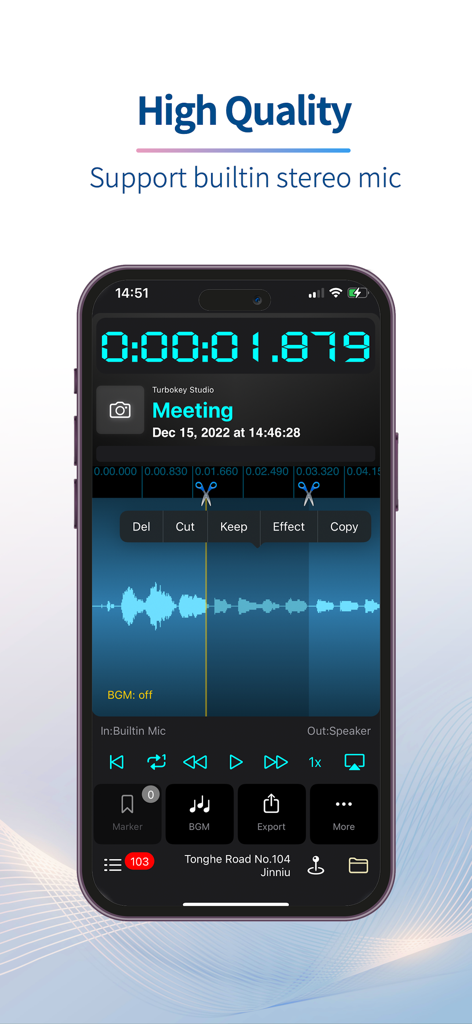
Recorder Plus - Audio Editor - Recorder Plus アプリのスクリーンショット。会議の録音のためのカットやコピーなどの編集ツールと音声波形が表示されています。
Recorder Plus アプリのスクリーンショット。会議の録音のためのカットやコピーなどの編集ツールと音声波形が表示されています。

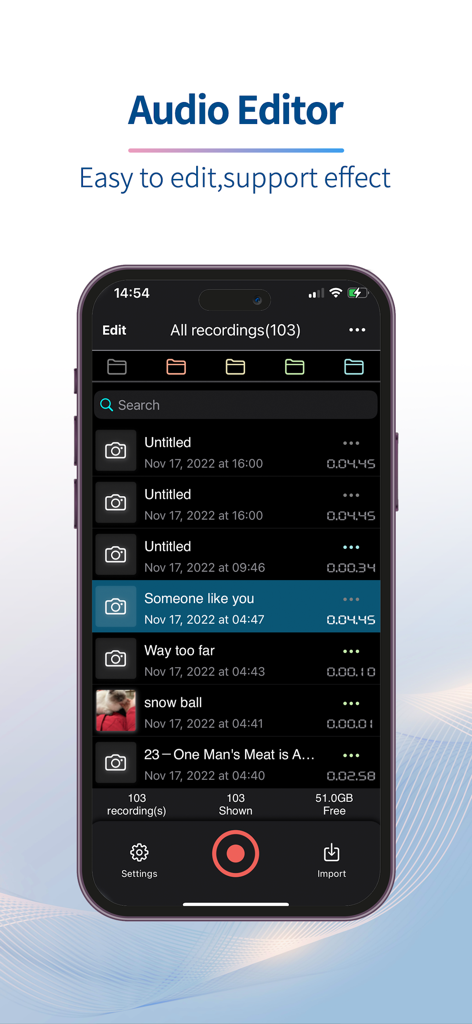
Recorder Plus - Audio Editor - Recorder Plus オーディオエディターのモバイルアプリインターフェース。iPhone 上に録音された音声のリストが表示されています。
Recorder Plus オーディオエディターのモバイルアプリインターフェース。iPhone 上に録音された音声のリストが表示されています。

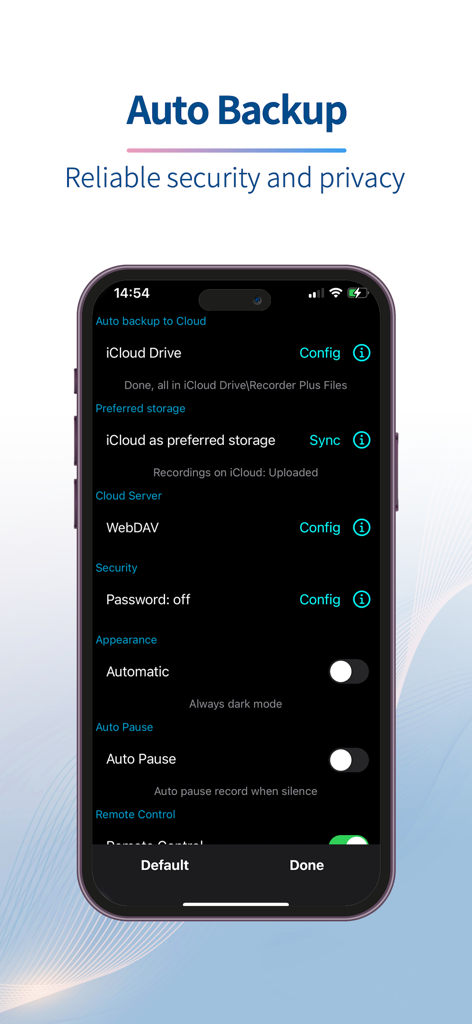
Recorder Plus - Audio Editor - Recorder Plus アプリのインターフェース。クラウドバックアップとセキュリティ設定オプションが表示されています。

Recorder Plus アプリのインターフェース。クラウドバックアップとセキュリティ設定オプションが表示されています。

説明

After nearly ten years of improvement, Recorder Plus has evolved into a simple, easy-to-use and powerful recorder - download now for FREE! Record: There is no limitation on recording time length and times. You can record as long as you want and as many times as you want. It's only up to the storage and battery power of your iPhone/iPad. And you can add markers when recording. Edit: (In-App purchase) Cut, Copy, Paste, even between different recordings. Undo, Redo, and you can get back original file easily. Add markers and notes for the markers. Import audio file from other apps or from Cloud drive. Security: Backup recordings automatically to your iCloud drive or Google Drive. So your recordings will be safe even if your iPhone/iPad get lost. And you can set iCloud as preferred storage in the app, so you can access all recordings on other devices(iPhone/iPad). Share: Share recordings by Email, Messages, other apps, cloud drive(iCloud drive, Dropbox, GoogleDrive, OneDrive, Box...). Also you can download recordings by USB cable or WiFi sync. Effect:(Subscription needed) Tempo, Pitch, Gain, Noise reduction, Background music Yes, this app is not only a recorder, but also a powerful audio editor. Audio synthesis: Text to speech support for 38 countries with 54 voices. Speech to text: Transcribe English speech to text. More information about subscription($4.99/year): 1.Payment will be charged to iTunes Account at confirmation of purchase 2.Subscription automatically renews unless auto-renew is turned off at least 24-hours before the end of the current period. 3.Subscriptions may be managed by the user and auto-renewal may be turned off by going to the user's Account Settings after purchase Terms of use: https://recorderplus.com/termsofuse.html Privacy Policy: https://recorderplus.com/privacy.html

Download

ダウンロード: App Store

このページはアプリまたはその開発者の公式ページではなく、情報提供および論評を目的として作成された独立した編集出版物です。明示的に別段の記載がない限り、アプリおよびその開発者は、MWM、Apple、Google Play、アプリのパブリッシャー、またはアプリの開発者と提携、承認、後援、認可、またはその他の公式的な関係はなく、このページのいかなる内容も、アプリがMWMのサービスを使用して開発されたことを意味するものではありません。すべての商標、ロゴ、スクリーンショット、その他のコンテンツはそれぞれの所有者の財産です。








