REDCap Mobile App
REDCap Mobile App
ダウンロード: App Store

このページはアプリまたはその開発者の公式ページではなく、情報提供および論評を目的として作成された独立した編集出版物です。明示的に別段の記載がない限り、アプリおよびその開発者は、MWM、Apple、Google Play、アプリのパブリッシャー、またはアプリの開発者と提携、承認、後援、認可、またはその他の公式的な関係はなく、このページのいかなる内容も、アプリがMWMのサービスを使用して開発されたことを意味するものではありません。すべての商標、ロゴ、スクリーンショット、その他のコンテンツはそれぞれの所有者の財産です。
ロゴ: REDCap Mobile App
ダウンロード: App Store

REDCap Mobile App

研究者が、あらゆる環境で高品質なデータ、マルチメディア、署名をキャプチャし、機関のREDCapサーバーにシームレスに同期するための必須モバイル拡張機能です。

主要数値

ダウンロード

163K+

ユーザー評価

2.8/5

評価数

0

開発元

Vanderbilt University Medical Center

カテゴリ

Medical

対応言語

1

最新バージョン

5.30.10

サイズ

25.8 MB

リリース日

2015年4月15日
機能

どこでもフィールド調査を強化

機関基準に合わせて設計された安全なオフラインファーストモバイルワークフローで、リモートデータ収集とREDCapサーバー間のギャップを埋めます。

信頼性の高いオフラインモード

紙のフォームは不要です。インターネットが利用可能になったら、病院のデッドゾーンやリモートフィールドサイトでデータを収集し、安全にサーバーに同期します。

機関グレードのセキュリティ

暗号化されたストレージ、マルチユーザーセキュアログイン、および機関のREDCapプロジェクトに直接同期される完全な監査ログにより、データの整合性を維持します。

以下のスクリーンショットと説明は、アプリの公式ストアリスティングから直接取得されたものであり、アプリ開発者の所有物です。

アプリストア

スクリーンショット
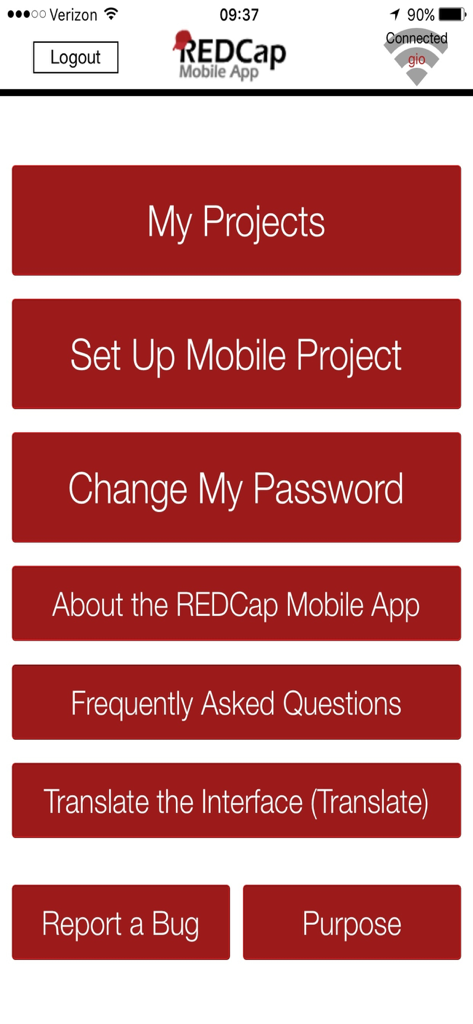
REDCap Mobile App - REDCapモバイルアプリのメインメニュー画面、臨床研究プロジェクト管理オプションを表示
REDCapモバイルアプリのメインメニュー画面、臨床研究プロジェクト管理オプションを表示

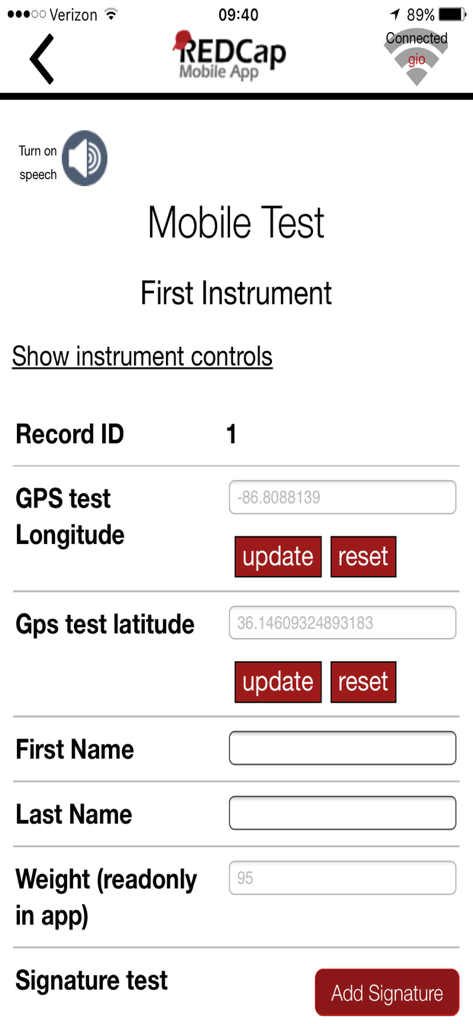
REDCap Mobile App - REDCapモバイルアプリのスクリーンショット、GPSおよび署名フィールドを含む臨床研究データ収集フォームを表示

REDCapモバイルアプリのスクリーンショット、GPSおよび署名フィールドを含む臨床研究データ収集フォームを表示

説明

Collect your REDCap data in an offline environment in the REDCap mobile app, and then sync your data back to your project on a REDCap server. REDCap is a web application, which requires the Internet to be used, but the REDCap mobile app allows for offline data collection for your REDCap projects. You can create your project in REDCap, securely download your project to the REDCap mobile app on your iPad or iPhone, collect data on the device (with or without an Internet connection), and then securely send your data back to your project on a REDCap server. Features • Multi-user interface with secure login that allows each user account to collect data for multiple REDCap projects in the app. • In addition to text and structured data, you can store and transmit photos, videos, signatures, and audio to REDCap. • When collecting data in the app from a participant, for security purposes you can easily restrict access to the rest of the app as they enter their data. • All user activity in the app is logged for audit purposes. The full logging history can be sent to your project on the REDCap server. Who is the REDCap Mobile App for? In order to use the REDCap Mobile App, REDCap must be installed on your institution’s server and must be at version 6.5.0 or higher. The REDCap Mobile App is designed to fit the following scenarios: • A REDCap project that needs data to be collected without any Internet access available. • A REDCap project that needs data to be collected with sporadic Internet access. If mobile devices are desired for use in REDCap data collection, and if WiFi or cellular Internet is amply available, then it is suggested to use the REDCap mobile web view that is available on the REDCap server, which provides real-time access to data. What is REDCap? REDCap is a mature, secure web application for building and managing online surveys and databases, and it is used by hundreds of thousands of users around the world (http://projectredcap.org). Before setting up a REDCap project in the app, you must already have a user account on a REDCap server hosted by a participating REDCap partner institution. If you belong to an institution that does not have REDCap, please visit http://projectredcap.org/participate.php to learn how to get REDCap where you are. What are some limitations of this app? The REDCap mobile app runs in conjunction with the REDCap web application software. You must already have a REDCap user account and project on a REDCap server before being able to download the project to the app. The app cannot function or stand independently without a REDCap server.

Download

ダウンロード: App Store

このページはアプリまたはその開発者の公式ページではなく、情報提供および論評を目的として作成された独立した編集出版物です。明示的に別段の記載がない限り、アプリおよびその開発者は、MWM、Apple、Google Play、アプリのパブリッシャー、またはアプリの開発者と提携、承認、後援、認可、またはその他の公式的な関係はなく、このページのいかなる内容も、アプリがMWMのサービスを使用して開発されたことを意味するものではありません。すべての商標、ロゴ、スクリーンショット、その他のコンテンツはそれぞれの所有者の財産です。









