
このページはアプリまたはその開発者の公式ページではなく、情報提供および論評を目的として作成された独立した編集出版物です。明示的に別段の記載がない限り、アプリおよびその開発者は、MWM、Apple、Google Play、アプリのパブリッシャー、またはアプリの開発者と提携、承認、後援、認可、またはその他の公式的な関係はなく、このページのいかなる内容も、アプリがMWMのサービスを使用して開発されたことを意味するものではありません。すべての商標、ロゴ、スクリーンショット、その他のコンテンツはそれぞれの所有者の財産です。


ダウンロード
250k+ユーザー評価
評価数
8開発元
カテゴリ
Entertainment対応言語
1最新バージョン
3.3サイズ
92.8 MBリリース日
2024年5月20日テックアナリストによる主要機能とその影響度評価
アプリ「Remote Control - All TV」の機能分析
スマートフォンをTVリモコンとして使用
このアプリは、ユーザーがスマートフォンを介して直接テレビを操作することを可能にし、メニューナビゲーション、設定調整、およびシームレスな操作を実現します。
スマート検索機能
本ツールは直感的な検索機能を提供し、ユーザーがお気に入りの番組、映画、スポーツイベントを簡単に見つけ、複数のチャンネルを横断してコンテンツを検索することを可能にします。
幅広い互換性
本ツールは、Samsung、Roku、LGなどの多様なテレビブランドとのシームレスな接続性を提供し、所有するテレビのブランドに関わらずユーザーが操作できることを保証します。
音量調整機能
このアプリを使用することで、ユーザーはスマートフォンから直接テレビの音量を調整でき、映画や音楽チャンネルのサウンドを簡単に微調整することが可能です。
簡単なチャンネル切り替え
ユーザーは物理的なリモコンに手を伸ばすことなくチャンネルを簡単に切り替えることができ、プロのようにチャンネルをスワイプ操作することが可能です。
ワンタッチ電源操作
ユーザーはシンプルなタップ操作でテレビの電源をオン/オフすることができ、複数のリモコンを探す手間を省き、効率的な操作を実現します。
よくある質問
について知っておくべきこと Remote Control - All TV
What is the Remote Control - All TV app?
The "Remote Control - All TV" app transforms your phone into a smart TV controller. It offers seamless navigation and enhances your entertainment experience, putting you in charge of your TV.
How do I connect the Remote Control - All TV app to my television?
To connect "Remote Control - All TV", ensure your phone and TV are on the same Wi-Fi network. Open the app, tap the icon, and follow on-screen instructions to pair with your television.
Is the Remote Control - All TV app compatible with major TV brands?
Yes, "Remote Control - All TV" offers universal compatibility. It seamlessly connects with a wide range of major TV brands, including Samsung, Roku, LG, Sony, TCL, Aqua WebOS, and Sharp.
Can I customize themes in the Remote Control - All TV app?
Yes, you can customize themes within the "Remote Control - All TV" app. It provides a variety of themes to personalize your remote interface, matching your preferred style.
Does Remote Control - All TV allow changing TV channels?
Yes, the "Remote Control - All TV" app makes channel surfing easy. You can change channels directly from your phone, eliminating the need for a physical remote.
Can the Remote Control - All TV app mirror photos and videos?
Yes, "Remote Control - All TV" supports mirroring. The app enables quick mirroring of photos and videos from your phone to your TV, enhancing your viewing experience.
How can I power my TV on or off with Remote Control - All TV?
Yes, "Remote Control - All TV" offers a One-Touch Power feature. You can turn your TV on or off with a simple tap directly from the app on your phone.
Does Remote Control - All TV provide quick access to streaming services?
Yes, "Remote Control - All TV" provides quick access to streaming services. You can directly launch apps like Netflix, YouTube, Disney+, and Prime Video from the app interface.
以下のスクリーンショットと説明は、アプリの公式ストアリスティングから直接取得されたものであり、アプリ開発者の所有物です。
アプリストア
スクリーンショット
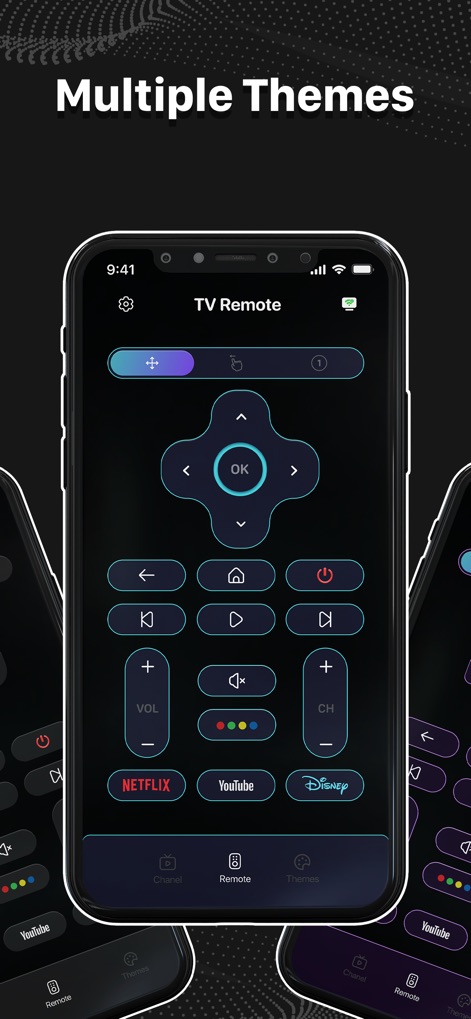
このアプリでは、ユーザーはリモコンのインターフェースをカスタマイズできます。ダークを基調とした洗練されたデザインや、Netflix、YouTubeなどの人気アプリへの素早いアクセスボタンといった視覚的機能が利用可能です。
多彩なテーマ

ユーザーはスマートフォンを万能リモコンとして活用し、テレビを簡単に操作できます。電源のオン/オフ、音量調整、チャンネル変更といった基本的な機能に加え、主要なストリーミングサービスへのダイレクトアクセスが視覚的に提供されています。
直感的な操作性
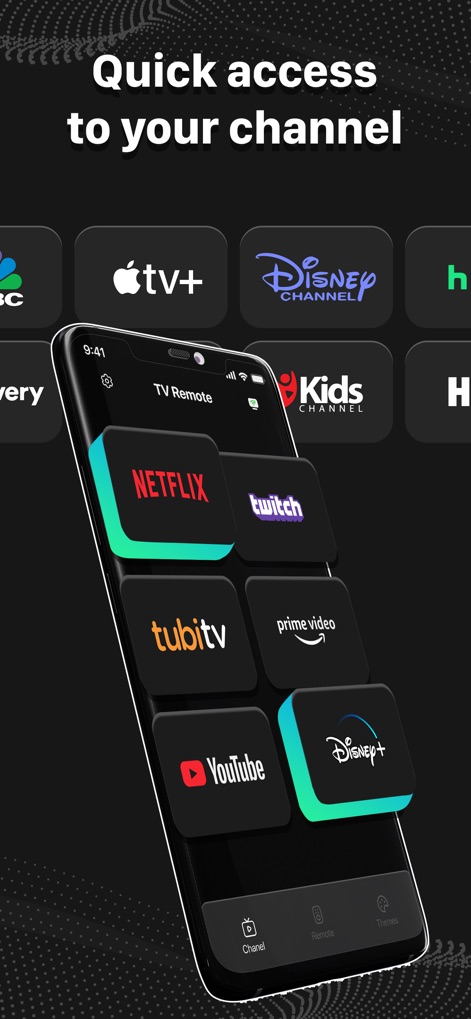
この画面では、ユーザーは様々なストリーミングアプリにワンタップでアクセスできます。Netflix、Twitch、YouTubeなどのアイコンがグリッド状に配置され、お気に入りのコンテンツを素早く選択できる視覚的利便性を提供します。
アプリへ素早くアクセス

ユーザーは、Samsung、Roku、Sony、TCLなど、多種多様なテレビブランドの中から接続したいデバイスを簡単に選択できます。明確なブランドロゴ表示と簡潔なデバイス選択画面により、迅速なペアリングが可能です。
幅広い互換性

このアプリは、スマートフォンからテレビへの写真や動画の高速ミラーリングを可能にします。車のレースゲームのようなコンテンツがスマートフォンとテレビの両方に同時に表示され、シームレスなコンテンツ共有体験を視覚的に示しています。
スムーズな画面共有
説明
Download
類似アプリ
似た機能とユーザー体験を持つアプリ

The Roku App (Official)
ROKU INC

TV Remote & Smart TV Control
To Ngoc Mai

Universal TV Remote Control .
Apps Venture Inc.

TV Remote, Universal Remote
Hangzhou Yingshitong Technology Co., Ltd.

TV Remote Control “Universo”
Nemo Apps LLC

TV Remote・Universal Control #1
Mihai Turlea

Remote Smart Tv Universal
clement gasner

Remote TV Control TCL Onn App
CEMAL CAGLAR KIRICI

TV Remote Control Universal AI
Anh Ngo
このページはアプリまたはその開発者の公式ページではなく、情報提供および論評を目的として作成された独立した編集出版物です。明示的に別段の記載がない限り、アプリおよびその開発者は、MWM、Apple、Google Play、アプリのパブリッシャー、またはアプリの開発者と提携、承認、後援、認可、またはその他の公式的な関係はなく、このページのいかなる内容も、アプリがMWMのサービスを使用して開発されたことを意味するものではありません。すべての商標、ロゴ、スクリーンショット、その他のコンテンツはそれぞれの所有者の財産です。