
このページはアプリまたはその開発者の公式ページではなく、情報提供および論評を目的として作成された独立した編集出版物です。明示的に別段の記載がない限り、アプリおよびその開発者は、MWM、Apple、Google Play、アプリのパブリッシャー、またはアプリの開発者と提携、承認、後援、認可、またはその他の公式的な関係はなく、このページのいかなる内容も、アプリがMWMのサービスを使用して開発されたことを意味するものではありません。すべての商標、ロゴ、スクリーンショット、その他のコンテンツはそれぞれの所有者の財産です。


remove watermark video retouch
AI搭載の精度で、不要なオブジェクト、人物、透かしを簡単に消去。数回タップするだけで、Instagram、TikTok、YouTube向けの動画を完璧に仕上げましょう。
ダウンロード
243K+ユーザー評価
評価数
1K+開発元
カテゴリ
Graphics & Design対応言語
1最新バージョン
1.9サイズ
21.8 MBリリース日
2022年6月21日コンテンツを完璧に変身させましょう
AIの力で、邪魔なものや透かしを瞬時に消去。あなたのソーシャルメディアの視聴者にふさわしい、プロフェッショナルでクリーンなルックを動画に与えましょう。
AI搭載オブジェクトリムーバー
高度なAIアルゴリズムを使用して、ピンポイントの精度で、フォトボマー、透かし、または浮遊オブジェクトを簡単に削除します。
リアルタイムインスタントプレビュー
編集しながら魔法が起こるのを見てください。直感的なインターフェースで、その場で調整し、時間を節約しましょう。これはあなたのペースの速いライフスタイルに合わせて設計されています。
よくある質問
について知っておくべきこと remove watermark video retouch
動画レタッチアプリ「ウォーターマーク除去」は何ができますか?
動画レタッチアプリ「ウォーターマーク除去」は、不要なオブジェクトを動画から簡単に削除します。AIとアルゴリズムを活用して、映像内の人物、オーバーレイ、傷、その他の邪魔な要素を特定して削除します。
動画レタッチアプリ「ウォーターマーク除去」はオブジェクト除去にAIを使用していますか?
はい、動画レタッチアプリ「ウォーターマーク除去」は強力な人工知能と高度なアルゴリズムを活用しています。これらの技術により、動画内の不要なオブジェクトを正確に特定して削除します。
動画レタッチアプリ「ウォーターマーク除去」はどのようなオブジェクトを削除できますか?
動画レタッチアプリ「ウォーターマーク除去」は、動画から人物、オーバーレイ、傷、テキスト、その他の邪魔な要素を削除できます。さまざまな不要な要素に対して精密な除去を提供します。
動画レタッチアプリ「ウォーターマーク除去」で変更をリアルタイムでプレビューできますか?
はい、動画レタッチアプリ「ウォーターマーク除去」にはリアルタイムプレビュー機能があります。これにより、ユーザーはオブジェクトが動画から即座に消えるのを確認し、必要に応じて調整できます。
動画レタッチアプリ「ウォーターマーク除去」は動画の品質を維持しますか?
はい、動画レタッチアプリ「ウォーターマーク除去」は、映像の元の解像度と鮮明度を維持します。このアプリは、最終的な編集済み動画がプロフェッショナルで洗練された外観を保つことを保証します。
動画レタッチアプリ「ウォーターマーク除去」で編集した動画を保存または共有するにはどうすればよいですか?
動画レタッチアプリ「ウォーターマーク除去」では、編集した動画をデバイスのギャラリーに直接保存できます。また、ソーシャルメディアプラットフォームやメッセージングアプリで即座に共有することもできます。
動画レタッチアプリ「ウォーターマーク除去」は無料アプリですか?
動画レタッチアプリ「ウォーターマーク除去」には、広告付きの無料バージョンと機能が制限されたバージョンがあります。高度な機能を利用したり、広告を削除したりするには、Video Retouch Premiumサブスクリプションを購入できます。
動画レタッチアプリ「ウォーターマーク除去」はプレミアムサブスクリプションの無料トライアルを提供していますか?
はい、動画レタッチアプリ「ウォーターマーク除去」は、月額プレミアムサブスクリプションに3日間の無料トライアル、年額プレミアムサブスクリプションに7日間の無料トライアルを提供しています。トライアルの詳細はサインアップ時に確認できます。
動画レタッチアプリ「ウォーターマーク除去」プレミアムの料金はいくらですか?
動画レタッチアプリ「ウォーターマーク除去」プレミアム月額は月額0.99ドル(3日間の無料トライアル付き)、プレミアム年額は年額5.99ドル(7日間の無料トライアル付き)です。
動画レタッチアプリ「ウォーターマーク除去」プレミアムサブスクリプションをキャンセルするにはどうすればよいですか?
ユーザーは、iTunesアカウント設定からいつでも自動更新をオフにすることができます。更新料金を避けるためには、サブスクリプションまたはトライアルが終了する少なくとも24時間前までにキャンセルを行う必要があります。
動画レタッチアプリ「ウォーターマーク除去」のプライバシーポリシーはどこで見ることができますか?
動画レタッチアプリ「ウォーターマーク除去」のプライバシーポリシーは、https://www.racersoft.in で確認できます。このリンクから、データ処理とユーザープライバシーの詳細を確認できます。
以下のスクリーンショットと説明は、アプリの公式ストアリスティングから直接取得されたものであり、アプリ開発者の所有物です。
アプリストア
スクリーンショット
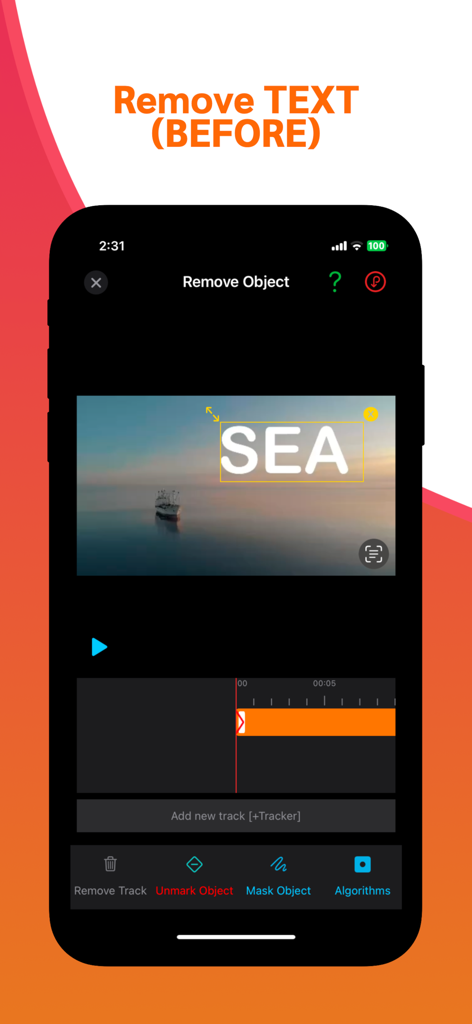
動画レタッチアプリのインターフェース。風光明媚な動画の上に削除対象として選択されたテキストオーバーレイが表示されています。
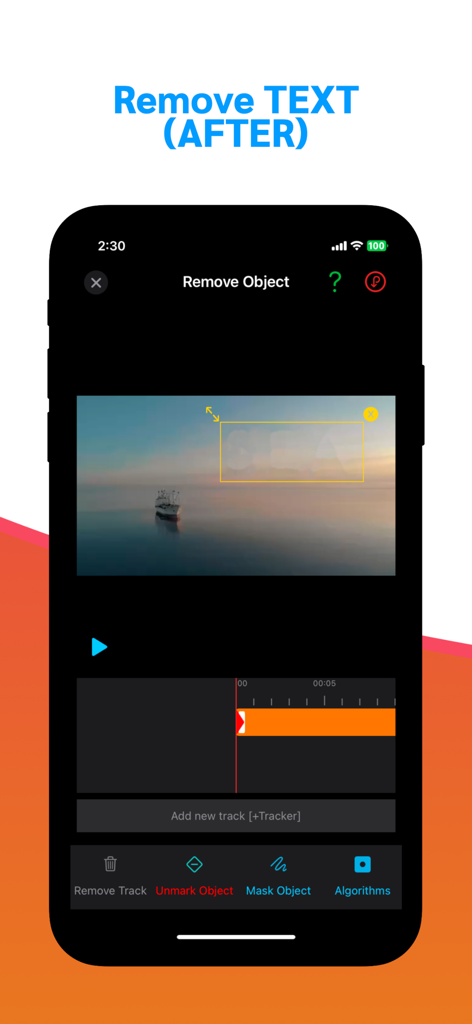
iPhoneのスクリーンショット。動画レタッチアプリのインターフェースが表示され、海上のボートの動画の上にぼかされたテキストマスクがかかっています。
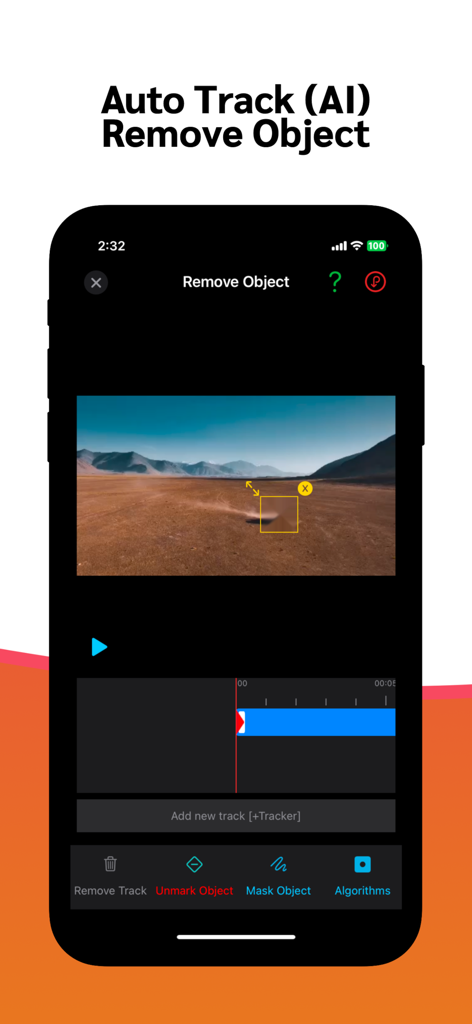
動画レタッチアプリのインターフェース。AIオブジェクトトラッキングと風景動画での削除を示しています。
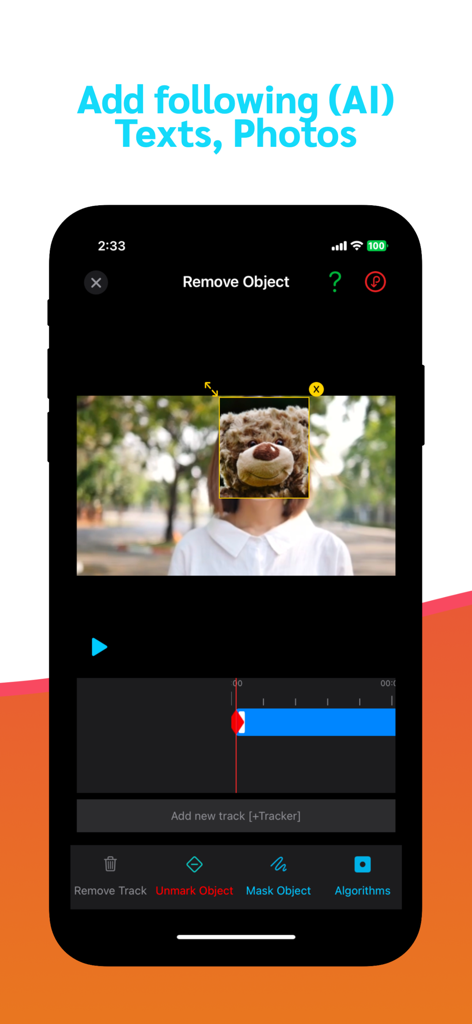
動画レタッチアプリのモバイルインターフェース。AI搭載オブジェクト削除とマスキングツールが表示されています。
説明
Download
類似アプリ
似た機能とユーザー体験を持つアプリ

CocoAI - BG Remover
Beijing Jianchang Technology Co., Ltd.

水印宝-视频水印助手软件
Beijing Pengtuzhumeng Technology Co., Ltd.

Photo Retouch - Remove object
化媚 席

PhotoBy-Batch adding borders
岳森 刘

Watermarkly ― Watermark Maker
Julia Nikitina

去水印大师-短视频编辑助手
志阳 郭

大神水印-照片图像制作修图神器
伟 黄

Add Watermark -Batch Process
Saraswati Javalkar

Background Eraser: AI Remove
SUNWOONG JANG
このページはアプリまたはその開発者の公式ページではなく、情報提供および論評を目的として作成された独立した編集出版物です。明示的に別段の記載がない限り、アプリおよびその開発者は、MWM、Apple、Google Play、アプリのパブリッシャー、またはアプリの開発者と提携、承認、後援、認可、またはその他の公式的な関係はなく、このページのいかなる内容も、アプリがMWMのサービスを使用して開発されたことを意味するものではありません。すべての商標、ロゴ、スクリーンショット、その他のコンテンツはそれぞれの所有者の財産です。