Run For Fun: Screen Time Focus
ダウンロード: App Store

このページはアプリまたはその開発者の公式ページではなく、情報提供および論評を目的として作成された独立した編集出版物です。明示的に別段の記載がない限り、アプリおよびその開発者は、MWM、Apple、Google Play、アプリのパブリッシャー、またはアプリの開発者と提携、承認、後援、認可、またはその他の公式的な関係はなく、このページのいかなる内容も、アプリがMWMのサービスを使用して開発されたことを意味するものではありません。すべての商標、ロゴ、スクリーンショット、その他のコンテンツはそれぞれの所有者の財産です。

ロゴ: Run For Fun: Screen Time Focus
ダウンロード: App Store

Run For Fun: Screen Time Focus

あなたの歩数をスクリーンタイムに変えましょう。アクティブに過ごすことへのご褒美として、お気に入りのアプリを利用することで、ますます悪くなる一方のニュースやSNSの閲覧サイクルを断ち切り、自己規律を取り戻しましょう。サブスクリプション不要、完全なプライバシー、そして集中力を高めます。

主要数値

ダウンロード

500

ユーザー評価

1.0/5

評価数

0

開発元

Pranoy Chowdhury

カテゴリ

Health & Fitness

対応言語

1

最新バージョン

8

サイズ

1.5 MB

リリース日

2025年4月20日
機能

すべての歩数を報酬に変える

Run For Funは、あなたの身体の健康とデジタル習慣の間のギャップを埋めます。身体活動を、お気に入りのアプリの通貨として利用することで、ますます悪くなる一方のニュースやSNSの閲覧サイクルを断ち切りましょう。

アクティビティ連動アクセス

HealthKitと同期して、歩数、カロリー、ワークアウトをスクリーンタイムポイントに変換しましょう。座りっぱなしのスクロールをやめ、運動を通じてエンターテイメントを獲得しましょう。

壊れない説明責任

「制限を無視」をクリックするのをやめましょう。友達にロックパスワードを設定してもらい、目標をバイパスできないようにしましょう。デジタルウェルネスに真剣な人々のために設計された、本物のガードレールです。

以下のスクリーンショットと説明は、アプリの公式ストアリスティングから直接取得されたものであり、アプリ開発者の所有物です。

アプリストア

スクリーンショット
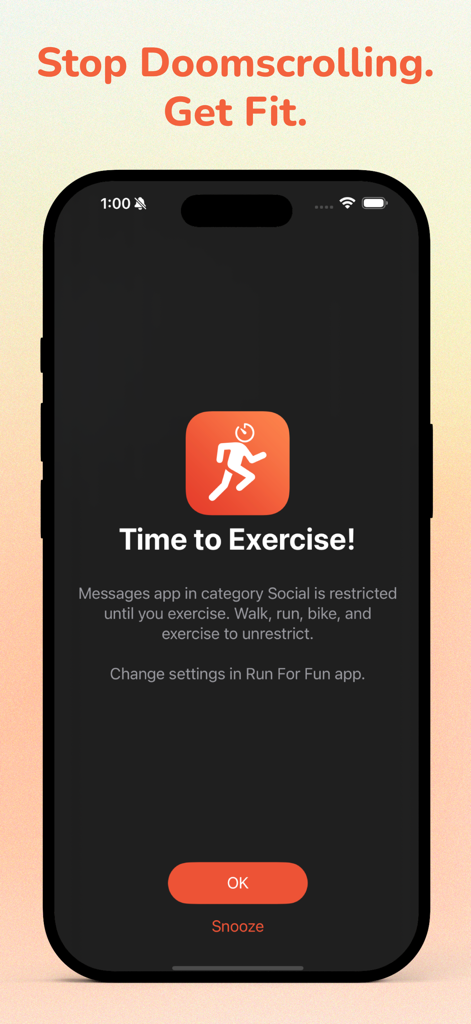
Run For Fun: Screen Time Focus - 身体活動が完了するまでソーシャルメディアアプリを制限する、運動時間を表示する時間を示す携帯電話の画面
身体活動が完了するまでソーシャルメディアアプリを制限する、運動時間を表示する時間を示す携帯電話の画面

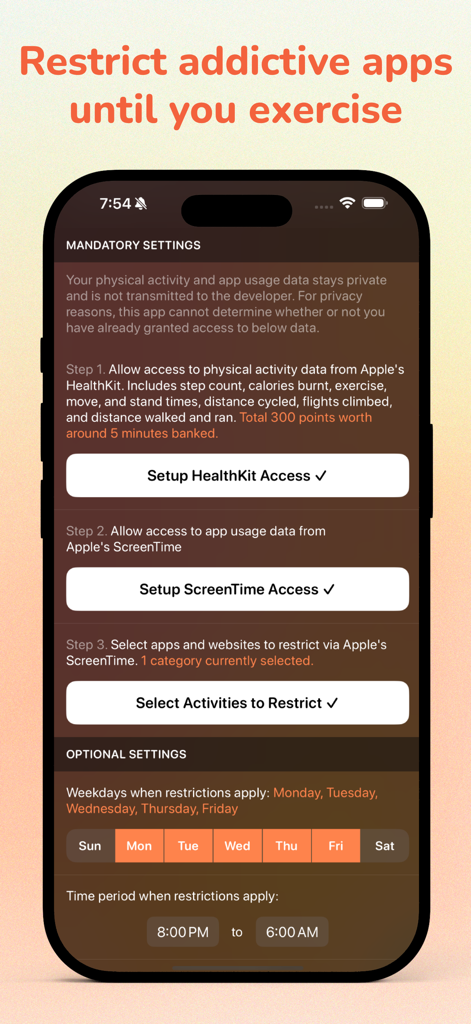
Run For Fun: Screen Time Focus - HealthKitとスクリーンタイムへのアクセスに関する必須設定と、オプションの制限スケジュールを示すRun For Funアプリの設定画面。
HealthKitとスクリーンタイムへのアクセスに関する必須設定と、オプションの制限スケジュールを示すRun For Funアプリの設定画面。

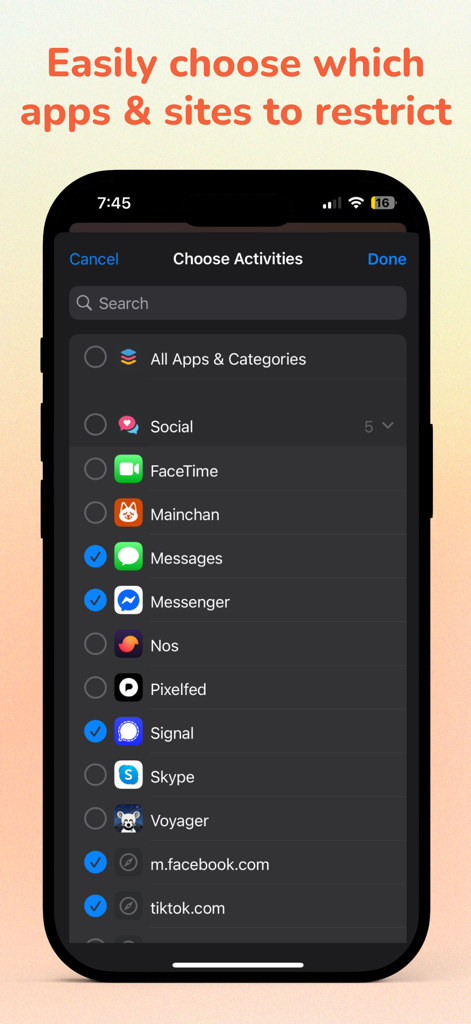
Run For Fun: Screen Time Focus - 制限するソーシャルメディアアプリとウェブサイトを選択するためのインターフェース。
制限するソーシャルメディアアプリとウェブサイトを選択するためのインターフェース。

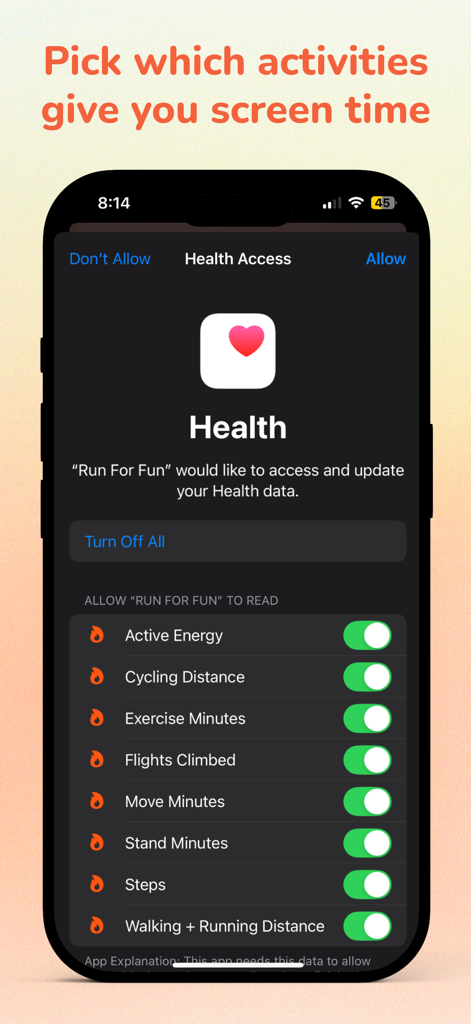
Run For Fun: Screen Time Focus - スクリーンタイムを獲得する身体活動を選択するための健康アクセス設定を示すiPhone画面
スクリーンタイムを獲得する身体活動を選択するための健康アクセス設定を示すiPhone画面

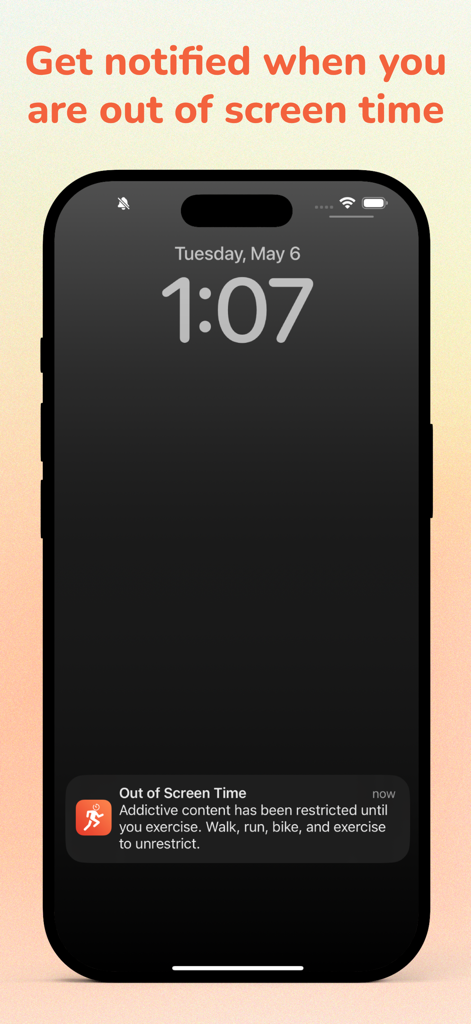
Run For Fun: Screen Time Focus - Run For Funアプリからのスクリーンタイム超過通知を表示するiPhoneロック画面。
Run For Funアプリからのスクリーンタイム超過通知を表示するiPhoneロック画面。

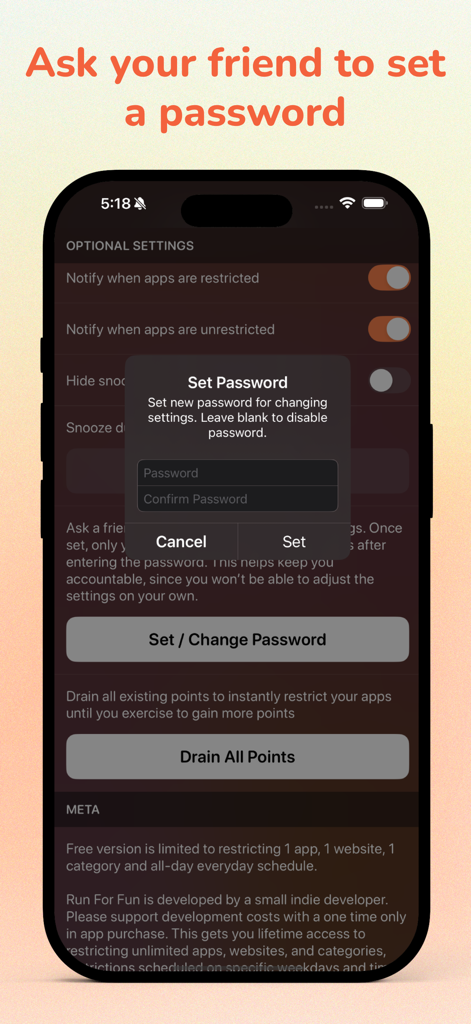
Run For Fun: Screen Time Focus - 友達が説明責任パスワードを作成するためのRun For Funアプリ設定を表示するモバイル画面
友達が説明責任パスワードを作成するためのRun For Funアプリ設定を表示するモバイル画面

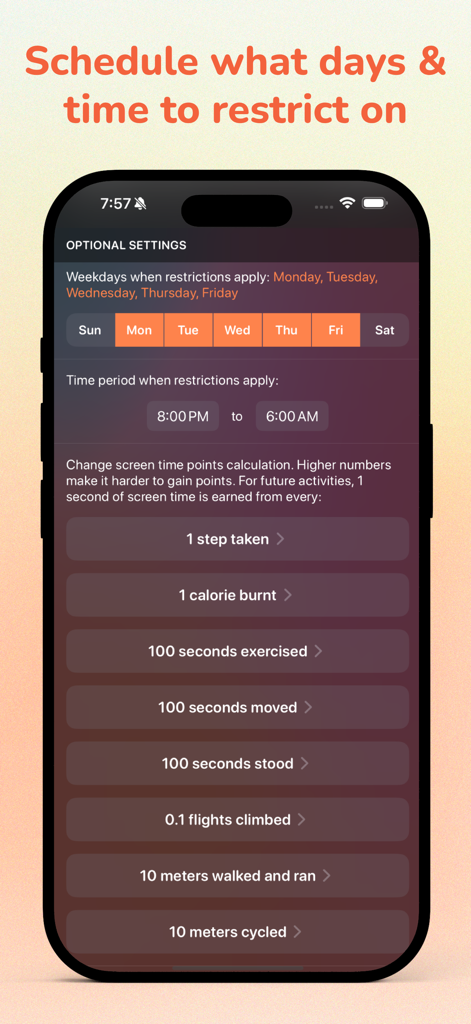
Run For Fun: Screen Time Focus - 制限をスケジュールし、身体活動に基づいてスクリーンタイムポイントを計算するためのRun For Funアプリ設定画面
制限をスケジュールし、身体活動に基づいてスクリーンタイムポイントを計算するためのRun For Funアプリ設定画面

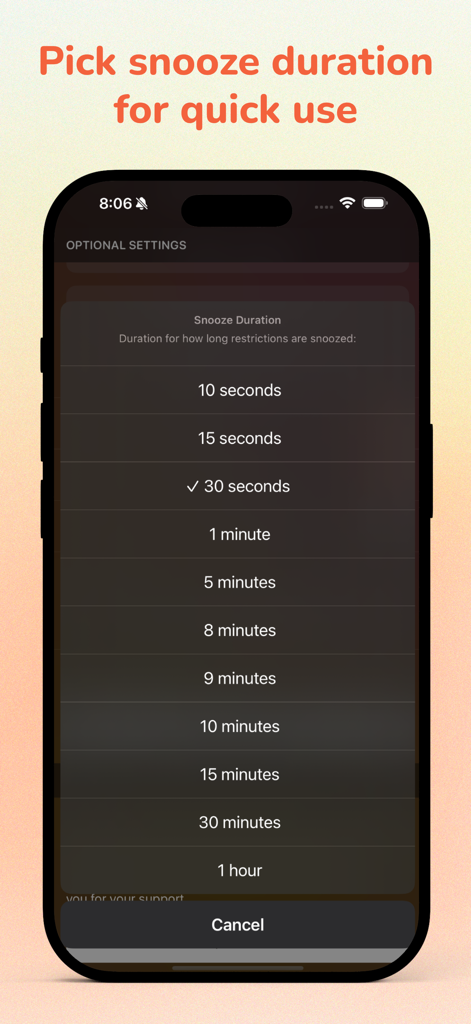
Run For Fun: Screen Time Focus - Run For Funアプリのアプリ制限のスヌーズ時間オプションのリストを示すiPhone画面。
Run For Funアプリのアプリ制限のスヌーズ時間オプションのリストを示すiPhone画面。

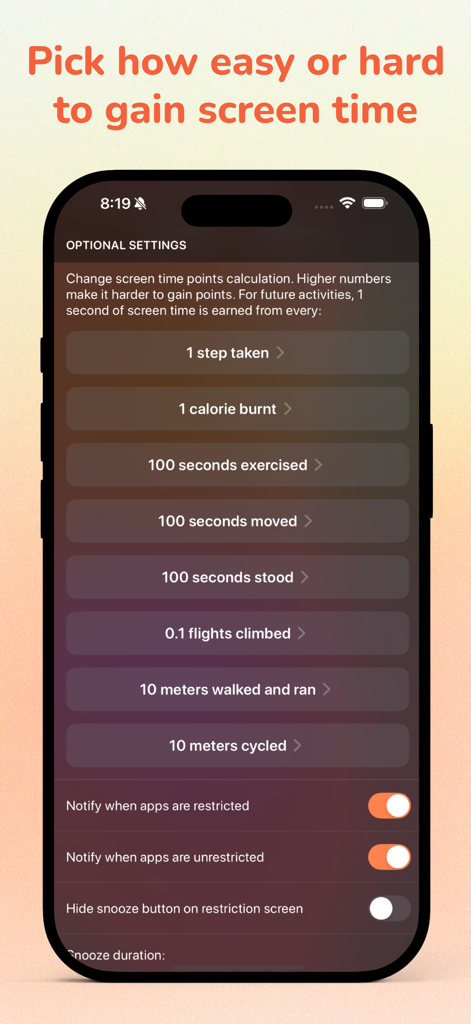
Run For Fun: Screen Time Focus - スクリーンタイムポイントの身体活動変換率を示すオプション設定画面

スクリーンタイムポイントの身体活動変換率を示すオプション設定画面

Run For Fun: Screen Time Focus - Run For Funアプリのアイコンと、プライバシー、広告なし、サブスクリプションなしを強調するテキスト

Run For Funアプリのアイコンと、プライバシー、広告なし、サブスクリプションなしを強調するテキスト

説明

Run For Fun helps you reduce screen addiction, end doomscrolling, practice self-discipline, and get healthy. Privately and securely limit the usage of addictive social media apps and websites until you perform physical activity. When you walk, run, bike, climb stairs, and exercise, you gain screen time points to use those apps. - Your physical activity and app usage data stays private and is not transmitted to the developer. - Using an Apple Watch or similar capable device is optional but highly recommended for best results as it more accurately tracks things like steps, calories burnt, stairs climbed etc. - Your physical activity in the last 1.5 days is used. Usage: Step 1. Allow access to physical activity data from Apple's HealthKit. Includes step count, calories burnt, exercise, move, and stand times, distance cycled, flights climbed, and distance walked and ran. Step 2. Allow access to app usage data from Apple's ScreenTime. Step 3. Select apps and websites to restrict via Apple's ScreenTime. - Optionally, enable notifications for when apps are restricted and unrestricted. - You can choose which weekdays and between what time period restrictions apply. - You can snooze restrictions, choose how long to snooze for, or disable the snooze button altogether. - Change how screen time points are calculated from your physical activity. You control how easy or hard it is to gain screen time points. - Ask your friend to set a password for editing settings. Once set, only your friend can change settings after entering the password. This helps keep you accountable, since you won’t be able to adjust the settings on your own. - Drain all existing points to instantly restrict your apps until you exercise to gain more points. - Only around 550 KB to download and 1.5 MB to install. Free version is limited to restricting 1 app, 1 website, 1 category and all-day everyday schedule. This app is developed by a small indie developer. Please support development costs with a one time only in app purchase. This gets you lifetime access to restricting unlimited apps, websites, and categories, restrictions scheduled on specific weekdays and time, and custom screen time points calculation and snooze times. No subscriptions. Thank you for your support. If you have any questions, please email me from the app at: pran@pranapps.com ----- Running Dog icon created by https://www.flaticon.com/free-icons/dog

Download

ダウンロード: App Store

このページはアプリまたはその開発者の公式ページではなく、情報提供および論評を目的として作成された独立した編集出版物です。明示的に別段の記載がない限り、アプリおよびその開発者は、MWM、Apple、Google Play、アプリのパブリッシャー、またはアプリの開発者と提携、承認、後援、認可、またはその他の公式的な関係はなく、このページのいかなる内容も、アプリがMWMのサービスを使用して開発されたことを意味するものではありません。すべての商標、ロゴ、スクリーンショット、その他のコンテンツはそれぞれの所有者の財産です。