Say it Mail it Plus
Say it Mail it Plus
ダウンロード: App Store

このページはアプリまたはその開発者の公式ページではなく、情報提供および論評を目的として作成された独立した編集出版物です。明示的に別段の記載がない限り、アプリおよびその開発者は、MWM、Apple、Google Play、アプリのパブリッシャー、またはアプリの開発者と提携、承認、後援、認可、またはその他の公式的な関係はなく、このページのいかなる内容も、アプリがMWMのサービスを使用して開発されたことを意味するものではありません。すべての商標、ロゴ、スクリーンショット、その他のコンテンツはそれぞれの所有者の財産です。


ロゴ: Say it Mail it Plus
ダウンロード: App Store

Say it Mail it Plus

タイピングはやめて、話しましょう。アイデア、写真、GPS位置情報をハンズフリーでキャプチャし、直接受信トレイに自動送信します。移動中に生産性を維持する必要がある忙しいプロフェッショナルに最適です。

主要数値

ダウンロード

26K+

ユーザー評価

1.0/5

評価数

0

開発元

Carnation Software

カテゴリ

Business

対応言語

1

最新バージョン

1.0.4

サイズ

2.8 MB

リリース日

2021年10月16日
機能

思考の速さでアイデアをキャプチャ

Say it & Mail it Plusは、キーボードに触れることなく音声メモを行動項目に変える必要がある忙しいプロフェッショナルのための究極の生産性ツールです。

スムーズな音声キャプチャ

電話を耳に当てるだけ、または素早く振るだけでハンズフリー録音—運転中や現場でキーボードを操作する手間はもうありません。

自動受信トレイ配信

「送信」ボタンは完全にスキップ。メモはユニバーサル音声ファイルとして自動的にメール送信され、タスクが受信トレイで待っていることを保証します。

以下のスクリーンショットと説明は、アプリの公式ストアリスティングから直接取得されたものであり、アプリ開発者の所有物です。

アプリストア

スクリーンショット
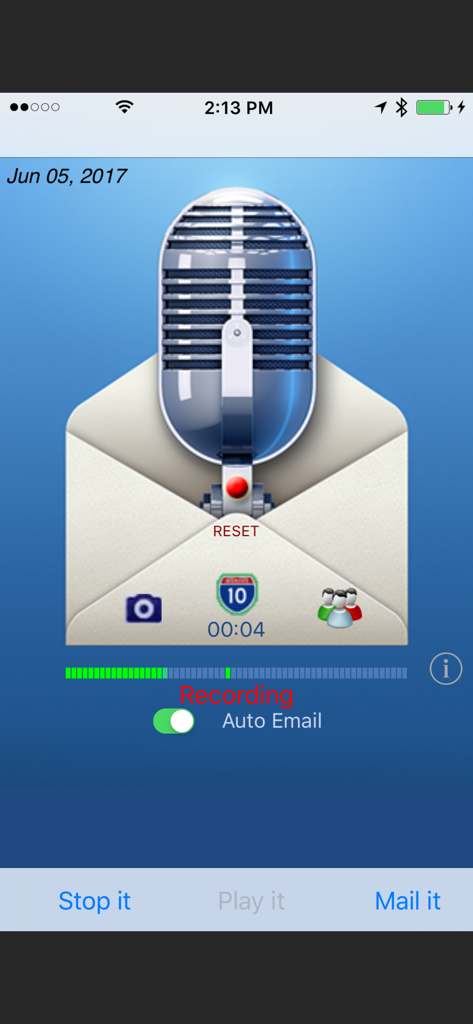
Say it Mail it Plus - Say it Mail it Plusアプリのインターフェース。自動メールトグル付きの音声メモ録音が表示されています。
Say it Mail it Plusアプリのインターフェース。自動メールトグル付きの音声メモ録音が表示されています。

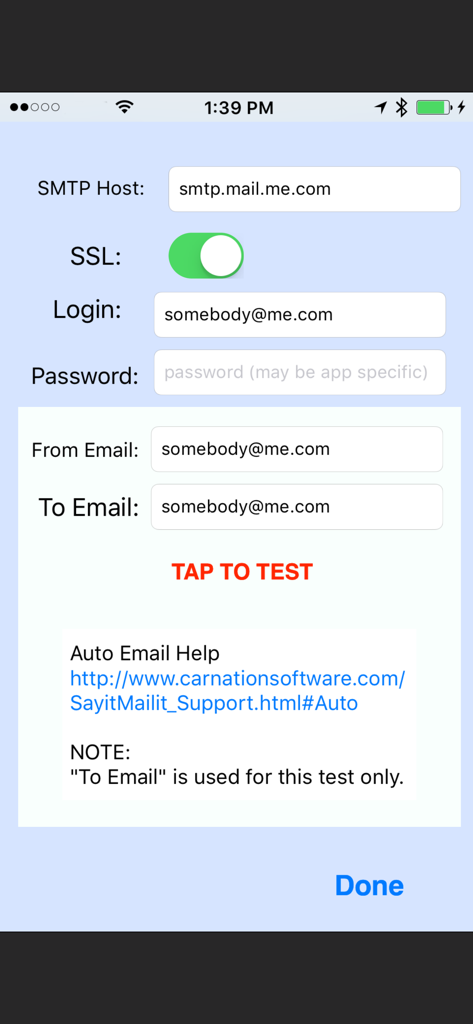
Say it Mail it Plus - アプリのSMTP設定画面。メールホストのログインとサーバーテストのフィールドが表示されています。

アプリのSMTP設定画面。メールホストのログインとサーバーテストのフィールドが表示されています。

説明

Don't type it! Just Say it & Mail it. The fastest way to email a voice memo to yourself or to someone else and optionally include a photo, movie and map location. You can optionally turn on Auto Email. (Then you can Say it and Mail it with no need to tap the Send button) No In-App purchases. "Say it & Mail it" has been designed with simplicity and speed in mind. It remembers your name and an email address, which makes it very fast and easy to send yourself an email memo. Four methods of recording to fit your style: * Method 1: Tap 'Say it' then tap 'Mail it' * Method 2: Hold the iPhone to your ear and speak. When you move the iPhone away, recording stops and the email window opens * Method 3: Shake it to start recording and shake it to stop * Method 4: Tap on the microphone to start recording and tap it again to stop BUT WAIT, THERE'S MORE :-) EMAIL TO GROUPS Uses the groups you already have set up in your Contacts INCLUDE A PICTURE OR MOVIE IN YOUR EMAIL Take a photo or movie or select from the album. Pictures are full resolution compressed jpg format and the picture size can be adjusted. INCLUDE YOUR MAP LOCATION IN YOUR EMAIL When someone receives your email with an iPhone, they will be able to click on the link to launch the map application, see your location and get directions. When someone receives your email with a Mac or PC, they will be able to click on the link to launch their browser to see your location and get directions. So, what else can you do with 'Say it & Mail it'? Lots of things! •Recommend a good restaurant, including location map and photo •Email a reminder to yourself, a friend or preset groups •Document when, why and where you took a great photo •Update your blog via email •Track a real estate tour with info about each home (agent or buyer) •Send a customer the location and details of a house for sale •Record scientific notes with map location and photo of findings •Add content to your podcast •Communicate with elderly relatives who have difficulty typing •Send product information or newsflashes to clients •Email great vacation photos, footage, maps and commentary •Let people know where you are when you need help •Email your messages in any language (no QWERTY keyboard limits) •Document where you park your car so you can easily find it again •And a whole lot more! Emailed voice memos are compatible with Mac, PC and any other computer O/S (uses compressed wave format). No file maintenance on your iPhone/iPod Touch, since audio files are not stored there. NO ADVERTISING in your emails. Just a 'Say it Mail it' signature, which you can optionally remove in the 'Info' setup. Send yourself reminders when you are away from your computer. No typing required. Your email address and subject are autofilled. If you are using an iPhone, your message is sent off immediately, thanks to cell towers. iPod Touch devices store the email and send as soon as they are able to make a Wi-Fi connection. Great way to send anyone a detailed email without using the keyboard. Send an MMS Instant Message So many uses, we can't imagine them all. You will think of many more NOTES: iPod Touch requires headphones with microphone and a Wi-Fi connection. The iPhone has a microphone built-in. Camera may only be available on iPhone. Not all devices can take movies.

Download

ダウンロード: App Store

このページはアプリまたはその開発者の公式ページではなく、情報提供および論評を目的として作成された独立した編集出版物です。明示的に別段の記載がない限り、アプリおよびその開発者は、MWM、Apple、Google Play、アプリのパブリッシャー、またはアプリの開発者と提携、承認、後援、認可、またはその他の公式的な関係はなく、このページのいかなる内容も、アプリがMWMのサービスを使用して開発されたことを意味するものではありません。すべての商標、ロゴ、スクリーンショット、その他のコンテンツはそれぞれの所有者の財産です。








