SensorLog
SensorLog
ダウンロード: App Store

このページはアプリまたはその開発者の公式ページではなく、情報提供および論評を目的として作成された独立した編集出版物です。明示的に別段の記載がない限り、アプリおよびその開発者は、MWM、Apple、Google Play、アプリのパブリッシャー、またはアプリの開発者と提携、承認、後援、認可、またはその他の公式的な関係はなく、このページのいかなる内容も、アプリがMWMのサービスを使用して開発されたことを意味するものではありません。すべての商標、ロゴ、スクリーンショット、その他のコンテンツはそれぞれの所有者の財産です。

ロゴ: SensorLog
ダウンロード: App Store

SensorLog

iPhoneとApple Watchの最大100Hzの高忠実度生センサーデータへのアクセスを解除します。CSV/JSONへのエクスポート、TCP/UDP/HTTP経由でのライブストリーミング、そして精度の高いCore ML研究を可能にします。

主要数値

ダウンロード

117K+

ユーザー評価

4.1/5

評価数

200

開発元

Bernd Thomas

カテゴリ

Utilities

対応言語

2

最新バージョン

6.1

サイズ

3.9 MB

リリース日

2010年9月8日
機能

高精度センサーデータ取得

Appleハードウェアの潜在能力を最大限に引き出します。リアルタイムでの生センサーデータストリーミング、または高度な研究、IoTプロトタイピング、機械学習のためのログエクスポートが可能です。

超高周波ロギング

モーション解析や高速テレメトリのために最大100Hzでデータを記録し、科学研究に必要な精度ですべての詳細をキャプチャします。

ライブストリーミング&接続性

TCP、UDP、またはHTTP POST経由でカスタムサーバーまたはREST APIに即座にデータをブロードキャストし、デバイスを汎用的なIoTセンサーノードに変えます。

以下のスクリーンショットと説明は、アプリの公式ストアリスティングから直接取得されたものであり、アプリ開発者の所有物です。

アプリストア

スクリーンショット
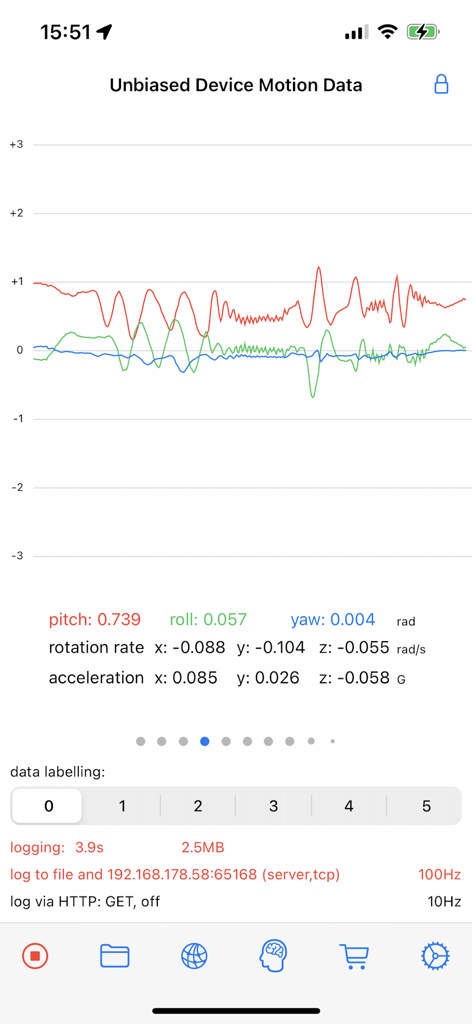
SensorLog - SensorLogインターフェースが、ピッチ、ロール、ヨーのリアルタイムグラフで偏りのないデバイスモーションデータを表示
SensorLogインターフェースが、ピッチ、ロール、ヨーのリアルタイムグラフで偏りのないデバイスモーションデータを表示

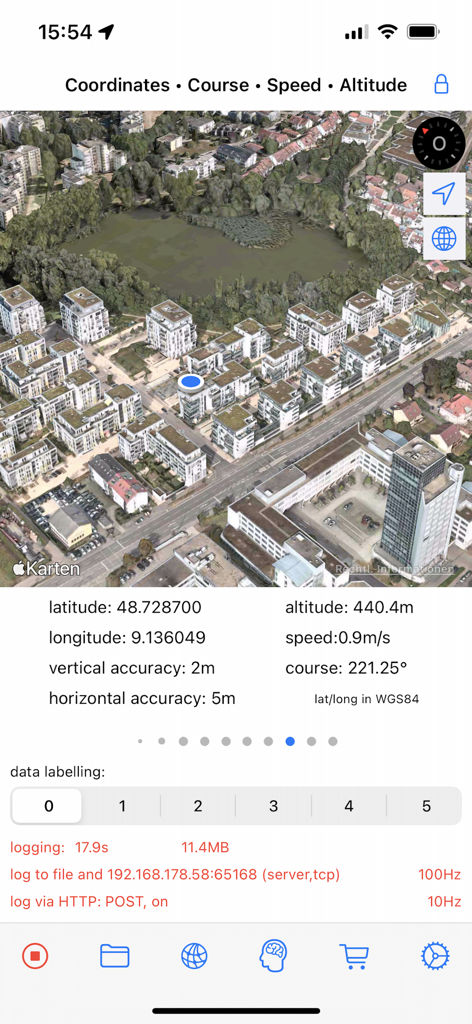
SensorLog - SensorLogアプリインターフェースが、緯度と経度を含む3D衛星マップとリアルタイムGPSセンサーデータを表示
SensorLogアプリインターフェースが、緯度と経度を含む3D衛星マップとリアルタイムGPSセンサーデータを表示

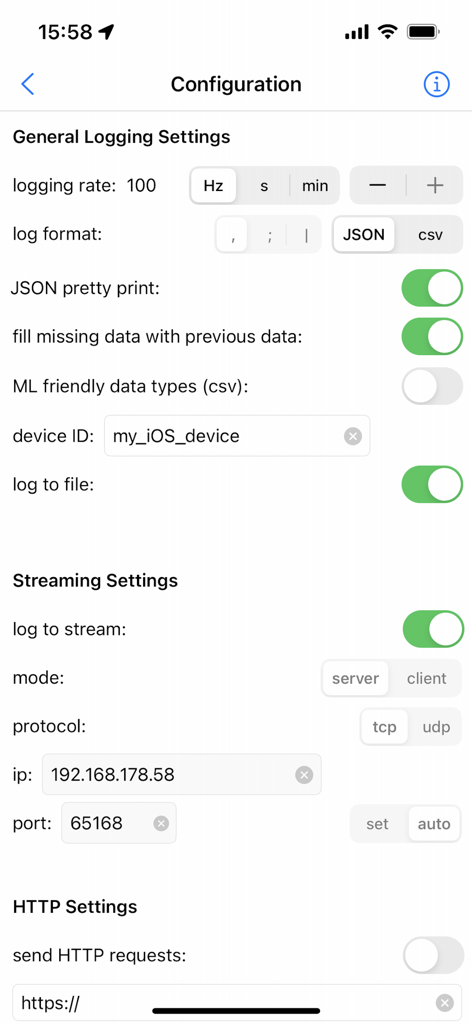
SensorLog - SensorLogアプリの設定画面には、データ収集のためのロギングおよびストリーミング設定が表示
SensorLogアプリの設定画面には、データ収集のためのロギングおよびストリーミング設定が表示

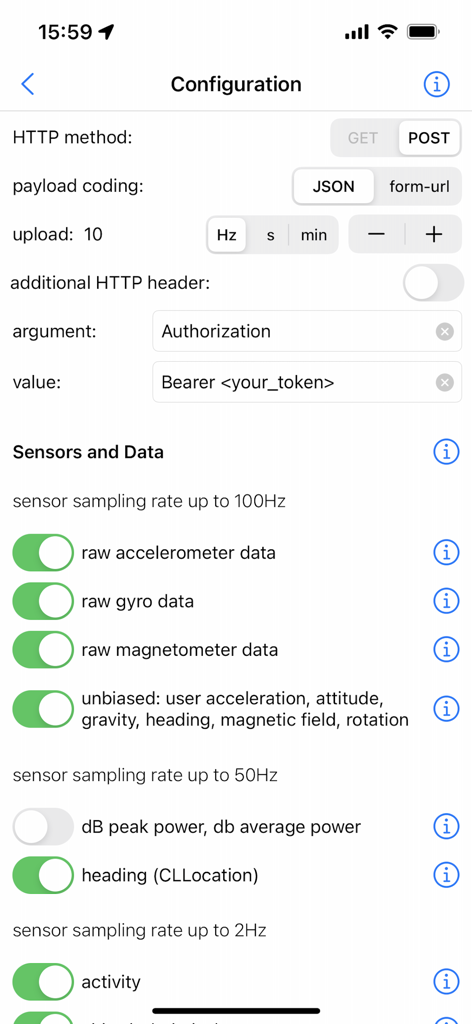
SensorLog - SensorLogアプリの設定画面には、HTTP設定と、生データ収集のためのセンサーサンプリングレートトグルが表示
SensorLogアプリの設定画面には、HTTP設定と、生データ収集のためのセンサーサンプリングレートトグルが表示

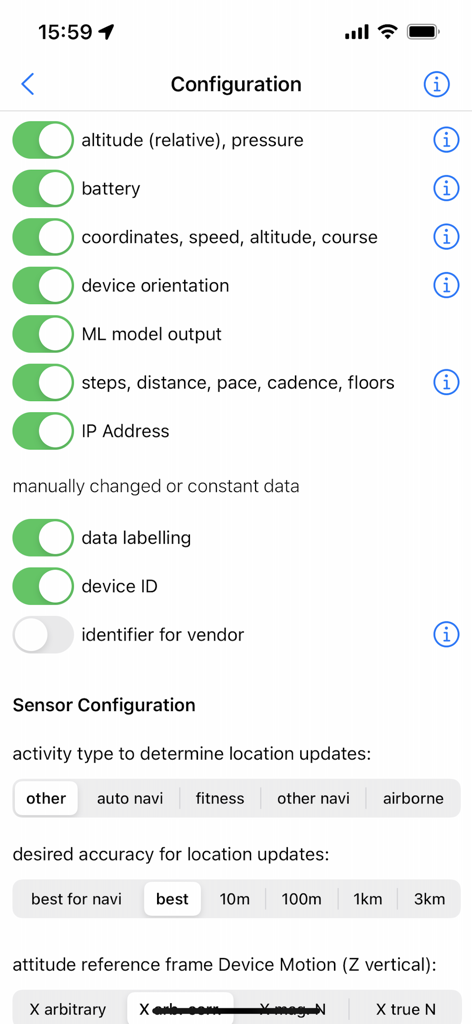
SensorLog - SensorLogアプリの設定画面には、高度、バッテリー、座標、MLモデル出力を含むセンサーデータ収集のトグルが表示
SensorLogアプリの設定画面には、高度、バッテリー、座標、MLモデル出力を含むセンサーデータ収集のトグルが表示

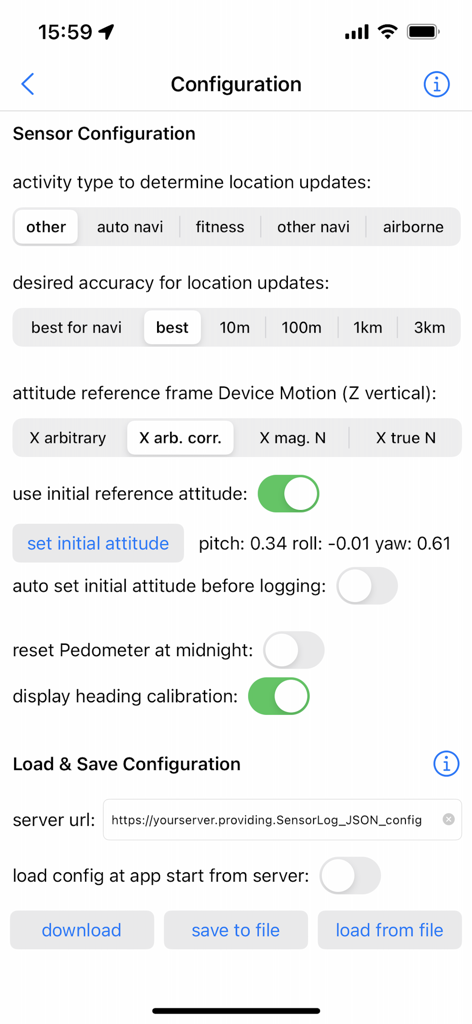
SensorLog - SensorLogアプリの設定インターフェースには、センサー精度とデータストレージオプションが表示
SensorLogアプリの設定インターフェースには、センサー精度とデータストレージオプションが表示

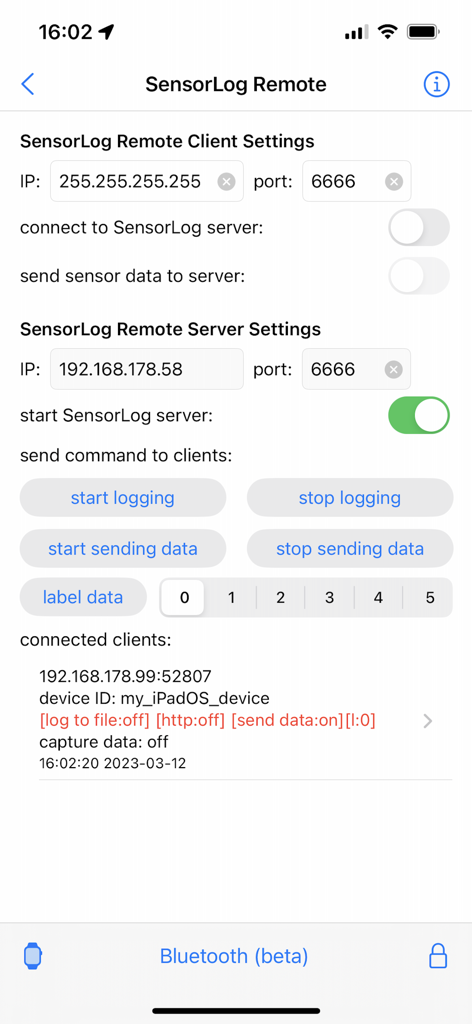
SensorLog - SensorLog Remoteインターフェースには、クライアントおよびサーバーの設定と接続済みデバイスのステータスが表示
SensorLog Remoteインターフェースには、クライアントおよびサーバーの設定と接続済みデバイスのステータスが表示

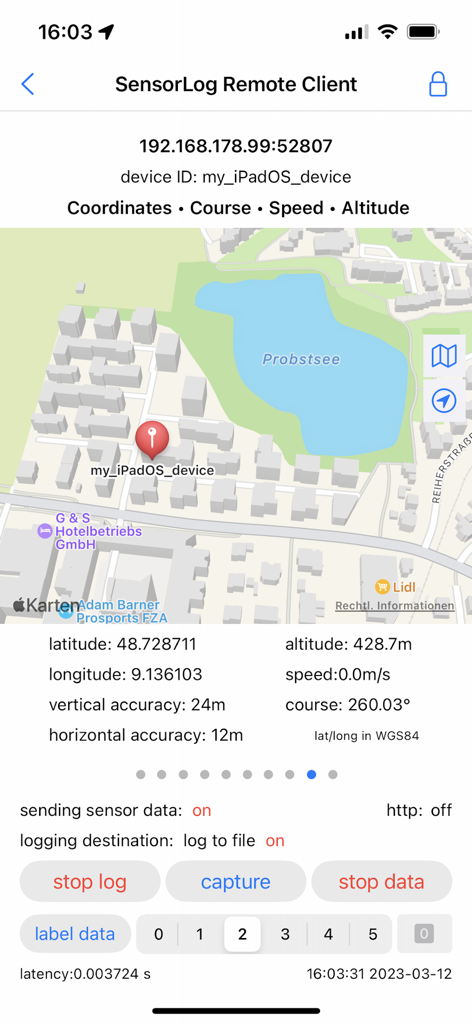
SensorLog - SensorLogアプリインターフェースには、マップと座標を含むリモートクライアントGPSトラッキングが表示
SensorLogアプリインターフェースには、マップと座標を含むリモートクライアントGPSトラッキングが表示

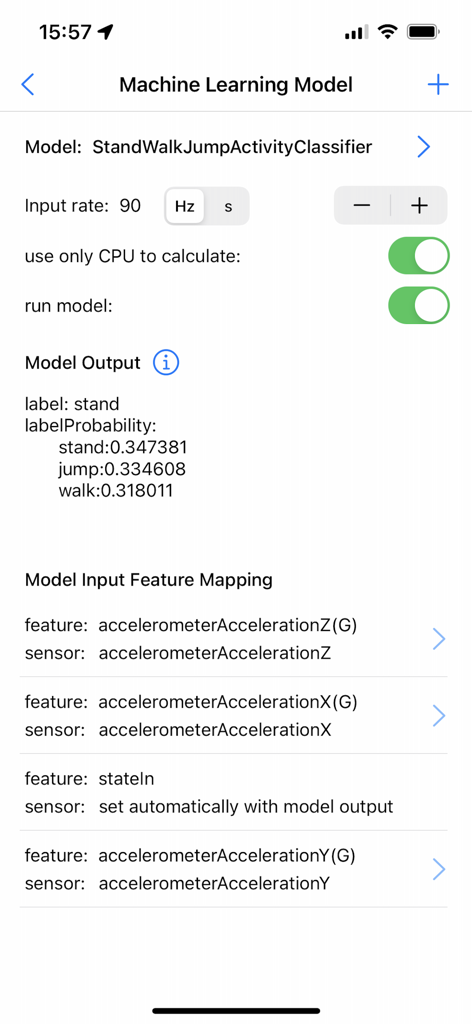
SensorLog - SensorLogアプリの機械学習モデルインターフェースには、アクティビティ分類の確率とセンサー入力特徴のマッピングが表示
SensorLogアプリの機械学習モデルインターフェースには、アクティビティ分類の確率とセンサー入力特徴のマッピングが表示

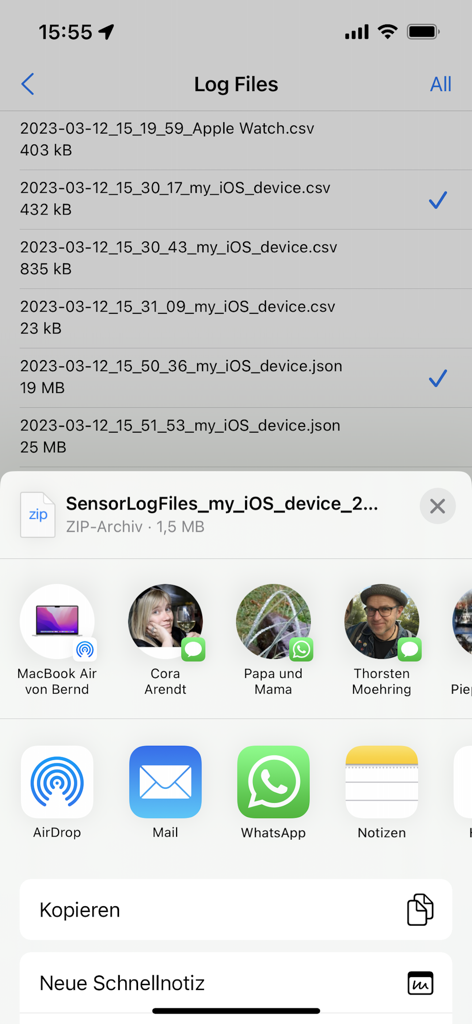
SensorLog - iOS共有シート経由でエクスポートされるCSVおよびJSON形式の記録済みセンサーデータファイルリスト

iOS共有シート経由でエクスポートされるCSVおよびJSON形式の記録済みセンサーデータファイルリスト

説明

With SensorLog you can read sensor data from the iPhone, iPad and Apple Watch. The sensor data can be saved as a file in CSV or JSON format, streamed via TCP/UDP or sent as an HTTP request. The most important functions for iPhone and iPad: - Sensor data can be recorded at up to 100Hz (depending on the iOS device version and sensor type). - Sensor data can be streamed in server or client mode using TCP or UDP. Depending on the network speed and the server or client configuration used, this is possible with up to 100Hz. - Via HTTP(S) GET/POST request, sensor data in JSON format (POST) or form-url encoded (POST and GET) can be transmitted to a REST API with up to 20Hz. - With the SensorLog Remote Client/Server function, an iPad or iPhone can connect as a SensorLog Remote Client to an iPhone or iPad, which takes on the role of SensorLog Remote Server. The client's sensor data can be visualized on the server, and the server can control the clients (start/stop logging, start/stop sending data). - Logging can be started and stopped using Siri and shortcuts. - SensorLog supports Core ML models created with Apple's Create ML app. Log data with SensorLog, train a model with the data in Create ML, load exported models in SensorLog and log the model prediction. Supported Create ML models are: Activity Classifier, Tabular Regressor and Tabular Classifier. - If you have an Apple Watch, HealthKit data such as heart rate, energy used, sleep and movement data can be exported on the watch as a csv or json file and then transferred to your iPhone. Sensor data iPhone / iPad: For sample log files, please visit the SensorLog homepage (link App Support). - CLLocation, CLHeading, CMAccelerometer, CMGyroData, CMMagnetometer, CMDeviceMotion, CMActivity, CMPedometer, CMAltimeter, WLAN and network provider IP addresses, device orientation, battery info, decibels. The most important functions for Apple Watch: - Logging Option 1: Logging duration up to 1 hour Simultaneous logging of all selectable sensor data is supported in the background with up to 50Hz. Individual sensors can be logged with a higher frequency of up to 100Hz. Sending data via HTTP requests is supported. - Logging option 2: Logging duration greater than 1 hour In the background only logging of the accelerometer data with max. 50Hz is supported. In the foreground all sensor data with up to 100Hz. Sending data via HTTP requests is only supported when the app is in the foreground. - Via HTTP(S) GET/POST request, sensor data can be transmitted to a REST API with up to 10Hz in JSON format (POST) or form-url encoded (POST and GET). - The Health Store data feature off the SensorLog Watch app allows you to export HealthKit data like heart rate, energy burned, sleep, and movement data. This data is automatically recorded by your Watch and can be read out and exported by SensorLog as csv or json file and transferred to your iPhone. - Logging can be started and stopped using Siri and Shortcuts. Sensor Data Watch: For sample log files, please visit the SensorLog homepage (link App Support). - CLLocation, CMAccelerometer, CMDeviceMotion, CMActivity, CMPedometer, CMAltimeter, battery info

Download

ダウンロード: App Store

このページはアプリまたはその開発者の公式ページではなく、情報提供および論評を目的として作成された独立した編集出版物です。明示的に別段の記載がない限り、アプリおよびその開発者は、MWM、Apple、Google Play、アプリのパブリッシャー、またはアプリの開発者と提携、承認、後援、認可、またはその他の公式的な関係はなく、このページのいかなる内容も、アプリがMWMのサービスを使用して開発されたことを意味するものではありません。すべての商標、ロゴ、スクリーンショット、その他のコンテンツはそれぞれの所有者の財産です。








