
このページはアプリまたはその開発者の公式ページではなく、情報提供および論評を目的として作成された独立した編集出版物です。明示的に別段の記載がない限り、アプリおよびその開発者は、MWM、Apple、Google Play、アプリのパブリッシャー、またはアプリの開発者と提携、承認、後援、認可、またはその他の公式的な関係はなく、このページのいかなる内容も、アプリがMWMのサービスを使用して開発されたことを意味するものではありません。すべての商標、ロゴ、スクリーンショット、その他のコンテンツはそれぞれの所有者の財産です。

Sharp Chart 2020 LogMAR Chart
AirPlay、Siri音声コントロール、HomeKit連携により、あらゆるスクリーンを高精度な臨床ディスプレイに変えましょう。精度と最先端の患者体験を求める視能訓練士のためのオールインワンデジタルソリューションです。
ダウンロード
1K+ユーザー評価
評価数
0開発元
カテゴリ
Medical対応言語
1最新バージョン
1.61サイズ
23.0 MBリリース日
2020年4月4日デジタル精度で臨床業務を向上
最新の視能訓練士向けに設計されたプロフェッショナルグレードの視力検査ソリューション。比類なき携帯性とスマートクリニック連携により、シームレスな検査体験を提供します。
シームレスなAirPlay連携
あらゆるテレビやモニターを高解像度視力検査システムに変えましょう。iPhoneやApple TVを使用して、かさばる高価なプロジェクターを排除し、診察室を近代化します。
ゴールドスタンダードの臨床的多用途性
LogMAR、Sloan、Duochromeを含む科学的に検証されたチャートのフルスイートに加え、小児および低視力患者向けの特殊検査にアクセスできます。
以下のスクリーンショットと説明は、アプリの公式ストアリスティングから直接取得されたものであり、アプリ開発者の所有物です。
アプリストア
スクリーンショット
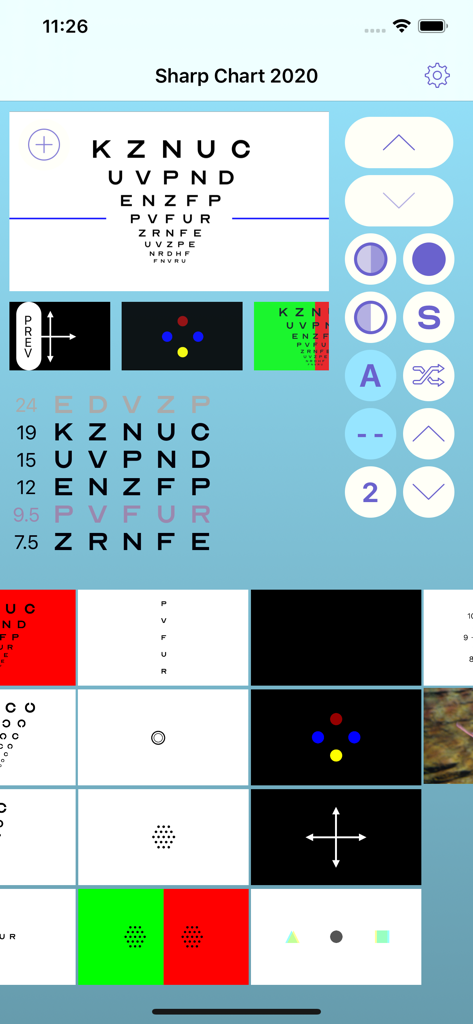
Sharp Chart 2020アプリのインターフェイス。プロフェッショナルな眼科検査チャートと臨床視力検査ツールを表示。
説明
Download
類似アプリ
同じカテゴリのトップランクアプリ

国家医保服务平台
National Healthcare Security Administration

MyChart
Epic Systems Corporation

Doctolib - Your health partner
Doctolib

Pregnancy + | Tracker App
Philips Digital UK Limited

CVS Health
CVS Pharmacy

江苏医保云
Jiangsu Healthcare Security Bureau

UnitedHealthcare
UNITED HEALTHCARE SERVICES, INC.

京东健康
BEIJING JINGDONG 360 DU E-COMMERCE LTD.

Meu SUS Digital
Servicos e Informacoes do Brasil
このページはアプリまたはその開発者の公式ページではなく、情報提供および論評を目的として作成された独立した編集出版物です。明示的に別段の記載がない限り、アプリおよびその開発者は、MWM、Apple、Google Play、アプリのパブリッシャー、またはアプリの開発者と提携、承認、後援、認可、またはその他の公式的な関係はなく、このページのいかなる内容も、アプリがMWMのサービスを使用して開発されたことを意味するものではありません。すべての商標、ロゴ、スクリーンショット、その他のコンテンツはそれぞれの所有者の財産です。