Shot Designer

Shot Designer

ダウンロード: App Store
ロゴ: Shot Designer

Shot Designer: カメラブロッキングを数秒でマスター

監督とDPのためのオールインワンツール。プロフェッショナルなカメラ図、自動ショットリスト、リアルタイムアニメーションを作成します。ワークフローを効率化し、セットで時間が迫っている中でもあなたのビジョンを実現しましょう。

開発元

Hollywood Camera Work SRL Semplificata

カテゴリ

Photo & Video

ダウンロード

96K+

ユーザー評価

4.1/5

評価数

600

対応言語

1

すべてのフレームに正確さを

このインターフェースを利用する 96K+ 人のユーザー.

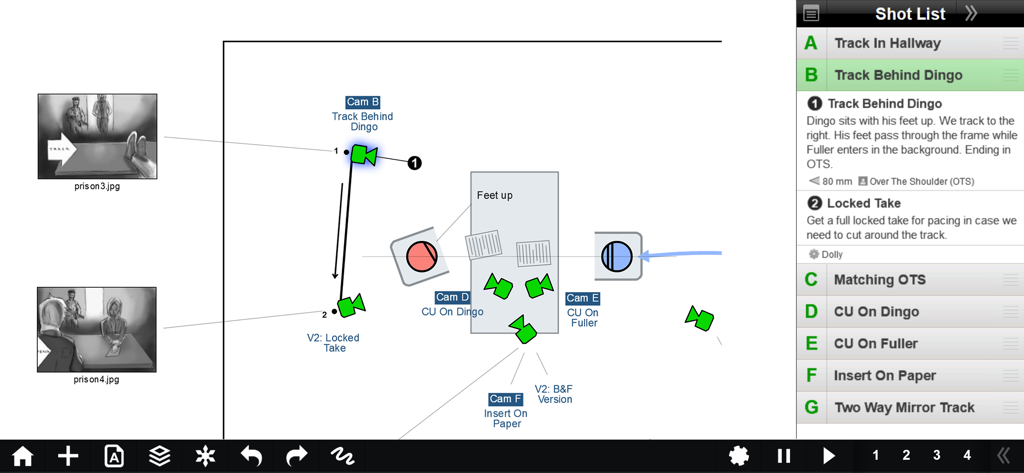
Shot Designerアプリインターフェースには、キャラクターの動きと統合されたショットリストが表示されたカメラブロッキング図が表示されています
Shot Designerアプリインターフェースには、キャラクターの動きと統合されたショットリストが表示されたカメラブロッキング図が表示されています

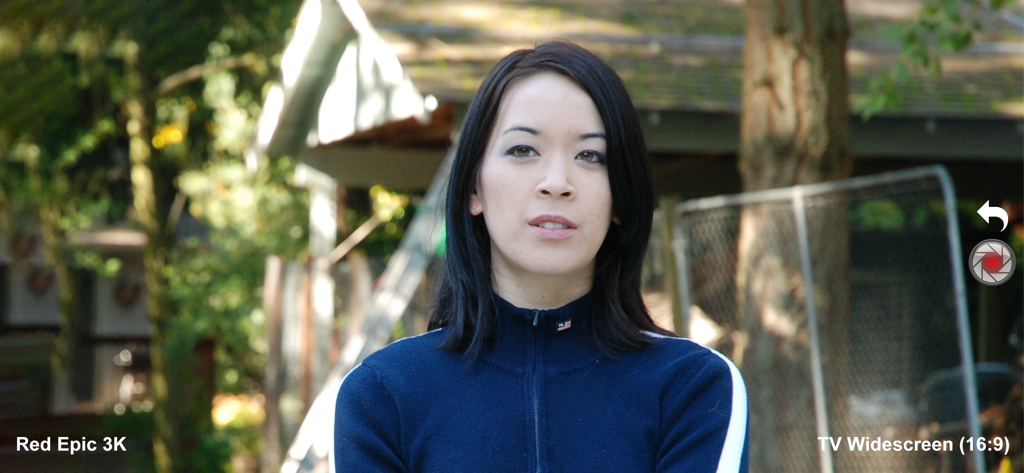
Shot Designerアプリのディレクタービューファインダーには、Red Epic 3Kカメラシミュレーションとワイドスクリーンアスペクト比が表示されています
Shot Designerアプリのディレクタービューファインダーには、Red Epic 3Kカメラシミュレーションとワイドスクリーンアスペクト比が表示されています

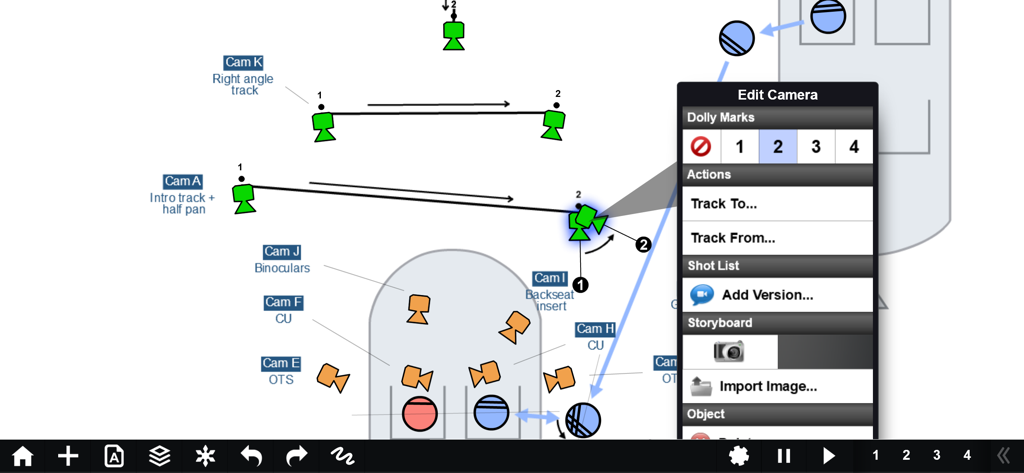
Shot Designerアプリのプロフェッショナルカメラブロッキング図には、カメラトラッキングの動きとドリーマークが表示されています。

Shot Designerアプリのプロフェッショナルカメラブロッキング図には、カメラトラッキングの動きとドリーマークが表示されています。

正確なブロッキングでセットをマスター

このアプリを際立たせるツール、 96K+ 人のユーザーが選択.

🎬

驚異的なスピードのブロッキング

複雑なカメラ図を数秒で作成できます。キャラクターを移動すると、インテリジェントなソフトウェアが自動的にカメラを再配置するため、俳優が待っている間でも再ブロッキングできます。

📋

自動作成ショットリスト

スプレッドシートでの時間を無駄にするのはやめましょう。ショットリストは図に直接リンクされており、作業中にリアルタイムで更新されるため、計画とリストは常に同期されます。

☁️

プロの同期とチーム共有

クルー全員を同じページに保ちましょう。すべてのデバイスでシーンを同期し、ガファー、DP、ADとフォルダを共有して、完全に調整された制作を維持しましょう。

アプリについて

について知っておくべきこと Shot Designer.

説明

WHAT IS SHOT DESIGNER? • CAMERA DIAGRAM - Shot Designer dramatically speeds up the Director's process of making camera diagrams. Create full-blown diagrams in seconds. The software does most of the work. • ANIMATION - Animate your characters and cameras to move around your diagram in real-time. Previsualize the rhythm of a scene by seeing it play out. • SHOT LIST - The integrated Shot List is tied into the diagram and writes itself while you work. Edit shots intuitively in the diagram, not in a confusing spreadsheet. • DIRECTOR'S VIEWFINDER / STORYBOARDS - Bring in lens-accurate camera angles via the integrated Director's Viewfinder or Storyboard Import. • MAC/PC DESKTOP VERSION - An identical Mac/PC Desktop Version is included with the Pro Version (in-app upgrade). • SYNC & TEAM SHARING - Sync your scenes across all your devices. Share scene folders with teams. Control who owns which scene. (Pro Feature) Watch the feature-demo at https://www.hollywoodcamerawork.com/shot-designer-videos.html CAMERA-BLOCKING ON STEROIDS Shot Designer was developed by Per Holmes, the creator of the renowned Hollywood Camera Work training, and has been developed in conjunction with major TV and Film productions. Shot Designer is based on the realization that neither Camera Diagrams, Shot Lists, or Storyboards by themselves give you a satisfying understanding of camera-blocking -- you have to use them *together*. Shot Designer is FAST. The app knows how Directing works and automatically does most of the work for you. Cameras rearrange themselves when you move characters. Animate characters and cameras with simple Walk To and Track To commands. Create sophisticated tracking shots with multiple marks. Shot Designer is fast enough that you can rearrange the diagram with actors waiting. OTHER FEATURES • Integrated Set Designer for building floor plans. • Integrated Lighting Designer for DPs, with lighting symbols provided by Ari Golan of Atomic Imaging Studios Chicago. • Import production drawings as backgrounds and block on top of them. • Factory Templates of pre-made camera setups for any situation. • Make your own templates as starting points for new scenes. • Large and growing prop/furniture library. Email us requests, we'll build them. • Scene Freeze: Experiment easily by taking snapshots you can return to (Pro). • PDF/JPG/Excel export and emailing of Camera Diagrams and Shot Lists (Pro). • Unlimited Folder Structure for organizing scenes (Pro). The Free Version of Shot Designer is full-featured except for Save, Export and Sync/Team. Your current scene is always saved, and you can be fully productive working on one scene at a time. The Pro Version (in-app upgrade) adds File Management, identical Mac/PC Desktop Version, Sync and Team Sharing, PDF/JPG/Excel Export and more.

最新バージョン

1.80.8

サイズ

81.8 MB

リリース日

2012年10月10日

セットをコマンドしよう

何千人もの監督やDPが、ブロッキングの効率化、クルーとの同期、制作時間の節約のために業界をリードするこのツールを使用しています。

ダウンロード: App Store

App information, icons, screenshots, and descriptions displayed on this page are sourced from the Apple App Store and are the property of their respective developers. Download estimates and rankings are based on MWM's proprietary models and may not reflect actual figures. This page is provided for informational and analytical purposes only.

Believe this page infringes your intellectual property? File a dispute