Signature: sign documents
ダウンロード: App Store

このページはアプリまたはその開発者の公式ページではなく、情報提供および論評を目的として作成された独立した編集出版物です。明示的に別段の記載がない限り、アプリおよびその開発者は、MWM、Apple、Google Play、アプリのパブリッシャー、またはアプリの開発者と提携、承認、後援、認可、またはその他の公式的な関係はなく、このページのいかなる内容も、アプリがMWMのサービスを使用して開発されたことを意味するものではありません。すべての商標、ロゴ、スクリーンショット、その他のコンテンツはそれぞれの所有者の財産です。


ロゴ: Signature: sign documents
ダウンロード: App Store

Signature: sign documents

プリンターはもう不要。数秒で契約書に署名。自然な手書きをキャプチャし、複数ページの書類に即座に署名し、ウォーターマークなしのPDFをオフラインでプライベートにエクスポート。

主要数値

ダウンロード

22K+

ユーザー評価

4.6/5

評価数

100

開発元

GAL APP LTD

カテゴリ

Utilities

対応言語

24

最新バージョン

1.5.4

サイズ

14.9 MB

リリース日

2025年6月3日
機能

プロフェッショナルな署名をシンプルに

不動産業者、フリーランサー、リモートワーカーがプリンターなしで数秒で契約を処理できる、完全なモバイルツールキット。

本物の手書きインク

画面に描画するか、AIによる自動背景除去で紙の署名をスキャンして、プロフェッショナルな署名を作成します。

インスタント一括署名

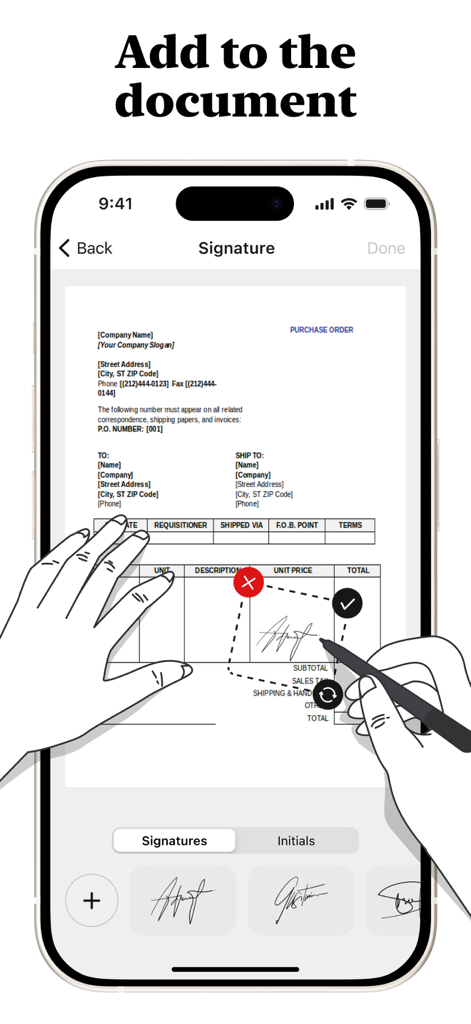
署名を一度配置するだけで、すべてのページに自動的に同期され、長文の書類も楽に処理できます。

以下のスクリーンショットと説明は、アプリの公式ストアリスティングから直接取得されたものであり、アプリ開発者の所有物です。

アプリストア

スクリーンショット
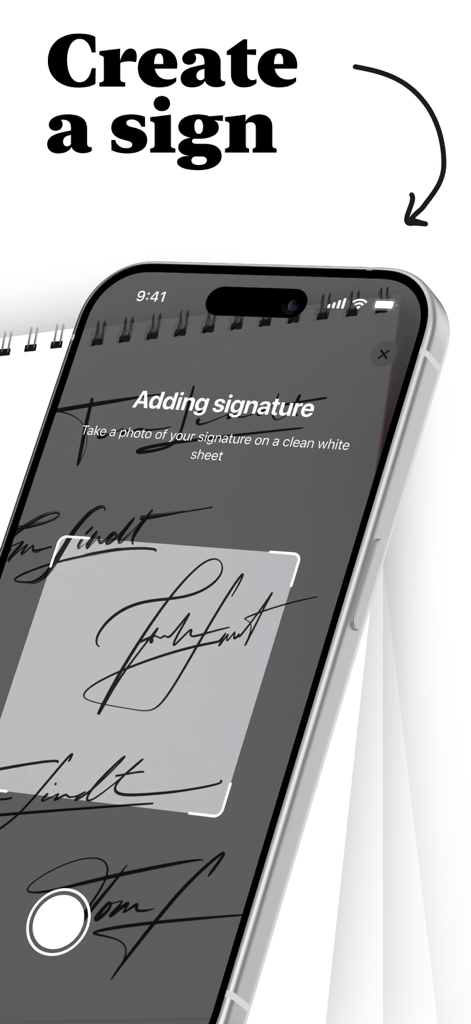
Signature: sign documents - Signatureアプリでカメラを使って手書きの署名をキャプチャするプロセスを示すiPhone画面
Signatureアプリでカメラを使って手書きの署名をキャプチャするプロセスを示すiPhone画面

Signature: sign documents - Signatureアプリを使用して購入注文書にデジタル署名を追加するユーザーを示すiPhone画面
Signatureアプリを使用して購入注文書にデジタル署名を追加するユーザーを示すiPhone画面

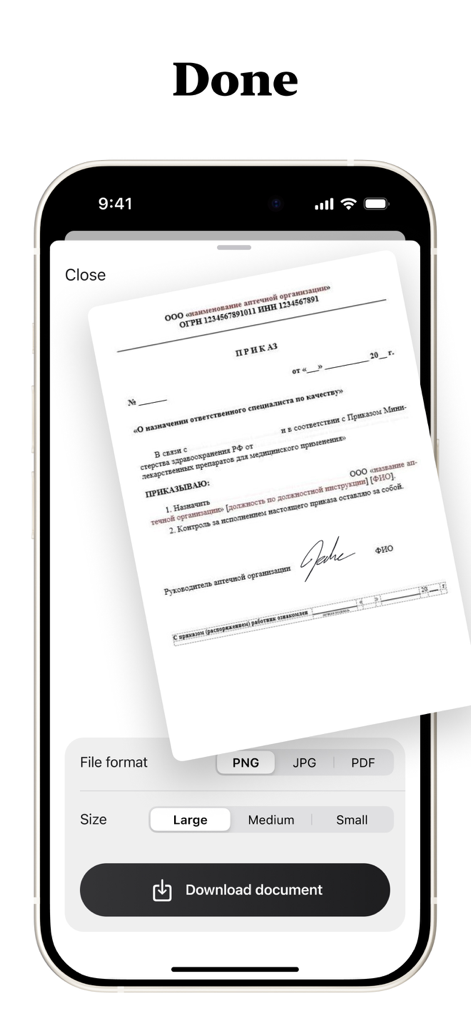
Signature: sign documents - 署名済みドキュメントのダウンロード設定(ファイル形式やサイズを含む)を示すモバイルアプリインターフェイス。

署名済みドキュメントのダウンロード設定(ファイル形式やサイズを含む)を示すモバイルアプリインターフェイス。

説明

SignQuick - Professional Digital Document Signing Transform your document workflow with SignQuick, the comprehensive digital signing solution designed for professionals, students, and anyone who needs to sign documents quickly and securely. Create Perfect Signatures Draw signatures naturally with your finger using our intuitive drawing canvas, or take photos of handwritten signatures on paper with automatic background removal. Create professional initials for quick document marking and approval, and store unlimited signatures and initials for instant access. Universal Document Support Import and sign PDF documents with full formatting preservation. Work seamlessly with Word documents, PowerPoint presentations, and text files. Scan physical documents directly with your camera and enjoy automatic conversion of non-PDF files to PDF format for universal compatibility. Advanced Signing Features Drag, resize, and position signatures anywhere on your documents. Copy signatures to all pages or select specific pages for bulk signing with real-time preview of signature placement before finalizing. Precision controls ensure perfect signature positioning every time. Multiple Export Options Save signed documents as PDF, PNG, or JPG formats. Export directly to Files app, email, or cloud storage services while maintaining original document quality with no compression artifacts. Share signed documents instantly with clients, colleagues, or institutions. Professional Quality Output Generate clean, watermark-free signed documents with high-resolution signature rendering. Preserve original document formatting and layout for professional appearance suitable for legal and business use. Premium Features Access unlimited document pages - sign lengthy contracts and reports without restrictions. Enjoy unlimited signature storage - create and save as many signatures as needed. Benefit from advanced PDF conversion - transform any document format to PDF. Receive priority support and regular feature updates. Security and Privacy All signatures are stored securely on your device with no cloud storage of sensitive documents unless you choose to export. Maintain complete privacy and control over your signature data with full offline functionality - sign documents anywhere, anytime. Why Choose SignQuick? SignQuick eliminates the need for printing, manual signing, and scanning. Whether you're a business professional handling contracts, a student submitting assignments, or anyone dealing with paperwork, SignQuick streamlines your document workflow. The intuitive interface follows Apple's design guidelines, ensuring a familiar and efficient user experience. Perfect for real estate agents, lawyers, consultants, students, small business owners, and remote workers who need reliable, professional document signing capabilities on their mobile device. Download SignQuick today and experience the future of digital document signing. Full access is available only with an active subscription. After subscribing, the chosen plan will be billed immediately. Terms: https://www.apple.com/legal/internet-services/itunes/dev/stdeula/

Download

ダウンロード: App Store

このページはアプリまたはその開発者の公式ページではなく、情報提供および論評を目的として作成された独立した編集出版物です。明示的に別段の記載がない限り、アプリおよびその開発者は、MWM、Apple、Google Play、アプリのパブリッシャー、またはアプリの開発者と提携、承認、後援、認可、またはその他の公式的な関係はなく、このページのいかなる内容も、アプリがMWMのサービスを使用して開発されたことを意味するものではありません。すべての商標、ロゴ、スクリーンショット、その他のコンテンツはそれぞれの所有者の財産です。








