SlimSpace - Compressor
ダウンロード: App Store

このページはアプリまたはその開発者の公式ページではなく、情報提供および論評を目的として作成された独立した編集出版物です。明示的に別段の記載がない限り、アプリおよびその開発者は、MWM、Apple、Google Play、アプリのパブリッシャー、またはアプリの開発者と提携、承認、後援、認可、またはその他の公式的な関係はなく、このページのいかなる内容も、アプリがMWMのサービスを使用して開発されたことを意味するものではありません。すべての商標、ロゴ、スクリーンショット、その他のコンテンツはそれぞれの所有者の財産です。


ロゴ: SlimSpace - Compressor
ダウンロード: App Store

SlimSpace - Compressor

品質を損なうことなく、大きな4K動画や写真を圧縮します。ギガバイト単位の容量を解放し、100%安全なオフライン処理でデータをプライベートに保ちます。

主要数値

ダウンロード

1M+

ユーザー評価

4.8/5

評価数

40K+

開発元

琛 王

カテゴリ

Productivity

対応言語

33

最新バージョン

6.11

サイズ

40.8 MB

リリース日

2017年5月16日
機能

「ストレージがほぼ満杯」という警告を二度と見ない

巨大な動画を縮小し、重複した写真を削除し、高品質な思い出を保持するための究極のストレージツールキット。すべて100%プライベートなままで。

プロ品質の圧縮

驚くほど鮮明な画質を維持しながら、4K動画や高解像度写真を元のサイズの数分の一に圧縮します。TikTokやiMessageでの共有に最適です。

100%プライベート&オフライン

あなたのデータはデバイスから離れることはありません。すべての処理はローカルの電話で行われるため、インターネット接続なしで個人情報が安全に保たれます。

以下のスクリーンショットと説明は、アプリの公式ストアリスティングから直接取得されたものであり、アプリ開発者の所有物です。

アプリストア

スクリーンショット
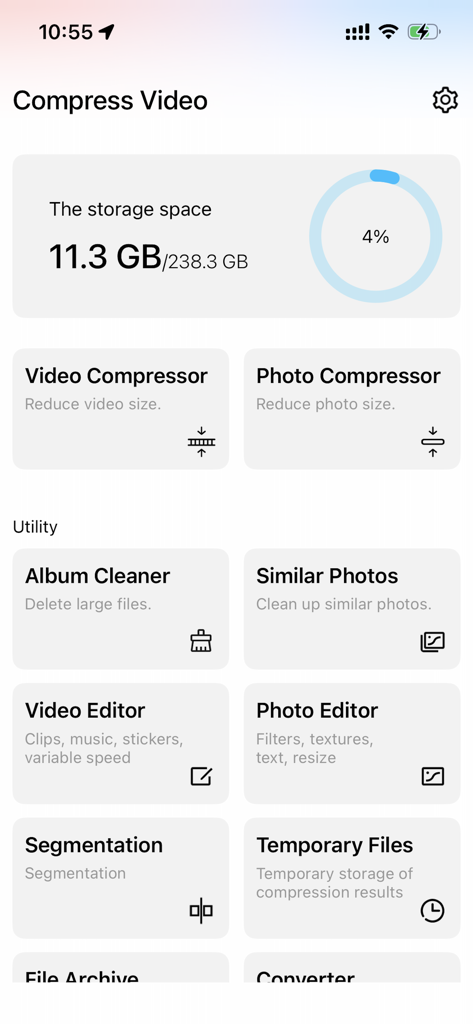
SlimSpace - Compressor - SlimSpaceアプリのダッシュボード、ストレージ統計と動画・写真圧縮ツールのアイコンを表示
SlimSpaceアプリのダッシュボード、ストレージ統計と動画・写真圧縮ツールのアイコンを表示

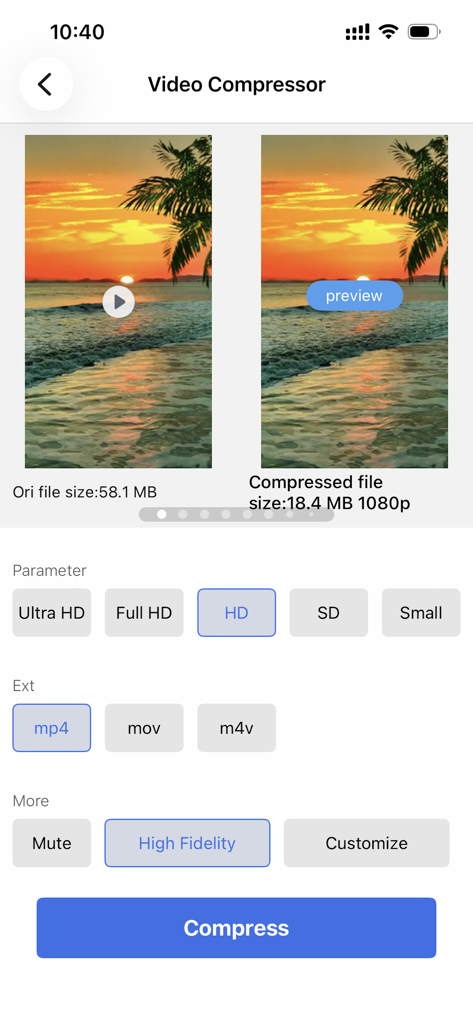
SlimSpace - Compressor - SlimSpaceアプリのインターフェース、動画圧縮設定とファイルサイズ削減比較を表示
SlimSpaceアプリのインターフェース、動画圧縮設定とファイルサイズ削減比較を表示

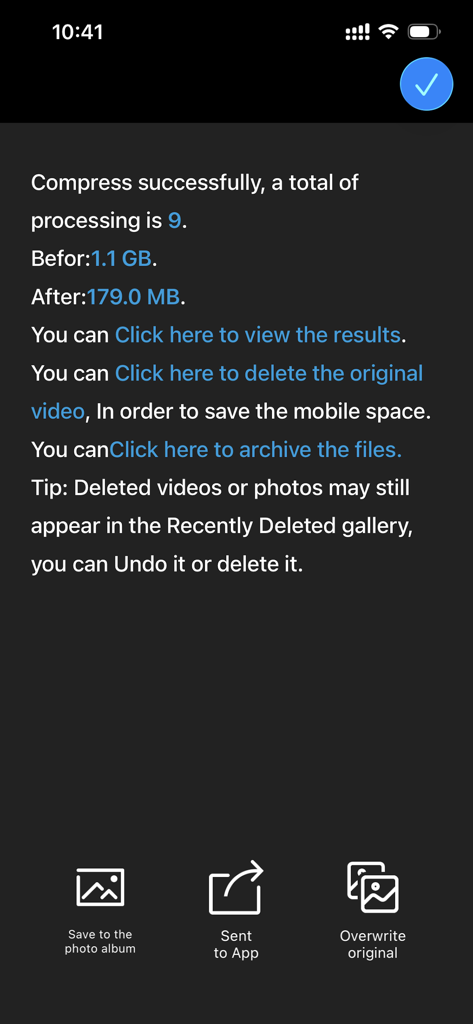
SlimSpace - Compressor - SlimSpaceアプリの画面、動画圧縮の成功と1.1ギガバイトから179メガバイトに保存されたストレージを表示
SlimSpaceアプリの画面、動画圧縮の成功と1.1ギガバイトから179メガバイトに保存されたストレージを表示

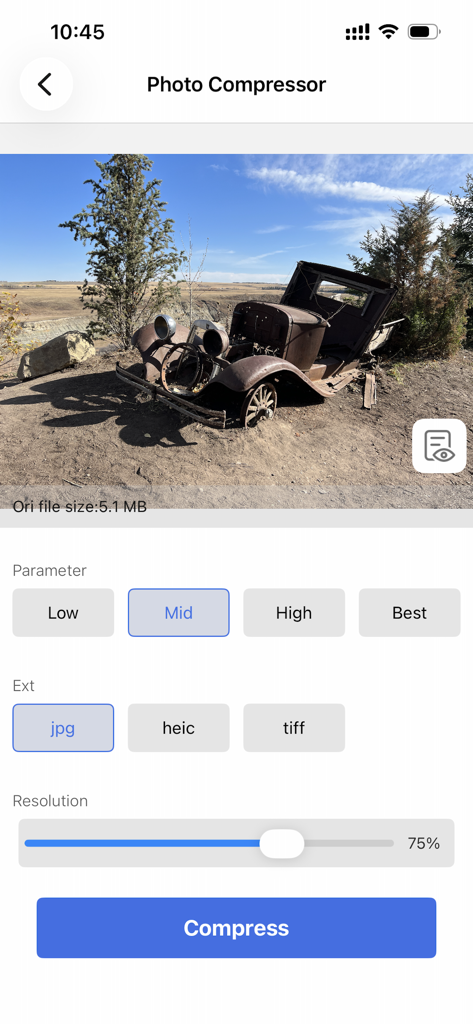
SlimSpace - Compressor - SlimSpaceアプリのインターフェース、解像度やファイル形式オプションを含む写真圧縮設定を表示
SlimSpaceアプリのインターフェース、解像度やファイル形式オプションを含む写真圧縮設定を表示

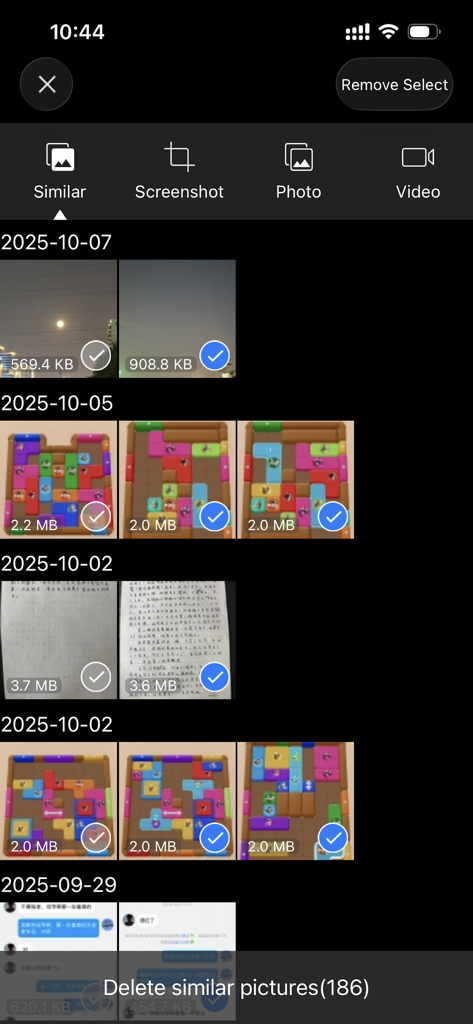
SlimSpace - Compressor - SlimSpaceアプリの類似写真クリーナーインターフェース、ストレージ容量を解放
SlimSpaceアプリの類似写真クリーナーインターフェース、ストレージ容量を解放

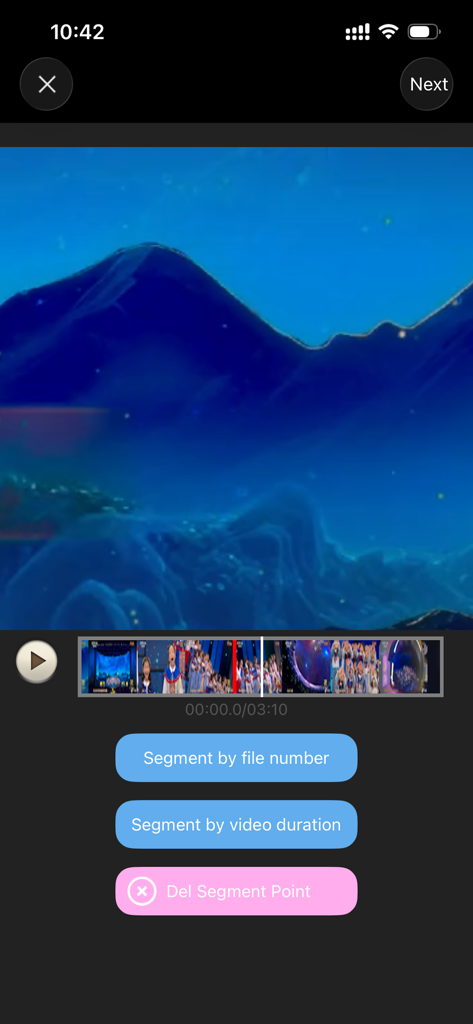
SlimSpace - Compressor - SlimSpaceアプリのインターフェース、動画を期間またはファイル数でセグメントに分割

SlimSpaceアプリのインターフェース、動画を期間またはファイル数でセグメントに分割

説明

Running out of storage space? Videos too large to send? Photos too big to share on WeChat or social media? Video & Photo Compressor is here to help! This app is your all-in-one solution for reducing file sizes without sacrificing quality. Whether it's videos, images, or other large files, you can compress them in just a few taps and save valuable storage on your device. 【Key Features】 • No watermark, no time limits • Offline compression — all processing happens locally on your phone. No internet needed, keeping your data secure • Advanced compression algorithms that preserve original quality while minimizing file size • Supports all major formats — MP4, MOV, AVI, MKV, 3GP, FLV, MPG, JPEG, PNG, and more • Customizable settings — choose compression priority: smaller size or better resolution • Preview results before saving • One-tap delete original files to save space instantly • Batch compression — process multiple files at once with ease 【More Space-Saving Tools】 • Album cleaner • Similar photo cleaner • Screenshot manager • Video splitter • File archiving and compression ========================== Compressor Pro Unlimited Subscription ========================== - Join Compressor Pro members, free to use all features, including all video & audio formats, ocr function, in addition, ads will be automatically removed. - Compressor Pro Unlimited subscription is billed monthly or annually at the rate correspnding to the selected plan. In addition, a one-time payment will be offered if needed, which is not one of the subscription plan. - Payment will be charged to Itunes Account at confirmation of purchase. - Subscriptions automatically renews unless auto-renew is turned off at least 24 hours before the end of the current period. - Account will be charged for renewal within 24-hours prior to the end of the current period, and identify the cost of the renewal. - Subscriptions may be managed by the user and auto-renewal may be turned off by going to the user's Account Settings after purchase. - Any unused portion of a free trial period, if offered, will be forfeited when the user purchases a subscription to that publication, where applicable. - Terms of use : https://www.jianshu.com/p/7b3c05310c93 - Privacy policy: https://www.jianshu.com/p/4a71bed09de0

Download

ダウンロード: App Store

このページはアプリまたはその開発者の公式ページではなく、情報提供および論評を目的として作成された独立した編集出版物です。明示的に別段の記載がない限り、アプリおよびその開発者は、MWM、Apple、Google Play、アプリのパブリッシャー、またはアプリの開発者と提携、承認、後援、認可、またはその他の公式的な関係はなく、このページのいかなる内容も、アプリがMWMのサービスを使用して開発されたことを意味するものではありません。すべての商標、ロゴ、スクリーンショット、その他のコンテンツはそれぞれの所有者の財産です。