
このページはアプリまたはその開発者の公式ページではなく、情報提供および論評を目的として作成された独立した編集出版物です。明示的に別段の記載がない限り、アプリおよびその開発者は、MWM、Apple、Google Play、アプリのパブリッシャー、またはアプリの開発者と提携、承認、後援、認可、またはその他の公式的な関係はなく、このページのいかなる内容も、アプリがMWMのサービスを使用して開発されたことを意味するものではありません。すべての商標、ロゴ、スクリーンショット、その他のコンテンツはそれぞれの所有者の財産です。

ダウンロード
100k+ユーザー評価
評価数
1.7K開発元
カテゴリ
Productivity対応言語
22最新バージョン
1.8サイズ
64.4 MBリリース日
2025年8月29日モバイルデータ移行ソリューションの主要機能評価
Smart Switch: Copy & Move Data アプリケーション分析
デバイス間直接転送
本アプリは、デバイスからデバイスへ数ステップでデータを移行する機能を提供します。
高速かつ安全なデータ転送
本ツールは、高速なデータ転送とプライバシー保護のためのデータ暗号化を備えています。
多様なファイルタイプのサポート
ユーザーは、写真、ビデオ、連絡先、カレンダーなど、様々な種類のデータを転送することが可能です。
クラウド不要の直接転送
本アプリは、外部ストレージやクラウドサービスを介さず、デバイス間で直接データを転送できます。
ワイヤレスデータ転送
本アプリは、ケーブルを必要とせず、Wi-Fiを介してワイヤレスでデータ転送を行う機能を提供します。
直感的なユーザーインターフェース
本ツールは、クリーンで直感的なデザインを備えており、スムーズなユーザーエクスペリエンスを提供します。
よくある質問
について知っておくべきこと Smart Switch: Copy & Move Data
What is Smart Switch: Copy & Move Data?
Smart Switch: Copy & Move Data is an app that facilitates secure and fast data transfer between devices. It helps users move photos, contacts, videos, and calendars wirelessly when upgrading phones or backing up files.
How does Smart Switch: Copy & Move Data transfer files?
Smart Switch: Copy & Move Data transfers files wirelessly using Wi-Fi. It connects devices over the same local network, eliminating the need for cables or cloud storage for data transfer.
What types of data can Smart Switch: Copy & Move Data transfer?
Smart Switch: Copy & Move Data can transfer multiple file types, including photos, videos, contacts, and calendars. The app supports comprehensive data migration between devices.
Is the data transfer with Smart Switch: Copy & Move Data secure?
Yes, data transfer with Smart Switch: Copy & Move Data is secure. The app features high-speed transfer with data encryption to ensure user privacy and protection of transferred files.
Does Smart Switch: Copy & Move Data require a subscription?
Yes, Smart Switch: Copy & Move Data requires a subscription. Payment is charged to the iTunes Account upon purchase, and subscriptions automatically renew unless turned off 24 hours prior to the next period.
How do I manage my subscription for Smart Switch: Copy & Move Data?
Users manage their subscription for Smart Switch: Copy & Move Data through their Account Settings after purchase. Auto-renewal can be turned off there at least 24-hours before the current period ends.
Can Smart Switch: Copy & Move Data transfer data between different phone operating systems?
Yes, Smart Switch: Copy & Move Data can transfer data between different phone operating systems. The app supports connections from an 'Old Phone' to an 'iPhone', indicating cross-platform capability like Android to iOS.
Is a cloud service needed to use Smart Switch: Copy & Move Data?
No, Smart Switch: Copy & Move Data does not require a cloud service. It transfers data directly between devices, ensuring that external storage is not necessary for the process.
以下のスクリーンショットと説明は、アプリの公式ストアリスティングから直接取得されたものであり、アプリ開発者の所有物です。
アプリストア
スクリーンショット

この画面では、ユーザーはWi-Fi転送オプションからデータの送信または受信を選択でき、さらに最近の転送履歴も確認できます。
簡単データ転送

この画面では、ユーザーが同一ローカルネットワーク内の互換性のあるデバイスを検索している状況が表示され、複数のデバイスが検出された様子を確認できます。
デバイスを検出

この画面は、旧端末からiPhone 17への接続プロセスを示しており、AndroidとAppleの異なるOS間でのデータ転送進捗状況がパーセンテージで明確に表示されています。
データ移行中
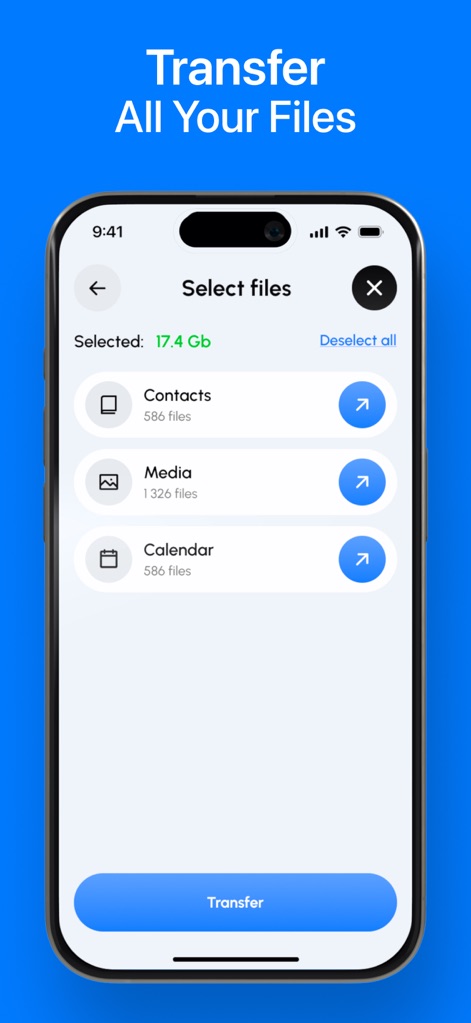
この画面では、連絡先、メディア、カレンダーといった複数のファイルタイプから転送対象を選択でき、それぞれのカテゴリに属するファイル数が表示されます。
転送ファイル選択
説明
Download
類似アプリ
似た機能とユーザー体験を持つアプリ

Data Transfer - Copy My Data
Simple Health Limited

互传 - 快速换机数据迁移智能助手
家呈 郭

Copy My Data - Smart Transfer
Red Sky Labs, SOCIEDAD LIMITADA
Smart Switch - Copy My Data
学斌 林
Copy My Data - Mobile Transfer
KHD Plaza LLC

Phone Clone - Smart Switch .
俊杰 刘

Smart Switch: Data Transfer
Zadore Tracy
手机同步传输-同步转移数据文件
冰 杜

Smart Switch - Phone Clone .
晓珍 胡
このページはアプリまたはその開発者の公式ページではなく、情報提供および論評を目的として作成された独立した編集出版物です。明示的に別段の記載がない限り、アプリおよびその開発者は、MWM、Apple、Google Play、アプリのパブリッシャー、またはアプリの開発者と提携、承認、後援、認可、またはその他の公式的な関係はなく、このページのいかなる内容も、アプリがMWMのサービスを使用して開発されたことを意味するものではありません。すべての商標、ロゴ、スクリーンショット、その他のコンテンツはそれぞれの所有者の財産です。