
このページはアプリまたはその開発者の公式ページではなく、情報提供および論評を目的として作成された独立した編集出版物です。明示的に別段の記載がない限り、アプリおよびその開発者は、MWM、Apple、Google Play、アプリのパブリッシャー、またはアプリの開発者と提携、承認、後援、認可、またはその他の公式的な関係はなく、このページのいかなる内容も、アプリがMWMのサービスを使用して開発されたことを意味するものではありません。すべての商標、ロゴ、スクリーンショット、その他のコンテンツはそれぞれの所有者の財産です。


Speedometer GPS: Speed Monitor
退屈なドライブが未来のコックピットに変わる。あらゆる速度、あらゆる旅路を掌握し、リスクは過去のものとなる。
ダウンロード
250k+ユーザー評価
評価数
245開発元
カテゴリ
Navigation対応言語
21最新バージョン
1.1.5サイズ
57.1 MBリリース日
2025年3月7日主要機能の評価とターゲットユーザーへの影響
アプリ機能分析: Speedometer GPS: Speed Monitor
正確なGPS速度測定
アプリは高精度GPS技術を活用し、現在の速度、平均速度、最高速度をリアルタイムで表示し、正確な速度測定を保証します。キロメートル/時 (km/h) とマイル/時 (mph) の両単位切り替えをサポートしており、多様なユーザーのニーズに対応します。
スマートな速度超過警告
ユーザーは個別の制限速度値を設定でき、速度が超過するとアプリがアラームを発して警告します。これにより、速度超過を効果的に防止し、安全な運転を支援します。4つのプリセット制限速度をサポートしており、運転中にワンクリックで切り替えが可能です。
HUDヘッドアップディスプレイモード
HUDモードを有効にすることで、ユーザーは携帯電話をフロントガラスの下に置くと、速度情報がフロントガラスに投影されるため、特に夜間の運転の安全性が向上します。
詳細な走行データ記録
アプリは移動時間、走行距離、停車時間、高度などの詳細なデータを自動的に記録します。これにより、ユーザーは過去の走行データを容易に確認したり、共有したりすることが可能になります。
内蔵地図とリアルタイム軌跡表示
内蔵の地図機能は、現在の位置をリアルタイムで表示し、走行経路を描画することで、ユーザーが道に迷うことを防ぎ、方向感覚を維持するのに役立ちます。
ピクチャーインピクチャー (PiP) モード
PiPモードを有効にすることで、ユーザーは他のアプリケーション(ナビゲーションや音楽再生など)を使用しながら、リアルタイムで速度情報を確認できます。これにより、速度測定が他の操作に干渉することなく、マルチタスクが可能になります。
よくある質問
について知っておくべきこと Speedometer GPS: Speed Monitor
What is Speedometer GPS: Speed Monitor?
Speedometer GPS: Speed Monitor is a high-precision GPS speedometer app. It offers speed monitoring, trip recording, HUD display, speeding reminders, and navigation assistance for various users including drivers, cyclists, and outdoor explorers.
Does Speedometer GPS: Speed Monitor track speed accurately?
Yes, Speedometer GPS: Speed Monitor tracks speed accurately. It relies on high-precision GPS technology to display current, average, and maximum speeds in real time, supporting both km/h and mph units.
Can I set a speed limit alert in Speedometer GPS: Speed Monitor?
Yes, users can set personalized speed limit values in Speedometer GPS: Speed Monitor. The application issues an alarm when the set limit is exceeded, with support for four preset speed limits.
Is the HUD (Head-Up Display) feature free in Speedometer GPS: Speed Monitor?
No, the HUD (Head-Up Display) mode in Speedometer GPS: Speed Monitor is a premium feature. Access to HUD mode requires an active subscription to unlock the full feature experience.
How does the Picture-in-Picture mode work in Speedometer GPS: Speed Monitor?
Picture-in-Picture (PiP) mode in Speedometer GPS: Speed Monitor allows users to view speed information while using other apps. The PiP window's size and position are adjustable for an optimal visual experience.
Does Speedometer GPS: Speed Monitor record travel data?
Yes, Speedometer GPS: Speed Monitor automatically records detailed travel data. This includes travel time, driving distance, stay time, and altitude, allowing users to view historical data.
Can Speedometer GPS: Speed Monitor help with navigation?
Yes, Speedometer GPS: Speed Monitor includes a built-in map that displays the current location in real time. It also draws the driving trajectory, providing navigation assistance.
What units of speed does Speedometer GPS: Speed Monitor support?
Speedometer GPS: Speed Monitor supports two units for speed measurement. Users can switch between kilometer/hour (km/h) and mile/hour (mph) as needed for their display.
How do I cancel my Speedometer GPS: Speed Monitor subscription?
Users manage or cancel Speedometer GPS: Speed Monitor subscriptions in "Settings" > "Apple ID" > "Subscriptions". Cancellation must occur at least 24 hours before the current period ends to avoid automatic renewal.
Is Speedometer GPS: Speed Monitor suitable for cycling?
Yes, Speedometer GPS: Speed Monitor is suitable for cycling. The app provides real-time speed tracking and includes an altimeter, making it useful for cyclists and outdoor adventures.
以下のスクリーンショットと説明は、アプリの公式ストアリスティングから直接取得されたものであり、アプリ開発者の所有物です。
アプリストア
スクリーンショット
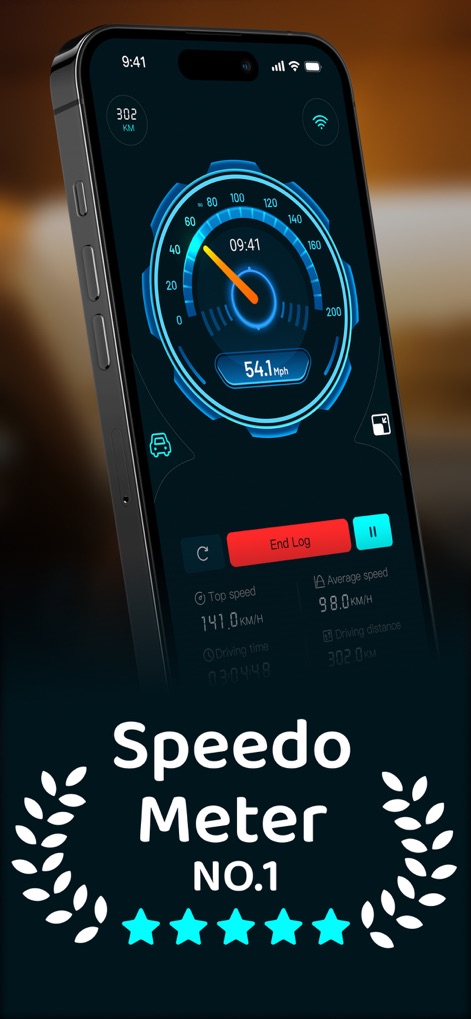
このアプリは、デジタル速度計で現在の速度を正確に表示し、同時に走行時間や走行距離などの詳細な走行データを記録します。
リアルタイム速度監視
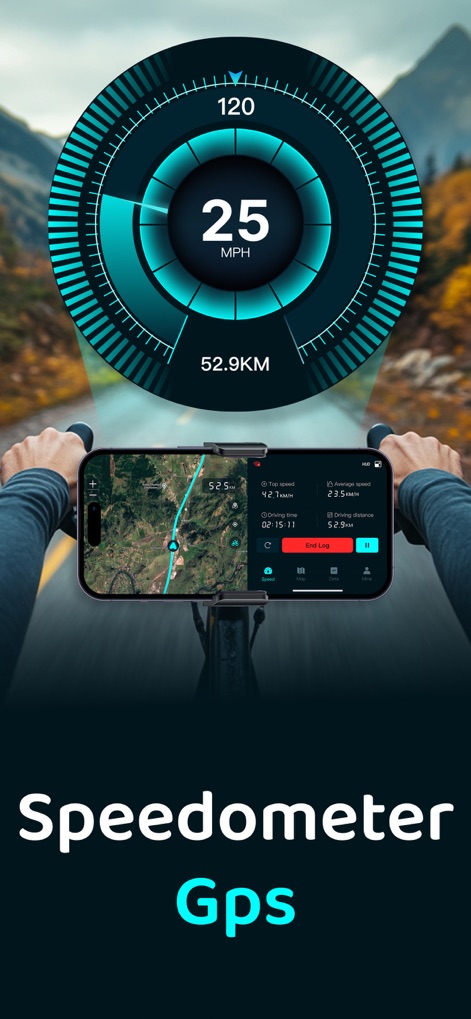
本アプリは、マップ表示で現在地と走行経路を示しながら、画面中央にGPS速度計をオーバーレイ表示し、アウトドア活動中の速度をリアルタイムで監視できます。
多様な移動をサポート
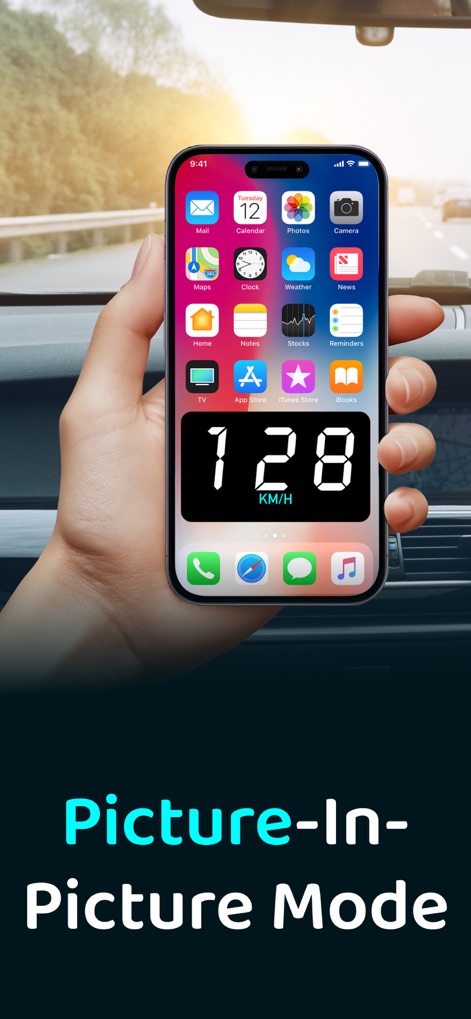
このアプリのピクチャーインピクチャーモードを使用すると、他のアプリを利用しながらでも、小さなウィンドウで現在の速度を大きなデジタル表示で確認できます。
子画面で速度確認
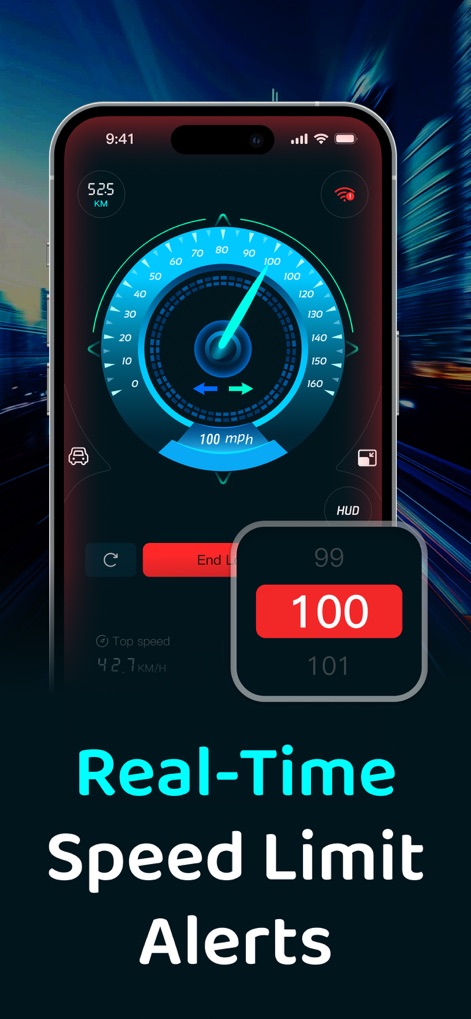
本ツールは、リアルタイム速度計で現在の速度を表示しつつ、設定された速度制限を超過すると、スマート速度超過アラートが警告を発し、安全運転をサポートします。
安全運転を支援
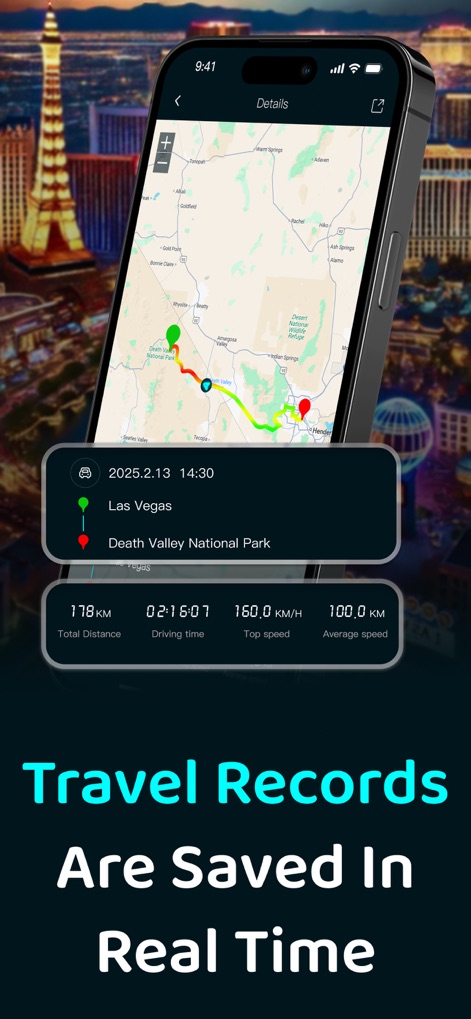
このアプリは、走行軌跡をマップ上に表示し、総走行距離や最高速度など、過去の走行に関する詳細な走行データを自動的に記録・保存します。
走行履歴を自動記録
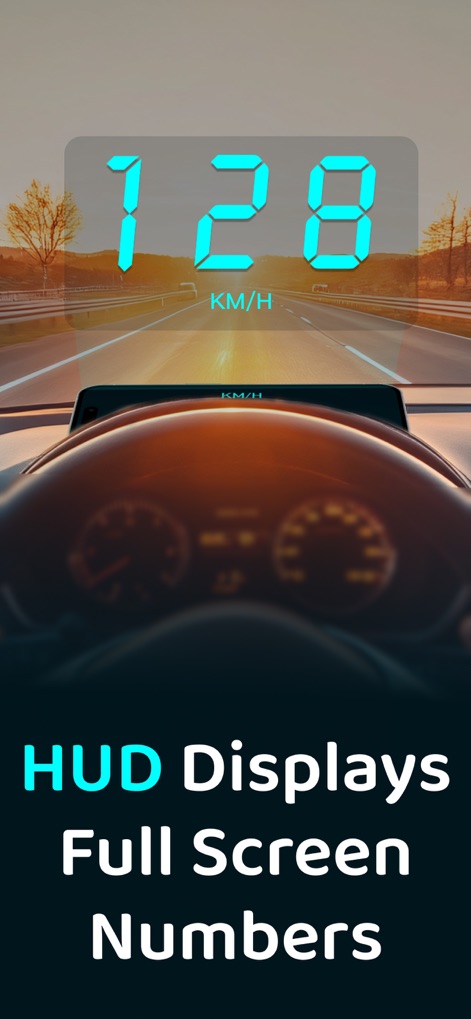
本アプリのHUDヘッドアップディスプレイモードでは、速度情報がフロントガラスに投影され、フルスクリーン速度表示により視線移動を最小限に抑え、夜間の運転をより安全にします。
HUDで視線集中
説明
Download
類似アプリ
似た機能とユーザー体験を持つアプリ

Speedometer»
Tim O's Studios, LLC

Speedometer: Speed Control.
Sandy Masey

Speedometer Simple
WATT APPS LTD

GPS Speedometer HUD - SpeedAce
Changsha Liangchao Technology Co., Ltd.
GPS Speedometer: MPH Tracker
APPASPECT TECHNOLOGIES PRIVATE LIMITED
Speedometer 55 GPS Speed & HUD
Stanislav Dvoychenko

GPS Speedometer MPH Tracker
BITHAUS.TECH, UNIPESSOAL LDA

Speedometer∞
Roman Baulin
Digital Speed GPS Speedometer
BITHAUS.TECH, UNIPESSOAL LDA
このページはアプリまたはその開発者の公式ページではなく、情報提供および論評を目的として作成された独立した編集出版物です。明示的に別段の記載がない限り、アプリおよびその開発者は、MWM、Apple、Google Play、アプリのパブリッシャー、またはアプリの開発者と提携、承認、後援、認可、またはその他の公式的な関係はなく、このページのいかなる内容も、アプリがMWMのサービスを使用して開発されたことを意味するものではありません。すべての商標、ロゴ、スクリーンショット、その他のコンテンツはそれぞれの所有者の財産です。