SpeedPro Slow speed video edit

SpeedPro Slow speed video edit

ダウンロード: App Store
ロゴ: SpeedPro Slow speed video edit

SpeedPro:バイラルなReelsやTikTokのためのシネマティックスピードランピング

プロフェッショナルなスローモーションや早送り効果を簡単に、精密に作成。特定の部分を選択してスピードを調整し、お気に入りの音楽を追加して、数秒でフィードに直接共有しましょう。

開発元

pixel force private limited

カテゴリ

Photo & Video

ダウンロード

1M+

ユーザー評価

4.1/5

評価数

139K+

対応言語

1

動きの中の創造性

このインターフェースを利用する 1M+ 人のユーザー.

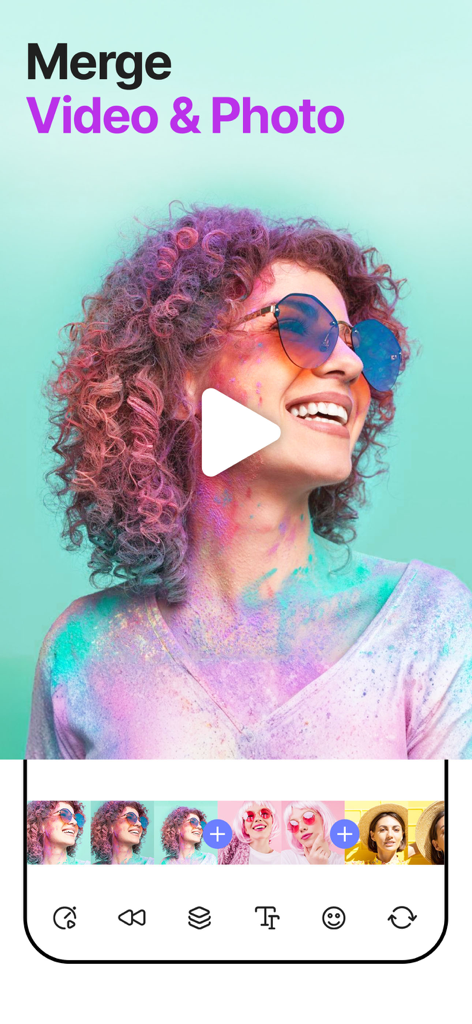
SpeedProモバイルアプリインターフェース。カラフルなビデオプレビューと編集タイムラインで、ビデオと写真クリップをマージする方法を示しています。
SpeedProモバイルアプリインターフェース。カラフルなビデオプレビューと編集タイムラインで、ビデオと写真クリップをマージする方法を示しています。

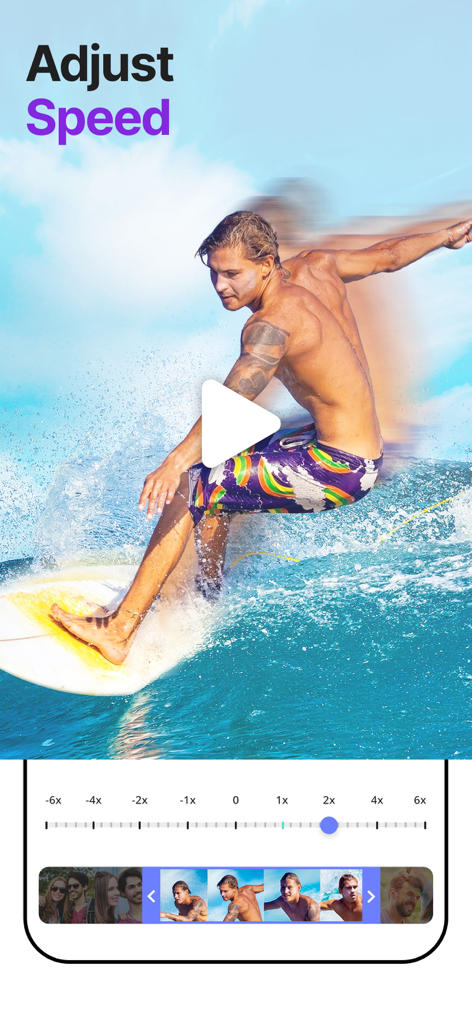
SpeedProアプリのモバイルインターフェース。スピード調整スライダーと、サーファーのビデオプレビューを示しています。
SpeedProアプリのモバイルインターフェース。スピード調整スライダーと、サーファーのビデオプレビューを示しています。

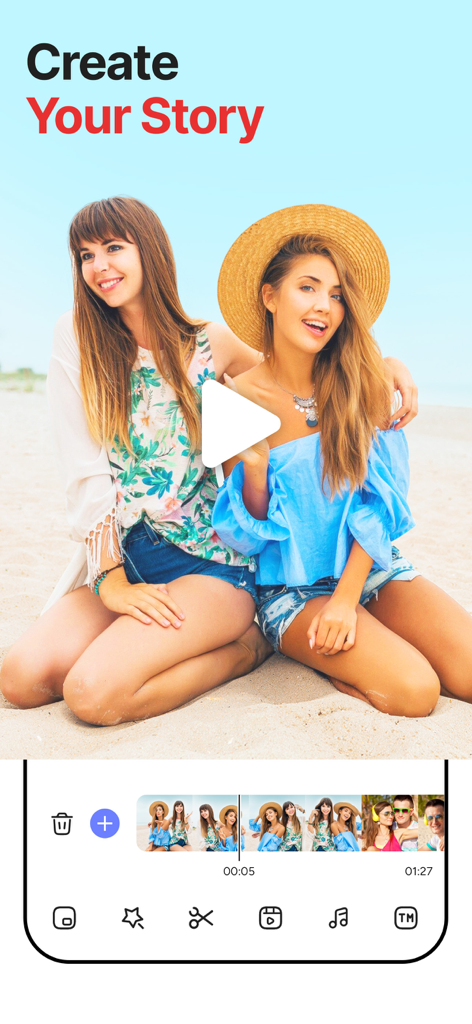
SpeedProモバイルアプリのビデオ編集インターフェース。「ストーリーを作成」の見出しとビーチのビデオプレビューがあります。

SpeedProモバイルアプリのビデオ編集インターフェース。「ストーリーを作成」の見出しとビーチのビデオプレビューがあります。

SpeedProアプリのインターフェース。トレンドのビデオマーケティングスタイルとファッションテンプレートを表示しています。
SpeedProアプリのインターフェース。トレンドのビデオマーケティングスタイルとファッションテンプレートを表示しています。

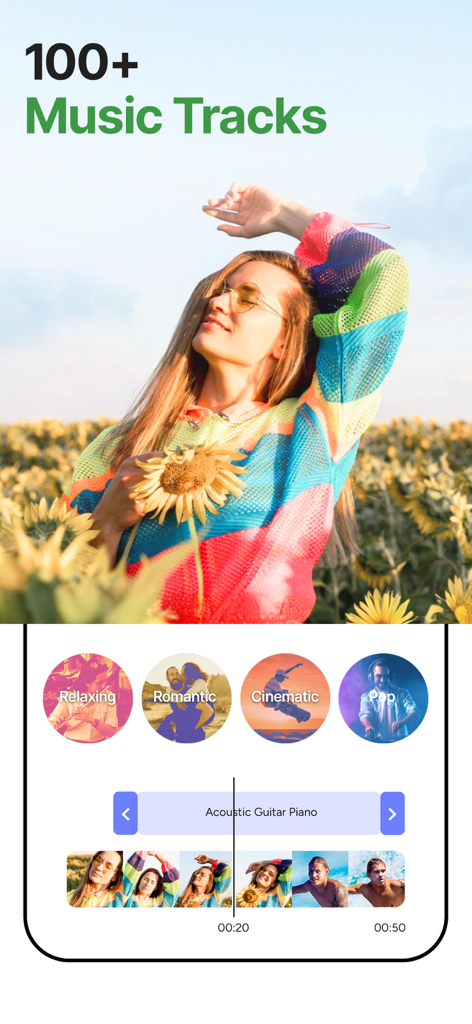
SpeedProアプリのインターフェース。100以上のトラックと、リラックス、シネマティックなどのジャンルを持つ音楽ライブラリを表示しています。ビデオ編集用です。
SpeedProアプリのインターフェース。100以上のトラックと、リラックス、シネマティックなどのジャンルを持つ音楽ライブラリを表示しています。ビデオ編集用です。

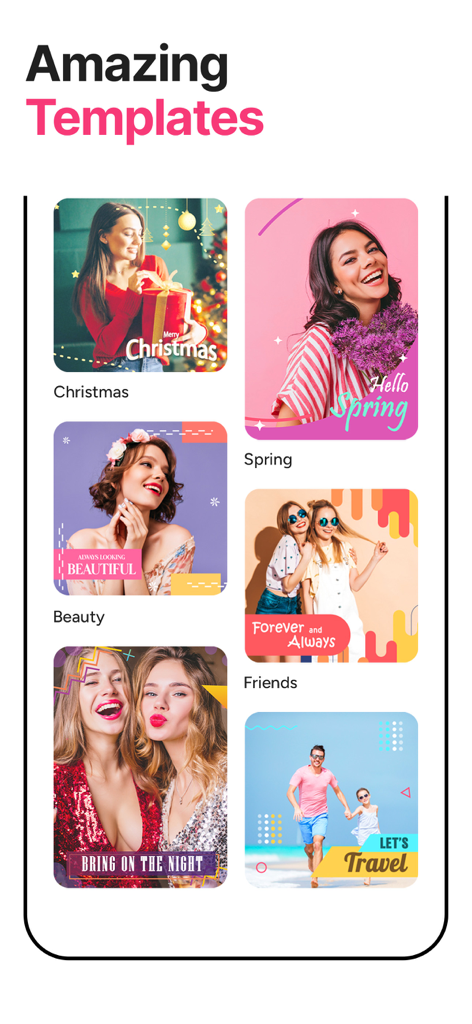
SpeedProの多様なビデオテンプレートのプレビュー。クリスマス、春、旅行のテーマが含まれています。
SpeedProの多様なビデオテンプレートのプレビュー。クリスマス、春、旅行のテーマが含まれています。

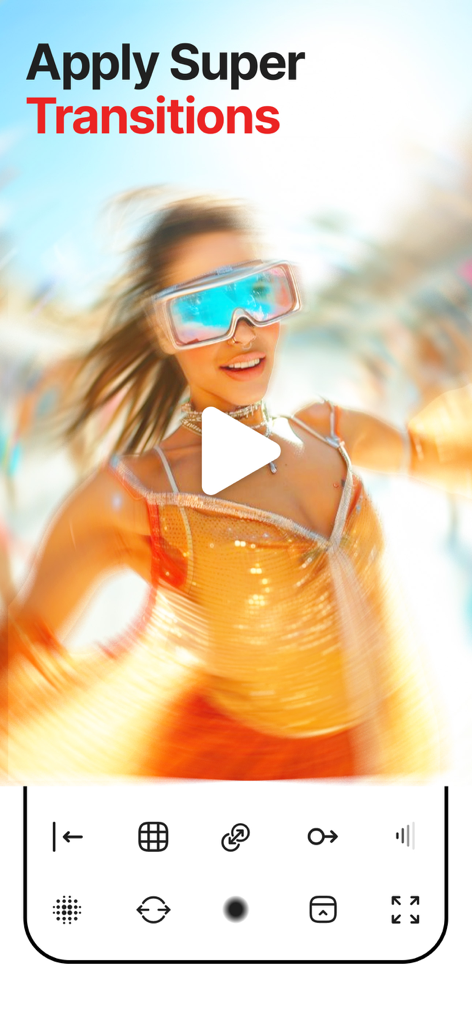
SpeedProビデオ編集アプリで、モーションブラー遷移効果のある未来的なメガネをかけた女性が表示されています。
SpeedProビデオ編集アプリで、モーションブラー遷移効果のある未来的なメガネをかけた女性が表示されています。

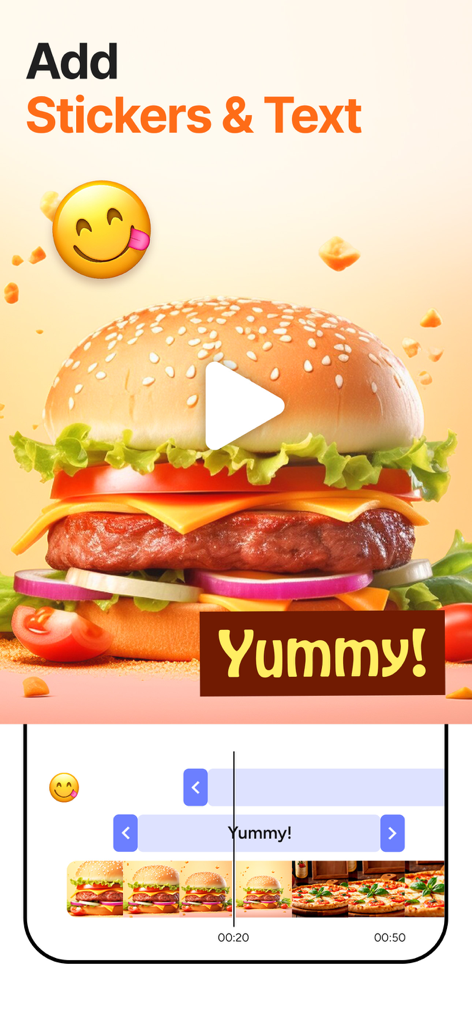
ビデオ編集アプリのインターフェース。料理のビデオにステッカーやテキストを追加する方法を示しています。

ビデオ編集アプリのインターフェース。料理のビデオにステッカーやテキストを追加する方法を示しています。

SpeedProアプリの共有画面。ビーチにいる少年のビデオと、Instagram、Facebook、WhatsAppで共有するためのアイコンが表示されています。
SpeedProアプリの共有画面。ビーチにいる少年のビデオと、Instagram、Facebook、WhatsAppで共有するためのアイコンが表示されています。

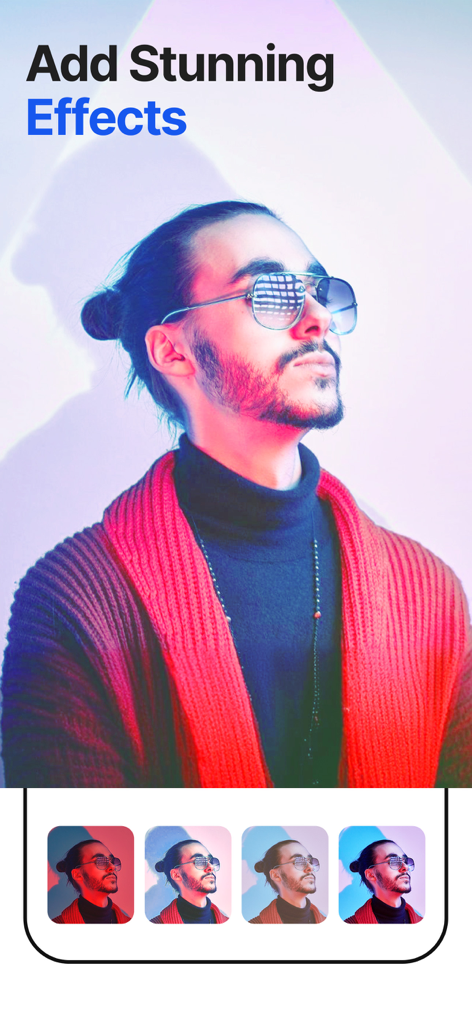
SpeedProアプリのインターフェースで、サングラスをかけた男性に、さまざまなシネマティックカラーフィルターが表示されています。

SpeedProアプリのインターフェースで、サングラスをかけた男性に、さまざまなシネマティックカラーフィルターが表示されています。

あらゆる瞬間をマスターする

このアプリを際立たせるツール、 1M+ 人のユーザーが選択.

プロスピードランピング

動画の特定の部分をスローまたは高速化してアクションを強調し、真にシネマティックな効果を生み出します。

🎵

統合サウンドトラック

新しい動画のテンポに完璧に同期する音楽を追加して、エネルギーを維持しましょう。

📲

インスタントソーシャルエクスポート

InstagramやTikTokへの直接共有で手間を省き、より早く投稿してトレンドに乗ることができます。

アプリについて

について知っておくべきこと SpeedPro Slow speed video edit.

説明

SpeedPro, A Free app to increase or decrease video speed easily on your iPhone,iPod or iPad. If you are looking for an app to make your video in slow motion or in fast motion, then download our free SpeedPro app to your iOS device. In this app you can also add audio, edit video, add effects to your video clip. This app is exclusively designed to do only two task- to slow video and to fasten your video. If you are researching for what is the best slow motion app? then why don’t to try this app once? with our free SpeedPro app you can easily adjust the speed of the video with video editing, Video Effects and Video Themes. ================================== Key Features of SpeedPro app : ================================== 1. SpeedPro app is exclusively designed to make slow motion video or fast motion video easily 2. Simple user interface 3. You can select the particular region of video clip to increase or decrease video speed 4. Add music to your video 4. Save to camera roll, upload to instagram, mail, upload to youtube, upload to viddy from app itself. ======================================================= Steps to Slow down video or speed up video with SpeedPro App: ======================================================= 1. Select the video clip that you want to increase or decrease video speed. 2. In the next screen you can increase or decrease the speed of the video. By default complete video is selected, but you can choose only particular portion of that video by using selecting scroll bar at the bottom of Adjust speed window. Once you select the particular video position that you want to increase or decrease the video speed, next you decide whether you need to make slow motion video or fast motion video of the selected video clip. If you wish to make Fast Motion video, then drag the Video Speed controlling slider towards right side, if you wish to slow down the video then drag the video speed controller slider towards left side. click on the Tick mark icon on the top right corner to generate new video clip. You can save generated video clip to your Camera roll, upload to instagram, you can mail that clip, upload to youtube or share it on viddy with our built-in social sharing option. 3. If you wish to add music to your video then click on Music icon on Adjust speed screen and choose the audio file that you need to add to your video If you are searching for best slow motion video app or fast motion video app then download our SpeedPro app to your device. RESTORE: You can restore your paid in app purchases without paying again. Follow these steps 1. Open the app 2. Click on Top Right to open the Premium window 3. Click on RESTORE to re-activate your in app purchases again 4. DONE SpeedPro Premium Subscription ========================== 1. Enjoy professional video editing tools with Pro-Level Features & Amazing Members-Only Benefits. 2. Get unlimited access to all premium Video Themes. 3. Get unlimited access to all premium filters and tools 4. Get access to multiple speed controls, Stickers and Fonts 5. Get rid of ads and watermark • Subscriptions may be managed by the user and auto-renewal may be turned off by going to the user's Account Settings after purchase • Any unused portion of a free trial period, if offered, will be forfeited when the user purchases a subscription to that publication, where applicable Subscription plans: 1. USD $30.99/Year with 1 Week Free Trial 2. USD $20.99/6 Months 3. USD $6.99/Month Subscriptions automatically renew unless they are turned off at least 24 hours before the end of the current period in account settings. Renewals are charged within 24-hours preceding the end of the current period. Payment is charged to iTunes Account at confirmation of purchase. Subscriptions are managed by the user. Terms of Service: http://206.189.130.170/ps_tc.html Privacy: http://206.189.130.170/ps_privacy.html

最新バージョン

2.1.22

サイズ

96.0 MB

リリース日

2014年11月18日

スピードランピングの芸術をマスターする

100万人以上のクリエイターに参加して、あなたの動画をシネマティックな傑作に変えましょう。今すぐSpeedProをダウンロードして、あなたの次のReelやTikTokをバイラルにしましょう。

ダウンロード: App Store
FAQ

よくある質問

について知っておくべきこと SpeedPro Slow speed video edit

SpeedProアプリとは何ですか?

SpeedProは、iPhone、iPod、iPadデバイスでスローモーションまたはファストモーションビデオを簡単に作成できる、無料のiOSアプリケーションです。

SpeedProアプリでビデオの速度を調整できますか?

はい、SpeedProアプリではビデオの速度を上げたり下げたりできます。ユーザーはビデオクリップの特定の領域を選択して速度調整を適用できます。

SpeedProアプリはビデオに音楽を追加できますか?

はい、SpeedProアプリではビデオに音楽を追加できます。この機能は「Adjust Speed」画面からアクセスできます。

SpeedProアプリでスローモーションビデオを作成するにはどうすればよいですか?

SpeedProでスローモーションビデオを作成するには、ビデオクリップを選択し、「Adjust Speed」ウィンドウで「Video Speed」スライダーを左側にドラッグします。

SpeedProアプリでファストモーションビデオを作成するにはどうすればよいですか?

SpeedProでファストモーションビデオを作成するには、ビデオクリップを選択し、「Adjust Speed」ウィンドウで「Video Speed」スライダーを右側にドラッグします。

SpeedProアプリはビデオをカメラロールに保存できますか?

はい、SpeedProアプリでは生成されたビデオクリップを直接カメラロールに保存できます。これは組み込みの共有オプションです。

SpeedProアプリはどのソーシャルメディアプラットフォームの共有をサポートしていますか?

SpeedProアプリは、Instagram、YouTube、Viddyへの直接共有をアプリからサポートしています。ビデオクリップをメールで送信することもできます。

SpeedProアプリは無料でダウンロードできますか?

はい、SpeedProアプリはiOSデバイスで無料でダウンロードできます。プレミアム機能のアプリ内購入が提供されています。

SpeedProプレミアムサブスクリプションにはどのような機能が含まれていますか?

SpeedProプレミアムには、プロフェッショナルなビデオ編集ツール、プレミアムビデオテーマ、フィルター、ツールへの無制限アクセス、複数の速度制御、ステッカー、フォントが含まれ、広告とウォーターマークが削除されます。

SpeedProプレミアムサブスクリプションの料金はいくらですか?

SpeedProプレミアムサブスクリプションプランは、1週間の無料トライアル付きで年間30.99米ドル、6ヶ月で20.99米ドル、月額6.99米ドルです。

SpeedProプレミアムは無料トライアルを提供していますか?

はい、SpeedProプレミアムは、年間30.99米ドルのサブスクリプションプランで1週間の無料トライアルを提供しています。

SpeedProアプリでアプリ内購入を復元するにはどうすればよいですか?

SpeedProでアプリ内購入を復元するには、アプリを開き、右上をタップしてプレミアムウィンドウを開き、「RESTORE」をタップして再アクティブ化します。

SpeedProアプリを使用してビデオにエフェクトを追加できますか?

はい、ユーザーはSpeedProアプリを使用してビデオクリップにエフェクトを追加できます。プレミアムサブスクリプションは、プレミアムフィルターとツールへの無制限アクセスを提供します。

SpeedProアプリはビデオと写真をマージできますか?

はい、SpeedProアプリにはビデオと写真をマージする機能が含まれています。これにより、包括的なコンテンツ作成が可能になります。

SpeedProアプリはビデオテンプレートを提供していますか?

はい、SpeedProアプリはビデオ作成のための素晴らしいテンプレートを提供しています。プレミアムユーザーはすべてのプレミアムビデオテーマに無制限にアクセスできます。

SpeedProアプリはビデオトランジションをサポートしていますか?

はい、SpeedProアプリでは、クリップ間の視覚的な流れを強化するスーパートランジションをビデオに適用できます。

SpeedProアプリでステッカーやテキストオーバーレイを追加できますか?

はい、SpeedProアプリでは、ビデオにステッカーやテキストオーバーレイを追加できます。プレミアムでは、複数の速度制御、ステッカー、フォントが利用可能です。

App information, icons, screenshots, and descriptions displayed on this page are sourced from the Apple App Store and are the property of their respective developers. Download estimates and rankings are based on MWM's proprietary models and may not reflect actual figures. This page is provided for informational and analytical purposes only.

Believe this page infringes your intellectual property? File a dispute