Splice: Make music now
ダウンロード: App Store

このページはアプリまたはその開発者の公式ページではなく、情報提供および論評を目的として作成された独立した編集出版物です。明示的に別段の記載がない限り、アプリおよびその開発者は、MWM、Apple、Google Play、アプリのパブリッシャー、またはアプリの開発者と提携、承認、後援、認可、またはその他の公式的な関係はなく、このページのいかなる内容も、アプリがMWMのサービスを使用して開発されたことを意味するものではありません。すべての商標、ロゴ、スクリーンショット、その他のコンテンツはそれぞれの所有者の財産です。


ロゴ: Splice: Make music now
ダウンロード: App Store

Splice: Make music now

数百万ものロイヤリティフリーサンプルとプロ級の録音ツールで、あらゆるインスピレーションの火種を逃さずキャッチ。数秒でスタックを構築し、DAWへ直接書き出して、モバイルでのアイデアを次のヒット曲に繋げましょう。

主要数値

ダウンロード

833K+

ユーザー評価

3.5/5

評価数

1K+

開発元

Distributed Creation Inc

カテゴリ

Music

対応言語

1

最新バージョン

v.3.6.5+6279

サイズ

80.0 MB

リリース日

2016年5月17日
機能

どこでもあなたのプロフェッショナルスタジオに

世界最大級のロイヤリティフリーサンプルライブラリと直感的なモバイル制作ツールで、あらゆるインスピレーションの瞬間をヒットの可能性へと変えましょう。

プロ仕様のサンプルライブラリ

チャートを賑わすプロデューサーたちも愛用する数百万のロイヤリティフリーサウンドをブラウズして、次のプロジェクトにぴったりのバイブスを見つけましょう。

Createモードで瞬時にバイブスを構築

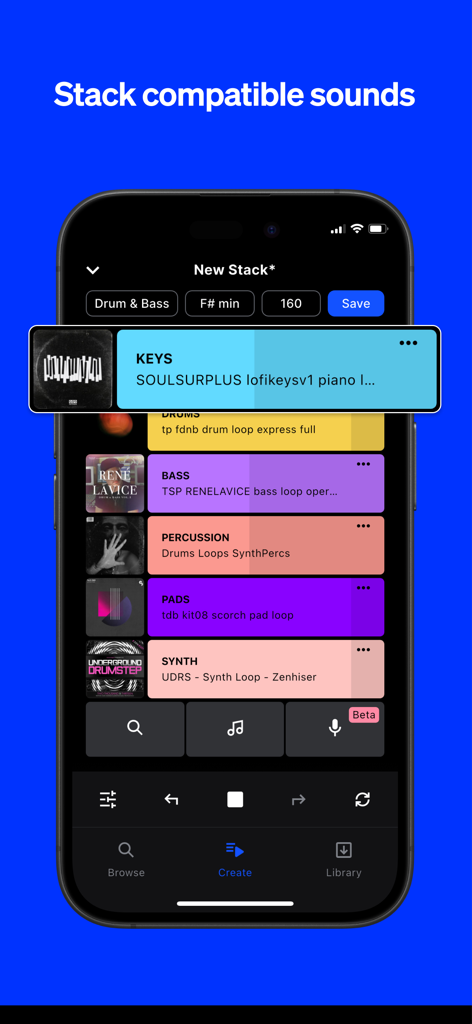
相性の良いループを自動でスタック。数秒で素晴らしい響きの組み合わせを作り、スランプを打破しましょう。

FAQ

よくある質問

について知っておくべきこと Splice: Make music now

Splice Mobileアプリとは何ですか?

Splice Mobileは、ユーザーがSpliceのロイヤリティフリーカタログ全体を閲覧し、サウンドを整理し、Splice Micでオーディオを録音し、スマートフォンから直接Createモードを使用して新しい音楽のアイデアを開始できるアプリです。

Splice MobileアプリでSpliceの全カタログを閲覧できますか?

はい、Splice Mobileアプリを使用すると、スマートフォンから直接Spliceの全カタログを閲覧できます。キーワードで検索したり、タグでフィルタリングしたり、ループを試聴して特定のサウンドを見つけたりできます。

Splice Mobileアプリで自分のオーディオを録音できますか?

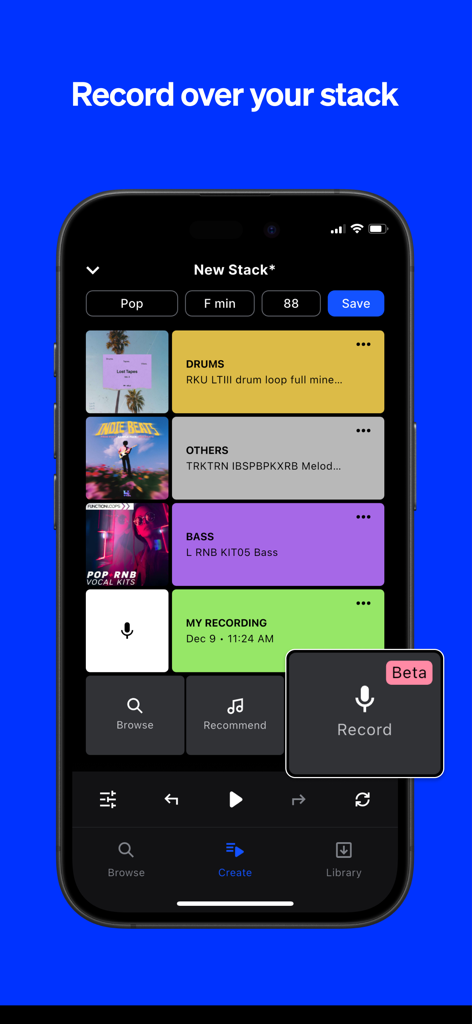
はい、Splice MobileにはSplice Micという機能があり、ユーザーは自分のオーディオを録音できます。この機能は、既存のSpliceサウンドに合わせて録音を音楽的なコンテキストに統合します。

以下のスクリーンショットと説明は、アプリの公式ストアリスティングから直接取得されたものであり、アプリ開発者の所有物です。

アプリストア

スクリーンショット
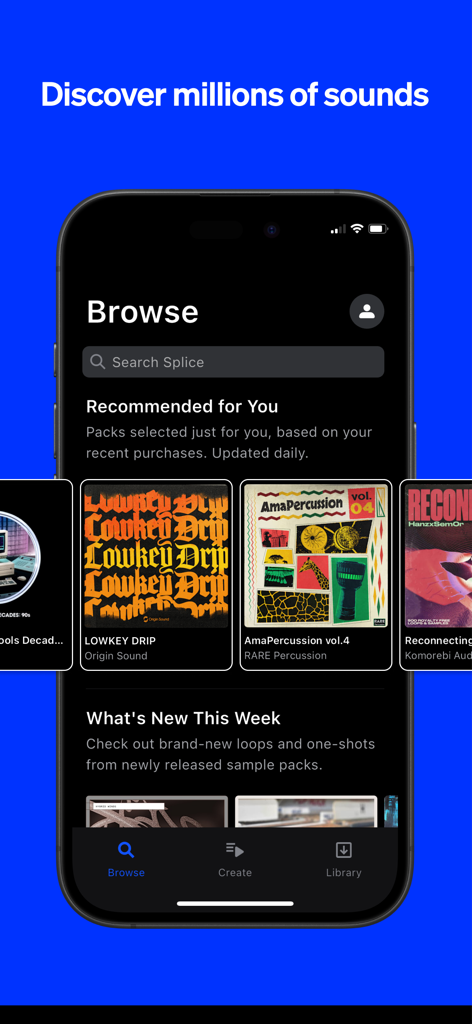
Splice: Make music now - Spliceモバイルアプリのインターフェース。Lowkey DripやAmaPercussionなどの推奨ミュージックサンプルパックが表示されているブラウズセクション。
Spliceモバイルアプリのインターフェース。Lowkey DripやAmaPercussionなどの推奨ミュージックサンプルパックが表示されているブラウズセクション。

Splice: Make music now - 相性の良いミュージックループをスタックするためのSpliceアプリインターフェースを表示しているスマートフォンの画面。
相性の良いミュージックループをスタックするためのSpliceアプリインターフェースを表示しているスマートフォンの画面。

Splice: Make music now - マルチトラックループと音声録音機能を備えたSpliceアプリのCreateモードを表示しているiPhoneの画面。
マルチトラックループと音声録音機能を備えたSpliceアプリのCreateモードを表示しているiPhoneの画面。

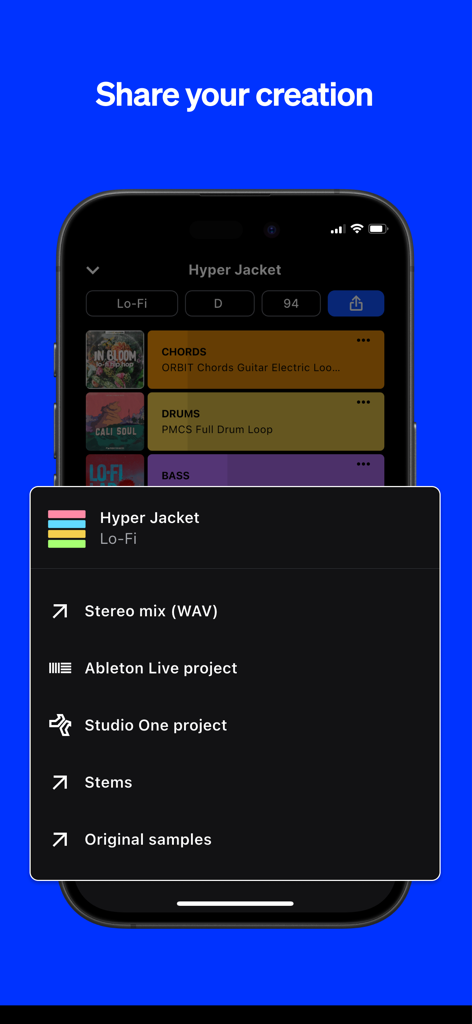
Splice: Make music now - 音楽プロジェクトをステレオミックス、ステム、またはAbleton LiveやStudio One用のDAWファイルとして書き出すオプションを表示しているSpliceアプリのスクリーンショット。

音楽プロジェクトをステレオミックス、ステム、またはAbleton LiveやStudio One用のDAWファイルとして書き出すオプションを表示しているSpliceアプリのスクリーンショット。

説明

Splice is a royalty-free sample library, trusted and used by your favorite music creators. With Splice Mobile, you now have the power to browse the entire Splice catalog, organize your favorite sounds, discover hidden gems, record your own audio, and start countless new ideas with Create mode—right from your phone. Splice Mobile keeps inspiration within reach wherever you are. DISCOVER NEW SPLICE SOUNDS ON THE GO Inspiration isn’t limited to the studio, and now, neither is your creativity. With our mobile app, you can browse the entire Splice catalog all from your phone. Dive deep into packs and genres and discover hidden gems. Search by keyword and filter by tags to find the perfect sound for your project. Quickly audition loops, tap the heart icon to save your favorite sounds, and organize them into Collections. VOICE TO VERSE—ANYWHERE The latest mobile feature, Splice Mic, redefines mobile music creation for songwriters who know inspiration doesn’t wait. More than just a recording app, it lets you hear every topline, verse, or riff in full musical context over Splice sounds—right from your phone. Instantly test ideas, explore genres, and unlock new creative possibilities. Humming a melody? Strumming a riff? Working out lyrics? Splice Mic turns spontaneous moments into real musical opportunities. Every take is a step toward your next track. When you're ready, export to your DAW and turn those mobile ideas into full songs. INSTANT INSPIRATION WITH CREATE MODE Generating new musical ideas and starting beats on the go has never been easier. Simply tap on the Create icon, select your desired genre, and immediately drop into a Stack of loops from the Splice library. You may find the generated Stack fits what you’re looking for perfectly, but if not, that’s great too. Developing a musical idea is often about trying combinations of sounds and figuring out what feels good to you—Create Mode is a great companion for that process. Create Mode leaves creative control in your hands—shuffle to create a whole new Stack or add new layers of compatible sounds and your own recordings. If you want to replace a single loop with a new option of the same type of sound, swipe right. If you want to delete the layer altogether, swipe left. You can also solo a layer by holding down, or tap the layer to mute. Once you’ve chosen your Stack layers, you can fine-tune your loop with volume adjustments and BPM control. When your idea hits the spot, save it with a click. You can also click the Stack icon to hear any individual loop in the Splice library in musical context with Create mode. SAVE IT. SEND IT. SHARE IT. Creating and saving your Stack is just the beginning. Not only is the Stack accessible from anywhere you can access your Splice account, but you can also share it directly with a unique link, AirDrop it to friends, or upload to Dropbox, Drive, or another cloud service right from your device for seamless collaboration. If you work in Ableton Live or Studio One, you can export your Stack as a DAW file and open it up with key and tempo information synced when you’re back in the studio. You can also save as a bounced stereo mix to hear the full idea rendered. START WITH SPLICE Subscribe to use Splice's expansive library of royalty-free samples, presets, MIDI, and creative tools in your music. Use Splice samples to create anything—they’re cleared for commercial use in new works. Cancel your subscription anytime and keep everything you've downloaded. Privacy Policy: https://splice.com/privacy-policy Terms of Use: https://splice.com/terms

Download

ダウンロード: App Store

このページはアプリまたはその開発者の公式ページではなく、情報提供および論評を目的として作成された独立した編集出版物です。明示的に別段の記載がない限り、アプリおよびその開発者は、MWM、Apple、Google Play、アプリのパブリッシャー、またはアプリの開発者と提携、承認、後援、認可、またはその他の公式的な関係はなく、このページのいかなる内容も、アプリがMWMのサービスを使用して開発されたことを意味するものではありません。すべての商標、ロゴ、スクリーンショット、その他のコンテンツはそれぞれの所有者の財産です。