
このページはアプリまたはその開発者の公式ページではなく、情報提供および論評を目的として作成された独立した編集出版物です。明示的に別段の記載がない限り、アプリおよびその開発者は、MWM、Apple、Google Play、アプリのパブリッシャー、またはアプリの開発者と提携、承認、後援、認可、またはその他の公式的な関係はなく、このページのいかなる内容も、アプリがMWMのサービスを使用して開発されたことを意味するものではありません。すべての商標、ロゴ、スクリーンショット、その他のコンテンツはそれぞれの所有者の財産です。


ダウンロード
750k+ユーザー評価
評価数
24.0K開発元
カテゴリ
Social Networking対応言語
4最新バージョン
2.0.138サイズ
142.0 MBリリース日
2014年10月5日子供の安全と親の安心を最優先したメッセンジャーアプリの主要機能評価
「Stars Messenger Kids Safe Chat」機能分析
保護者向けビュー(ペアレンタルコントロール)
保護者は任意で保護者向けビューを有効にし、子供の友人、参加グループ、アプリ利用時間などをリアルタイムで監視し、通知を受け取ることができます。
ユニークなフレンドコードによる接続管理
ユーザーは、独自のフレンドコードとグループコードを介して接続を完全に制御でき、見知らぬ人や不要な連絡から保護されます。
リセット可能なフレンドコード
このプラットフォームは、いつでもリセット可能なフレンドコードを提供し、ユーザーが不要な連絡先をブロックした後でも、新しい接続を完全に制御できるようにします。
電話番号不要と広告なし
このツールは、電話番号、見知らぬ人、広告を必要とせずに、プライベートで安全なコミュニケーション環境を保証します。
プライベートで安全な無料チャット
このアプリは、子供から大人まで安全に利用できる、プライベートで安全な無料のメッセージングおよびビデオチャット機能を提供します。
グループビデオ通話
このアプリは、家族や友人とのグループビデオ通話を可能にし、楽しく安全な環境で対面でのインタラクションを提供します。
写真、ビデオ、音声メッセージの共有
このプラットフォームは、ユーザーが写真、ビデオ、音声メッセージを友人や家族と共有することを可能にし、表現豊かなコミュニケーションをサポートします。
メッセージスタイルのカスタマイズ
ユーザーは、フォント、色、サイズなど、幅広い選択肢でメッセージスタイルをカスタマイズして、コミュニケーションを表現豊かにできます。
豊富な絵文字
アプリは、コミュニケーションをより楽しく表現豊かにするためのクールな絵文字を多数備えています。
ワンタップのカスタムクイックメッセージ
ユーザーは、事前に定義されたカスタムメッセージをワンタップで迅速に送信でき、素早いコミュニケーションを促進します。
よくある質問
について知っておくべきこと Stars Messenger Kids Safe Chat
Is Stars Messenger Kids free to download and use?
Yes, Stars Messenger Kids is a free application. It provides safe messaging and video chat functionalities for all ages on smartphones and tablets without any cost.
How does Stars Messenger Kids provide safety for its users?
Stars Messenger Kids ensures safety by using unique Friend Codes, eliminating phone numbers and strangers. It includes Parent View and AI-powered Stars Shield to block inappropriate content and provide real-time parental notifications.
What is a Friend Code in Stars Messenger Kids?
A Friend Code in Stars Messenger Kids is a unique, randomly generated code. Users must share this code, along with their username, for others to add them, ensuring controlled and private connections.
Can I reset my Friend Code in Stars Messenger Kids?
Yes, users can reset their Friend Code in Stars Messenger Kids at any time. This generates a new unique code, giving users full control over who can connect with them.
Does Stars Messenger Kids require a phone number to register?
No, Stars Messenger Kids does not require a phone number for registration or use. It prioritizes user privacy and safety by utilizing unique Friend Codes instead.
Does Stars Messenger Kids contain advertisements?
No, Stars Messenger Kids is completely ad-free. The app guarantees a 100% private, safe, and spam-free environment without any advertisements.
What are the main communication features of Stars Messenger Kids?
Stars Messenger Kids offers messaging, voice messages, photo/video sharing, group chats, and group video calls. It also includes customizable message styles and quick one-tap messages for fun communication.
How do I block a contact in Stars Messenger Kids?
To block someone in Stars Messenger Kids, delete them from your contacts. The app then prompts you to reset your Friend Code, ensuring the blocked person cannot add you again.
What is the Parent View feature in Stars Messenger Kids?
Parent View in Stars Messenger Kids allows parents to monitor their child's app activity. Parents can see who their child is friends with, groups joined, time spent, and receive real-time notifications.
Does Stars Messenger Kids use AI to enhance user safety?
Yes, Stars Messenger Kids utilizes AI-Powered Safety through its Stars Shield feature. This technology actively blocks inappropriate words and images within chat conversations for enhanced protection.
以下のスクリーンショットと説明は、アプリの公式ストアリスティングから直接取得されたものであり、アプリ開発者の所有物です。
アプリストア
スクリーンショット
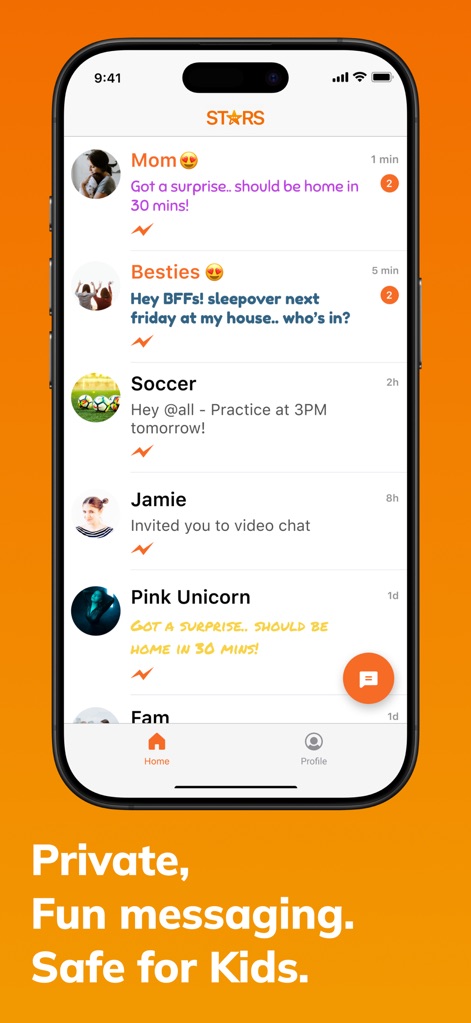
本アプリの安全なチャット一覧では、子どもたちは家族や友人とつながり、各チャットの最新メッセージプレビューを通じてコミュニケーションをスムーズに開始できます。
安全なチャット一覧
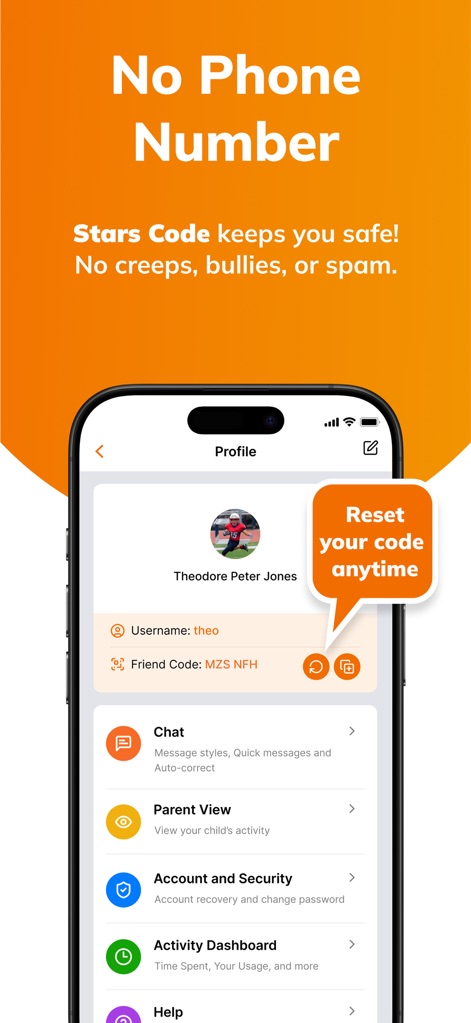
ユーザーは独自の友達コード(例:MZS NFH)を使用して安全な接続を確立し、必要に応じてコードをいつでもリセットできるため、プライバシー保護を徹底できます。
友達コードで安心
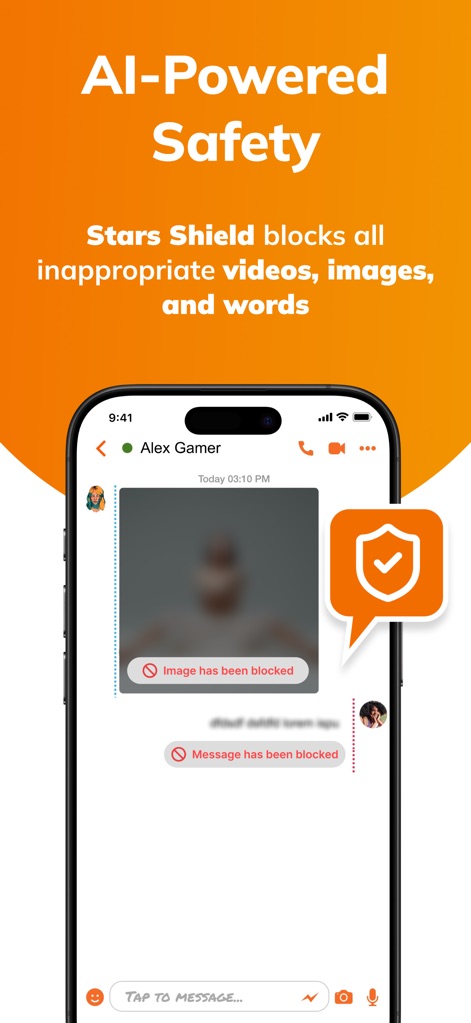
AIを搭載した「Stars Shield」は、不適切な画像やメッセージ(例:「Image has been blocked」表示)を自動でブロックし、子どもたちのオンライン環境を安全に保ちます。
AI安全シールド
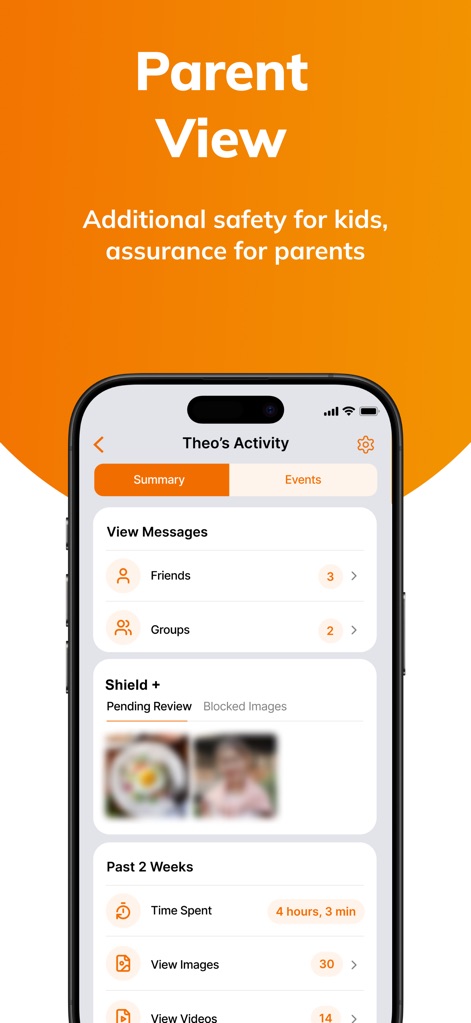
「保護者ビュー」を通じて、保護者は子どものアプリ利用時間(例:4時間3分)を確認し、ブロックされた画像コンテンツを「Shield +」セクションで詳細にレビューできます。
保護者監視機能
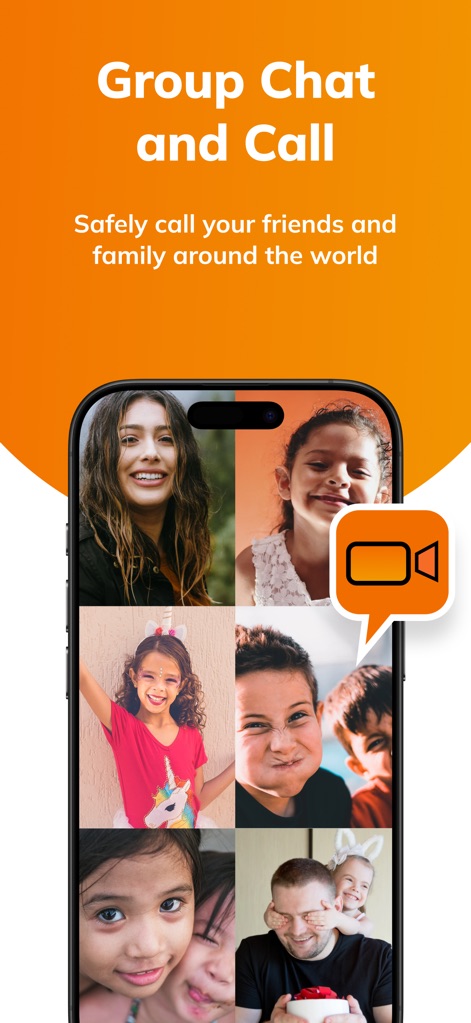
本アプリでは、ユーザーは複数人でのグループビデオ通話を通じて、世界中の友人や家族と顔を見ながら安全にコミュニケーションを楽しみ、笑顔を共有できます。
グループビデオ通話
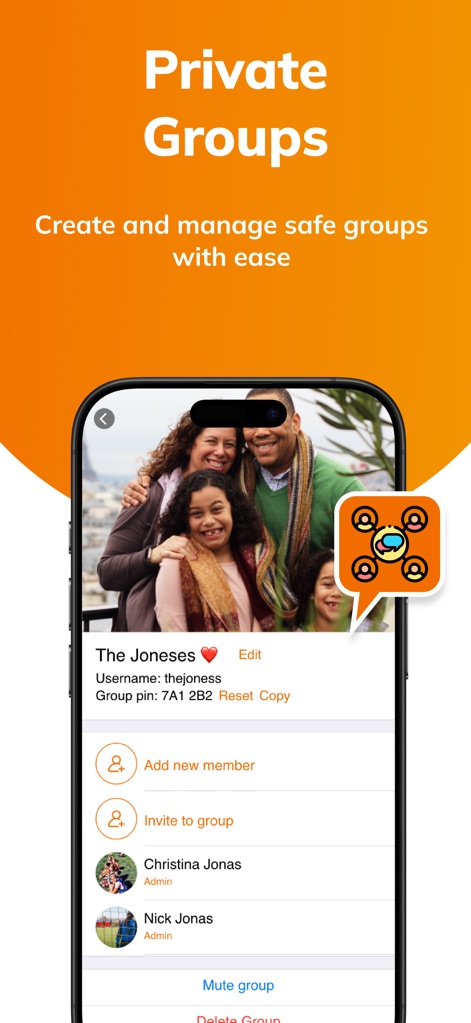
ユーザーはユニークなグループピンを使って簡単にプライベートグループを作成・管理し、メンバーリストからの追加や、管理者の設定(例:「Admin」表示)によりグループを柔軟に運営できます。
プライベートグループ管理
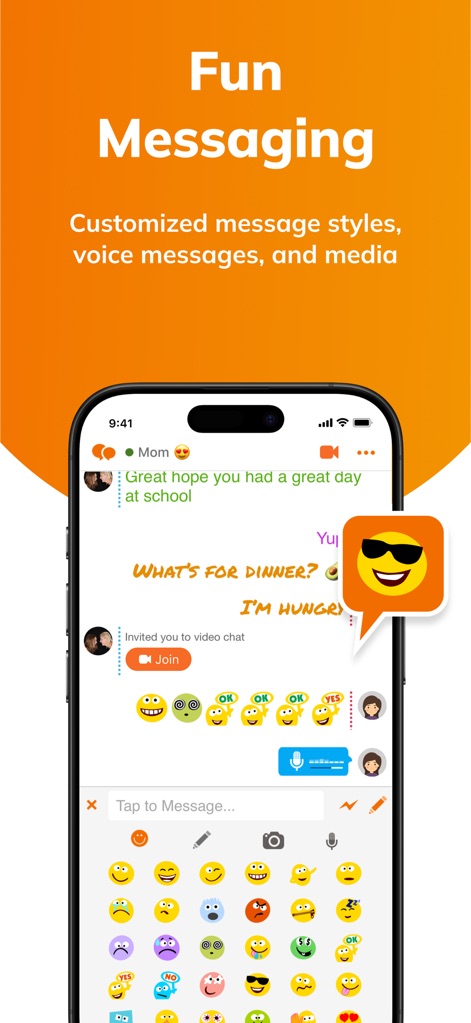
ユーザーはカスタマイズ可能なメッセージスタイル(多様なフォントと色)や、豊富な絵文字を活用することで、より表現豊かで楽しいチャットコミュニケーションを実現できます。
表現豊かなメッセージ
説明
Download





このページはアプリまたはその開発者の公式ページではなく、情報提供および論評を目的として作成された独立した編集出版物です。明示的に別段の記載がない限り、アプリおよびその開発者は、MWM、Apple、Google Play、アプリのパブリッシャー、またはアプリの開発者と提携、承認、後援、認可、またはその他の公式的な関係はなく、このページのいかなる内容も、アプリがMWMのサービスを使用して開発されたことを意味するものではありません。すべての商標、ロゴ、スクリーンショット、その他のコンテンツはそれぞれの所有者の財産です。