SVG Vector Editor Sketch Maker
ダウンロード: App Store

このページはアプリまたはその開発者の公式ページではなく、情報提供および論評を目的として作成された独立した編集出版物です。明示的に別段の記載がない限り、アプリおよびその開発者は、MWM、Apple、Google Play、アプリのパブリッシャー、またはアプリの開発者と提携、承認、後援、認可、またはその他の公式的な関係はなく、このページのいかなる内容も、アプリがMWMのサービスを使用して開発されたことを意味するものではありません。すべての商標、ロゴ、スクリーンショット、その他のコンテンツはそれぞれの所有者の財産です。


ロゴ: SVG Vector Editor Sketch Maker
ダウンロード: App Store

SVG Vector Editor Sketch Maker

ピクセルパーフェクトなデザインにアイデアを。正確なアンカーポイント編集とiPadに最適化されたシームレスな操作性で、どこにいてもスケーラブルなSVGの傑作を作成できます。デザイナー、Etsyクリエイター、デジタルアーティストに最適なツールです。

主要数値

ダウンロード

29K+

ユーザー評価

4.1/5

評価数

100

開発元

RainbowFactory LTD

カテゴリ

Graphics & Design

対応言語

12

最新バージョン

2.0.5

サイズ

7.5 MB

リリース日

2023年5月25日
機能

プロのベクターデザイン。どこでも。

デスクトップクラスのベクター編集機能をモバイルデバイスで利用できます。フリーランスデザイナーでもDIYクラフターでも、当社のツールはスケーラブルなアートを簡単かつ正確に作成するのに役立ちます。

精密なパス制御

アンカーポイント編集とパス操作でアートを完全に制御できます。どのようなスケールでもシャープなプロフェッショナルロゴやカスタムアイコンを作成できます。

メイカー向けに最適化

Etsyショップに最適なコンパニオン。Cricut、Silhouette、その他のビニールカッティングマシンと完全に互換性のあるSVGファイルをシームレスにエクスポートできます。

以下のスクリーンショットと説明は、アプリの公式ストアリスティングから直接取得されたものであり、アプリ開発者の所有物です。

アプリストア

スクリーンショット
SVG Vector Editor Sketch Maker - 芸術的なポートレートを特徴とする、ベクターグラフィックデザイン用のSVGエディターアプリ画面。
芸術的なポートレートを特徴とする、ベクターグラフィックデザイン用のSVGエディターアプリ画面。

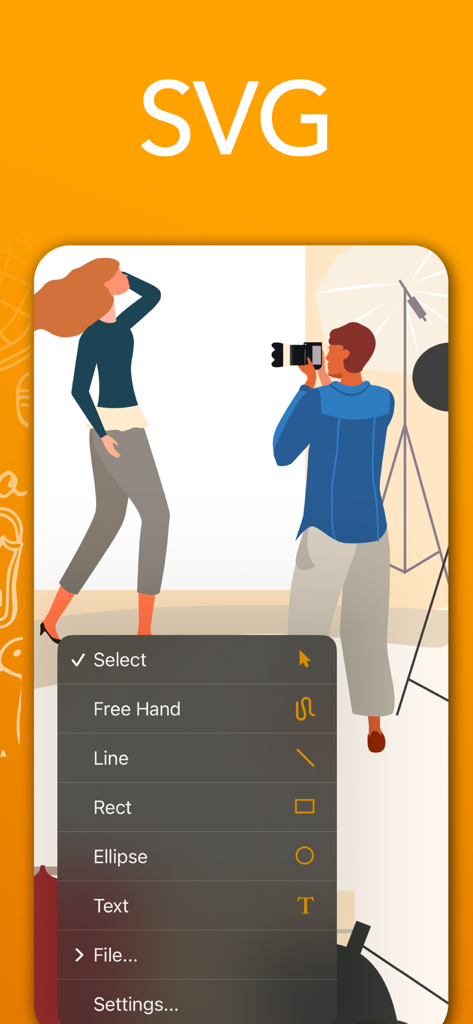
SVG Vector Editor Sketch Maker - ベクターイラスト上に描画ツールのメニューを表示するSVGベクターエディターアプリのインターフェース。
ベクターイラスト上に描画ツールのメニューを表示するSVGベクターエディターアプリのインターフェース。

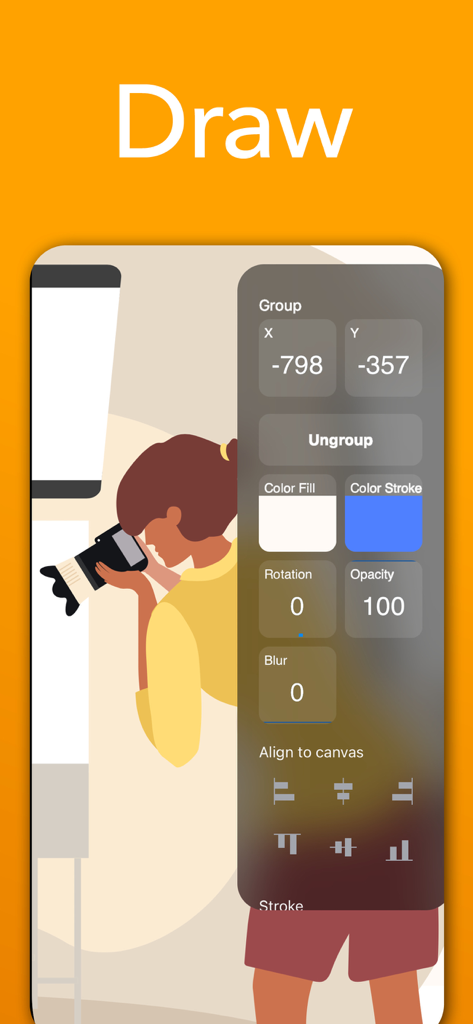
SVG Vector Editor Sketch Maker - ベクターイラストのデザインツールと配置オプションを示すSVGベクターエディターインターフェース

ベクターイラストのデザインツールと配置オプションを示すSVGベクターエディターインターフェース

説明

Introducing SVG Editor: The Ultimate Vector Graphics Design and Editing App for iPhone and iPad Unleash your creativity and transform your ideas into stunning visual masterpieces with SVG Editor, the premier vector graphics design and editing app built specifically for iPhone and iPad. With its exceptional performance and intuitive interface, SVG Editor empowers you to bring your imagination to life with precision and speed. Powerful Vector Editing Tools: Dive into a rich array of professional-grade tools and unleash your artistic potential. Create and manipulate vector shapes, lines, curves, and paths with ease. Perfect your designs with advanced features such as anchor point editing, grouping, layer management, and more. Seamless iOS and iPad Integration: Enjoy the benefits of a native iOS app that takes full advantage of the platform's capabilities. SVG Editor seamlessly integrates with the iOS ecosystem, enabling you to effortlessly import and export your projects across multiple devices and apps. Lightning-Fast Performance: Experience unrivaled speed and responsiveness while working on your vector graphics projects. SVG Editor is optimized to deliver lightning-fast performance, ensuring smooth rendering, editing, and real-time previews, even with complex designs. Precision and Accuracy: Achieve pixel-perfect precision in your designs. SVG Editor provides a robust set of tools for precise alignment, resizing, scaling, and positioning of elements. Grids, rulers, and guides further assist you in maintaining accuracy throughout your creative process. Versatile Export Options: Share your creations with the world effortlessly. SVG Editor supports a wide range of export formats, including SVG, PNG . Whether you need graphics for web design, print media, or social media, SVG Editor has you covered. User-Friendly Interface: Designed with simplicity and usability in mind, SVG Editor offers an intuitive interface that caters to both beginners and professionals.  Get started quickly, navigate effortlessly, and access the powerful editing tools right at your fingertips. Smart Undo/Redo: Mistakes happen, but with SVG Editor, they're easily rectified.  The app's smart undo/redo feature lets you step back and forth through your editing history, giving you the freedom to experiment and refine your designs without limitations. Unleash your creative prowess and revolutionize vector graphics editing on iPhoneand iPad. Download SVG Editor now and let your imagination soar to new heights!

Download

ダウンロード: App Store

このページはアプリまたはその開発者の公式ページではなく、情報提供および論評を目的として作成された独立した編集出版物です。明示的に別段の記載がない限り、アプリおよびその開発者は、MWM、Apple、Google Play、アプリのパブリッシャー、またはアプリの開発者と提携、承認、後援、認可、またはその他の公式的な関係はなく、このページのいかなる内容も、アプリがMWMのサービスを使用して開発されたことを意味するものではありません。すべての商標、ロゴ、スクリーンショット、その他のコンテンツはそれぞれの所有者の財産です。







