Time Jump - Date Calculator
ダウンロード: App Store

このページはアプリまたはその開発者の公式ページではなく、情報提供および論評を目的として作成された独立した編集出版物です。明示的に別段の記載がない限り、アプリおよびその開発者は、MWM、Apple、Google Play、アプリのパブリッシャー、またはアプリの開発者と提携、承認、後援、認可、またはその他の公式的な関係はなく、このページのいかなる内容も、アプリがMWMのサービスを使用して開発されたことを意味するものではありません。すべての商標、ロゴ、スクリーンショット、その他のコンテンツはそれぞれの所有者の財産です。


ロゴ: Time Jump - Date Calculator
ダウンロード: App Store

Time Jump - Date Calculator

任意の2つの日付間のカレンダー日と営業日を簡単に計算できます。並列カレンダー、統合された米国祝日、シームレスなiOSカレンダー同期により、最大2,000年をナビゲートします。

主要数値

ダウンロード

3K+

ユーザー評価

5.0/5

評価数

0

開発元

Time Theory Software, LLC

カテゴリ

Utilities

対応言語

1

最新バージョン

3.12.0

サイズ

2.4 MB

リリース日

2015年4月15日
機能

精密なタイムラインをマスターする

数秒で正確な日付計算、営業日ロジック、長期計画を必要とするプロフェッショナル向けの究極のユーティリティ。

高度な営業日計算

週末とカスタマイズ可能な米国連邦または州の祝日を自動的に除外して、完璧なプロジェクト追跡のための期間を即座に計算します。

デュアルカレンダーナビゲーション

iPhoneとiPadの両方で視覚的な明瞭さと迅速な日付比較のために設計された並列ビューで、最大2,000年をナビゲートします。

以下のスクリーンショットと説明は、アプリの公式ストアリスティングから直接取得されたものであり、アプリ開発者の所有物です。

アプリストア

スクリーンショット
Time Jump - Date Calculator - 日付間の差を計算するためのTime Jumpアプリインターフェースの並列カレンダー
日付間の差を計算するためのTime Jumpアプリインターフェースの並列カレンダー

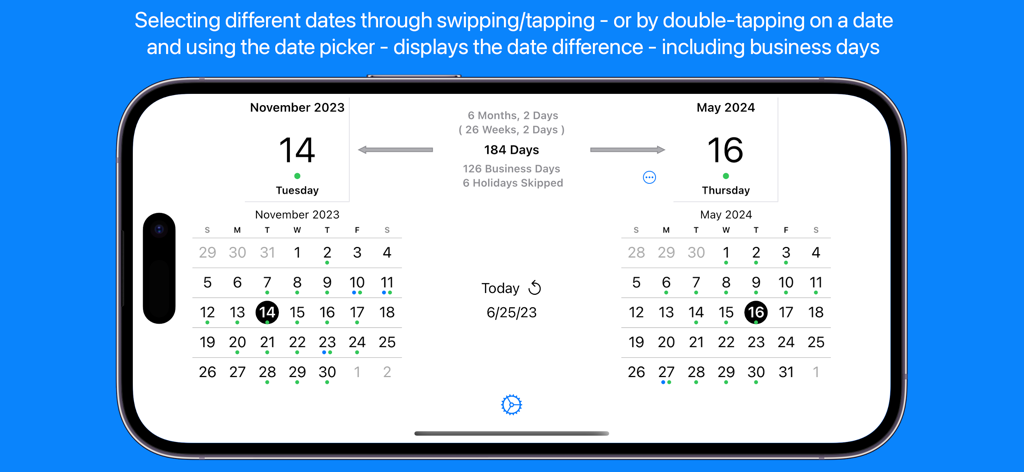
Time Jump - Date Calculator - Time Jumpアプリのデュアルカレンダーインターフェース。2023年11月から2024年5月までの日付差と営業日計算を表示。
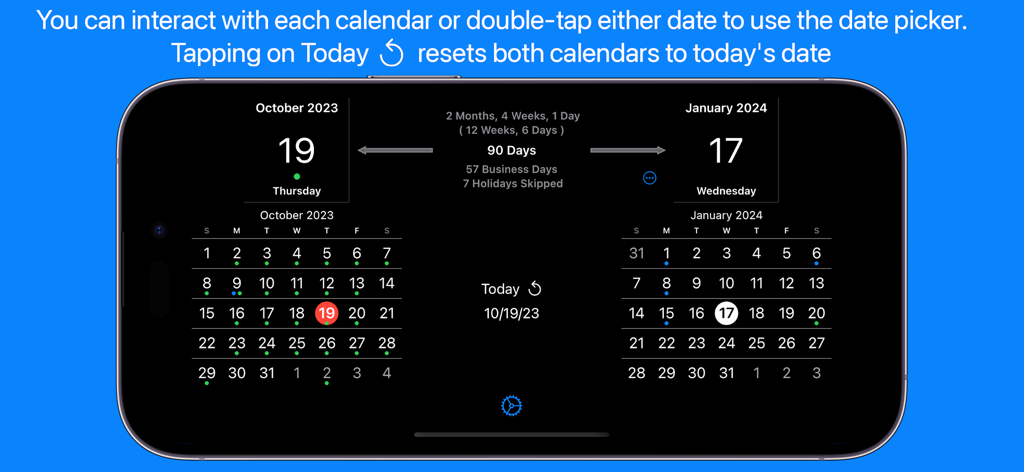
Time Jumpアプリのデュアルカレンダーインターフェース。2023年11月から2024年5月までの日付差と営業日計算を表示。

Time Jump - Date Calculator - Time Jumpアプリインターフェース。並列カレンダーに営業日と祝日の計算が表示されている。
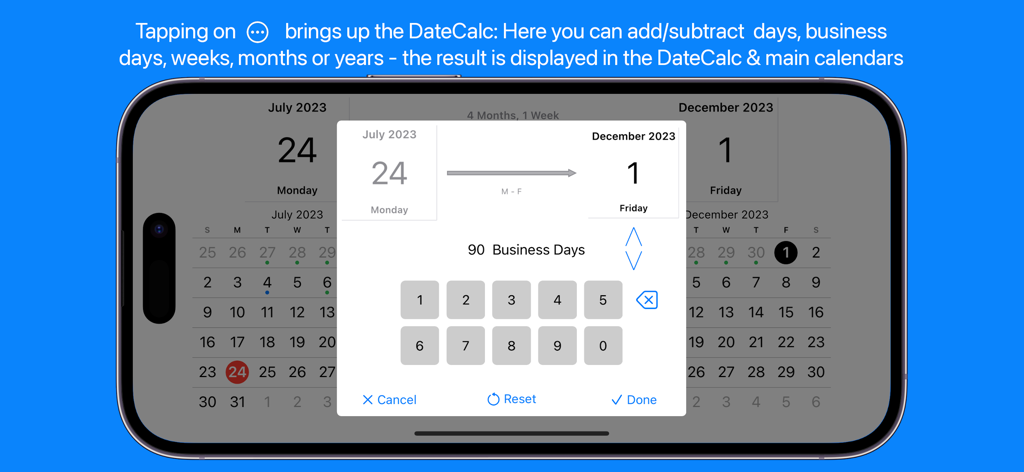
Time Jumpアプリインターフェース。並列カレンダーに営業日と祝日の計算が表示されている。

Time Jump - Date Calculator - Time Jumpアプリインターフェース。7月から12月までの90営業日の計算を表示。
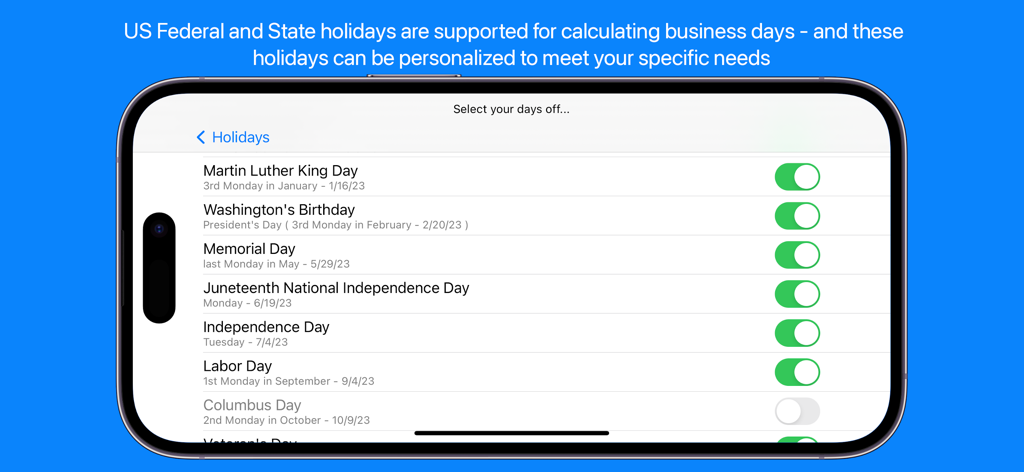
Time Jumpアプリインターフェース。7月から12月までの90営業日の計算を表示。

Time Jump - Date Calculator - Time Jumpアプリの営業日計算のための米国祝日選択画面

Time Jumpアプリの営業日計算のための米国祝日選択画面

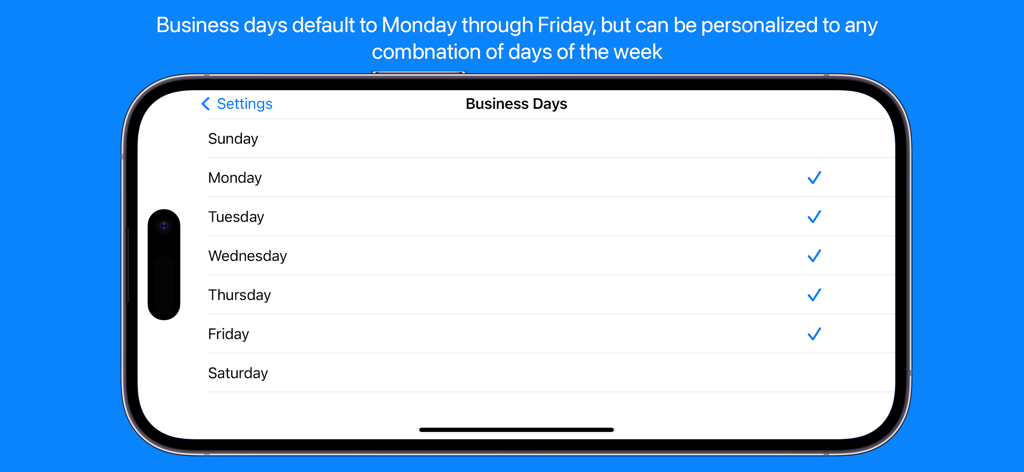
Time Jump - Date Calculator - Time Jumpアプリの営業日設定を表示するスマートフォン画面。ユーザーがカスタム稼働日を選択できる。
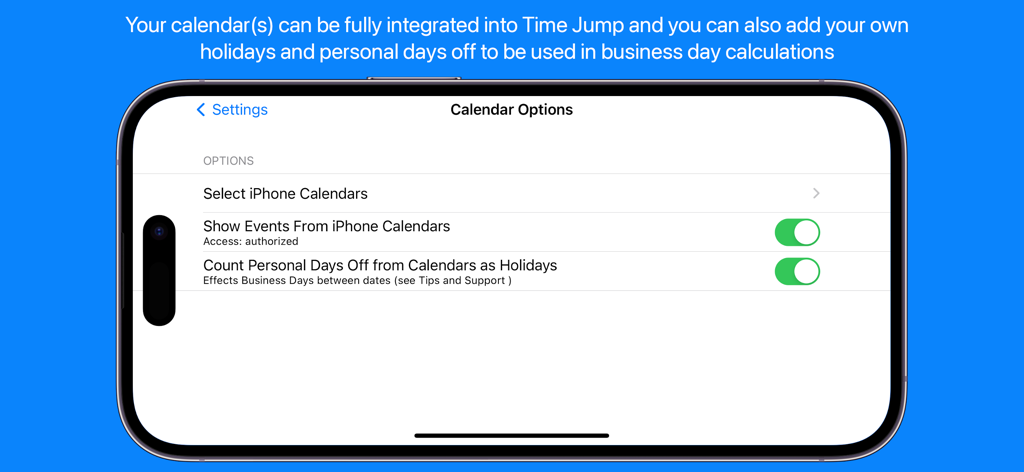
Time Jumpアプリの営業日設定を表示するスマートフォン画面。ユーザーがカスタム稼働日を選択できる。

Time Jump - Date Calculator - Time Jumpアプリのカレンダー統合および個人祝日計算設定画面

Time Jumpアプリのカレンダー統合および個人祝日計算設定画面

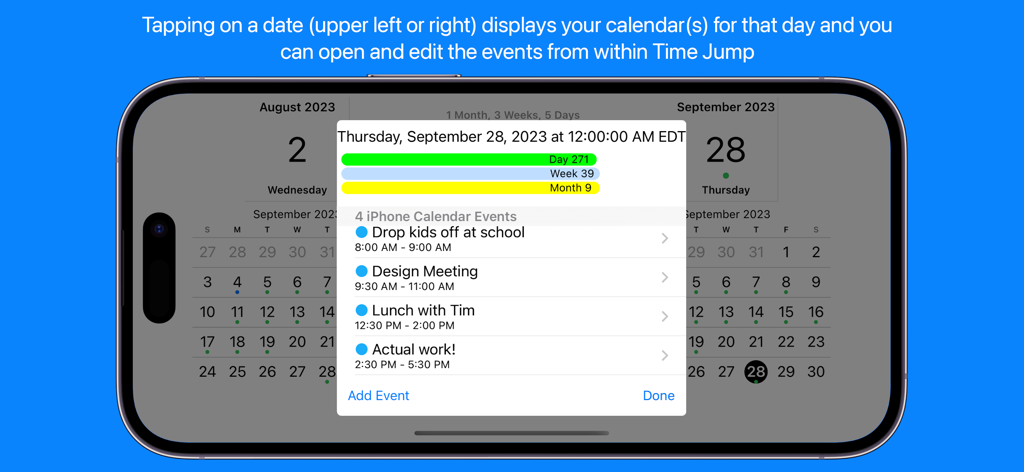
Time Jump - Date Calculator - Time Jumpアプリ。統合されたiPhoneカレンダーイベントと日次スケジュール詳細を表示。
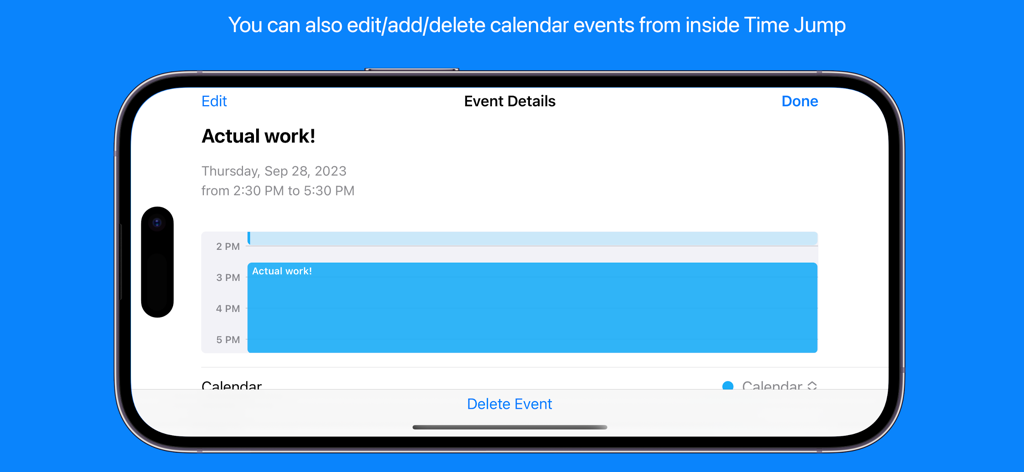
Time Jumpアプリ。統合されたiPhoneカレンダーイベントと日次スケジュール詳細を表示。

Time Jump - Date Calculator - Time Jumpアプリのスクリーンショット。iPhoneでカレンダーイベントの詳細と編集オプションを表示。
Time Jumpアプリのスクリーンショット。iPhoneでカレンダーイベントの詳細と編集オプションを表示。

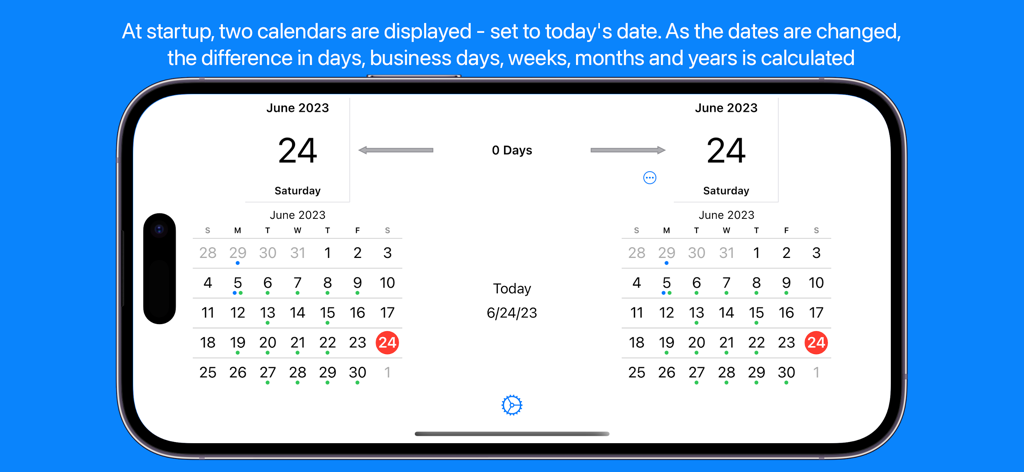
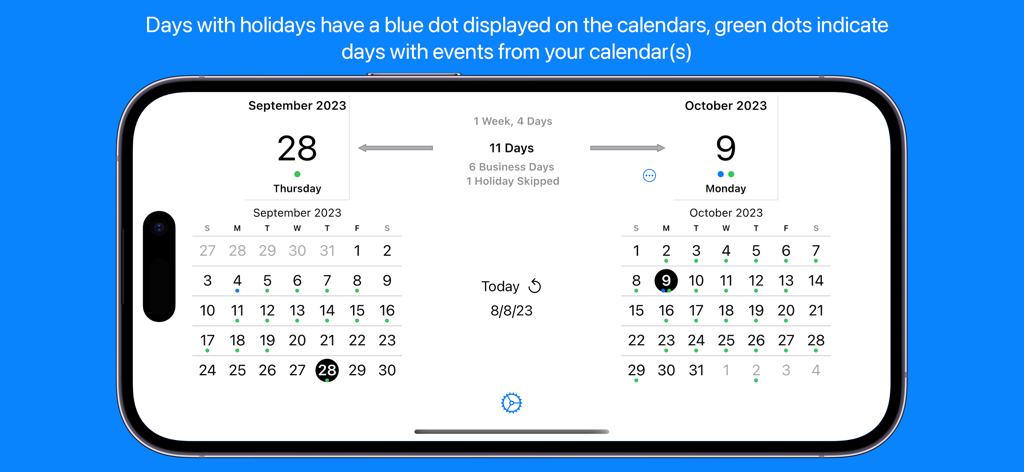
Time Jump - Date Calculator - Time Jumpアプリ。並列カレンダーに日数と営業日を計算して表示。

Time Jumpアプリ。並列カレンダーに日数と営業日を計算して表示。

説明

Date Calculator Time Jump for iPhone & iPad is a full-featured date calculator (counts the days between two dates) that uses side-by-side calendars to allow you to flip backward and forward in time. Tap on dates and instantly see the time difference between them in days and business days as well as the total time in years, months, weeks and days. Based on a recent customer request, results are also displayed in weeks & days. Don't want to flip through calendars? Double-tap on the selected date above either calendar and use the date picker to select a specific date – your birthday, a project deadline, an anniversary – anything. Time Jump supports dates up to 2,000 years in the past or the future. You can always tap days directly on the calendar to fine tune your selection. Time Jump's DateCalc When you need to do a specific calculation - like 180 days from a date, 45 business days before a date, 40 weeks from a date, etc. - use the DateCalc feature that allows you to add/subtract days, business days, weeks, months or years to/from any date. Business Day Calculations In addition to calendar days, Time Jump quickly and easily calculates the number of business days between two dates – this can be essential for project managers, shippers, attorneys, software developers, manufacturers – anyone working in business days. Time Jump can take US Federal and State holidays into account (skipping them) when calculating business days and you can select exactly which holidays to skip. You can also add your own custom days off (Personal Days) that are skipped for business day calculations. You can even set which days of the week are considered business days if you need to use something other than Monday through Friday. Integrated with Your iPhone/iPad Calendar Time Jump - with your permission - can be fully integrated with your iPhone/iPad calendar. You can see events - and even create or delete them - from within Time Jump. A tap on the selected date above either calendar and you will see a list of the calendar events you have chosen to view from within Time Jump in the Date Detail View. Use the Time Jump settings to select one, some or all of your calendars - including your Google calendar. Create Custom Days Off for Business Day Calculations As mentioned above, in addition to standard business day calculations, you can also add your own custom days off - Personal Days - (vacations, travel, school schedules, etc.) and Time Jump will treat these days as non-business days in the business day calculations. Of course, you can use settings to turn this feature on and off. Time Jump allows you to create your days off directly from within the app - and then they will appear in your selected iPhone calendar. Time Jump Date Detail View The Date Detail View shows you more details about a selected date: holiday information and/or a list of activities from your iPhone/iPad calendar (if you've given Time Jump permission to take a look). Once you've done a calculation you may wonder what's on your calendar and you can see your schedule from within Time Jump. Who's Time Jump for? Project managers Planners & schedulers Attorneys & paralegals Scientists Procurement managers Logistics specialists Shippers Investors & bankers Historians Educators Time explorers Anyone interested in time Follow us in Twitter: http://www.twitter.com/timetheoryapps Time Jump does not use a network connection during normal operation - use it anywhere, anytime. It does use a network connection if you access our website from within the app or provide app feedback directly to us.

Download

ダウンロード: App Store

このページはアプリまたはその開発者の公式ページではなく、情報提供および論評を目的として作成された独立した編集出版物です。明示的に別段の記載がない限り、アプリおよびその開発者は、MWM、Apple、Google Play、アプリのパブリッシャー、またはアプリの開発者と提携、承認、後援、認可、またはその他の公式的な関係はなく、このページのいかなる内容も、アプリがMWMのサービスを使用して開発されたことを意味するものではありません。すべての商標、ロゴ、スクリーンショット、その他のコンテンツはそれぞれの所有者の財産です。