
このページはアプリまたはその開発者の公式ページではなく、情報提供および論評を目的として作成された独立した編集出版物です。明示的に別段の記載がない限り、アプリおよびその開発者は、MWM、Apple、Google Play、アプリのパブリッシャー、またはアプリの開発者と提携、承認、後援、認可、またはその他の公式的な関係はなく、このページのいかなる内容も、アプリがMWMのサービスを使用して開発されたことを意味するものではありません。すべての商標、ロゴ、スクリーンショット、その他のコンテンツはそれぞれの所有者の財産です。


Timemark: #1 Job Photo App
現場の混沌から、揺るぎない証拠を瞬時に生成する。Timemarkは、ありふれた写真を絶対的な信頼に変える。
ダウンロード
2.5M+ユーザー評価
評価数
308.6K開発元
カテゴリ
Photo & Video対応言語
21最新バージョン
10.0.80サイズ
101.3 MBリリース日
2023年3月9日現場プロフェッショナル向けの高度な写真ドキュメンテーション
Timemark: #1 Job Photo App の主要機能分析
改ざん防止写真証拠
ネットワーク検証済みのタイムスタンプ、正確なGPS座標、独自の検証コードにより、写真が改ざんされていないことを保証し、あらゆる紛争において信頼できる証拠を提供します。
チームワークスペースによる写真自動同期
チームメンバーが撮影した全ての写真が自動的に一つのワークスペースに同期され、プロジェクト、クライアント、または場所ごとに整理できるため、情報の一元管理と効率的な共同作業が実現します。
ワンクリックプロフェッショナルレポート作成
PDF、Excel、またはZIP形式で写真レポートを簡単にエクスポートでき、Google Earth用のKMZファイル生成や、アプリ不要で共有可能なライブリンクを提供することで、クライアントへの報告とプロジェクト進捗の伝達を効率化します。
オフラインファースト設計と現場対応
電波状況の悪い現場でも写真と完全なメタデータをキャプチャできるオフラインファースト設計を採用しており、軽量なアプリは特別なトレーニングなしに即座に使用開始できるため、現場での作業効率を最大化します。
カスタムウォーターマーク
会社のロゴ、プロジェクト名、ジョブ詳細を写真にカスタムウォーターマークとして追加することで、ブランドの一貫性を保ち、写真の所有権を明確にし、プロフェッショナルな印象を与えます。
役割ベースのアクセス権限
役割に基づいて各チームが閲覧できるプロジェクトを制限できるため、データのセキュリティとプライバシーを確保しつつ、適切な情報のみが共有されるよう管理することができます。
よくある質問
について知っておくべきこと Timemark: #1 Job Photo App
What is Timemark: Photo Proof?
Timemark: Photo Proof is an application designed to help users take and organize job-related photos and videos. It facilitates daily reports, team communication, and serves as proof of work.
How does Timemark: Photo Proof ensure photo trustworthiness?
Timemark: Photo Proof ensures trustworthiness by embedding accurate date, time, and GPS location into every photo and video. It also uses anti-tamper time and location features to prevent alterations.
Can I add custom information to photos taken with Timemark?
Yes, Timemark allows users to add custom information to photos. This includes maps, GPS coordinates, weather data, notes, company logos, job tags, and altitude details.
Does Timemark support team collaboration and photo organization?
Yes, Timemark features Teamspace, which automatically collects team photos into designated project folders. Users can review these photos in map, gallery, or sheet view for organized collaboration.
What kind of reports can Timemark: Photo Proof generate?
Timemark: Photo Proof generates various reports from collected photos and videos. Users can create reports in PDF, Excel, or KMZ formats for different operational needs.
Is Timemark: Photo Proof suitable for construction project tracking?
Yes, Timemark: Photo Proof is specifically tailored for construction, allowing users to track project progress using templates and cloud sync. It is designed for various field service applications.
How does subscription renewal work for Timemark: Photo Proof?
Subscriptions for Timemark: Photo Proof automatically renew unless auto-renew is turned off at least 24 hours before the current period ends. The account is charged for renewal within 24 hours prior.
Can I manage or cancel my Timemark: Photo Proof subscription?
Yes, users can manage their Timemark: Photo Proof subscriptions and turn off auto-renewal through their device's settings after purchase. Cancellation is not permitted during an active subscription period.
Does Timemark: Photo Proof offer time tracking features?
Yes, Timemark: Photo Proof includes simple time tracking features. Users can clock in/out, log breaks, and view their total work hours directly within the app.
Is Timemark: Photo Proof certified for data security?
Yes, Timemark: Photo Proof is certified for data security. It has achieved CASA Tier 2 certification, indicating compliance with industry-recognized security standards.
Can Timemark display both latitude/longitude and altitude on photos?
Yes, Timemark: Photo Proof allows users to display both latitude/longitude coordinates and altitude directly on their photos. These options are customizable within the app's template settings.
以下のスクリーンショットと説明は、アプリの公式ストアリスティングから直接取得されたものであり、アプリ開発者の所有物です。
アプリストア
スクリーンショット
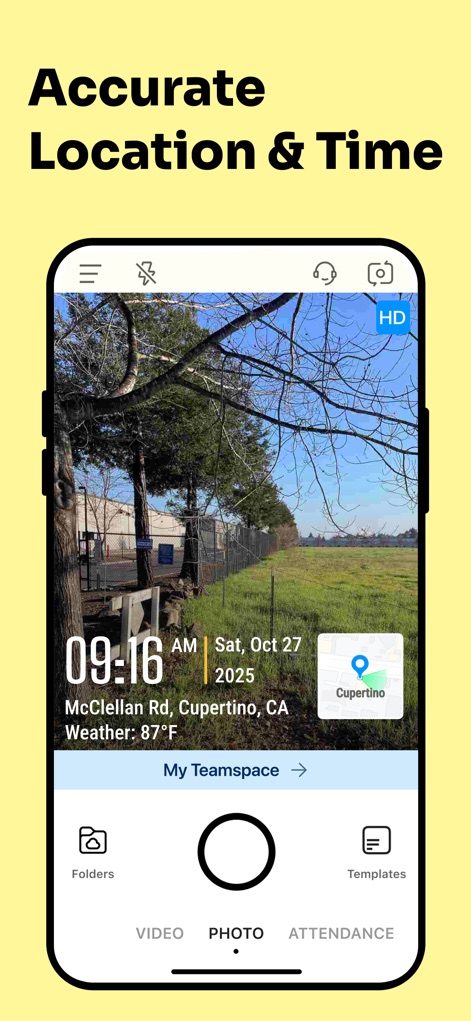
このスクリーンショットでは、写真に埋め込まれた正確な「撮影日時(09:16 AM, Sat, Oct 27, 2025)」と、地図上で確認できる「高精度なGPSロケーション(Cupertino, CA)」が視覚的に提示されています。
正確な記録
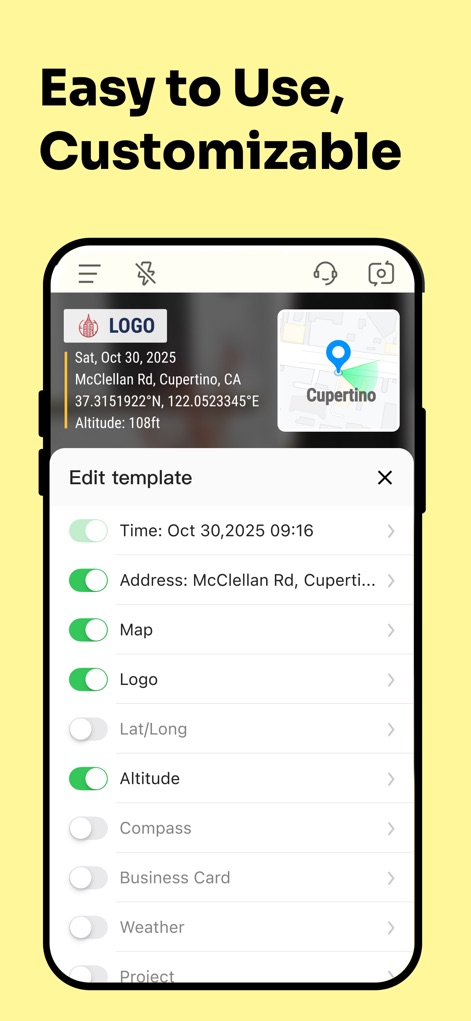
本画面では、写真に貴社「ロゴ」を埋め込む機能と、タイムスタンプや住所、天気などの表示項目を細かく設定できる「テンプレート編集インターフェース」が明確に示されています。
高度なカスタマイズ
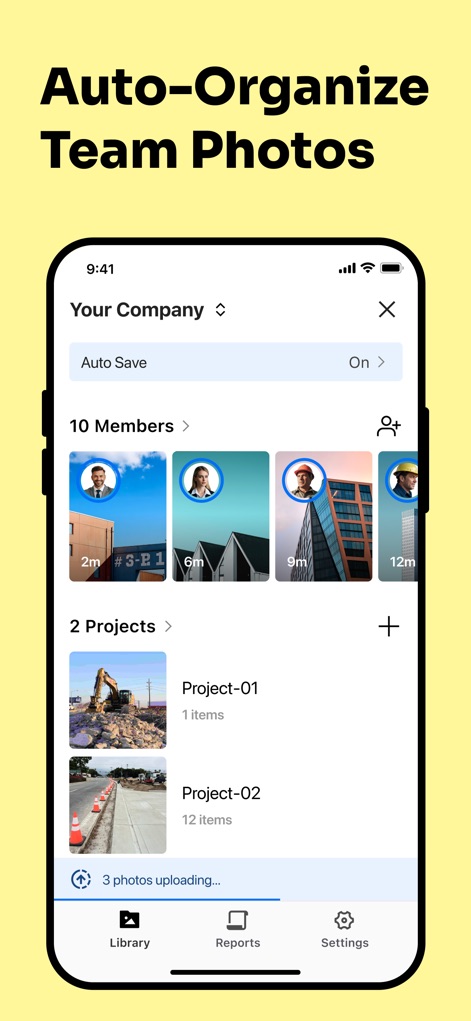
この画面は、チームメンバーが撮影した写真が自動的に一元管理され、プロジェクトごとに写真が「整理されて表示される機能」と、複数の写真が効率的に「アップロードされている状況」を示しています。
チーム写真を自動整理
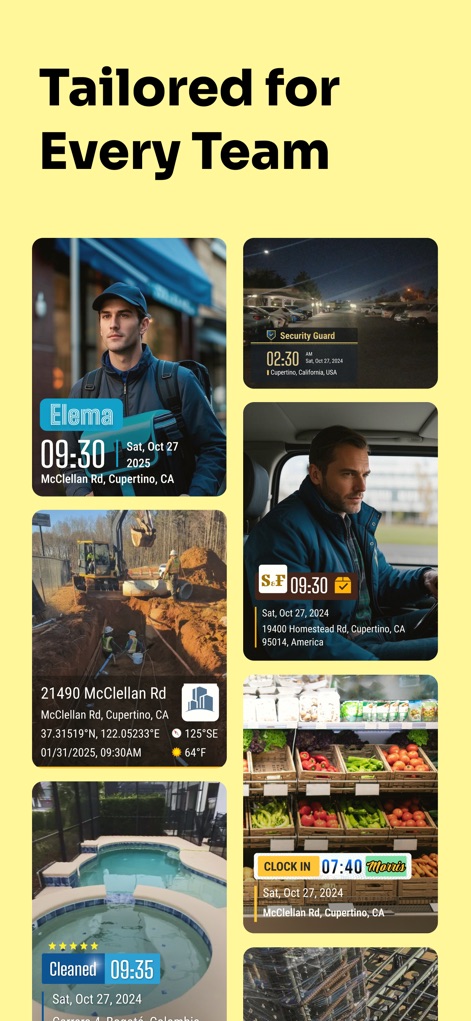
配達、セキュリティ、建設など、多様な業種での活用例が視覚的に示されており、それぞれの現場で記録された「時刻スタンプ」と「位置情報」を含む写真が確認できます。
あらゆる業務に対応
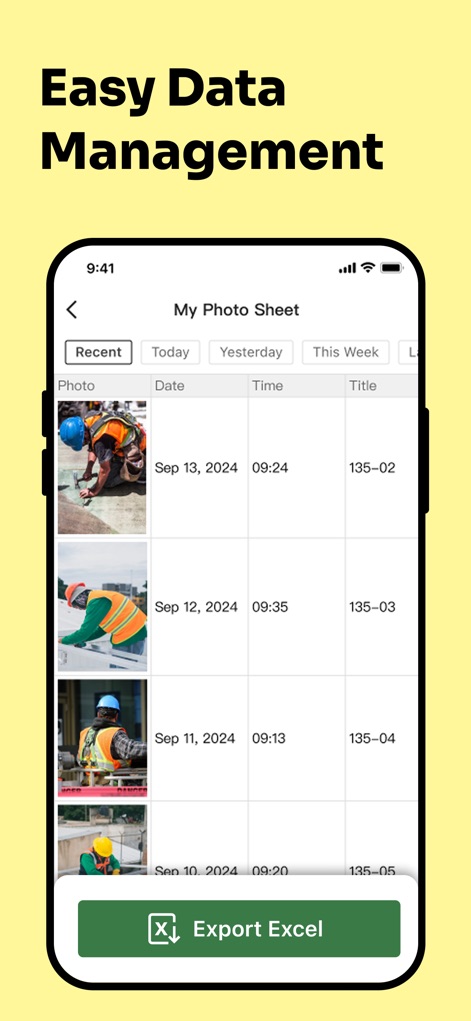
撮影された写真が日付、時刻、タイトルとともに「リスト形式で一覧表示」されており、重要なデータを「Excel形式で手軽にエクスポート」できる機能が本画面で紹介されています。
簡単なデータ管理
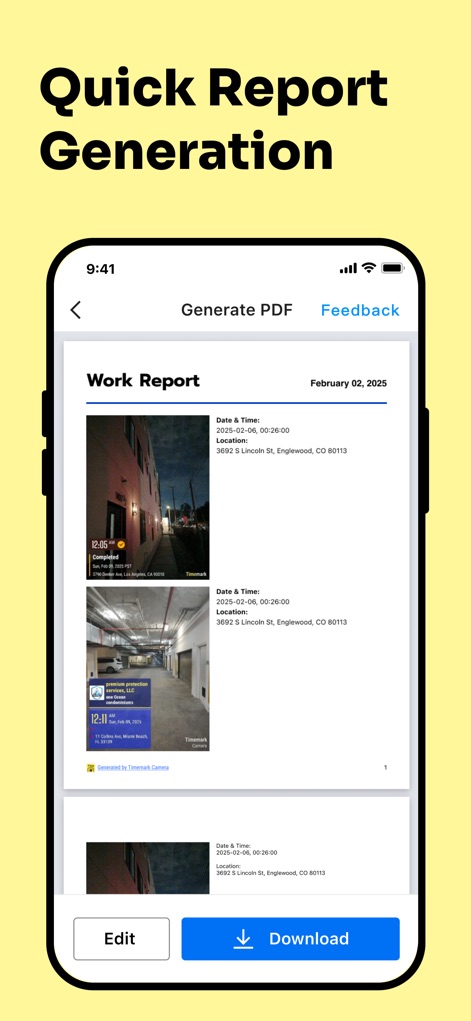
このスクリーンショットでは、写真のメタデータが詳細に記載されたプロフェッショナルな「ワークレポートのプレビュー画面」と、完成したレポートを「即座にダウンロードできる機能」が明確に示されています。
迅速なレポート作成
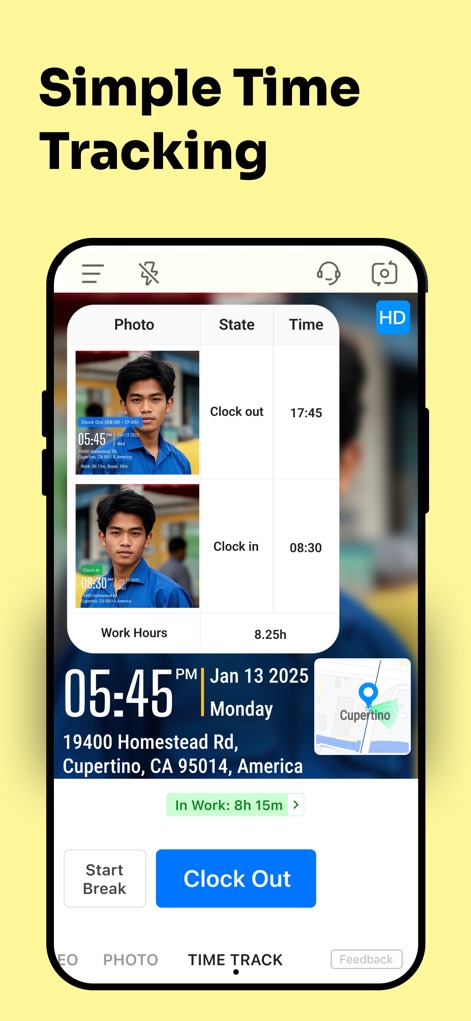
ユーザーの「Clock in / Clock out 時刻」が写真付きで記録されており、合計勤務時間「8時間15分」がリアルタイムで表示されるシンプルな勤怠管理機能が確認できます。
シンプルな勤怠管理
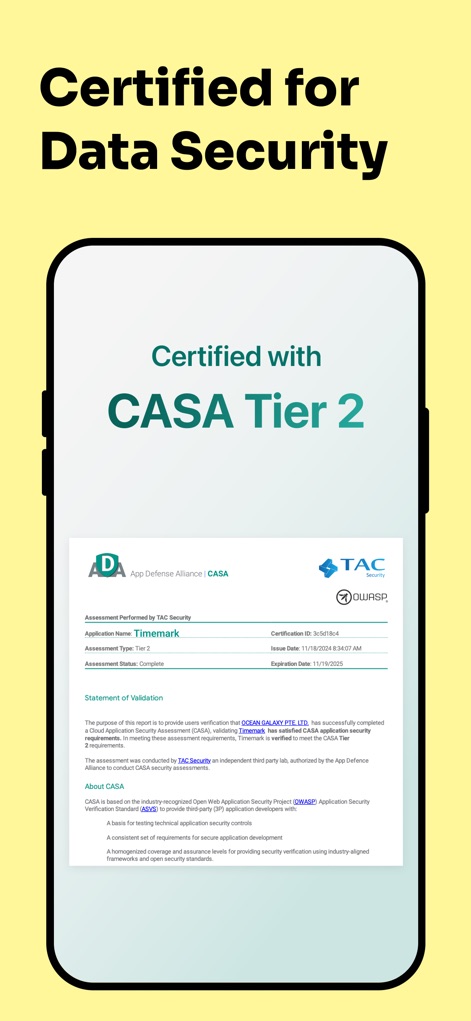
本画面は、アプリがCASA Tier 2の「セキュリティ認証を取得していること」と、TAC Securityによる「厳格な評価プロセス」を経て安全性が保証されていることを示す公式文書を提示しています。
堅牢なデータセキュリティ
説明
Download
類似アプリ
似た機能とユーザー体験を持つアプリ

今日水印相机-时间地点经纬度打卡拍照
Keep Curiosity, Inc.

自定义水印相机
Beidou Hanglu Technology Co.,Ltd.

CompanyCam
CompanyCam, Inc
今日水印专业版-官方无广告版,真实时间今日水印相机拍照
Keep Curiosity, Inc.

经纬度相机&水印相机-记录时间地点天气
Shuzhuo Network Technology Guangzhou Co., Ltd.

水印相机-时间地点工作打卡拍照视频
Chengdu Chongbianli Science and Technology Ltd.

经纬相机:水印相机拍照水印记录时间地点
佳铭 游

TimeStamp Camera+MAP
源泽 高

工作打卡水印相机-时间地点天气工作打卡拍照
则建 高
このページはアプリまたはその開発者の公式ページではなく、情報提供および論評を目的として作成された独立した編集出版物です。明示的に別段の記載がない限り、アプリおよびその開発者は、MWM、Apple、Google Play、アプリのパブリッシャー、またはアプリの開発者と提携、承認、後援、認可、またはその他の公式的な関係はなく、このページのいかなる内容も、アプリがMWMのサービスを使用して開発されたことを意味するものではありません。すべての商標、ロゴ、スクリーンショット、その他のコンテンツはそれぞれの所有者の財産です。