TV Widget +
TV Widget +
ダウンロード: App Store

このページはアプリまたはその開発者の公式ページではなく、情報提供および論評を目的として作成された独立した編集出版物です。明示的に別段の記載がない限り、アプリおよびその開発者は、MWM、Apple、Google Play、アプリのパブリッシャー、またはアプリの開発者と提携、承認、後援、認可、またはその他の公式的な関係はなく、このページのいかなる内容も、アプリがMWMのサービスを使用して開発されたことを意味するものではありません。すべての商標、ロゴ、スクリーンショット、その他のコンテンツはそれぞれの所有者の財産です。


ロゴ: TV Widget +
ダウンロード: App Store

TV Widget +

次のアップグレードの guesswork をなくしましょう。理想のテレビサイズ、視聴距離、角度を即座に計算し、リビングルームを完璧に調整された映画体験に変えましょう。

主要数値

ダウンロード

600

ユーザー評価

4.5/5

評価数

0

開発元

Michael Imperato

カテゴリ

Utilities

対応言語

1

最新バージョン

2.0

サイズ

1.3 MB

リリース日

2014年3月12日
機能

ホームシアターのセットアップを完璧に

次のテレビ購入の guesswork をなくしましょう。TV Widget + は正確な計算を使用して、真に没入感のある体験のための適切な画面サイズと座席距離を選択するのに役立ちます。

スマートなサイズ推奨

65インチと85インチの間で推測するのはやめましょう。座席距離と部屋のレイアウトに完璧にフィットする正確な画面サイズを見つけましょう。

映画館の雰囲気を再現

実際の映画館体験と比較する視覚的なゲージで視聴角度を評価しましょう。

以下のスクリーンショットと説明は、アプリの公式ストアリスティングから直接取得されたものであり、アプリ開発者の所有物です。

アプリストア

スクリーンショット
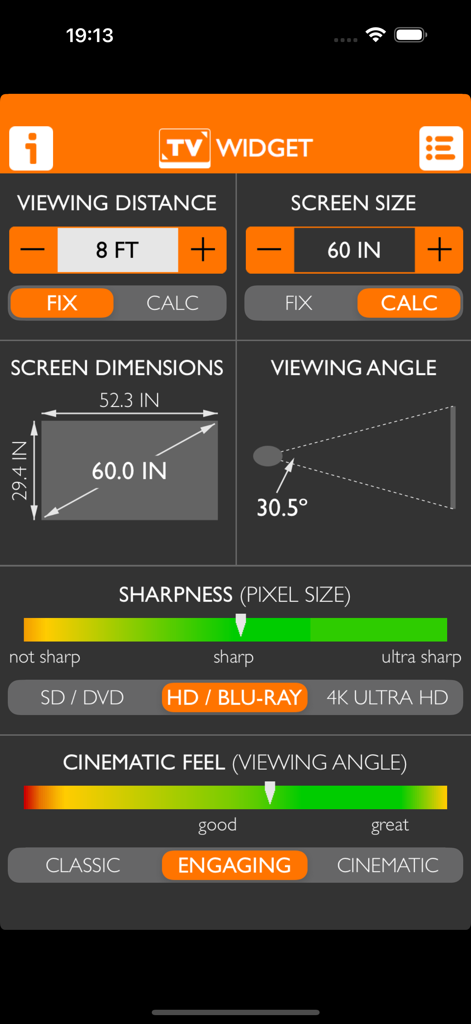
TV Widget + - TV Widgetアプリのインターフェース。60インチの画面サイズ、8フィートの視聴距離に対する計算と、シャープネスおよびシネマティックフィールゲージが表示されています。
TV Widgetアプリのインターフェース。60インチの画面サイズ、8フィートの視聴距離に対する計算と、シャープネスおよびシネマティックフィールゲージが表示されています。

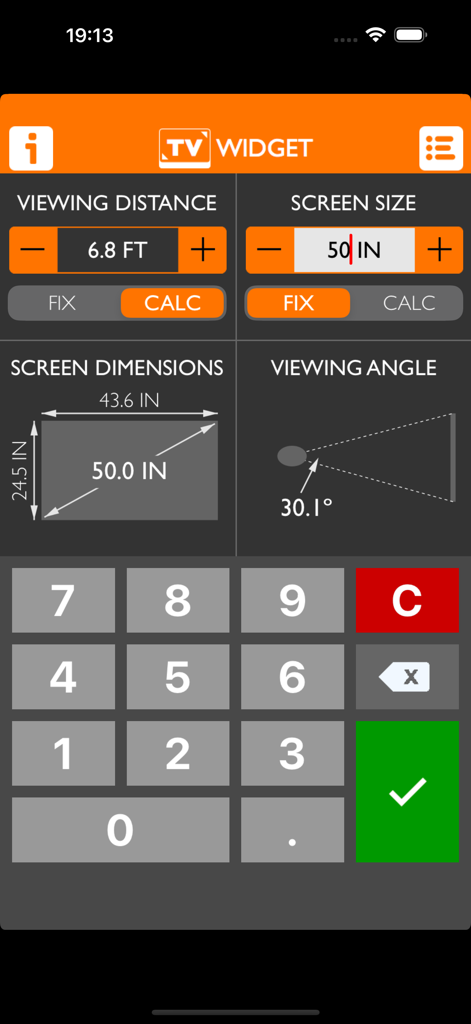
TV Widget + - TV Widgetアプリのインターフェース。視聴距離、画面サイズ、視聴角度の計算が表示されています。
TV Widgetアプリのインターフェース。視聴距離、画面サイズ、視聴角度の計算が表示されています。

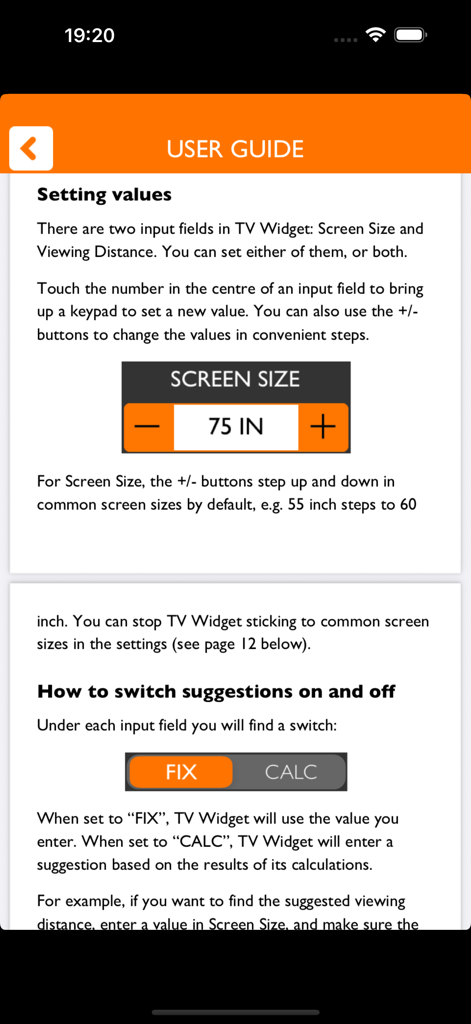
TV Widget + - TV Widget plus のユーザガイド。画面サイズ設定と計算モードについて説明しています。
TV Widget plus のユーザガイド。画面サイズ設定と計算モードについて説明しています。

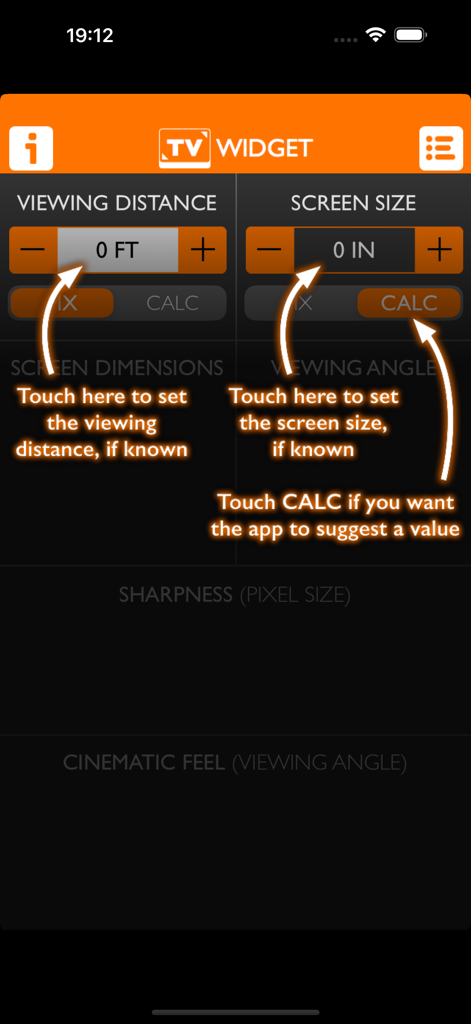
TV Widget + - TV Widgetアプリのメインインターフェース。視聴距離と画面サイズ計算機の設定と、説明用の矢印が表示されています。
TV Widgetアプリのメインインターフェース。視聴距離と画面サイズ計算機の設定と、説明用の矢印が表示されています。

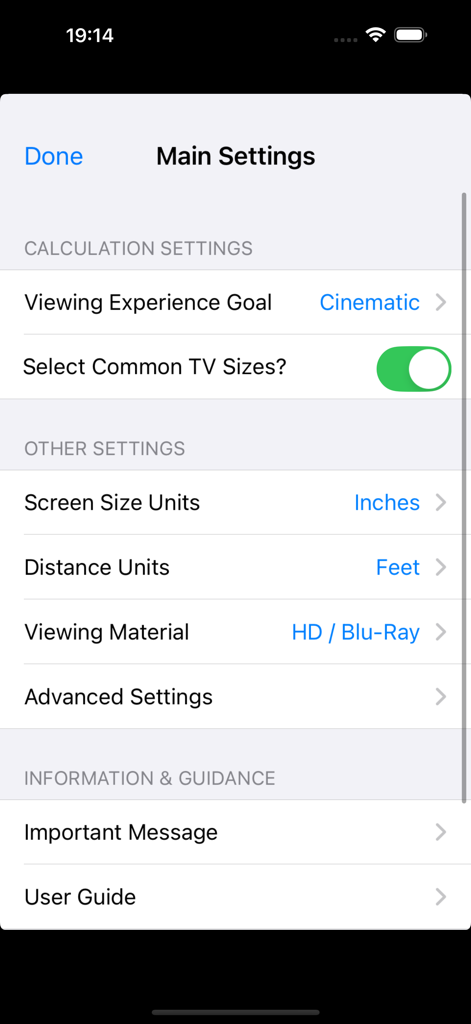
TV Widget + - TV Widget plus アプリのメイン設定画面。ホームシアター計算のプリファレンスが表示されています。

TV Widget plus アプリのメイン設定画面。ホームシアター計算のプリファレンスが表示されています。

説明

Instant calculations for TV size, viewing distance and viewing angle! TV Widget is a fun and informative app for learning about the relationship between screen size, viewing distance and viewing angle. You can use it to help inform your decision about what size TV to buy, or how to arrange the seating in your room. You can use TV Widget to do three things: 1. Calculate screen size. If you know how far you'll site from the screen, TV Widget can suggest a suitable TV size. 2. Calculate viewing distance. If you know the TV size, TV Widget can suggest the distance of your seating. 3. Assess the viewing experience. TV Widget calculates the viewing angle and provides fun gauges that help you assess how big the picture will feel compared to a cinema/theatre. It can help you work out if that new Ultra HD TV is really worthwhile given your seating arrangement and TV size constraints! TV Widget is designed to be fun and easy to use. It’s not a replacement for expert advice as it cannot take into account all your preferences and requirements, and it includes guidelines that are quite subjective in nature. However, it can be helpful in narrowing down your choices and understanding the trade-offs. The app is in active development. Please contact us with any issues, feedback or suggestions – our email address is tvwidgetapp@gmail.com. ADDITIONAL FEATURES - Provides instant calculations as you type - Makes suggestions based on three user-selectable 'viewing experiences' - Selects common TV sizes automatically (can be switched off) - Provides a guide to the sharpness of the TV image (e.g. Blu-rays vs. DVDs vs. Ultra HD) - Calculates screen height, width and diagonal - Gauges the visual impact of the TV image - Pre-selects the international TV system in your region: NTSC, PAL or SECAM - Includes a built-in user guide - Supports measurements in feet, inches and cm. Optional Advanced Settings: - Allows screen to be measured by width rather than diagonal (for projectors) - Allows international TV system region to be changed - Supports the standard 16:9 widescreen TV ratio, but can also be switched to 4:3, 16:10, 1.85:1, 21:9, 2.39:1 and 32:9 aspect ratios for projectors and computer monitors.

Download

ダウンロード: App Store

このページはアプリまたはその開発者の公式ページではなく、情報提供および論評を目的として作成された独立した編集出版物です。明示的に別段の記載がない限り、アプリおよびその開発者は、MWM、Apple、Google Play、アプリのパブリッシャー、またはアプリの開発者と提携、承認、後援、認可、またはその他の公式的な関係はなく、このページのいかなる内容も、アプリがMWMのサービスを使用して開発されたことを意味するものではありません。すべての商標、ロゴ、スクリーンショット、その他のコンテンツはそれぞれの所有者の財産です。








