Typography Insight
Typography Insight
ダウンロード: App Store

このページはアプリまたはその開発者の公式ページではなく、情報提供および論評を目的として作成された独立した編集出版物です。明示的に別段の記載がない限り、アプリおよびその開発者は、MWM、Apple、Google Play、アプリのパブリッシャー、またはアプリの開発者と提携、承認、後援、認可、またはその他の公式的な関係はなく、このページのいかなる内容も、アプリがMWMのサービスを使用して開発されたことを意味するものではありません。すべての商標、ロゴ、スクリーンショット、その他のコンテンツはそれぞれの所有者の財産です。


ロゴ: Typography Insight
ダウンロード: App Store

Typography Insight

書体の解剖学を探求するための触覚的でインタラクティブな環境で、教科書を超えましょう。カーニングをマスターし、Apple Pencilで歴史的な構造をトレースし、Apple Vision Proで新しい次元のタイプを体験してください。

主要数値

ダウンロード

71K+

ユーザー評価

4.4/5

評価数

500

開発元

BRDY Studios, LLC

カテゴリ

Education

対応言語

1

最新バージョン

6.0

サイズ

178.3 MB

リリース日

2011年6月1日
機能

タイポグラフィの芸術をマスターする

静的な教科書はもう不要です。あなたの目を肥やし、創造的なワークフローを高めるために設計された書体のインタラクティブな博物館を体験してください。

精密オーバーレイ分析

2つの書体を重ねて即座に比較します。セリフ、カウンター、xハイトの微妙な違いを見つけて、情報に基づいたデザインの決定を行います。

触覚トレースモード

運動感覚学習を通じて文字形態の解剖学をマスターします。Apple Pencilで歴史的な書体をトレースして、すべてのストロークの緊張感と構造を感じてください。

以下のスクリーンショットと説明は、アプリの公式ストアリスティングから直接取得されたものであり、アプリ開発者の所有物です。

アプリストア

スクリーンショット
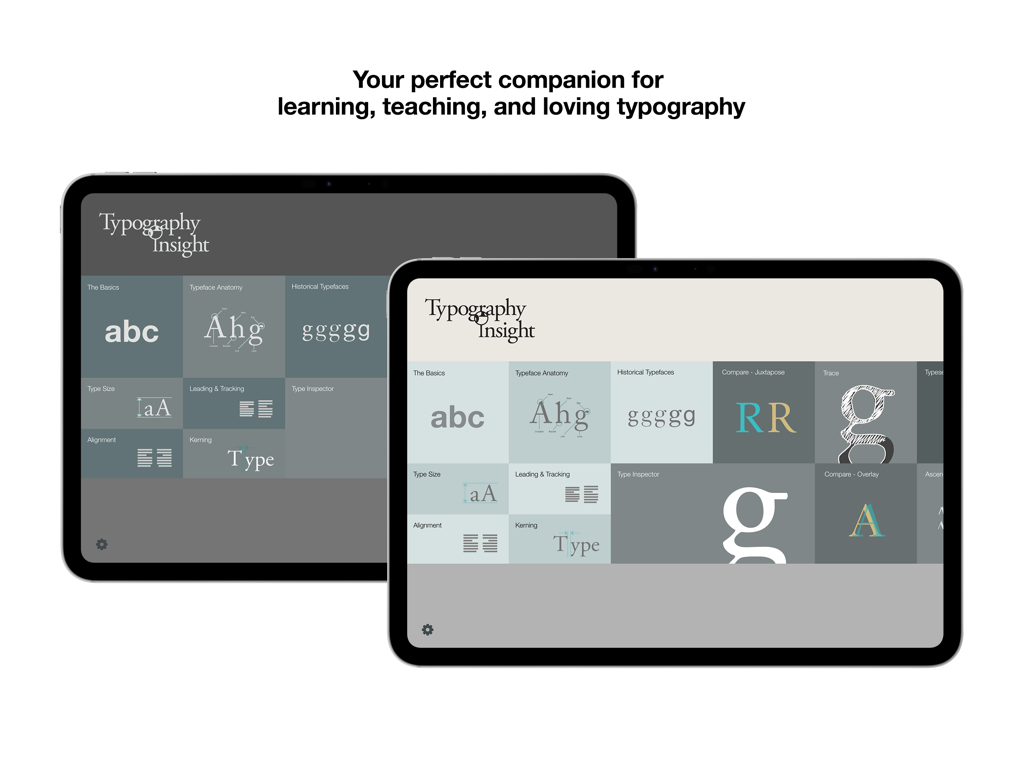
Typography Insight - Typography Insightアプリのダッシュボードが2台のiPadに表示され、さまざまな学習モジュールが表示されている様子
Typography Insightアプリのダッシュボードが2台のiPadに表示され、さまざまな学習モジュールが表示されている様子

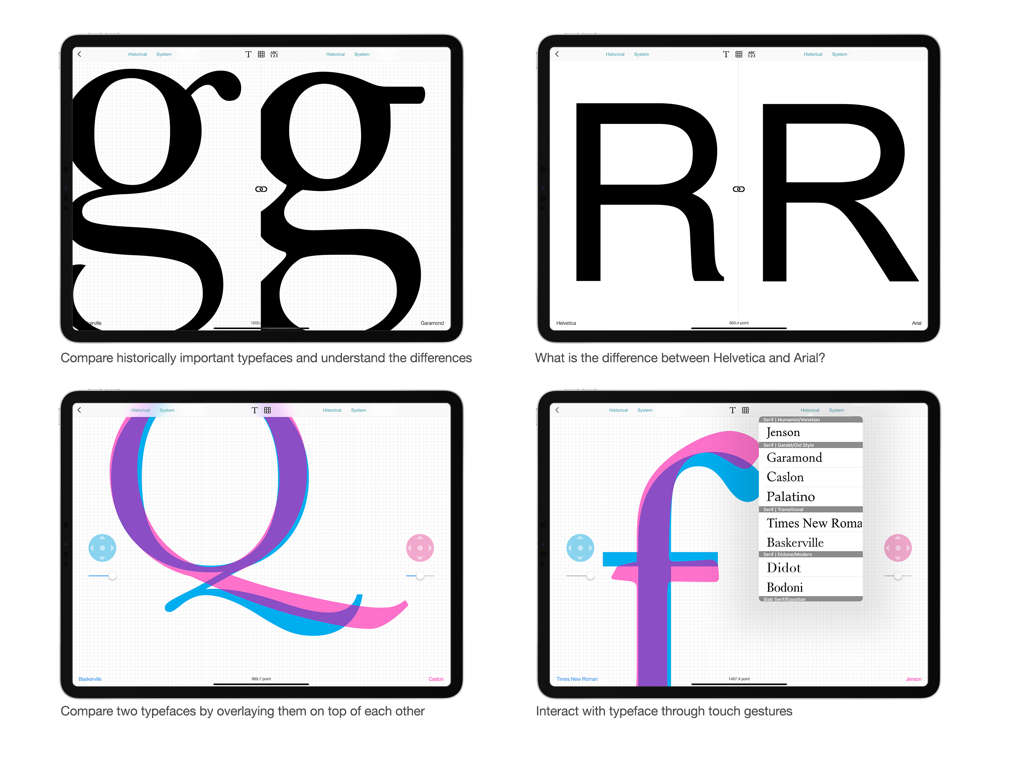
Typography Insight - Typography Insight iPadアプリの4つの画面で、デザイン学生やプロ向けのフォント比較とオーバーレイ機能を示している様子
Typography Insight iPadアプリの4つの画面で、デザイン学生やプロ向けのフォント比較とオーバーレイ機能を示している様子

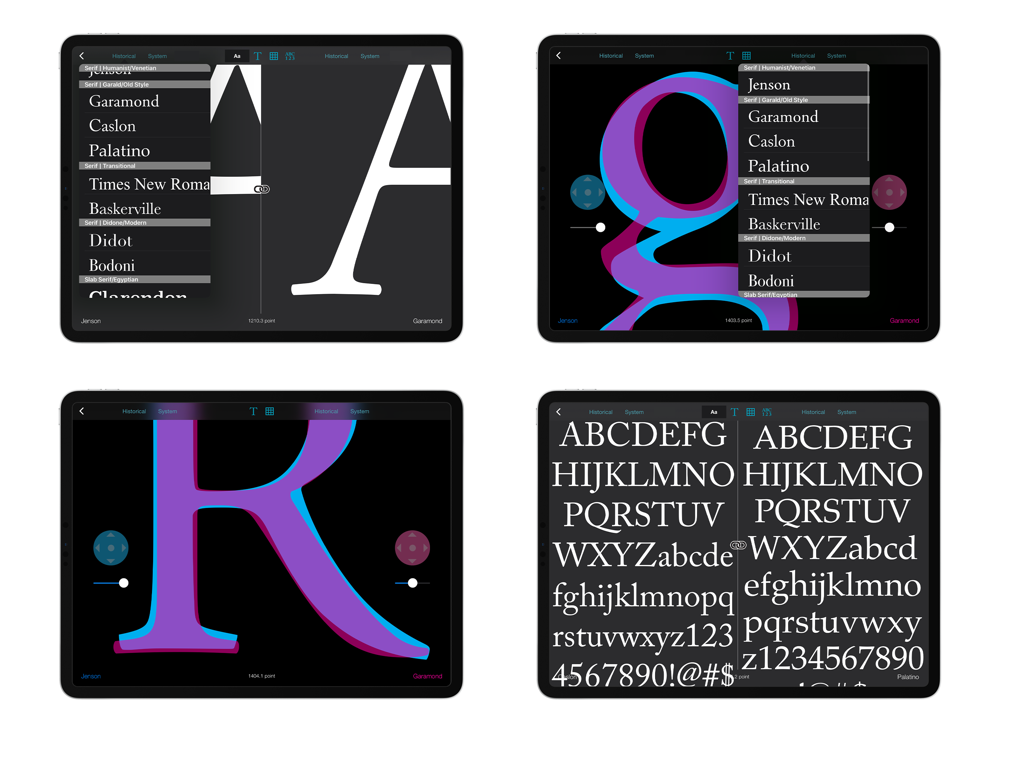
Typography Insight - iPad上でフォントオーバーレイと並べての比較を示すTypography Insightアプリのスクリーンショットのコラージュ
iPad上でフォントオーバーレイと並べての比較を示すTypography Insightアプリのスクリーンショットのコラージュ

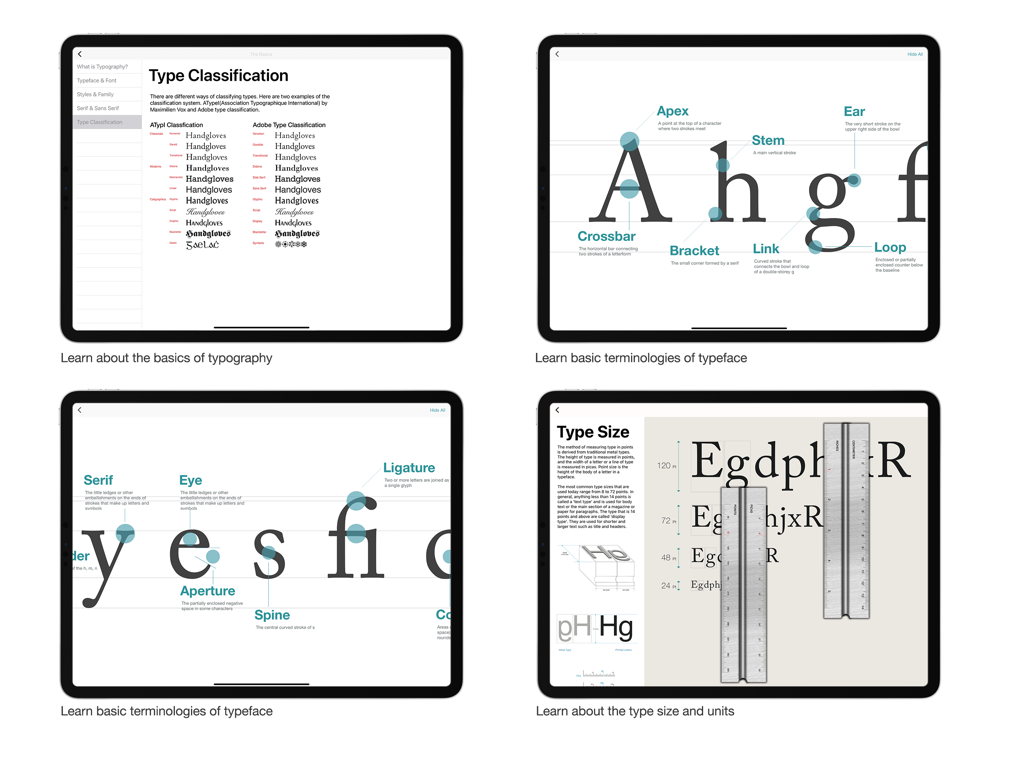
Typography Insight - Typography Insightの4つの画面で、フォント分類システム、文字の解剖学的図、およびタイプサイズ測定ツールを示している様子
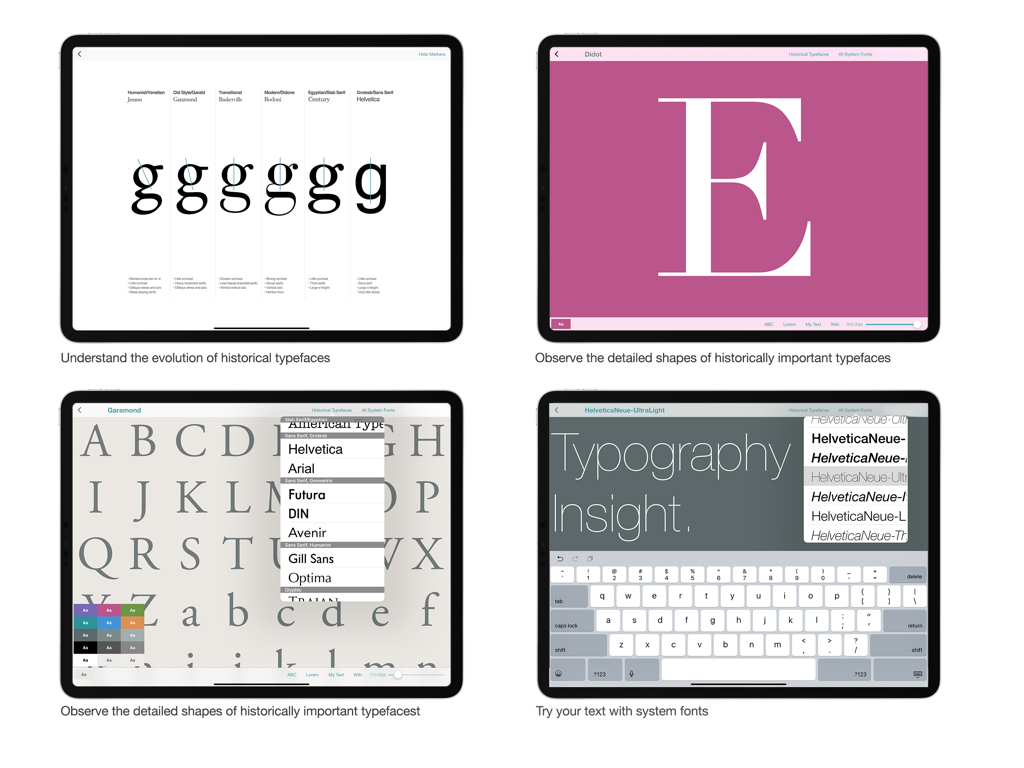
Typography Insightの4つの画面で、フォント分類システム、文字の解剖学的図、およびタイプサイズ測定ツールを示している様子

Typography Insight - Typography Insightアプリの4つのスクリーンショットで、書体の進化、詳細なフォント形状、iPadでのカスタムテキスト入力を示している様子
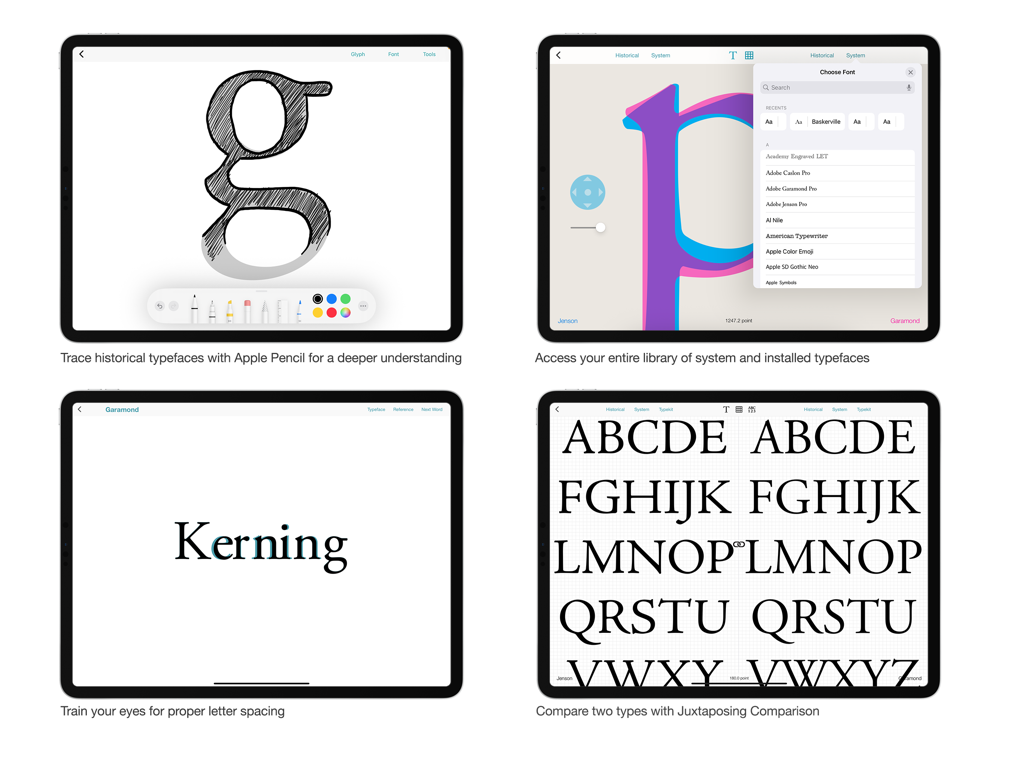
Typography Insightアプリの4つのスクリーンショットで、書体の進化、詳細なフォント形状、iPadでのカスタムテキスト入力を示している様子

Typography Insight - Typography Insightアプリの4つの画面で、フォントトレース、フォントライブラリ選択、カーニングトレーニング、および並べての書体比較を示している様子
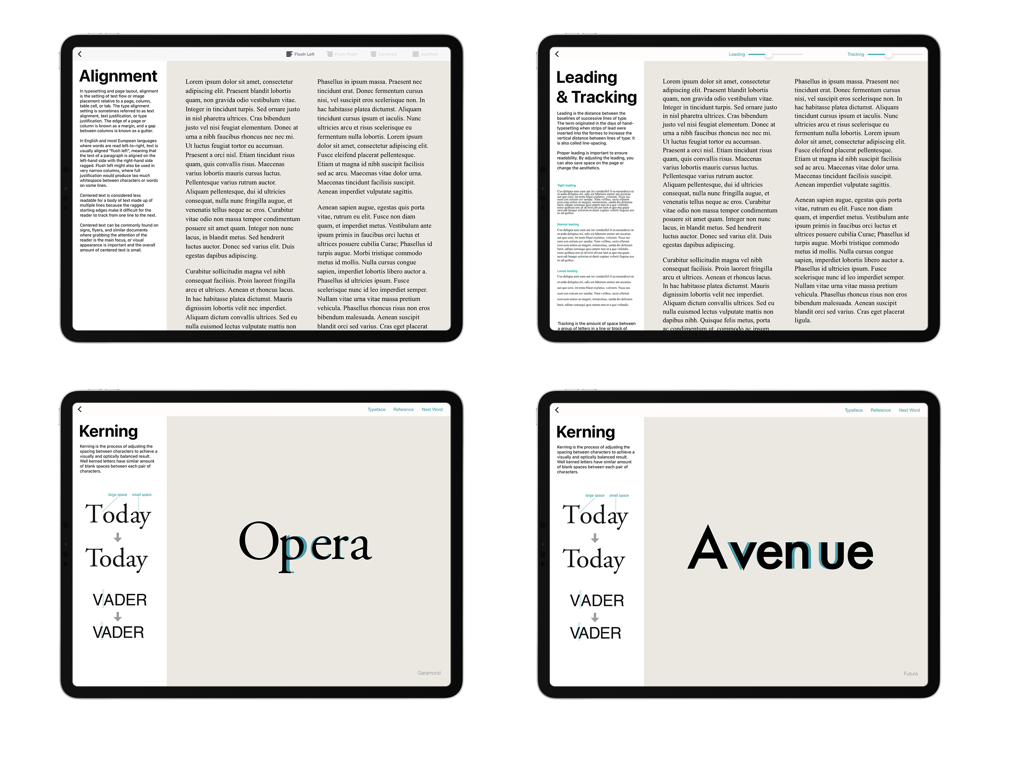
Typography Insightアプリの4つの画面で、フォントトレース、フォントライブラリ選択、カーニングトレーニング、および並べての書体比較を示している様子

Typography Insight - Typography Insightアプリの4つの画面で、テキストの配置、トラッキング、カーニングに関するインタラクティブなレッスンを示している様子
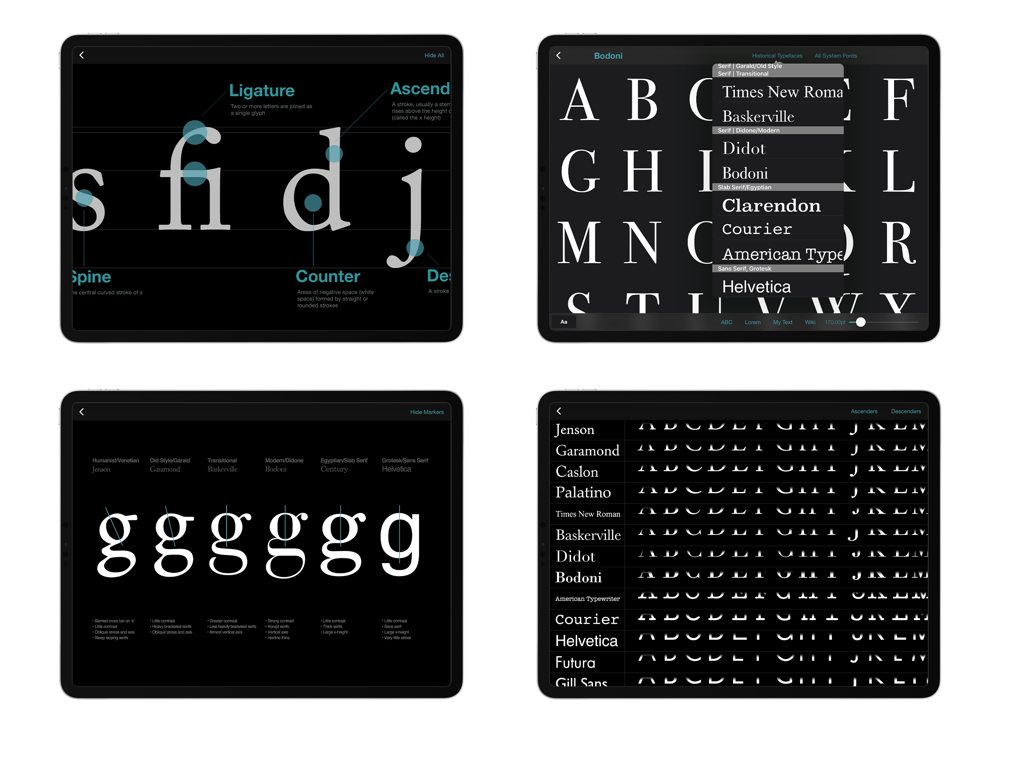
Typography Insightアプリの4つの画面で、テキストの配置、トラッキング、カーニングに関するインタラクティブなレッスンを示している様子

Typography Insight - Typography Insightアプリの4つのスクリーンショットで、iPad上のフォント解剖学的図と書体比較を示している様子

Typography Insightアプリの4つのスクリーンショットで、iPad上のフォント解剖学的図と書体比較を示している様子

説明

Featured as ‘App of the Day’ in 119 countries. “This app could be just your type. Typography Insight will make you think differently about the words you see every day... It’s excitingly interactive.” — Apple Typography Insight is an immersive environment for exploring historically important typefaces, observing their details, and comparing them side-by-side. Designed for students, designers, and type lovers, it bridges the gap between textbooks and interactive learning. Now updated with support for Apple Vision Pro & System Font Picker. PRESS & REVIEWS "It's more like an exquisite museum exhibit than a musty textbook... Intoxicating as Wikipedia and as fun as a video game." — Fast Company "Learning the subtleties of Helvetica and Garamond used to be a pain—but a sleek new app has made the process easier." — The Atlantic "Typography Insight is sort of like an iPad typeface encyclopedia. Only encyclopedias are boring, and Typography Insight is beautiful and fun." — Gizmodo FEATURES • Type Inspector: Observe the finest details of typefaces—serifs, counters, and ears—at a massive scale using standard gestures. • Side-by-Side Comparison: Understand the subtle differences between typefaces instantly. • Overlay View: Compare two typefaces by stacking them on top of each other to spot structural variations. • Custom Font Support: Access system and downloaded fonts using the native iOS System Font Picker. • Spatial Ready: Experience typography in a new dimension on Apple Vision Pro with eye gaze and hand gesture input. • Kerning Training: Train your eye for balanced letter spacing with interactive exercises. • The Basics: Learn typeface anatomy, historical classifications, and typesetting fundamentals. • Tracing Mode: Experience kinesthetic learning by tracing historical typefaces with Apple Pencil. It is the best way to understand the physical structure and tension of type. Perfect for: • Design Students learning the fundamentals of type. • Educators looking for a visual teaching aid. • App Designers needing to visualize system fonts on device.

Download

ダウンロード: App Store

このページはアプリまたはその開発者の公式ページではなく、情報提供および論評を目的として作成された独立した編集出版物です。明示的に別段の記載がない限り、アプリおよびその開発者は、MWM、Apple、Google Play、アプリのパブリッシャー、またはアプリの開発者と提携、承認、後援、認可、またはその他の公式的な関係はなく、このページのいかなる内容も、アプリがMWMのサービスを使用して開発されたことを意味するものではありません。すべての商標、ロゴ、スクリーンショット、その他のコンテンツはそれぞれの所有者の財産です。








