Weave Chat AAC
Weave Chat AAC
ダウンロード: App Store

このページはアプリまたはその開発者の公式ページではなく、情報提供および論評を目的として作成された独立した編集出版物です。明示的に別段の記載がない限り、アプリおよびその開発者は、MWM、Apple、Google Play、アプリのパブリッシャー、またはアプリの開発者と提携、承認、後援、認可、またはその他の公式的な関係はなく、このページのいかなる内容も、アプリがMWMのサービスを使用して開発されたことを意味するものではありません。すべての商標、ロゴ、スクリーンショット、その他のコンテンツはそれぞれの所有者の財産です。


ロゴ: Weave Chat AAC
ダウンロード: App Store

Weave Chat AAC

保護者とSLPのために設計された、完全にカスタマイズ可能なAACアプリ。カラフルなボード、カスタム画像、ユニークなAAC間テキストメッセージ機能で、お子様に話し言葉と社会的なつながりのプレゼントを、一切費用なしで。

主要数値

ダウンロード

5K+

ユーザー評価

4.7/5

評価数

500

開発元

Weave Chat, LLC

カテゴリ

Education

対応言語

1

最新バージョン

1.19.3

サイズ

105.3 MB

リリース日

2021年9月23日
機能

障壁のないコミュニケーションを解き放つ

専門家によって設計されたプロフェッショナルグレードのAACツールで、言葉を話せない個人が自分自身を表現し、社会的に繋がり、成長するのを支援します。完全に無料です。

プロフェッショナルグレードのカスタマイズ

フィッツジェラルドキーのカラーコーディングと、学習者のニーズに合わせて成長できる1x2から7x15までの柔軟なグリッドサイズを使用して、教育基準に合わせます。

ソーシャルAACテキストメッセージ

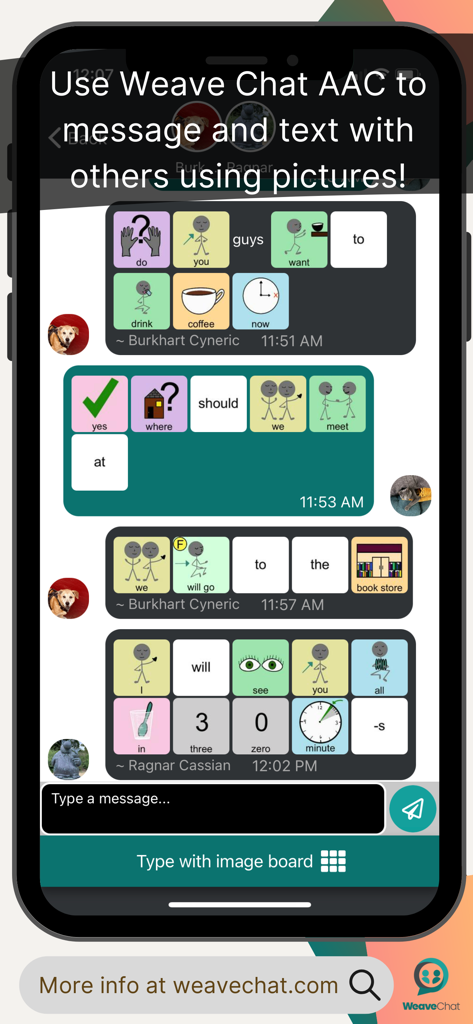
AACピクチャーアイコンを使用して他の人に「テキスト」できる革新的な機能で、孤立を断ち切り、デジタルインクルージョンと社会的自律性を育みます。

以下のスクリーンショットと説明は、アプリの公式ストアリスティングから直接取得されたものであり、アプリ開発者の所有物です。

アプリストア

スクリーンショット
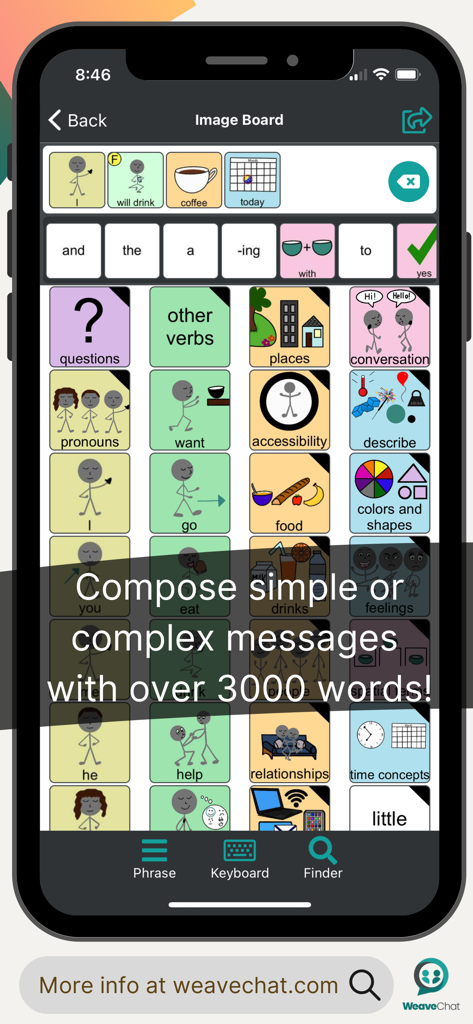
Weave Chat AAC - Weave Chat AACアプリのインターフェースを表示するスマートフォン画面。カラフルなコミュニケーショングリッドと作成された文章が表示されている。
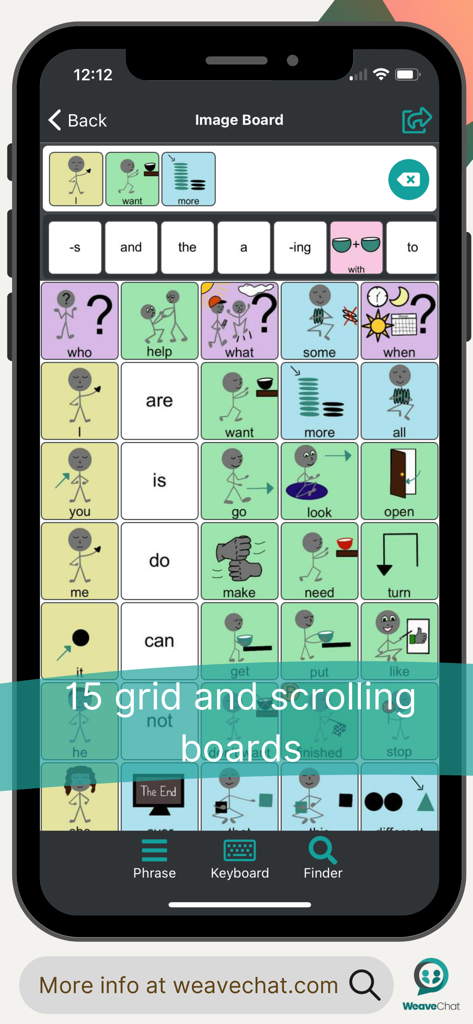
Weave Chat AACアプリのインターフェースを表示するスマートフォン画面。カラフルなコミュニケーショングリッドと作成された文章が表示されている。

Weave Chat AAC - Weave Chat AACモバイルアプリのインターフェース。カラフルな音声アイコンを備えた15グリッドのコミュニケーションボードが表示されている。
Weave Chat AACモバイルアプリのインターフェース。カラフルな音声アイコンを備えた15グリッドのコミュニケーションボードが表示されている。

Weave Chat AAC - AACピクチャーアイコンとカラフルなシンボルを使用したチャット会話を示す携帯電話画面。
AACピクチャーアイコンとカラフルなシンボルを使用したチャット会話を示す携帯電話画面。

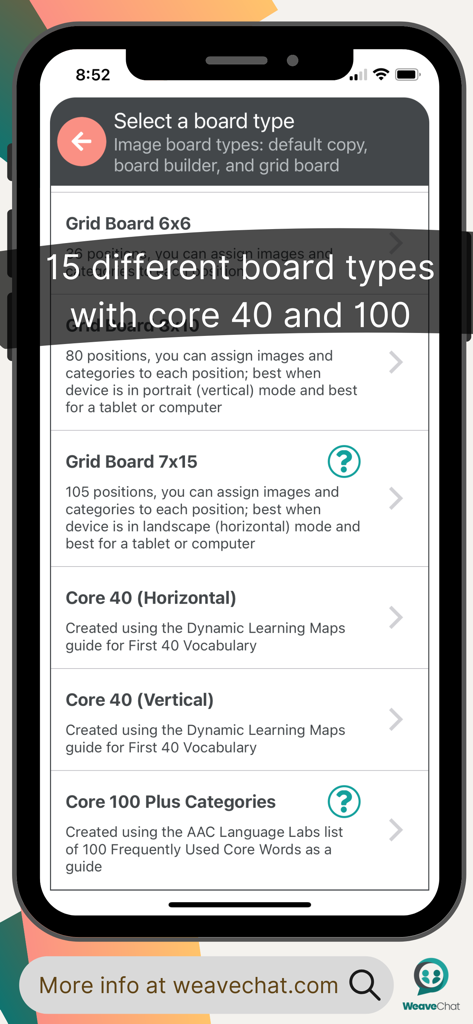
Weave Chat AAC - Weave Chat AAC画面。グリッドオプションやコア語彙セットを含む、さまざまなコミュニケーションボードレイアウトが表示されている。
Weave Chat AAC画面。グリッドオプションやコア語彙セットを含む、さまざまなコミュニケーションボードレイアウトが表示されている。

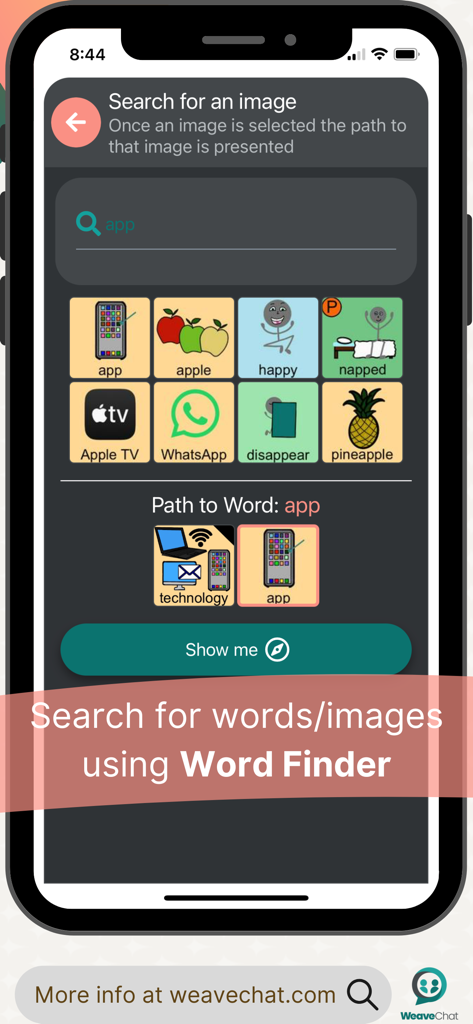
Weave Chat AAC - Weave Chat AACアプリ。単語「app」の画像検索とそのナビゲーションパスが表示されるWord Finder機能が表示されている。
Weave Chat AACアプリ。単語「app」の画像検索とそのナビゲーションパスが表示されるWord Finder機能が表示されている。

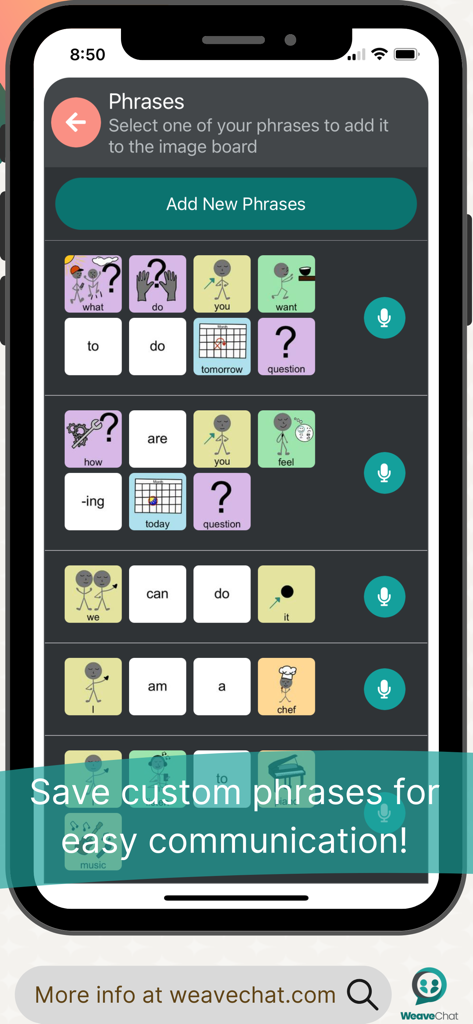
Weave Chat AAC - Weave Chat AACアプリ画面。アイコン付きの保存されたカスタムコミュニケーションフレーズのリストが表示されている。
Weave Chat AACアプリ画面。アイコン付きの保存されたカスタムコミュニケーションフレーズのリストが表示されている。

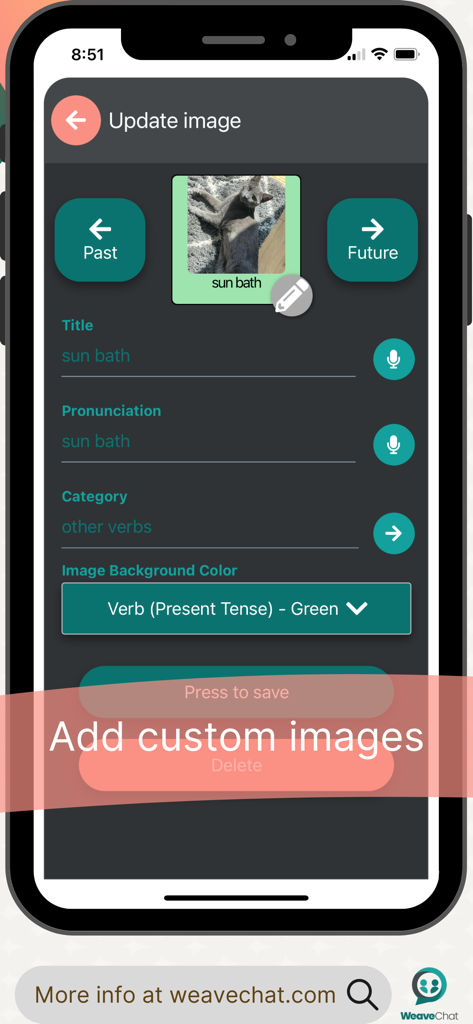
Weave Chat AAC - Weave Chat AACアプリのインターフェース。個人画像をステップ追加し、そのカテゴリと発音を設定するカスタマイズプロセスが表示されている。
Weave Chat AACアプリのインターフェース。個人画像をステップ追加し、そのカテゴリと発音を設定するカスタマイズプロセスが表示されている。

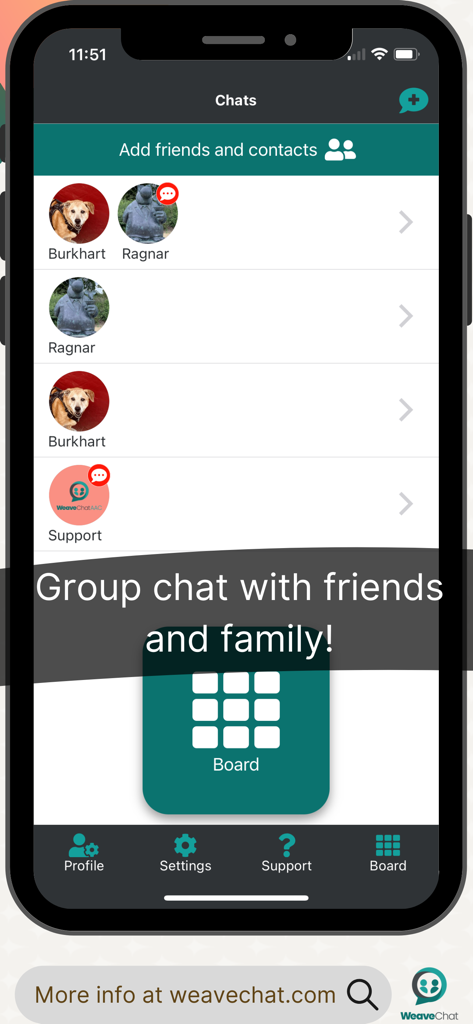
Weave Chat AAC - Weave Chat AACアプリのスクリーンショット。友人や家族にメッセージを送るためのグループチャット画面が表示されている。
Weave Chat AACアプリのスクリーンショット。友人や家族にメッセージを送るためのグループチャット画面が表示されている。

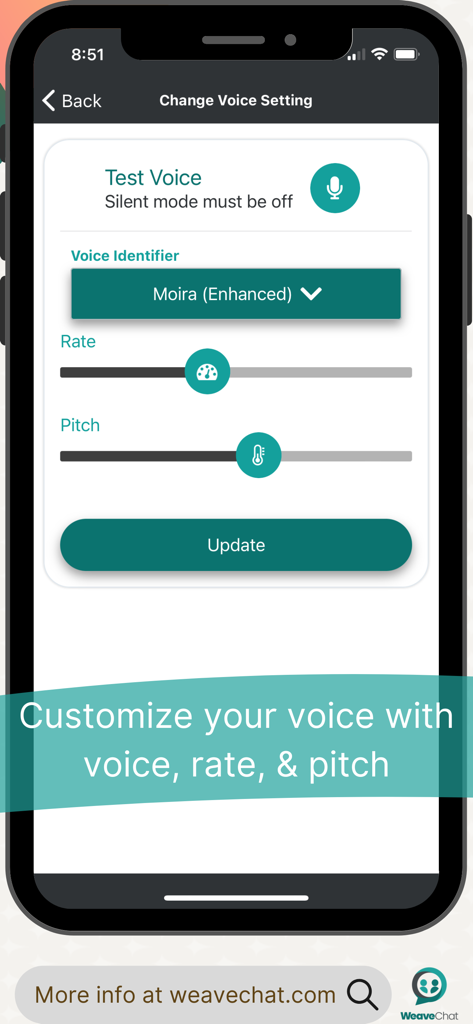
Weave Chat AAC - Weave Chat AACアプリ画面。音声識別子、話速、音高をカスタマイズするための画面。
Weave Chat AACアプリ画面。音声識別子、話速、音高をカスタマイズするための画面。

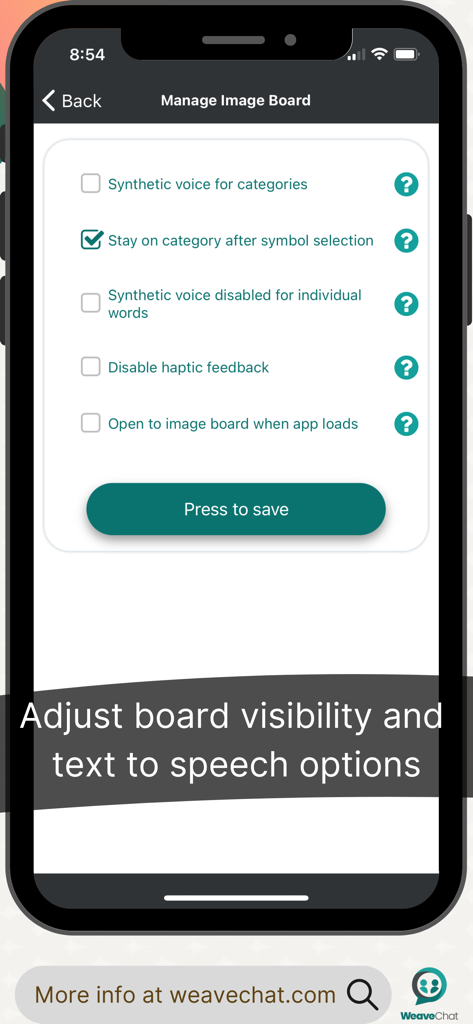
Weave Chat AAC - Weave Chat AAC画像ボードの可視性とテキスト読み上げ設定画面

Weave Chat AAC画像ボードの可視性とテキスト読み上げ設定画面

説明

Weave Chat AAC is a free, dynamic, and completely customizable AAC app that is available to a variety of devices. Weave Chat AAC offers a large variety of verbs (green), pronouns (yellow), questions (purple), nouns (tan/orange), adjectives (blue), and conversational words (pink). All color choices were made based on the Fitzgerald Key and new vocabulary is added weekly. Users can add their own custom images and categories in Settings —> Manage Custom Images. In addition, users can add their own custom phrases that can easily be accessed from their board; to add phrases, go to Settings —> Manage Phrases. Users can select a synthetic voice (dependent on their device settings) from Settings —> Change Voice Settings - here you can select your voice, vocal pitch, and rate of speech. Image and text size can be personalized from Settings —> Change Image & Text Size (select from default - small, medium, and large). Settings —> Configure Image Keyboard allows the user to turn on/off features that allow for the category text to be read aloud (synthetic voice for categories), to keep the user in the category after a image has been selected (stay on category after image selection), and disable the speech output for individual words so that it only reads aloud when the white text screen is touched (synthetic voice disabled for individual words). The AAC board can be modified in Settings —> Manage Board Builder. Here, the user can select from the default board (you must make a copy to edit it - to do this select “Add new keyboard” and then select “Hide Images” for Type of Keyboard); grid position boards (ranging in size from 1x2 - 7x15 rows/columns); and Board Builder (gives you the option to build a board from scratch). All boards are completely editable and all custom images and categories can be used from all boards. Lastly, Manage Pin Configuration allows the user to set a pin over all (or just some) aspects of customization to lock down features as needed. Feature List: - Dynamic, customizable, AAC boards - Large variety of verbs, nouns, and adjectives with additional vocabulary added weekly - Add custom images and custom categories - Create and save phrases - Select a synthetic voice (as available per your device settings) - Copy & Paste AAC picture icon messages via “share” - Create and/or modify AAC boards via 3 options: grid position boards (ranging from 1x2 - 7x15), hide images, and/or create a new board from scratch - “Text” others who have the app using AAC picture icons - Set a passcode to lock down features as needed - Weave Chat AAC currently only has English buttons/images

Download

ダウンロード: App Store

このページはアプリまたはその開発者の公式ページではなく、情報提供および論評を目的として作成された独立した編集出版物です。明示的に別段の記載がない限り、アプリおよびその開発者は、MWM、Apple、Google Play、アプリのパブリッシャー、またはアプリの開発者と提携、承認、後援、認可、またはその他の公式的な関係はなく、このページのいかなる内容も、アプリがMWMのサービスを使用して開発されたことを意味するものではありません。すべての商標、ロゴ、スクリーンショット、その他のコンテンツはそれぞれの所有者の財産です。








